- Published on
A Guide to Setting Up the Best Reminder Bot Slack for Your Team
- Authors

- Name
- Gabriel
- @gabriel__xyz
A solid reminder bot in Slack is non-negotiable for engineering teams that want to keep pull requests moving and prevent code reviews from getting stuck. These bots can be anything from a simple built-in command to a smart, third-party tool that hooks directly into platforms like GitHub, streamlining the whole review cycle. The right solution gets your team out of the business of manual nagging and into a smooth, automated workflow.
Why Your Team Needs a Smarter Slack Reminder Bot
Let's be honest: manually chasing down pull request reviews is a classic engineering bottleneck. It’s a frustrating loop of context switching for developers and a firehose of notifications for reviewers. Every time someone has to type "@here, can someone please review my PR?" into a channel, productivity takes a hit. These little interruptions really add up, delaying releases and frustrating developers.
The real problem is that pending PRs just become invisible, lost in the constant stream of channel chatter. This forces developers to moonlight as project managers, constantly pinging teammates and derailing their own focus. A dedicated reminder system flips this chaotic process into a structured, automated workflow.
Comparing Slack Reminder Methods for Pull Requests
Choosing the right approach depends on your team's needs. From Slack's built-in tools to more advanced bots, each method has its own strengths.
Here’s a quick breakdown to help you decide which path is best for your team:
| Method | Best For | Setup Complexity | Customization Level |
|---|---|---|---|
| Built-in /remind | Individual, one-off reminders for specific PRs. | Very Low | None |
| Slack Workflow Builder | Teams needing basic, scheduled reminders for a channel. | Low | Basic |
| Custom Slack Bot (API) | Teams with unique needs and developer resources. | High | Very High |
| PullNotifier | Teams wanting an intelligent, context-aware system with no coding. | Very Low | High |
While the built-in /remind command is handy for a quick nudge, it's a manual process. Workflow Builder offers a step up with simple automation, but for truly dynamic and context-aware reminders that don't create more noise, a specialized tool is usually the way to go.
The True Cost of Manual Reminders
The fallout from a disorganized review process is more than just a minor annoyance; it directly torpedoes team velocity and code quality. When PRs are left to sit, you'll quickly run into:
*   **More Context Switching:** Developers have to constantly pause what they're doing to follow up on old PRs, shattering their concentration and slowing down new work.
*   **Merge Conflicts:** The longer a feature branch exists, the more likely it is to drift from the main branch, creating painful merge conflicts and rework.
*   **Stale Code:** A PR that sits for days might not even be relevant anymore, or it could be based on outdated logic that requires a complete do-over.
This decision tree gives you a visual of the different routes you can take for managing PR reviews in Slack, from the most basic manual pings to smarter, automated solutions.
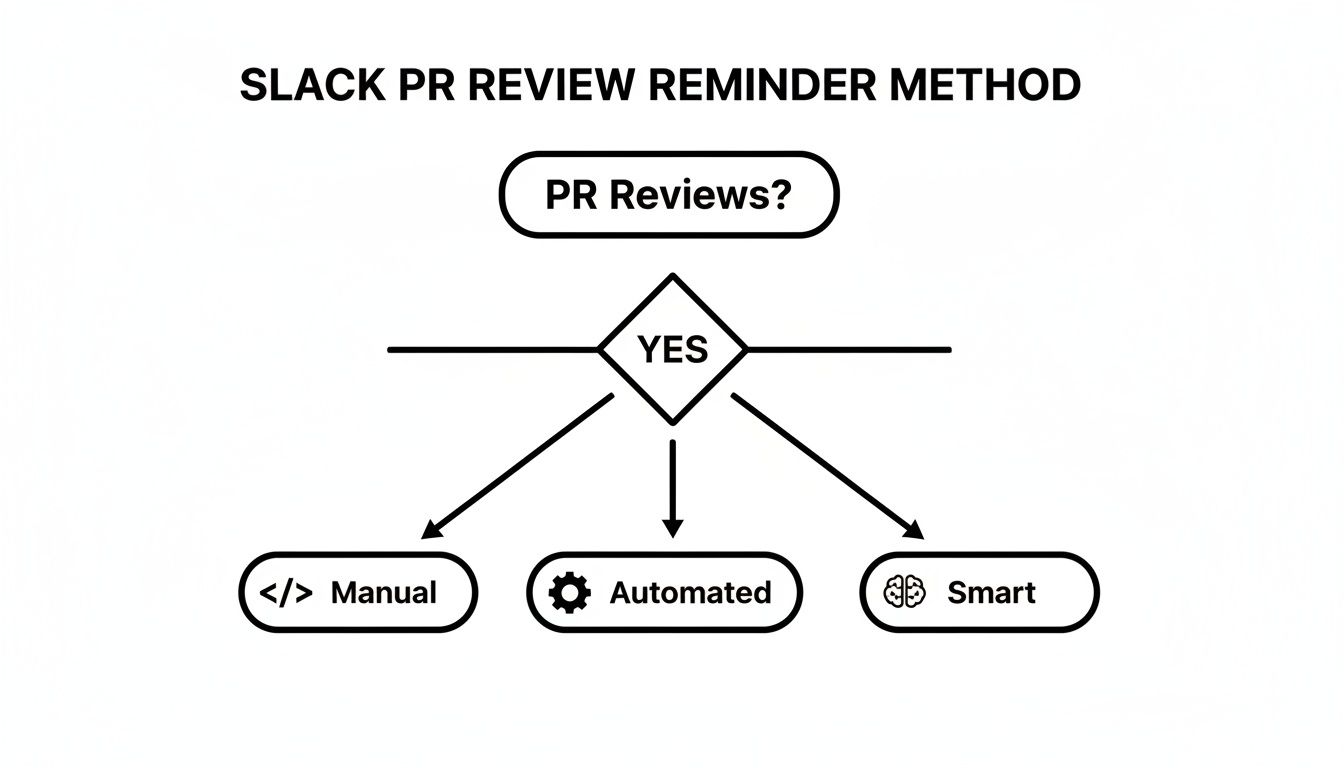
As the flowchart shows, while manual methods are easy to start with, "smart" automation is the most direct path to solving the real workflow challenges. A smart reminder bot for Slack does more than just blast a message; it understands the PR's context, knows who to ping, and crucially, stops nagging people once the review is done. If you're looking to dive deeper, we have a detailed guide on how to automate repetitive tasks.
The average user spends around 90 minutes per day actively using Slack, contributing to roughly 5 billion actions daily. This highlights just how central the platform is to modern work—and why integrating intelligent reminders directly into it is so powerful. For more insights on AI and team productivity, it's worth exploring how these tools are reshaping team communication.
Using Slack's Built-In /remind Command

Sometimes the simplest tool is the right one for the job, and when it comes to PR reminders, Slack's built-in /remind command is a great place to start. It’s a no-fuss, zero-setup option that anyone in your workspace can use right away. Think of it as the digital equivalent of a quick tap on the shoulder.
The command's directness is its biggest asset. You can instantly target a person, a channel, or even yourself with a reminder set for a specific time.
Crafting Effective Reminders
The beauty of /remind is its flexible, natural language syntax. This makes it easy to get super specific with your PR review requests.
Here are a few examples I've seen teams use effectively:
*   **Targeting an individual reviewer:** `/remind @anna to review PR #123 on the new login flow in 2 hours`
*   **Nudging a specific team:** `/remind #frontend-devs to look at the component library PR by EOD`
*   **Setting a recurring check-in:** `/remind #dev-team about any pending PRs every day at 10 AM`
Commands like these cut through the channel noise and turn a vague request into a clear, actionable task. And if you ever lose track, just type /remind list to see all your active reminders.
The
/remindcommand is all about simplicity. It's a manual, direct action that says, "This specific thing needs attention at this specific time." It's less of an automated system and more of a digital sticky note for your team.
The Limitations of Manual Nudges
While /remind is perfect for one-off situations, its manual nature is also its main drawback. As your team grows, relying on it exclusively will create more problems than it solves. The burden falls squarely on the developer to remember to set—and manage—these reminders for every single PR.
The biggest issue is the total lack of context. Slack's reminder bot has no clue if PR #123 was already reviewed, merged, or closed. This quickly leads to redundant pings, contributing to the very channel noise you were trying to avoid.
Worse yet, that recurring reminder for the whole channel? It’s going to fire off every single day, whether there are open PRs or not. This is a surefire way to cause notification fatigue, training your team to ignore the very messages meant to help them. It’s a great starting point, but it won’t solve the core workflow problem.
When your team gets tired of manually typing /remind over and over, Slack's Workflow Builder is the natural next step. It’s a fantastic no-code tool that lets you build simple automations right inside your workspace. This moves you from one-off nudges to a more structured, repeatable system for PR reminders.
It's perfect for teams that want more consistency without having to write a single line of code. Instead of remembering commands, you just build a workflow that triggers a series of actions. You could, for example, create a shortcut in your #dev-team channel that pops open a simple form. A developer fills it out with the pull request link, mentions the reviewers, and the workflow takes it from there—scheduling and sending a perfectly formatted reminder.
Designing Your First Workflow
Getting a workflow up and running is surprisingly simple. The main goal here is to create a predictable process that anyone on the team can use to flag a PR for review.
A basic PR reminder workflow usually breaks down like this:
*   **Trigger:** The whole thing kicks off when a user clicks a shortcut link in a channel, maybe one named "Request PR Review."
*   **Form Input:** A form appears, asking for the essential details—the PR URL and the reviewers who need to be tagged.
*   **Action:** The workflow grabs that info and formats it into a clear, actionable message for the channel.
*   **Scheduling:** You can even add a time delay. For instance, you could tell the workflow to wait **four hours** before posting the reminder.
This approach ensures every reminder looks the same, making them easy to scan and act on. It also takes the mental load off your developers, who no longer need to fuss with command syntax.
The image below gives you a sense of the visual editor in Workflow Builder, where you drag and drop different steps to build out your automation.
This visual style makes it incredibly easy to see exactly how your automation is wired together. You can add steps, tweak messages, and set schedules without ever touching an API doc.
Understanding the Trade-Offs
While Workflow Builder is a massive step up from manual commands, it has its limits. It’s not a full-blown PR management tool, mainly because it has no idea what’s happening outside of Slack. The workflow can't check GitHub to see if a pull request has already been approved, merged, or closed.
This means a scheduled reminder will fire off regardless of the PR's actual status. You might end up pinging people about work that's already been completed, which can create a bit of unnecessary noise.
Workflow Builder excels at automating predictable, user-initiated tasks. It's fantastic for standardizing reminder requests but lacks the intelligence to dynamically react to external events, like a change in a PR's status.
It's also worth keeping your Slack plan's limitations in mind. Workflows run on a usage-based system, so a very active team could potentially hit their monthly execution limit. Even with these constraints, it’s an excellent middle-ground solution that brings the power of automation to your team's review process with minimal effort.
Building a Custom Slack Bot with APIs
For teams that want total control, building a custom reminder bot for Slack with the GitHub and Slack APIs is the ultimate power move. This path isn’t about using something off-the-shelf; it's about crafting a solution from the ground up that’s perfectly molded to your team's specific review process and notification style.
The journey starts by creating a new Slack app inside your workspace. This app is your bot’s identity, and it’s where you'll set up its permissions. You'll need to request specific OAuth scopes, like chat:write to let it post messages and users:read so it can look up profiles for proper @-mentions.
Core Architectural Decisions
With the Slack app configured, the real work begins: orchestrating the conversation between Slack and GitHub. Your bot needs a server to live on—this could be a small cloud instance or a serverless function—which will house all its logic. This server's main job is to poll the GitHub API, checking for open pull requests across the repositories you care about.
A typical flow looks something like this:
*   **Fetch Data:** Periodically ping the GitHub API to grab a list of all open PRs.
*   **Check State:** For each PR, figure out if it needs a reminder. Is it stale? Has it been waiting for a review for more than **24** hours?
*   **Prevent Duplicates:** This part is critical. Your bot needs to manage its own state so it doesn’t spam your channels. A simple database or a key-value store can keep track of which PRs have already been nudged.
*   **Post to Slack:** If a reminder is due, use the Slack API to drop a formatted message into the right channel, tagging the assigned reviewers.
Building a custom bot means you own everything—the logic, the message templates, and the entire notification experience. You can design it to be as quiet or as loud as your team prefers, a level of control you just can't get with pre-built solutions.
Managing State and Designing Messages
The "smarts" of your custom bot really come down to its state management. A naive bot that just fetches and posts will quickly become the most annoying member of your team. To avoid that, your application needs to track PRs, the timestamps of the last reminders sent, and the current review status to make intelligent decisions. For instance, it should know to automatically stop nagging once a PR is approved or merged.
This approach also lets you get incredibly creative with how your messages look. You aren't stuck with generic templates. Your bot can pull in details like the author's avatar, the number of lines changed, and even link directly to the specific files that need reviewing. Many teams build entire notification systems this way. You can learn more about a similar approach in our guide on using GitHub Actions to send Slack notifications.
Of course, with complete customization comes a significant trade-off. You’re on the hook for all the development, hosting, security, and ongoing maintenance. As you build more advanced bots that use large language models, mastering skills like Prompt Engineering also becomes essential. Plus, every time Slack or GitHub changes an API, your code might break. It's a powerful path, but a resource-intensive one.
The Smartest Solution: PullNotifier for Automated Reminders
While built-in commands, workflows, and custom bots all have their uses, they usually force you to choose between simplicity and intelligence. Manual reminders are just noise, workflows don't have enough context, and building a custom bot is a massive engineering sinkhole.
This is where a dedicated tool like PullNotifier comes in. It strikes the perfect balance, giving you all the power of a custom reminder bot for Slack without any of the setup headaches.
PullNotifier was built from the ground up to solve one problem and solve it exceptionally well: making the pull request review cycle faster and quieter. It smartly bridges the gap between GitHub and Slack, transforming the chaotic firehose of notifications into a single, clean message thread that follows a PR from creation all the way to merge. The best part? You can connect your repos and set up your first reminders in just a couple of minutes.
Fine-Tuned Control Over Your Notifications
The real magic of PullNotifier is in its granular control. Instead of sending generic pings that everyone ignores, you can build super-specific routing rules that map certain repositories or even file paths to the right Slack channels.
Here’s a classic scenario: the backend team couldn't care less about minor CSS tweaks on the frontend. With PullNotifier, you can set a rule so that only PRs touching the api/ directory will ever notify the #backend-devs channel. That alone cuts out a ton of irrelevant noise.
PullNotifier’s whole philosophy is to deliver the right information to the right people at the right time. It helps teams move away from a "firehose" of notifications and toward focused, actionable alerts that actually move the review process forward.
This targeted approach even extends to reviewer mentions. The bot automatically pulls the assigned reviewers from the GitHub PR and @-mentions them directly in Slack. No more guesswork or manually tagging your teammates to get their attention.
From Open to Merged, Without the Spam
Unlike basic reminder tools that lose track of a PR once the notification is sent, PullNotifier follows the entire lifecycle. It neatly consolidates all updates—new commits, comments, approvals, and the final merge—into a single, evolving Slack message.
This threaded approach keeps your channels clean and gives everyone a clear, real-time snapshot of a PR's progress without ever having to leave Slack.
The rise of specialized workflow bots is part of a much bigger trend. The global market for remote team communication tools hit around 58.38 billion in the next decade. In this space, tools like PullNotifier are thriving because they replace noisy, generic webhooks with smart, filtered nudges for the right reviewers when it actually matters. You can dig into more of these trends in this detailed statistical analysis on Notta.ai.
Feature Breakdown: PullNotifier vs. Other Methods
To see just how much more you get with a dedicated tool, let's break down the features side-by-side. While built-in Slack options are fine for one-off tasks, they just don't scale for a serious development workflow.
| Feature | /remind | Workflow Builder | Custom Bot | PullNotifier |
|---|---|---|---|---|
| Setup Effort | None | Low (No Code) | Very High (Code) | Very Low (No Code) |
| Context-Aware | No | Limited | Yes (If built) | Yes (Out-of-the-box) |
| Routing Rules | No | Basic | Yes (Complex) | Yes (Granular) |
| Threaded Updates | No | No | Possible (High effort) | Yes (Default) |
| Auto @-mentions | No | No | Yes (If built) | Yes (Automatic) |
| Lifecycle Tracking | No | No | Possible (High effort) | Yes (Out-of-the-box) |
| Maintenance | None | Low | High | None |
As you can see, PullNotifier handles all the heavy lifting for you, providing the advanced features of a custom bot without requiring a single line of code or ongoing maintenance. It's the most direct path to a cleaner, more efficient PR review process.
Common Questions About Slack Reminder Bots
Whenever you bring a new tool into your development workflow, a few key questions always pop up—especially around security, flexibility, and performance. A reminder bot for Slack is no different. Let's break down some of the most common concerns to help you figure out which solution is right for your team.
Are Reminder Bots for Slack Secure?
Security is non-negotiable for engineering teams, and the answer here really depends on which path you take.
Slack’s built-in /remind command is completely self-contained within Slack, so there’s virtually no external risk. Workflow Builder is also pretty safe, but you need to be careful with any webhook URLs you generate and use.
Building a custom bot puts the entire security burden on your shoulders. You're responsible for everything from securely handling API keys to locking down the hosting environment.
Dedicated tools like PullNotifier are built with security front and center. They use secure OAuth for authentication and only request minimal, read-only permissions to PR metadata—never the code itself.
When you’re looking at a third-party reminder bot, always check its permission scopes. A well-designed tool will only ask for the access it absolutely needs to do its job, staying far away from broad permissions that could expose sensitive data.
Can I Customize Reminder Messages?
This is where the different approaches really start to show their true colors.
The basic /remind command offers almost zero flexibility beyond the text you manually type in. Slack's Workflow Builder lets you create more structured messages, but editing them can feel clunky and time-consuming. A custom bot gives you unlimited customization, but every tiny tweak requires digging back into the code.
A dedicated reminder bot for Slack usually hits the sweet spot. Tools like PullNotifier provide a powerful, no-code interface where you can build dynamic message templates, set up complex routing rules, and fine-tune notification schedules. This ensures reminders are only sent when and where they'll be most effective.
How Do Bots Handle Draft Pull Requests?
Now we’re getting into the features that separate a basic tool from an intelligent one. This is a big one.
Simple methods like /remind and most workflow automations are completely oblivious to a PR's status. They'll ping you about a pull request whether it's ready for review or still a work-in-progress, creating a ton of unnecessary noise in your channels.
A custom bot can be programmed to check for these states, but that just adds another layer of complexity to the build and maintenance.
PullNotifier handles this intelligently right out of the box. It recognizes draft PRs and can be configured to ignore them until they’re marked as "Ready for Review." This simple feature prevents premature notifications and keeps your channels focused on what's actually actionable.
Ready to stop chasing pull request reviews and eliminate channel noise? PullNotifier delivers smart, context-aware reminders that streamline your code review process from open to merge. Try PullNotifier for free today and see why over 10,000 engineers trust it to keep their teams in sync.