- Published on
Choosing an Open Source Document Management System for Developers
- Authors

- Name
- Gabriel
- @gabriel__xyz
An open source document management system (DMS) is a piece of software you host yourself to store, track, and manage all your digital documents in one central place. But unlike proprietary tools, its source code is wide open for anyone to see, modify, and build upon.
Unlocking Control with an Open Source DMS
Think of it like this: you can either rent a pre-built storage unit from a company like Google Drive or SharePoint, or you can get the full architectural blueprints to build your own custom warehouse. An open source document management system gives you the blueprints.
This is a huge step up from basic file storage. A real DMS is designed to manage a document’s entire journey—from the first draft and team collaboration all the way to long-term archival or secure deletion. The big difference here is that the foundation is completely transparent.

Beyond Free Software: The Philosophy of Control
The words "open source" and "free" get thrown around together a lot, but the real value is in the control and transparency it offers. When the source code is public, your engineers can pop the hood and see exactly how every gear and piston works.
This kind of access opens up possibilities that you just don't get with closed-source, proprietary systems. It’s the difference between leasing an apartment with a long list of rules and owning a house where you can knock down walls, add an extension, or build a custom workshop in the garage.
For a technical team, this ownership turns into some serious advantages:
- Deep Customization: You can tweak the software to automate your exact workflows, like auto-tagging engineering diagrams or sending new compliance docs straight to the legal team for review.
- Seamless Integration: With an open API and visible codebase, you can build rock-solid connections to your existing tools, whether that’s a project management board or a CI/CD pipeline.
- Enhanced Security: Your security team isn't left guessing. They can conduct their own code audits, patch vulnerabilities on their own timeline, and not have to wait for a vendor to push an update.
- Future-Proofing: You’re not locked into a single vendor. Your document strategy can evolve with your tech stack, not a third-party’s business plan.
At its heart, an open source document management system is a strategic asset. It empowers you to build a system that conforms to your processes, rather than forcing your processes to conform to a rigid, off-the-shelf product.
Who Benefits Most from This Approach?
Sure, any organization could use an open source DMS. But it really shines for teams with specific technical or regulatory needs. Engineering teams can weave it directly into their development lifecycle, while companies in regulated fields like finance or healthcare can build custom compliance checks right into the system’s core.
This hands-on control ensures your most critical information hub isn't a black box, but a transparent, adaptable, and fully-owned part of your infrastructure.
The Strategic Advantages for Engineering Teams
Why would a fast-moving dev team go through the trouble of managing their own document system? The answer isn't just about saving a few bucks upfront. It’s about control, efficiency, and autonomy—the very things engineers value most. It’s a strategic play that favors long-term agility over short-term convenience.
Sure, proprietary systems look like the easy path, but they’re loaded with hidden handcuffs. Choosing an open source document management system is like buying a house instead of renting an apartment. You're investing in an asset that your team owns and can shape, not just paying for a service that tells you how to work and puts a ceiling on what you can do.
Rethinking Total Cost of Ownership
Let's be clear: "free" is a loaded term. A better way to look at it is through the lens of Total Cost of Ownership (TCO). An open source DMS doesn't have licensing fees, but it's not without costs. You'll be putting money into infrastructure—whether that's on-prem or in the cloud—and dedicating developer time to setup, customization, and upkeep.
But here’s the shift in mindset: you’re reallocating that budget. Instead of writing a check to a vendor every month, you're investing those funds directly into your own team and your own infrastructure. That turns a never-ending operational expense into a capital investment in a tool built perfectly for your company.
The global DMS market is already valued at USD 9.74 billion and is expected to hit USD 29.78 billion by 2034. In this massive market, open source solutions often slash TCO by up to 30% compared to vendor-locked alternatives, simply by turning licensing fees into development resources.
Unmatched Flexibility and Deep Integration
This is the big one for any engineering team: absolute flexibility. A proprietary DMS makes you bend your workflows to fit its rigid features. An open source DMS lets you bend the software to fit your team's exact workflows.
Imagine a DMS that plugs right into your CI/CD pipeline. When a new build passes all its tests, the system could automatically generate and file away release notes, compliance docs, and deployment logs in a way that's structured and instantly searchable. That's the kind of power we're talking about.
- API-First Customization: Build direct hooks into the tools you already live in, like Jira, GitHub, or your internal dashboards.
- Automated Workflows: Trigger document approvals based on a pull request merge or a change in a Jira ticket's status.
- Developer Experience: A properly integrated DMS stops being another annoying platform you have to log into and becomes a natural part of the toolchain. This kind of thoughtful integration can radically improve the overall developer experience in your team.
With open source, the DMS stops being a siloed app and becomes a core part of your engineering ecosystem. It works for your processes, not the other way around.
Enhanced Security Through Transparency
In a closed-source world, security is all about trust. You have to trust that the vendor has done their due diligence, audited their code, and patched every hole. With an open source DMS, security becomes a matter of verification.
Your own security team can tear through the entire codebase, looking for potential weak spots. When a major vulnerability like the Log4j incident hits, you aren't stuck waiting on a vendor's patch schedule. Your team can jump in and implement a fix immediately, securing your critical documents hours or even days before a proprietary vendor might get an update out the door.
This kind of transparency gives you a level of security assurance that a "black box" system just can't compete with.
Avoiding Long-Term Vendor Lock-In
Finally, going open source is a brilliant move to dodge vendor lock-in. Once you build all your critical processes around a proprietary tool, getting out is a nightmare. It's incredibly difficult and expensive. The vendor suddenly has all the power—they control the product roadmap, they can change the pricing on a whim, and they even control the format of your own data.
By building on an open source foundation, you keep total control. If your needs pivot or the project's community starts heading in a direction you don't like, you're free. You can fork the project, switch to a different open source tool, or build on top of what you already have. That freedom ensures your document management strategy can evolve right alongside your organization for years to come.
Core Features That Empower Developer Workflows
When you're looking at an open source document management system, it’s easy to get bogged down by generic features like "document storage." But for a development team, a DMS isn't just a digital filing cabinet. It should be a core piece of your infrastructure that actively speeds up the software development lifecycle.
The right features can turn a simple repository into a living, breathing part of your engineering workflow. A developer-centric DMS understands that documents—from API specs to deployment runbooks—evolve right alongside the code. It needs to treat your documentation with the same rigor you apply to your source code.
Git-Like Version Control for Documentation
For any developer, version control is table stakes. A simple "last modified" timestamp just doesn't cut it. A solid open-source DMS needs to provide Git-like version control, giving you a detailed history of every single change made to a document.
This is about more than just rolling back to an old copy. It lets your team:
- View Detailed Revision Histories: See exactly who changed what and when. This is a lifesaver when auditing changes to security policies or architectural diagrams.
- Compare Document Versions (Diffs): Visually compare two versions of a document to instantly spot what was added, removed, or changed—just like running a code diff.
- Revert to Previous States: If a recent update to an SOP causes confusion, you can instantly roll back to a known-good version without a headache.
This approach ensures your team's knowledge base stays stable, auditable, and reliable.
Granular Access Control That Mirrors Your Team
Not everyone on a project needs access to everything. A robust DMS must support granular access control, letting you set up permissions that reflect how your team actually works. This goes way beyond basic "view" or "edit" settings.
An effective access control model should be flexible enough to create roles like 'Developer,' 'QA Engineer,' 'Project Lead,' and 'External Contractor,' each with precisely defined permissions for specific document types or folders.
This level of precision is critical for protecting sensitive information. For example, you can lock down architectural documents so only senior engineers can modify them, while the QA team gets read-only access to the final tech specs. It’s a simple way to prevent accidental changes and tighten up your security.
Powerful Search and Indexing Capabilities
When a production issue blows up at 2 AM, no one has time to manually dig through hundreds of PDFs. A top-tier DMS needs to have powerful search and indexing that acts like a private search engine for your internal knowledge.
This has to include Optical Character Recognition (OCR), which automatically pulls text from scanned documents and images and makes it searchable. This feature is a game-changer when you're trying to find an error message in a scanned server log or a specific clause in a signed PDF contract. Full-text search ensures every word in every document is indexed and findable in seconds.
To really drive home why these features are so crucial, here's a quick breakdown of how they map directly to common development tasks.
Essential DMS Features for Modern Development Teams
| Core DMS Feature | Why It Matters for Developers | Example Use Case |
|---|---|---|
| Git-Like Version Control | Treats documentation like code, ensuring audibility, traceability, and easy rollbacks. | An architectural diagram is updated incorrectly; the team "reverts" to the previous stable version in one click. |
| Granular Access Control | Prevents accidental edits and protects sensitive info like security policies or API keys. | A junior developer is granted read-only access to production deployment runbooks to avoid accidental changes. |
| Advanced Search (OCR/Full-Text) | Makes critical information instantly findable, especially during high-pressure situations like outages. | A developer searches for an error code and instantly finds it mentioned in a scanned PDF from three years ago. |
| API and Integrations | Connects the DMS to existing tools (GitHub, Jira, CI/CD), automating workflows and reducing manual work. | A CI/CD pipeline automatically generates and archives release notes in the DMS upon a successful deployment. |
Ultimately, a DMS should slot into your existing toolchain and make life easier, not add another silo of information that no one can find.
Workflow Automation and Seamless Integrations
The real magic happens when an open-source DMS connects to the tools your team already lives in. Robust API and integration capabilities are arguably the most important feature, turning the DMS from a passive archive into an active part of your ecosystem.
With a well-documented API, you can build custom hooks that automate tedious tasks. Imagine a workflow where merging a pull request in GitHub automatically archives the old technical spec and generates a new, version-stamped release document in the DMS. You can learn more about how to boost efficiency with workflow automation in our detailed guide.
These integrations kill manual work, slash human error, and keep your documentation perfectly in sync with your development progress.
Reviewing the Top Open Source DMS Platforms
Choosing an open source document management system isn’t about finding a single "best" platform. It's about finding the right tool for your team's specific needs, technical skills, and daily workflows. The open-source world is packed with mature, powerful projects, each with its own philosophy and strengths. Let’s walk through some of the most respected contenders to help you build a solid shortlist.
Moving from abstract features to concrete platforms helps clarify what’s possible. We'll look at the top solutions technical teams rely on, breaking down their core strengths, potential weaknesses, and ideal use cases. This will give you a clear starting point for your own evaluation. We'll also note the underlying technology for each—a key factor for any dev team thinking about long-term maintenance and customization.
Mayan EDMS: The Automation Powerhouse
Mayan EDMS is a beast when it comes to customization and automated document processing. It's built for organizations that need to build sophisticated, trigger-based workflows from the ground up. Written in Python with the Django framework, it’s a natural fit for teams with Python expertise.
Its real magic lies in its state-machine approach to document handling. You can define incredibly detailed rules that automatically classify, tag, and route documents based on their content or metadata. For example, you could set it up to automatically apply a NEEDS_REVIEW tag to any uploaded PDF containing the word "invoice" and push it directly into the finance team's queue.
- Strengths: Unmatched workflow automation, granular metadata control, and an extensive API for deep integration. It logs every action as a distinct, auditable event.
- Weaknesses: The learning curve is steep. Its power comes from complex configuration, which demands a significant upfront time investment to get right.
- Ideal Use Case: Engineering teams in regulated industries or large organizations that need to automate complex, multi-step document approval and processing pipelines.
Paperless-ngx: The User-Friendly Archivist
On the complete opposite end of the spectrum, you have Paperless-ngx. This project prioritizes simplicity and an intuitive user experience above all else. It's designed to be the ultimate digital filing cabinet for individuals and small teams who just want to "scan, index, and forget." It absolutely excels at turning physical documents into a fully searchable digital archive.
Also built with Python and Django, its setup is refreshingly straightforward, and the web interface is clean and modern. Its most-loved feature is its machine-learning-powered document matching, which learns how you tag documents (like utility bills or receipts) and quickly starts doing it for you.
Paperless-ngx is less about complex business process management and more about efficiently turning a mountain of paper or digital clutter into a perfectly organized and searchable archive. It’s an ideal entry point into the world of open source document management.
This decision tree shows how a need for more control naturally leads to features like versioning, access management, and API integration—all hallmarks of systems like Mayan and Alfresco.
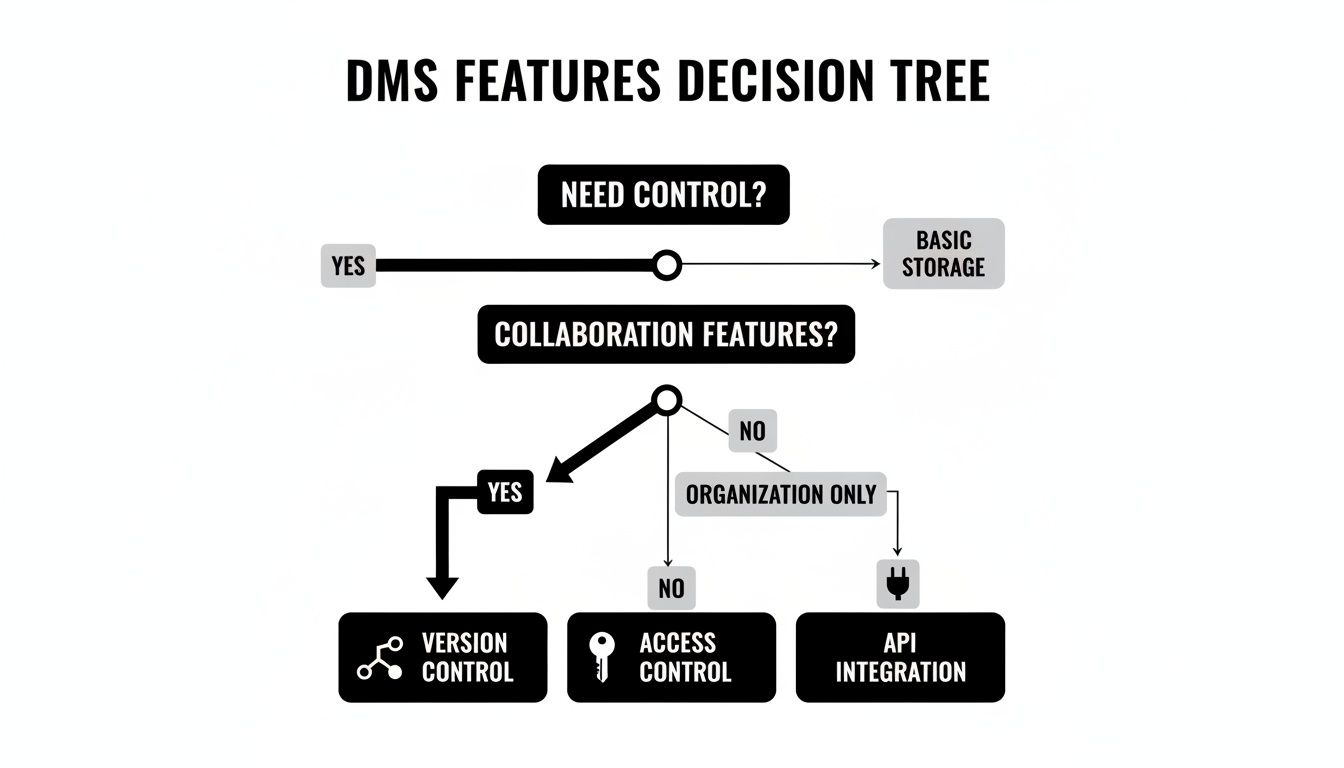
As the chart highlights, teams needing deep customization and control will gravitate toward solutions with robust APIs and access management, steering them away from simpler archival tools.
Alfresco Community Edition: The Enterprise-Grade Platform
Alfresco Community Edition is the open-source core of a major commercial product, which means it’s a battle-tested solution ready for large-scale enterprise deployments. Built on Java, it has a rock-solid foundation for handling massive volumes of documents and users. Its architecture is explicitly designed for scalability and integration with enterprise systems like LDAP and Active Directory.
The growth of cloud-based open source DMS platforms is changing how global teams work, with cloud deployments now commanding over 55% market share. Platforms like Mayan EDMS and OpenKM, which emerged around 2010, offer free cores that can be extended with community plugins—and now boast over 10,000 active installations combined. This trend is part of the broader open-source services boom, which is projected to grow from USD 33.30 billion to USD 77.58 billion by 2030, giving teams the freedom to customize without vendor lock-in. You can dive deeper into these market trends in the full document management system market analysis.
Because it has a commercial big brother, Alfresco benefits from a wealth of documentation, a large community, and a clear path to paid support if you ever need it. The trade-off? Its Java foundation makes it more resource-intensive than other options, so you'll need more powerful server hardware to keep it running smoothly.
- Strengths: Proven enterprise scalability, robust security features, and strong integration capabilities with corporate infrastructure.
- Weaknesses: Higher resource consumption (RAM and CPU) and a more complex setup process compared to lighter alternatives. The community edition can sometimes lag behind the enterprise version in features.
- Ideal Use Case: Large companies or government agencies that need a DMS capable of managing millions of documents while integrating tightly with their existing enterprise software stack.
OpenKM: The Knowledge Management Specialist
OpenKM, also built on a Java stack, bills itself as a complete knowledge management platform. It goes beyond traditional document management by including features for records management, team collaboration, and even email archiving. This makes it a compelling choice for teams looking to create a central "source of truth" for all organizational knowledge, not just formal documents.
Its standout features include a built-in workflow engine, robust version control, and powerful search that can index a huge variety of file types. OpenKM also provides a rich web service API (both SOAP and REST), making it highly extensible for development teams who need to integrate it with other business applications.
Much like Alfresco, its enterprise-grade DNA means it requires a capable server and some real technical expertise to deploy and maintain. And while the UI is perfectly functional, it can feel a bit dated compared to some of the newer players. Still, for sheer feature depth in the knowledge management space, it remains a top contender.
How to Select and Implement the Right DMS
Picking the right open-source DMS is a big decision, but the real magic happens during implementation. A well-planned rollout can completely change how your team manages information. A bad one? It just creates more headaches. Think of it less like buying a tool and more like rolling out a new operational blueprint for your team's knowledge.
The process kicks off long before you download any software. It starts with a serious look at what your team actually needs, followed by a careful evaluation of the open-source projects themselves. You need to look past a simple feature checklist and check the vital signs of the system you’re considering.

Evaluating Your Options Beyond the Feature List
A healthy open-source project is a living, breathing thing. You’ve got to check its pulse before you trust it with your team's most valuable documents. A project might look great on paper, but if its community is a ghost town, it could become a massive liability down the road.
Here are the key health indicators to look into:
- Community Activity: Pop open the project’s GitHub repository. Are there recent commits? Are pull requests being reviewed and merged? An active repo is a sign of a project that’s constantly getting better.
- Forum and Chat Engagement: Check out the project's forums, Discord, or Slack channels. Are people getting answers to their questions? A responsive community is an absolute lifesaver when you hit a snag.
- Documentation Quality: Is the documentation clear, complete, and up-to-date? Good docs will save you countless hours during setup and troubleshooting.
- Architectural Scalability: Can the system’s architecture keep up as you grow? Look at its database dependencies and whether it supports things like S3 for scaling file storage. If your team is growing, you need a system that can grow with it.
When you’re digging into a potential open-source DMS, it's also critical to see how it handles robust data leak prevention strategies to keep sensitive documents locked down. This should be a non-negotiable part of your initial security check.
Your Step-by-Step Implementation Checklist
Once you've got a shortlist of healthy, suitable projects, it's time to move into the implementation phase. A methodical, phased approach is your best bet for getting buy-in, minimizing disruption, and setting your team up for a win. Rushing this is a recipe for user frustration and a tool nobody wants to use.
A great DMS that no one uses is worse than a simple shared drive that everyone understands. The goal of implementation is not just to install software but to successfully integrate a new process into your team’s daily habits.
Follow this checklist for a much smoother rollout:
Define Clear Requirements: Get your team involved. What are the must-haves versus the nice-to-haves? Write down specific use cases, like "automating the archival of release notes" or "enabling version control for architectural diagrams."
Run a Proof-of-Concept (PoC): Before you go all-in, set up a small-scale test environment. Pick one or two projects from your list and get a small group of developers to use them for a specific, time-boxed task. This is the single best way to find potential roadblocks early. For anyone interested in setting up test environments, our guide on how to build a home server has some great foundational knowledge.
Plan Your Data Migration: This is usually the trickiest part. Figure out what needs to move from your old systems like Confluence or shared drives. Use this as a chance to do some spring cleaning and archive old, irrelevant documents before you migrate them.
Configure User Roles and Permissions: Based on your requirements, set up granular access controls. Create roles for different team members (e.g., Developer, QA, Tech Lead) to make sure the right people have the right level of access from day one.
Train Your Team and Roll Out in Phases: Start small with a single team or project. Give them training and clear documentation on the new workflows. Then, gather feedback, make adjustments, and expand the rollout to the rest of the organization.
Answering Your Key Questions
Moving to a new system, especially one as core as your document management, always brings up a few questions. When you're looking at an open source document management system, you're doing more than just picking software—you're deciding on a new way to handle your team's most important files.
Let's cut through the noise and get straight to the practical concerns engineering leaders have. We'll go beyond the feature lists to talk about what really matters: security, cost, scale, and the migration itself.
How Do Open Source DMS Solutions Handle Security and Compliance?
With an open source DMS, security starts with one huge advantage: transparency. Your team isn't just taking a vendor's word for it; you can actually audit the source code for vulnerabilities yourself. This gives you the power to apply security patches the moment you need them, without waiting on a vendor's release cycle.
You also get to build your security protocols from the ground up to nail specific compliance needs, whether it's SOC 2, HIPAA, or something else entirely. While top projects come loaded with strong security features like audit trails and fine-grained permissions, the ultimate responsibility to build and maintain the fortress is on your team.
The bottom line is this: an open source DMS hands you the tools for world-class security. But it's up to you to use them. It's a fundamental shift from outsourcing trust to owning your security in-house.
What Are the Hidden Costs of a 'Free' Open Source DMS?
The software license might be free, but the system itself isn't. The real metric to watch is the Total Cost of Ownership (TCO). You're not paying zero; you're just redirecting your investment from recurring license fees to your own infrastructure and people.
Here’s what you need to budget for:
- Infrastructure: Servers, storage, and networking, whether you host on-prem or in the cloud.
- Developer Time: This is a big one. Count on significant hours for the initial setup, data migration, and any custom integrations you need.
- Ongoing Maintenance: This bucket includes applying updates, managing backups, and troubleshooting whatever comes up.
- Paid Support: Some teams choose to buy an optional support contract from the project maintainers for that extra peace of mind.
The trade-off is pretty straightforward: instead of padding a vendor’s profit margins, you're investing that money into your team's skills and a system that's built perfectly for you.
Can an Open Source DMS Scale to an Enterprise Level?
Absolutely. Many of the big players, like Alfresco Community Edition and OpenKM, are built from the ground up for enterprise-level scale. These aren't just for small teams; they’re designed to handle massive document volumes and thousands of users.
Their architecture often includes essentials like high-availability clustering and integration with corporate directories like LDAP/Active Directory. Some are capable of managing billions of documents.
But that scalability isn't automatic. It all comes down to the system's architecture, the muscle of your infrastructure (like using AWS S3 for object storage), and disciplined database optimization. If you’re planning a large-scale deployment, a proof-of-concept isn't just a good idea—it's non-negotiable.
How Difficult Is Migrating from SharePoint or Google Drive?
The technical side of the migration depends on how much data you have, how complex your current folder structures are, and what you need to do with metadata. Most modern open source DMS platforms offer APIs or dedicated import tools to make this smoother.
Honestly, the biggest headaches are usually organizational, not technical. The real work is in:
- Cleaning up and organizing your data before you even start moving it.
- Mapping your old user permissions and roles to the new system.
- Training your team on the new workflows to make sure they actually use it.
A phased migration is almost always the way to go. Start with a single team or project. This lets you iron out the kinks in a controlled environment, get feedback, and build momentum. A slow and steady rollout minimizes disruption and builds confidence across the whole organization.
Ready to slash notification noise and accelerate your code reviews? PullNotifier integrates seamlessly with GitHub and Slack, delivering concise PR updates that keep your team in sync without the spam. Join over 10,000 engineers who trust PullNotifier to streamline their workflows. Start for free today at https://pullnotifier.com.