- Published on
How to do code review: A practical guide for 2026 teams
- Authors

- Name
- Gabriel
- @gabriel__xyz
An effective code review is a careful balance of technical precision and human communication. It's fundamentally a collaborative process, focused on improving the code and sharing knowledge, not just pointing out mistakes. Honestly, a great review starts before you even look at a single line of code—it begins with a small, well-described pull request from the author.
Beyond Finding Faults: A Modern Take on Code Review

Let's be real: code reviews can feel like a chore. Too often, they become a bottleneck that just slows everyone down. But what if we started treating them as the single most impactful process for boosting code quality and leveling up the entire team?
This guide leaves the old, tedious, fault-finding mindset behind. We're going to dive into a modern approach that blends technical rigor with psychological safety, turning reviews from a necessary evil into collaborative learning sessions. Forget vague feedback and endless back-and-forth—you'll get a practical system that has helped engineering teams ship with confidence.
The True Purpose of Code Reviews
At its heart, a code review is so much more than a quality gate. It’s a practice that serves several critical functions in a healthy engineering culture. Studies have shown that formal code inspection is one of the most effective ways to prevent defects, often catching certain types of bugs that even automated tests miss.
But the benefits go way beyond squashing bugs. A strong review process is also about:
- Knowledge Sharing: It’s the primary way team members learn the codebase. When a junior developer reviews a senior's code, they gain priceless insight into established patterns and architectural decisions.
- Maintaining Standards: Reviews are your first line of defense against technical debt. They ensure new code follows the team's agreed-upon style guides, architectural principles, and best practices.
- Collective Ownership: When multiple people review a piece of code, it fosters a sense of shared responsibility. This dramatically reduces the "bus factor"—the risk of losing critical knowledge if a key person leaves.
- Mentorship and Growth: Giving constructive, thoughtful feedback is an incredibly powerful mentorship tool. It helps developers at all levels sharpen their skills and think more critically about their work.
A well-run code review process doesn't just improve code quality; it helps developers learn and grow. When people have a stake in the codebase, they become emotionally invested in its success.
To put it all together, an effective review process rests on four key pillars. We'll unpack each of these throughout the guide, but here's a quick overview of what we're aiming for.
The Four Pillars of an Effective Code Review Process
A high-level look at the core components of a successful code review workflow, which we'll break down in detail throughout this guide.
| Pillar | Key Focus | Primary Goal |
|---|---|---|
| Preparation | Author's responsibility to create a small, well-documented PR. | Make the review easy and efficient for the reviewer. |
| Execution | Reviewer's systematic check of functionality, design, and style. | Catch bugs, improve code quality, and ensure consistency. |
| Communication | Giving and receiving feedback constructively and respectfully. | Foster a collaborative and psychologically safe environment. |
| Improvement | Using metrics and feedback to refine the process itself. | Reduce cycle time and increase the value of every review. |
This modern perspective shifts the focus from "what's wrong with this code?" to "how can we collectively make this code better?" It's a subtle but crucial distinction that transforms the entire dynamic from adversarial to collaborative.
How to Prepare a Pull Request for a Seamless Review
Let’s be honest, the best code reviews don't start when a reviewer opens up a pull request. They begin with the author. A well-prepared pull request (PR) is the single biggest factor in cutting down review friction, tightening feedback loops, and just making the whole experience more collaborative and less of a chore. Taking a few extra minutes to set the stage can literally save your team hours of back-and-forth.
A great PR anticipates what the reviewer is going to ask and gives them all the context they need right away. This means treating the PR description not as an afterthought but as a critical piece of the puzzle. It all starts with how you manage your changes, and mastering Git workflow best practices is a huge first step in getting your PRs ready for a smooth handoff.
Write a PR Description That Informs
The golden rule here is simple: provide enough context for a reviewer to understand the change without having to ask you anything. Your job is to eliminate guesswork. A solid description clearly lays out the "what," the "why," and the "how" of your changes.
To pull this off, structure your description to answer three key questions:
- What problem does this solve? Always link to the original ticket (e.g., Jira, Linear) and give a quick summary of the user story or bug. This immediately gets the reviewer oriented.
- What was changed? Give a high-level overview of your approach. Did you add a new component, refactor a messy service, or patch a security hole?
- How can this be tested? Provide clear, step-by-step instructions so a reviewer can actually verify your changes. Include any special setup, test accounts, or specific user flows they need to follow.
A vague description like "fixed the button bug" turns your reviewer into a detective. A clear description, on the other hand, empowers them to give you high-quality feedback, fast.
Keep Your Pull Requests Small and Focused
The size of a pull request has a direct impact on the quality and speed of its review. Huge, sprawling PRs with hundreds or thousands of lines of changes are a nightmare to review thoroughly. They create cognitive overload, making it way too easy for reviewers to miss subtle bugs or bigger architectural issues.
A study by Cisco found that a developer can only effectively review 200 to 400 lines of code at a time. Beyond that, the ability to find defects drops off a cliff.
The ideal PR is atomic—it tackles one single, logical concern. If you're fixing a bug but also decide to refactor an unrelated service, split that into two separate PRs. Small changes are just easier to understand, faster to test, and simpler to merge, which also cuts down the risk of painful merge conflicts.
Always Perform a Self-Review First
Before you tag a single person for a review, be your own toughest critic. A self-review is your chance to catch the simple stuff, clean up your code, and see your changes from a reviewer's perspective. Seriously, just open your own PR and read through the "Files Changed" tab line by line.
During your self-review, be on the lookout for things like:
- Leftover debugging code (
console.log,printstatements) - Typos in your code or comments
- Unused imports or variables
- Code that doesn't follow the project's style guide
- Inadequate or completely missing test coverage
By catching these issues yourself, you let your teammates focus on what matters—the logic and overall architecture. This simple habit shows you respect their time and raises the bar for your own work. It’s a small investment that pays off big time in efficiency and team morale.
A Practical Framework for Reviewing Code
Jumping into a complex pull request without a plan is a surefire way to miss bugs and give half-baked feedback. The best reviewers I know don't just scan the code; they have a system. Adopting a structured, multi-pass workflow will transform your reviews from a quick look-over into a systematic analysis that actually makes a difference.
This approach means you're evaluating changes from different altitudes, catching high-level architectural flaws before getting lost in the weeds of syntax. A great review, however, starts before you even see it.
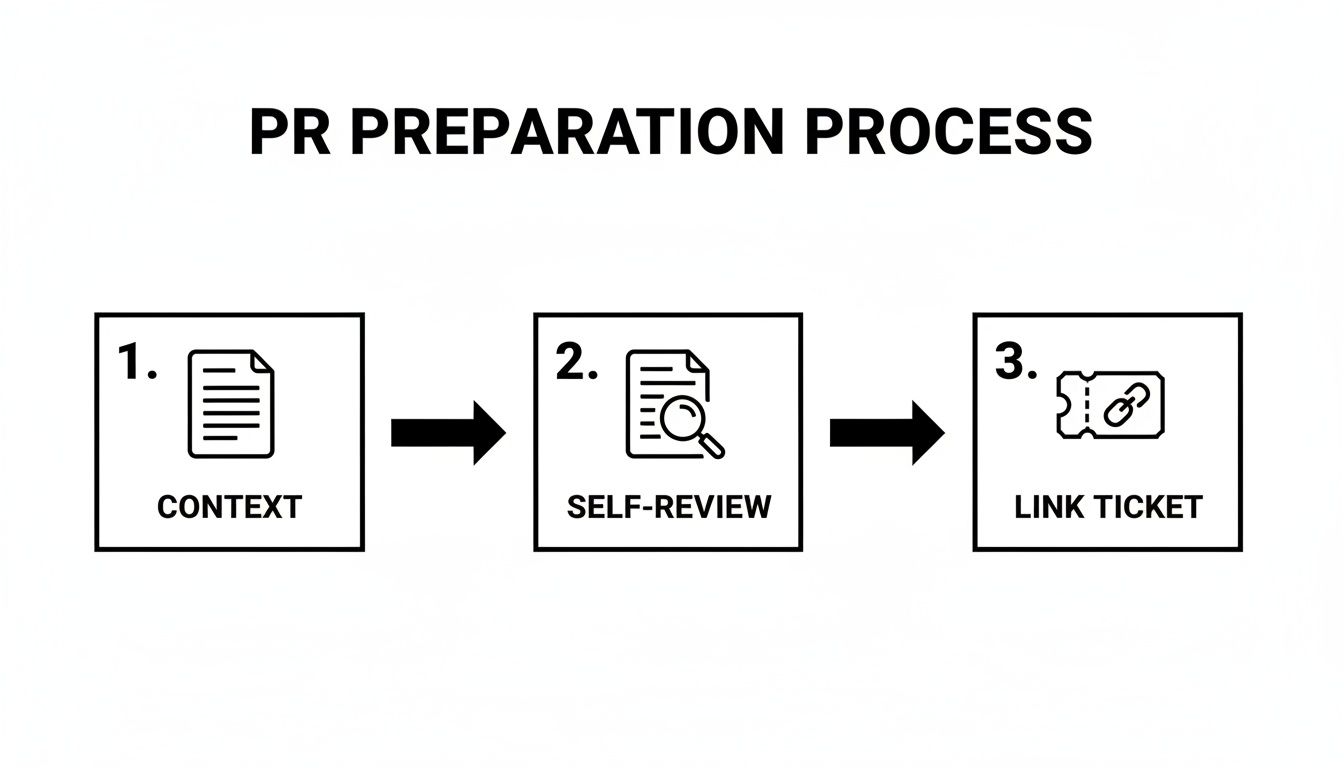
When the author provides solid context, does their own self-review first, and links the relevant tickets, it sets the stage for a much smoother and faster review cycle for everyone.
Pass 1: The 30,000-Foot View
Before you even glance at a line of code, your first pass should be all about the "why" and the "what." This is non-negotiable. Why? Because a perfectly implemented solution to the wrong problem is still a waste of time. Your only goal here is to understand the change's purpose and how it fits into the bigger picture.
Start by asking yourself:
- Does this actually solve the right problem? Read the PR description and the linked ticket. Does the code deliver on the promise of the user story or bug report?
- Is the architectural approach sound? Does this change play nice with our existing architecture? Or does it introduce a new dependency or pattern that clashes with our long-term vision?
- Is this change even in the right place? I've seen it a hundred times: business logic crammed into the front-end when it belongs in the API, or vice-versa.
Answering these questions first can save an incredible amount of time. If you spot a fundamental flaw in the approach, you can flag it immediately. That prevents everyone from wasting energy on implementation details that are just going to be thrown out.
Pass 2: Down in the Trenches
Once you're confident the overall direction is right, it's time to roll up your sleeves. Your second pass is all about the implementation itself. This is where you put on your detective hat and dig into the code for correctness, security, and maintainability.
Here’s a mental checklist for this phase:
- Correctness: Does the code do what it says on the tin without causing weird side effects? Hunt for off-by-one errors, faulty assumptions, and any edge cases the author might have missed.
- Security: Are we opening ourselves up to any new vulnerabilities? Keep an eye out for the usual suspects: SQL injection, cross-site scripting (XSS), or sloppy handling of sensitive data.
- Performance: Could this code bring our system to its knees? Watch out for inefficient database queries (especially N+1 problems), potential memory leaks, or heavy loops that could block the main thread.
- Test Coverage: Are there tests? More importantly, are they meaningful? Tests should cover the "happy path," sure, but they also need to check edge cases and failure modes.
For this pass, I almost always pull the branch down and run the code locally. It's the only way to really get a feel for it. You can use your editor's "go to definition," run the tests yourself, and step through complex logic with a debugger—things you just can't do by reading a diff on GitHub. Learning how to edit a paper shares a similar principle: deep, hands-on analysis always beats a surface-level scan.
To help structure this part of the review, a checklist can be invaluable. It keeps you honest and ensures you cover all the critical areas systematically.
The Code Reviewer's Checklist
Here is a systematic checklist to guide you through a comprehensive pull request review, from high-level purpose to low-level implementation details.
| Check Category | Key Questions to Ask | Example of a Good Comment |
|---|---|---|
| Purpose & Scope | Does the PR title and description clearly explain the why? Does it address the linked ticket? Is the scope small and focused? | "The description is a bit brief. Could you add a quick note on why we chose this library over the alternative we discussed?" |
| Architecture | Does this change fit our existing patterns? Does it introduce new dependencies or concepts we need to document? | "This new service class feels like a good approach, but let's make sure we document this new pattern in our team's wiki." |
| Correctness | Does the code do what it's supposed to? Are edge cases (nulls, empty arrays, errors) handled correctly? | "What happens if this API call returns a 404? It looks like we might get an unhandled exception here." |
| Security | Does this code introduce any vulnerabilities (e.g., XSS, SQL injection)? Is user input properly sanitized? | "Heads up, this raw HTML rendering could be an XSS risk. Let's make sure we sanitize this user-provided content first." |
| Performance | Are there any potential bottlenecks? Any N+1 query patterns? Are large data sets handled efficiently? | "This loop could be a performance issue. Since it's making a DB call on each iteration, could we fetch all the data in a single query beforehand?" |
| Testing | Are the tests comprehensive? Do they cover both happy paths and failure cases? Are they easy to understand? | "Great test coverage on the success path! Could we add one more test case to verify how the system behaves when the external API is down?" |
| Readability | Is the code clear and easy to follow? Are variable and function names descriptive? Is there any "clever" code that's hard to parse? | "I had to read this function a few times to understand it. What do you think about renaming itemProcessor to processUserPermissions for clarity?" |
| Maintainability | Will this be easy to debug and modify in the future? Is it overly complex? Does it follow our style guide? | "This is solid, but it's a bit inconsistent with our linter rules. Could you run npm run lint to fix the formatting?" |
Using a checklist like this ensures you don't just focus on your pet peeves but give a well-rounded and valuable review every time.
Pass 3: The Final Polish
Only after you’re satisfied with the architecture and the implementation should you move on to the final pass: style and conventions. This is all about making sure the code is readable, consistent, and won't make the next developer want to pull their hair out. Save this for last. There's no point in nitpicking variable names if the whole approach is wrong.
During this final scan, you're looking for:
- Readability: Is the code clear and self-documenting? Are variable names descriptive, or are they cryptic abbreviations?
- Consistency: Does the code follow the project’s established style guide and patterns? We have linters for a reason.
- Simplicity: Is there a simpler, more straightforward way to get the same result? Overly complex or "clever" code is a breeding ground for future bugs.
- Comments: Are there comments explaining the why behind non-obvious code? Good comments clarify intent, not just restate what the code is doing.
This multi-pass system—foundation, then structure, then surface polish—makes your feedback more organized, valuable, and less likely to miss the big stuff that automated tools can't catch. If you want to build out a more exhaustive process, our detailed code review checklist is a great place to start.
Mastering the Art of Constructive Feedback
The gap between a helpful code review and a frustrating one almost always comes down to communication. Your soft skills are just as critical as your technical chops here. Get it right, and you build a culture of trust and collaboration. Get it wrong, and you end up with fear and resentment.
The goal is simple: make sure feedback lands as a team effort to improve the code, not as a personal attack.
This all starts with how you frame your comments. Instead of barking commands like, "This is inefficient, use a Map," try opening a dialogue. A simple shift to, "I'm curious if using a Map here might offer a performance benefit for lookups. What do you think?" completely changes the dynamic and respects the author's ownership.
The Power of Framing and Intent
The words you choose have a direct impact on how your feedback is received. When you're learning how to do a code review well, always focus on the code's behavior—not the author's choices. The most important rule? Assume positive intent. Your teammate made the best decisions they could with the information they had at the time.
A few simple framing techniques can make all the difference:
- Focus on "I" statements: Instead of saying, "Your code is confusing," try, "I find this a bit hard to follow." This frames the feedback from your perspective, making it feel less confrontational.
- Suggest, don't command: Use collaborative phrases like "What if we..." or "Have you considered..." to propose alternatives.
- Always explain the "why": Never just say something is wrong. You have to explain why a change is needed, linking it back to a team standard, a performance issue, or a potential bug.
The most effective reviewers act as collaborators, not gatekeepers. Their goal is to help the author ship the best possible code by asking clarifying questions and offering thoughtful suggestions, fostering an environment where developers feel safe to learn and grow.
Structuring Your Comments for Clarity
Vague feedback just creates confusion and slows everything down. A great way to provide actionable suggestions is to categorize them by importance. One of the best frameworks for this is Conventional Comments, which uses simple prefixes to signal what kind of comment you're leaving.
This system cuts through the ambiguity, letting the author immediately know what’s a blocker and what’s just a minor suggestion.
Examples of Conventional Comments in Action
| Prefix | Meaning & Example |
|---|---|
suggestion: | A non-blocking idea for improvement. "suggestion: This function is getting a bit long. Maybe we could extract lines 45-60 into a separate helper function to improve readability?" |
question: | A request for clarification. "question: I'm not familiar with this library. Could you add a quick comment explaining why it was chosen here?" |
nitpick: | A minor, often stylistic, point. "nitpick: Could we align these variable declarations? Not a blocker, just for consistency." |
Using a structured approach like this makes your intent crystal clear and helps the author prioritize their work. For more in-depth strategies, our ultimate guide to constructive feedback offers additional frameworks and examples.
This human touch is becoming even more critical as automation finds its way into our workflows. According to a recent Stack Overflow survey, 84% of developers use AI tools daily, yet a staggering 46% don't fully trust their output. This trust gap, which you can read about in the full Stack Overflow survey analysis, shows why human-centric communication is essential for building confidence around automated tools—especially for notification tools like PullNotifier that sit at the intersection of automation and team collaboration.
Ultimately, a great comment educates, clarifies, and improves the codebase, all while making your team stronger.
Using Automation to Streamline Your Review Workflow
Let's be real: relying only on manual code reviews is a recipe for burnout and inefficiency. It just doesn't scale. Your best engineers end up wasting hours on nitpicks that a machine could have caught in milliseconds.
A modern review process is all about offloading the grunt work—the repetitive, objective checks—to automated tools. This builds a smart toolchain that acts as your first line of defense, filtering out the noise. When a pull request finally lands in front of a human, it has already passed a baseline of quality, freeing up your team to focus on what actually matters: architecture, logic, and user experience.
Laying the Foundation with Linters and Static Analysis
The first and most fundamental step is getting your linters and static analysis tools in order. Think of them as tireless automated teammates who instantly enforce your coding standards 24/7.
Linters are your go-to for keeping style consistent across the entire codebase. They’ll flag everything from indentation and spacing to variable naming conventions. This simple step kills off all those tedious "you missed a space here" comments that create so much friction in manual reviews.
Static analysis tools take it a step further. They inspect your code without running it to sniff out potential bugs, security holes, and nasty "code smells."
- Error Detection: They're great at catching common blunders like unused variables, unreachable code, or potential null pointer exceptions before they ever make it to production.
- Security Scanning: Many can spot basic security flaws, like using deprecated crypto functions or, even worse, hardcoded secrets.
- Complexity Analysis: These tools can measure things like cyclomatic complexity, helping you pinpoint functions that are becoming a tangled mess and are ripe for refactoring.
By wiring these checks directly into your CI/CD pipeline, you create a powerful quality gate. No code gets merged until it meets these automated standards, and all of this happens before a human reviewer even gets a notification. For a deeper look, check out our guide to automated code reviews.
The Rise of AI in Code Review
While linters handle the style guide, a new wave of AI-powered tools is changing how we hunt for more complex bugs. These tools go way beyond simple pattern matching. They use machine learning models, trained on mountains of open-source code, to spot subtle issues that traditional static analysis would almost certainly miss.
The industry is jumping on board, and fast. The AI code review market, valued at 25.7 billion by 2030. That kind of explosive growth tells you everything you need to know about where the industry is heading. You can explore the full market analysis on marketreportanalytics.com for more details.
AI doesn't replace the human reviewer. It empowers them. By automatically flagging potential logic flaws, race conditions, or resource leaks, AI acts as an expert assistant, pointing out areas that deserve closer human inspection.
This shift lets your team spend less time hunting for obscure bugs and more time thinking about the big-picture, architectural impact of a change.
Solving the Last Mile Problem: Review Latency
Here’s the catch: you can automate the code to perfection, but you can't automate the human. The biggest bottleneck is often review latency. A pristine pull request is completely useless if it just sits there for days, blocking features and grinding your development cycle to a halt.
This "last mile" problem is where notification management becomes absolutely critical.
The default notifications from platforms like GitHub are a firehose of noise. It's the classic "boy who cried wolf" problem—developers get so many pings that they just start tuning them out. The fix is to use targeted, intelligent notifications that get the right information to the right person, at exactly the right time.
This is precisely the problem a tool like PullNotifier was built to solve. By integrating GitHub with Slack, it turns that notification chaos into a smooth, actionable workflow.
- Targeted Alerts: You can route PR notifications to specific Slack channels based on the repository or team.
- Direct Mentions: It automatically @-mentions the right reviewers, so the request actually gets seen.
- Consolidated Updates: All updates for a single PR—comments, approvals, CI failures—get neatly threaded under one message. No more channel spam.
By tackling review latency head-on, you make sure your automated workflow actually delivers on its promise of moving faster. Your review process transforms into a high-velocity system that keeps your team shipping, without the delays.
Frequently Asked Questions About Code Review
Even with a solid framework, a few questions always pop up when teams start getting serious about code reviews. Let's tackle some of the most common ones, from dealing with disagreements to making sure everyone pulls their weight.
How Long Should a Code Review Take?
There's no magic number, but most high-performing teams aim to get reviews done within 24 hours. Anything longer and you risk blocking the author.
The real secret isn't about watching the clock—it's about the size of the pull request. A tight, focused PR with around 100-200 lines of change can usually be reviewed properly in under 30 minutes. On the other hand, a monster 1,000-line PR is a recipe for a bad time. It can take hours to get through, and the quality of the review will almost certainly suffer from cognitive overload.
Keep your PRs small, and your reviews will naturally get faster and better.
What Is the Best Way to Handle Disagreements?
If you find yourself in a written debate on a PR comment that's gone back and forth more than two or three times, just stop typing. Seriously. It’s a sign that text isn't working anymore.
Hop on a quick 5-minute video call. You can sort out a misunderstanding in a fraction of the time it would take to keep typing. The goal is to land on the best outcome for the code, not to "win" an argument. Once you’ve made a decision, always circle back and post a summary of the resolution in the PR thread. This keeps everything transparent and documented for anyone who looks at it later.
The most important rule in a disagreement is to keep the focus on the code's merits, not on personal opinions. Every discussion should be grounded in team standards, architectural principles, or the impact on the user.
How Do We Review Code from Senior Engineers?
The same way you review code from anyone else. No exceptions. In a healthy review culture, all code gets held to the same high standard, regardless of the author's title.
Junior engineers should be actively encouraged to jump in on seniors' PRs. It's one of the best ways for them to learn the codebase, see established patterns in action, and build their confidence. And for this to work, senior team members have to be genuinely open to feedback from everyone. It’s all about creating an environment of mutual respect where everyone is focused on getting better.
Should We Use a Formal Checklist for Every Review?
A rigid, mandatory checklist can sometimes feel like bureaucratic overhead, but a flexible guide is a huge win. Think of it less as a list of boxes to tick and more as a cognitive safety net.
A good guide reminds reviewers to look for things that are easy to miss when you're just focused on logic and style—like security holes, performance bottlenecks, or missing test coverage. This is especially true as automation gets smarter. Today’s leading AI code review tools can already detect 42-48% of bugs that would otherwise hit production, and teams using them report 62% fewer production issues. Discover more insights about AI code review automation on digitalapplied.com.
Stop letting pull requests get stuck in limbo. PullNotifier delivers targeted, real-time PR updates directly to Slack, cutting through the noise and reducing review latency by up to 90%. Try PullNotifier for free and accelerate your team's workflow today.