- Published on
Master Slack GitHub Integration for Workflow Success
- Authors

- Name
- Gabriel
- @gabriel__xyz
A proper Slack-GitHub integration should be your team's command center, not another source of digital noise. The goal is to pipe relevant GitHub updates directly into your team's channels, cutting down on context switching and keeping developers in the zone.
But let's be real—without careful management, this connection often creates more chaos than clarity. A finely-tuned setup filters out the fluff, making sure critical updates, like pull request reviews, are front and center and actually actionable.
Why Your Dev Workflow Is Drowning in Noise
The default integration between GitHub and Slack feels less like a helpful assistant and more like a firehose. Every commit, new branch, and minor comment floods your channels, burying the truly important signals in a sea of low-value updates. Your team's focus is taking a direct hit.
This isn’t just a minor annoyance; it’s a productivity killer. A critical pull request needing a review gets lost between ten automated commit messages. A developer has to wade through an entire channel just to find the one comment that's blocking their work. This constant digital static forces endless context switching, yanking engineers out of deep work and fragmenting their attention.
The Real Cost of Notification Fatigue
The problem gets exponentially worse as teams scale. What was once a manageable stream of updates for a small crew becomes an overwhelming torrent in a larger one. Every single notification demands a micro-decision: "Is this for me? Is it urgent? Can I ignore it?" That cognitive load adds up fast.
Eventually, you hit a state of "notification fatigue," where developers just start tuning out the channel altogether.
This isn't a niche problem. Slack is a titan in workplace communication, with over 42 million daily active users globally as of early 2025. When millions of developers rely on this very connection to manage their code reviews, a noisy setup doesn't just slow things down—it creates a bottleneck that grinds the entire development lifecycle to a halt.
A Slack-GitHub integration is supposed to deliver the right information to the right person at the right time. When it fails, it does the exact opposite, creating chaos instead of clarity.
This guide is about getting you out of that chaos. We’ll walk through how a smarter approach using a tool like PullNotifier can transform your integration from a noisy distraction into a focused, powerful workflow assistant. Instead of drowning in alerts, your team will finally get the clear, actionable updates they need to ship code faster.
Setting Up Your First Smart Integration

Alright, let's get you connected. Setting up PullNotifier isn't just about flipping a switch; it's about building a real, meaningful bridge between your code repositories and your team's Slack workspace. Think of this first step as laying the foundation for a much smarter, quieter notification system. We're going from a firehose of alerts to a curated feed that actually helps you work.
The first thing we'll do is authorize PullNotifier with your GitHub and Slack accounts. This is where the magic starts. Granting the right permissions now is what allows you to create those super-granular filtering rules later on.
Securely Connecting Your Accounts
Jump into the PullNotifier dashboard to kick things off. You’ll be prompted to authenticate with GitHub first. Here, you have a choice: grant access to all your repositories or pick and choose specific ones. The selective option is perfect if you want to start small or if your company's security policy keeps a tight leash on app permissions.
Next up is your Slack workspace. The authentication flow will ask for permission to post messages into your channels—this is the core of how you'll get your alerts. It’s a quick process, but it’s the bedrock for everything else you’ll build.
By the end of this, you won’t just have two platforms that know each other. You'll have a baseline integration ready for customization, giving you control over your notification flow from day one.
The official github slack integration is great for getting basic updates into Slack. Teams have used it for years to see PRs, issues, and merges without switching context. But we're here to take that a step further.
Choosing Your Target Channel and Repositories
With the accounts linked, now the real fun begins: mapping which repositories should talk to which Slack channels. You'll want to be strategic here. For instance, you could create a dedicated #dev-team-prs channel for all pull request updates from your main backend repo.
Here’s a simple, practical example of what that initial setup might look like:
- Repository:
your-org/main-api - Slack Channel:
#backend-alerts - Initial Rule: Notify on all new pull requests.
This simple mapping immediately sends the right activity to the right people. It's a huge improvement over the default integration, which often just dumps everything into a general channel, stripping away all context. For a deeper dive into the differences, check out our guide on https://blog.pullnotifier.com/blog/how-to-use-the-official-github-slack-app.
This initial setup is your launchpad. You now have a clean, working connection. From here, you can start layering on the powerful filtering rules that will truly help your team get their focus back. We'll get into that next.
How to Customize Notifications and Reclaim Your Focus
Alright, you’ve got the basic Slack–GitHub integration up and running. Now for the fun part: turning that firehose of alerts into something genuinely useful. This is where we go beyond the defaults and start building an intelligent, context-aware notification system with PullNotifier's filtering engine.
Let’s be honest, the standard integration treats every single event with the same level of urgency. But a typo fix in the docs is worlds apart from a critical bug fix on the main branch. Your notification system should know the difference.
Building Your First Custom Filter
We’ll start with a classic scenario that drives developers crazy: getting a notification for every single pull request across the entire repo. A simple, game-changing rule is to only get pinged when you are explicitly requested as a reviewer.
This one tweak means you only see alerts when someone on your team specifically needs your eyes on their code. No more digging through a mountain of PRs just to find the two or three that are actually for you.
Another incredibly useful filter is based on GitHub labels. Let's say your team uses an urgent-fix label. You can set up PullNotifier to blast a high-priority alert to the #dev-team channel the moment a PR with that label is opened. This makes sure critical fixes get eyeballs on them immediately.
This entire process is about smoothing out the flow from a code push to a team action, fitting automated notifications seamlessly into your development cycle.
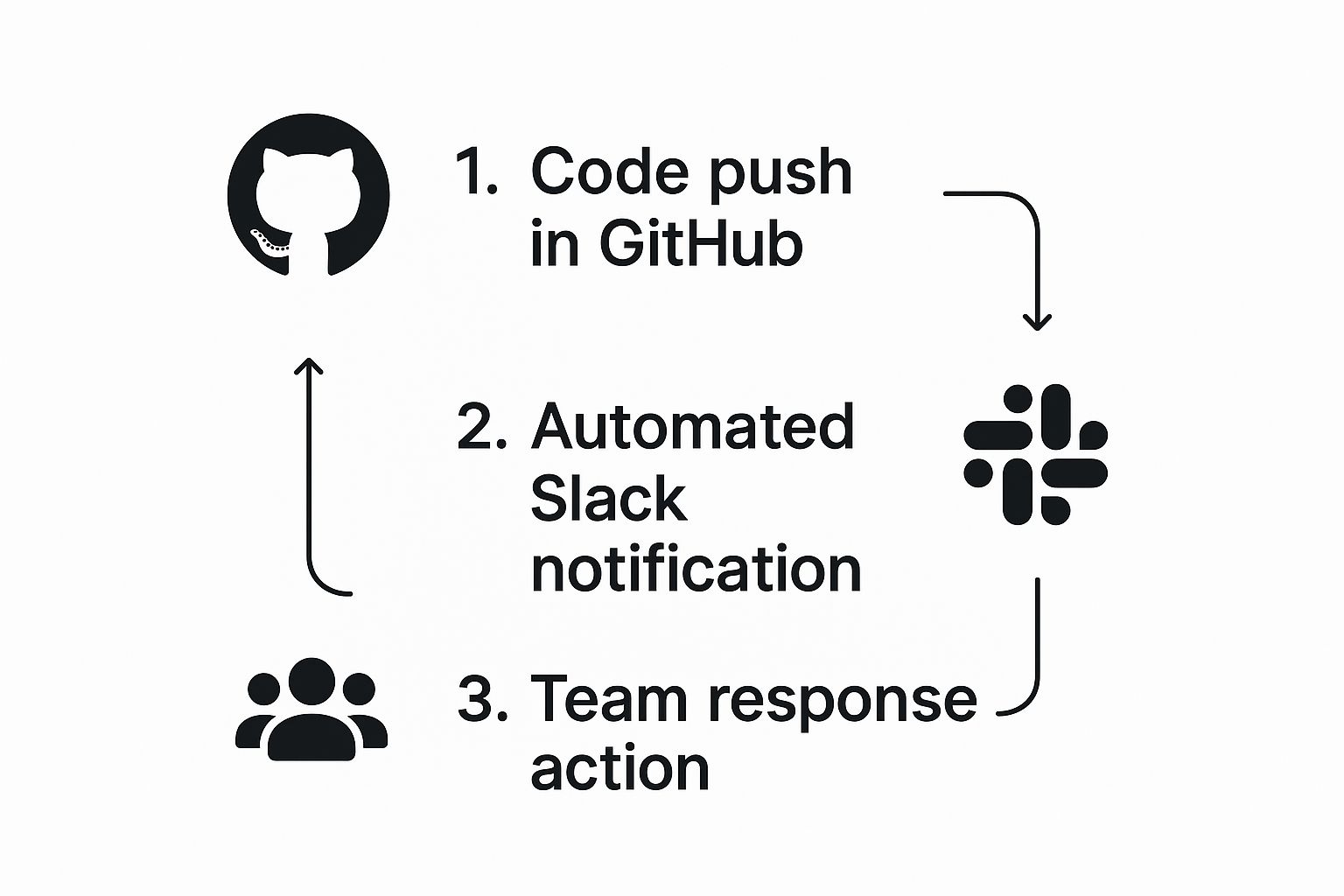
This graphic really captures the ideal workflow: a push in GitHub triggers a smart, actionable notification in Slack, prompting an immediate response from the team.
Real-World Filtering Recipes
To show you what’s possible, here are a few proven "recipes" you can steal and implement right away. These are designed to tackle some of the most common pain points for dev teams.
Recipe 1: CI/CD Failure Alerts
A broken build on a critical branch can bring the whole team to a grinding halt. Instead of letting that failure get buried in a sea of notifications, you can create a specific rule for it.
- Trigger: A GitHub Actions workflow fails.
- Condition: Only on the
mainorreleasebranch. - Action: Send an alert to the
#dev-ops-alertschannel and@mentionthe team lead.
This setup guarantees that build failures get immediate attention, stopping downstream issues before they start. It's a simple, proactive way to keep your codebase healthy.
Recipe 2: Stale PR Nudges
We’ve all seen it: a pull request sits for days without a single review, creating a bottleneck. PullNotifier can automate the gentle art of the follow-up.
- Trigger: A PR has been open for more than 48 hours.
- Condition: The PR has zero comments or approvals.
- Action: Post a threaded reminder in the original PR notification, tagging the requested reviewers.
This simple automation keeps the review cycle moving without making anyone play the role of manual-reminder-sender. It’s all about creating a system that supports your workflow instead of just reporting on it.
Fine-Tuning Notifications for Different Roles
Not everyone on the team needs the same firehose of information. A project manager might only care when a PR is merged to production, while a QA engineer needs to know the second a feature is ready for testing.
This is where role-specific notification channels come in handy. For example, you could create a #qa-ready channel that only gets alerts when a PR is tagged with the ready-for-testing label. This kind of targeted routing ensures every team member gets the signal without the noise.
It's this level of control that truly separates a smart Slack GitHub integration from a noisy one. Here’s a quick look at how PullNotifier stacks up against the default app in this area.
PullNotifier vs Default GitHub Integration Notification Control
| Feature | Default GitHub App | PullNotifier |
|---|---|---|
| Branch-Specific Alerts | Limited filtering | Yes, create rules for main, release, etc. |
| Label-Based Routing | No | Yes, route PRs with specific labels to different channels. |
| Reviewer-Specific Pings | Notifies on all activity | Yes, only alert when a user is explicitly requested. |
| CI/CD Status Alerts | Basic success/failure | Yes, customize alerts for specific workflow failures. |
| Stale PR Reminders | No | Yes, automate nudges for PRs needing review. |
| Role-Based Channels | Manual setup required | Yes, easily create channels for QA, PMs, etc. |
Ultimately, customization is about delivering precision. It helps every developer reclaim their focus and get back to what they do best: building great software.
Automating Your PR Workflow in Slack
 Once you've dialed in your notifications, the next level is to turn your Slack GitHub integration into a proactive assistant. Instead of just being a passive reporter on what’s already happened, it can actually start driving the workflow forward. This is where you really start to see the magic happen.
The core idea is to apply principles from how to automate repetitive tasks directly to your PR process. We're looking for the common bottlenecks, the little manual nudges, and the routine check-ins, and then letting our tools handle them. This frees up developer brainpower for what it's best at: solving complex problems.
Creating a Daily Digest Channel
One of the easiest wins for reducing noise is setting up a daily digest. Rather than getting pinged for every single event, you can configure PullNotifier to send one summarized report of a repository's activity. Just point it to a specific channel, like #dev-daily-digest, and have it post once a day.
This summary can be a quick, scannable update that includes things like:
- New pull requests opened in the last 24 hours.
- Which PRs were merged or closed.
- Any PRs that are still waiting for their first review.
This keeps the wider team in the loop without blowing up the main development channels. It’s a perfect solution for managers or other stakeholders who just need a high-level pulse on progress, not a play-by-play.
By automating summaries and reminders, you stop relying on individuals to manually track progress or nudge colleagues. The system itself becomes the source of truth and the gentle enforcer of your team's processes.
Proactive Reminders for Stale PRs
We've all seen it happen: a pull request is submitted, gets some initial comments, and then... crickets. It just sits there, slowly going stale. PullNotifier can be your automated sheepdog here, gently nudging things along.
You can set up a simple rule to automatically send a follow-up message in the original PR's Slack thread if it hasn't seen any action—like reviews or comments—after a set time, say 48 hours.
It’s a small change, but this kind of automation prevents PRs from falling through the cracks and keeps momentum high. And the best part? No one has to play the role of the "bad guy" chasing down reviews.
This isn't just a nice-to-have; in enterprise environments, it delivers real results. After implementing a more powerful Slack integration, Stripe's engineering team processed over 30% more pull requests and slashed their time-to-review by 25%.
Advanced Alerts Based on GitHub Actions
Your integration can get even smarter by plugging into your CI/CD pipeline. By tying notifications to the status of your GitHub Actions, you can create some seriously powerful, context-aware alerts. For a deep dive, check out our guide on using GitHub Actions to send Slack notifications.
Here’s a practical example: imagine a junior developer's PR gets its first approval from a peer. You can create an automation that spots this exact event and immediately sends a DM to the team lead. This targeted alert tells the lead, "Hey, this PR is ready for your final look," streamlining the whole mentorship and code-shipping process. It's clean, efficient, and keeps everyone focused.
Alright, turning your Slack–GitHub integration from another source of notification noise into a genuinely useful tool is where the real work begins. Getting it set up is one thing; keeping it that way is another. I've seen countless teams set this up, and there's a clear difference between an integration that sticks and one that gets muted within a month.
The most common mistake? Casting the net too wide. It’s tempting to create a rule that pings a channel for every single commit or PR, but all you've done is move the firehose of notifications from your email to Slack. The goal here is surgical precision, not a shotgun blast.
Establish Clear Team Conventions
To keep things from descending into chaos, your team needs to be on the same page about how this integration is actually used. A great starting point is dedicating specific channels to specific types of alerts. This one small act of organization can bring a ton of clarity right away.
For example, you could structure your channels like this:
#prs-ready-for-review: A channel exclusively for new pull requests that need eyes on them. No chit-chat, just PRs.#dev-builds: All your CI/CD notifications live here. This keeps build successes and failures from cluttering up your main development channels.#deployment-alerts: A high-signal, low-noise channel that only announces production deployments.
This kind of separation lets team members tune into the channels that matter for their role, effectively letting them build their own custom notification dashboard. It's a simple strategy, but it's foundational for keeping the noise down.
Think of your integration as a living tool, not a "set it and forget it" utility. The teams that get the most value are the ones who treat it that way, regularly auditing and tweaking their setup to match how they work.
Evolve and Refine Your Setup
A static configuration is a dead configuration. As your team grows, repositories change, and workflows mature, your notification rules need to keep pace. It's a good idea to schedule a quick review every quarter to ask some hard questions.
Are certain alerts getting consistently ignored? It’s probably time to kill that rule or dial it back. Is there a new type of critical event that isn't being tracked? Let's add a notification for it. This cycle of continuous improvement is what keeps your Slack GitHub integration from becoming stale.
I saw a team start by sending all PRs to one channel. A few months later, they realized their frontend and backend PRs needed totally different reviewers. The logical next step was to split the alerts into #frontend-prs and #backend-prs using label-based filtering. It's this kind of iterative refinement that turns a simple tool into a core part of your team's culture.
Common Questions About Slack GitHub Integrations
Even with a perfectly dialed-in setup, a few questions always seem to surface as teams start using their Slack GitHub integration. Getting these sorted out can be the difference between a tool that just works and one that genuinely transforms your workflow. Let's dig into some of the most common ones I hear.
Can It Connect to My Self-Hosted GitHub Enterprise Server?
This is a big one, especially for larger organizations. The good news is, yes. Tools like PullNotifier are designed from the ground up to support both GitHub.com and GitHub Enterprise (both Cloud and Server). You get the same secure authentication and deep customization, regardless of where your code lives.
How Is This Different From the Official GitHub App?
A lot of developers ask what a third-party tool really brings to the table compared to the standard GitHub app. While the official integration is fine for basic, out-of-the-box notifications, the real power of a dedicated tool lies in its customization depth.
The game-changer is the ability to build complex filtering rules. Think about filtering based on PR size, specific file paths, labels, authors, or even CI status. That’s how you kill notification fatigue for good and only see what you actually care about.
Can I Route Different Alerts to Different Channels?
Absolutely, and you definitely should. This is a core feature of any powerful Slack GitHub integration.
For example, you can set it up to:
- Send high-priority failed builds straight to a team-wide
#dev-ops-alertschannel. - Route routine PR review requests to a quieter
#team-prschannel. - Send direct messages for mentions or assignments.
This kind of smart routing keeps your main channels clean and ensures urgent issues get immediate attention.
What if My Notifications Stop Working?
If you suddenly find your notifications aren't coming through, it's almost always a permissions or configuration issue. It can be frustrating, but it's usually a quick fix. We’ve actually put together a detailed guide on how to fix common GitHub Slack notification problems that walks you through troubleshooting the most common culprits.
Can I Integrate Multiple Repositories?
Yes, you can connect as many repos as you need. You can funnel updates from all of them into a single channel or spread them out across multiple channels to keep things organized. This flexibility is key when you're trying to scale your workflow across different projects or teams.
If your team uses Microsoft Teams instead of Slack, the same workflow improvements apply — see our GitHub Microsoft Teams integration guide.
Ready to turn your noisy notifications into a focused, actionable workflow? PullNotifier cuts through the chaos, delivering only the GitHub updates you actually need. Start your free trial today.