- Published on
A Developer's Guide to Python Automation Scripts
- Authors

- Name
- Gabriel
- @gabriel__xyz
Python automation scripts are small, focused programs designed to handle the repetitive, manual tasks that every developer dreads. Think managing pull requests, running tests, or syncing data between tools. They use Python's clean syntax and massive library ecosystem to connect APIs, wrangle files, and generally streamline a team's entire workflow, saving a ton of time and cutting down on human error.
Why Python Is the Go-To for Developer Automation

Every software team has them: those small, manual jobs that seem harmless but slowly drain focus and add up over time. It could be the tedious cycle of checking CI/CD pipeline statuses, the mind-numbing task of triaging bug reports, or constantly reminding teammates about pending code reviews.
This is exactly where Python automation scripts shine.
These aren't large-scale applications. They’re purpose-built tools designed to solve a very specific workflow bottleneck with minimal fuss. Python's flexibility makes it a natural fit for this kind of work, especially with the rise of automation in DevOps practices. Its straightforward syntax and powerful libraries make it dead simple to interact with APIs from services like GitHub, Slack, and Jira.
This combo lets developers build custom solutions that fit their team's exact needs—something an off-the-shelf product rarely gets right.
The Real-World Impact on Team Efficiency
The proof is in the pudding. Take a company like Shopify, which deals with billions of events every day. Their engineering teams lean on Python scripts for everything from fraud detection to automated testing and deployments. This dedication to automation has boosted their engineering productivity by a staggering 40%, allowing them to iterate much faster.
Netflix is another great example, using Python to manage its enormous content delivery network. It's a testament to the language's ability to handle incredibly complex, large-scale automation. The ROI is usually a no-brainer; I've seen simple scripts pay for themselves in less than two months.
The most effective automation doesn't come from a grand, top-down strategy. It comes from developers on the ground identifying a personal annoyance and writing a 30-line script at 2 a.m. to fix it for good.
Essential Python Libraries for Developer Automation
To get started, you'll need a handful of key libraries. These are the workhorses of most automation scripts I've built or seen in the wild.
| Library Name | Primary Purpose | Example Use Case |
|---|---|---|
| Requests | Making HTTP requests to APIs | Fetching pull request data from the GitHub API. |
| Pandas | Data manipulation and analysis | Parsing a CSV of bug reports to generate a summary. |
| Pytest | Writing and running tests | Creating unit tests to ensure your automation script works correctly. |
| Slack SDK | Interacting with the Slack API | Posting a notification to a channel when a CI/CD build fails. |
| PyGithub | A wrapper for the GitHub API | Automating the process of labeling new issues in a repository. |
| Schedule | Job scheduling | Running a script every morning to send a daily PR summary. |
Mastering these libraries gives you a solid foundation for building almost any kind of developer-focused automation you can dream up.
Key Drivers for Python's Dominance
So, what really makes Python the king of the hill for these tasks? It boils down to a few key factors that just make life easier for developers.
- Massive Library Ecosystem: You rarely have to start from scratch. Libraries like
Requestsfor API calls,Pandasfor data wrangling, andPytestfor testing give you powerful, ready-made building blocks. - Low Barrier to Entry: Python’s syntax is incredibly readable. Even junior developers can get up and running, writing effective scripts without getting bogged down by a steep learning curve.
- Cross-Platform Compatibility: This is a big one. A script you write on a Mac will run just as smoothly on a Linux server or a Windows machine, which is critical for today's diverse development environments.
Preparing Your Environment for Automation
Before you write a single line of your first python automation script, a little prep work goes a long way. Think of it like setting up your workshop before a project—getting the right tools in place from the start saves you countless headaches down the road.
The first, non-negotiable step is to isolate your project's dependencies. Seriously, never install packages directly into your system's global Python installation. It's a fast track to version conflicts and project-breaking chaos.
The solution? Always use a virtual environment. It creates a clean, self-contained sandbox for your project, with its own Python interpreter and installed libraries.
Managing Dependencies and Secrets
For creating that sandbox, you've got a couple of great options. The venv module comes built into Python, and for simple scripts, it's perfectly fine. It’s lightweight and gets the job done without any extra fuss.
But as your projects get more complex, you might want to look at a more advanced dependency manager like Poetry. It offers powerful features like deterministic dependency resolution, which can be a lifesaver. Getting into the habit of using virtual environments, one way or another, is a cornerstone of professional Python development.
Just as important is how you handle sensitive information like API keys, tokens, and passwords. Hardcoding secrets directly into your source code is a massive security risk. If you push that code to a public repository like GitHub, you’ve just handed your credentials to the world.
The standard practice is to use environment variables.
By storing secrets in your local environment and loading them into your script at runtime, you effectively separate your configuration from your code. This makes your script more portable and secure, as the credentials never touch your version control system.
You can set these variables directly in your terminal for production, or use a .env file with a library like python-dotenv to make development easier.
Essential Tooling for Quality Code
Beyond just managing packages and secrets, a few core tools will dramatically improve your workflow.
- Version Control with Git: Every project, no matter how small, should live in a Git repository. It gives you a complete history of your changes, makes collaboration simple, and is an absolute safety net when you need to undo a mistake.
- A Capable Code Editor: An editor like VS Code, configured with the right extensions, acts as your co-pilot. The official Python extension, for instance, provides incredibly useful features like IntelliSense and debugging right out of the box.
- Code Linters and Formatters: Tools like Pylint or Flake8 analyze your code for potential errors and style issues, while formatters like Black automatically standardize its appearance. Integrating them into your editor ensures your code is clean, readable, and consistent from day one.
By establishing these practices early, you're building a solid foundation for creating robust and maintainable python automation scripts. If you want to go deeper, check out our guide on how to automate repetitive tasks for more insights.
Building Your First GitHub to Slack Notifier

Alright, let's build something genuinely useful. We're going to create one of the most common yet powerful python automation scripts for any dev team: a tool that watches a GitHub repository for new pull requests and pings a specific Slack channel with a polished notification.
This script solves a real-world headache. The default GitHub notifications are notoriously noisy, flooding channels and causing important PRs to get completely lost. A custom notifier gives you total control over the message format, what information gets included, and where it goes.
Getting Your API Credentials Sorted
First things first, our script needs to talk to both GitHub and Slack. That means we need to generate some API tokens for authentication.
- For GitHub: You'll need a Personal Access Token (PAT). Head over to your GitHub settings, find "Developer settings," and then "Personal access tokens." Generate a new token and give it the
reposcope. That's all it needs to read repository information. - For Slack: You’ll need to create a new Slack App in your workspace. Once that’s done, go to the "OAuth & Permissions" section and add the
chat:writescope to your Bot Token. This permission is what lets your app post messages in channels.
A quick but critical reminder: store these tokens securely as environment variables. Never, ever commit them directly into your code.
Talking to the GitHub API
With authentication ready, our first move is to fetch data from GitHub. The requests library is perfect for this—it makes API calls clean and simple. Our goal is to grab a list of all open pull requests for a specific repository.
Here's a straightforward function to get the job done. It builds the API URL, adds your PAT to the headers for authorization, and sends a GET request.
import requests
import os

GITHUB_TOKEN = os.getenv("GITHUB_TOKEN")
REPO_OWNER = "your-github-username"
REPO_NAME = "your-repo-name"

def fetch_open_prs():
    """Fetches open pull requests from a specific GitHub repository."""
    url = f"https://api.github.com/repos/{REPO_OWNER}/{REPO_NAME}/pulls"
    headers = {
        "Authorization": f"token {GITHUB_TOKEN}",
        "Accept": "application/vnd.github.v3+json",
    }
    response = requests.get(url, headers=headers)
    response.raise_for_status()  # This will raise an error for bad responses
    return response.json()
This little snippet is a great starting point for interacting with just about any GitHub endpoint you might need.
Crafting a Rich Slack Message
Next up, we need to send this information over to Slack. A plain text message is fine, but we can do so much better with Slack's Block Kit. It's a UI framework that lets you build messages with rich formatting, buttons, and custom layouts.
We'll take the pull request data and format it into a clean, actionable message. This approach makes the notification far more useful than just dropping a link in the channel.
import os
from slack_sdk import WebClient
from slack_sdk.errors import SlackApiError

SLACK_BOT_TOKEN = os.getenv("SLACK_BOT_TOKEN")
SLACK_CHANNEL = "#pr-notifications"

client = WebClient(token=SLACK_BOT_TOKEN)

def post_pr_to_slack(pr):
    """Formats and posts a single PR notification to a Slack channel."""
    pr_title = pr['title']
    pr_url = pr['html_url']
    author = pr['user']['login']

    message_blocks = [
        {
            "type": "section",
            "text": {
                "type": "mrkdwn",
                "text": f":large_blue_circle: *New Pull Request* \n<{pr_url}|*{pr_title}*>"
            }
        },
        {
            "type": "context",
            "elements": [
                {"type": "mrkdwn", "text": f"by *{author}*"}
            ]
        }
    ]

    try:
        client.chat_postMessage(channel=SLACK_CHANNEL, blocks=message_blocks)
        print(f"Posted notification for: {pr_title}")
    except SlackApiError as e:
        print(f"Error posting to Slack: {e.response['error']}")
Python’s simplicity and powerful libraries are a huge reason for its explosive growth in this space. By 2026, its adoption has continued to surge, with recruiters prioritizing Python skills at a rate of 42%. This is partly due to its dominance in automating DevOps and code review workflows. You can dive deeper into Python's global adoption stats at data.landbase.com.
Of course, you can take this even further by using GitHub Actions to send Slack notifications, which removes the need to host and run the script yourself.
With just these two functions, you have a powerful tool. The next step is to tie them together in a main script that fetches all open PRs and iterates through them, posting a notification for each one. This foundational script is a perfect launchpad for much more advanced automation.
Writing Scripts That Are Robust and Reusable
A one-off script that solves an immediate problem is great, but its real value multiplies when it becomes a reliable tool your whole team can use. Moving from a fragile, single-use python automation script to something professional-grade requires a shift in mindset. It’s about anticipating failures and building for adaptability from the very start.
An unhandled error is the fastest way to kill an automation workflow. If your script crashes because a network connection timed out or an API returned an unexpected 503 error, its reliability plummets. This is where robust error handling becomes non-negotiable.
Wrapping your network calls and critical logic in try...except blocks is the first line of defense. It's a simple structure that prevents your entire script from failing over a temporary glitch. Instead of crashing, it can catch the exception, log what happened, and decide whether to retry or just exit gracefully.
Add Structured Logging for Easier Debugging
When your script runs silently on a server, print() statements are totally useless. To understand what’s actually happening in production—especially when things go wrong—you need structured logging. Python's built-in logging module is perfect for this.
A good practice is to configure your logger to output timestamped messages with different severity levels (e.g., INFO, WARNING, ERROR). This creates a clear, readable trail of events, making it much easier to diagnose problems without having to reproduce them locally.
Proper logging turns a mysterious production failure into a clear-cut bug report. You can see exactly what the script was doing, what data it was processing, and where the exception occurred, cutting your debugging time in half.
For instance, you could log successful API calls at the INFO level and failed attempts at the ERROR level, making sure to include the status code and response body for context.
Refactor Your Code into Reusable Components
As your script grows, keeping all the logic in one long file becomes a nightmare to manage. The key to scalability is breaking down your code into smaller, reusable functions and classes. This practice, known as modularization, makes your code far cleaner and more adaptable.
- Create Functions for Specific Tasks: Have one function to fetch data from an API, another to format a message, and a third to post it. Each function should do one thing and do it well.
- Use Classes to Group Related Logic: If you're interacting with multiple services, you might create a
GitHubClientclass and aSlackClientclass to neatly encapsulate their respective logic and API credentials.
This approach not only improves readability but also lets you reuse those components in future python automation scripts. For more on building modular, reusable code, check out our guide on how to create reusable GitHub Actions.
Externalize Configuration for Flexibility
Hardcoding values like repository names, channel IDs, or user lists directly into your script is a recipe for maintenance headaches. Every single time a setting needs to change, someone has to dig into the source code.
A much better approach is to externalize all that configuration into a separate file. Using a simple format like YAML or JSON, you can create a config.yml file where even non-technical team members can safely update settings. Your script just reads this file at startup to get its instructions. This separation of code and configuration is a hallmark of professional, maintainable software.
This principle of building flexible, data-driven systems is what powers the entire Robotic Process Automation (RPA) industry. In fact, Python automation is a major driver of the RPA market, which is projected to grow from 28 billion by 2025. Many of the 53% of companies now deploying RPA are using Python-driven tools to achieve impressive ROI by automating integrations and reporting. To learn more about this trend, you can discover more insights about Robotic Process Automation statistics on ramamtech.com.
Comparing a Homegrown Script vs a Managed Tool
As your automation needs grow, you'll eventually face a classic "build vs. buy" decision. Building your own script gives you total control, but a managed tool like PullNotifier can save you countless hours on maintenance, error handling, and feature development.
Here’s a quick breakdown of the trade-offs:
| Feature | Custom Python Script | PullNotifier |
|---|---|---|
| Initial Setup | Requires coding, server setup, and dependency management. | Quick setup in under a minute, no code required. |
| Maintenance | You own all maintenance, bug fixes, and security updates. | Fully managed with automatic updates and bug fixes. |
| Error Handling | Must be built from scratch (logging, retries, alerting). | Built-in robust error handling and monitoring. |
| Flexibility | Highly customizable but requires development effort for changes. | Configurable rules and smart routing via a user interface. |
| Scalability | You are responsible for scaling infrastructure and handling load. | Managed infrastructure that scales automatically. |
| Feature Set | Limited to what you build; new features require coding time. | Rich feature set including smart routing and status updates. |
While a custom script is a great starting point, a dedicated tool often provides better long-term value by handling the operational overhead, letting your team focus on their core work instead of maintaining internal tools.
How to Deploy and Schedule Your Automation
An automation script sitting on your local machine is just a concept. The real magic happens when it runs reliably on its own, without anyone having to click "run." This is where deployment and scheduling come into play, turning your code into a true hands-off workflow.
Your choice of deployment method really depends on what your script does, what your team's infrastructure looks like, and, of course, your budget.
For simple, time-based tasks, the classic cron job on a Linux server is often the most direct path. It's a battle-tested utility that lets you schedule your Python script to run at specific intervals—every hour, once a day, or even on the first Monday of the month. Setting up a cron job is pretty straightforward, but it does mean you're on the hook for maintaining the server it runs on.
Before you push any script live, though, you need to be sure it's production-ready. This decision tree is a great mental model for that.
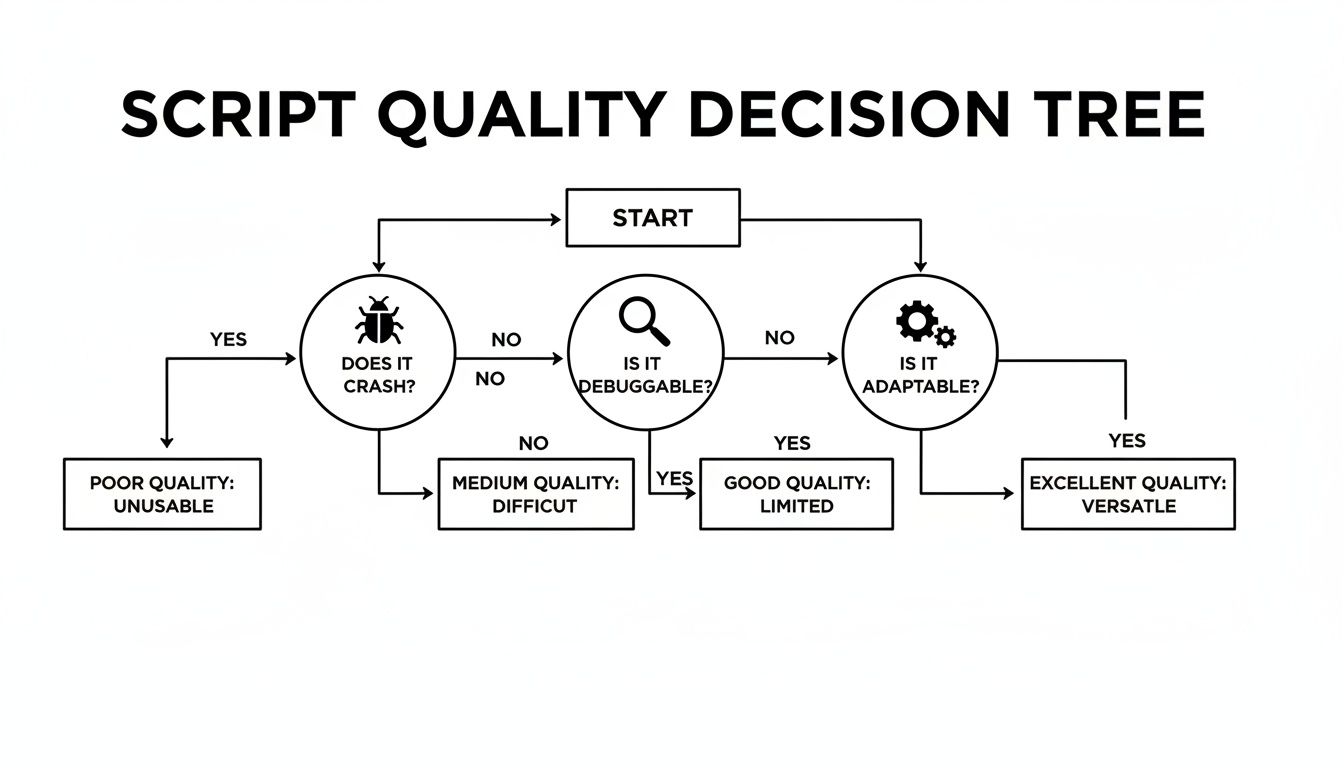
As you can see, a script's real value hinges on its stability, how easy it is to debug when things go wrong, and how adaptable it is to change. Nail these, and you're ready for deployment.
Modern Deployment and Scheduling Options
If managing a dedicated server sounds like overkill—and for many small scripts, it is—serverless computing is a powerful and cost-effective alternative. Platforms like AWS Lambda or Google Cloud Functions let you upload your script and have it run in response to specific triggers. This is perfect for event-driven python automation scripts, like processing an incoming webhook from GitHub.
With a serverless approach, you only pay for the exact compute time your script uses, which can be incredibly cheap for short-lived tasks. Best of all, it completely eliminates the need for server provisioning or maintenance, letting you focus purely on the code.
The biggest win with serverless is the scalability. Whether your script runs ten times a day or ten thousand, the platform handles the load automatically. You don't have to change a single thing.
For workflows that are tightly integrated with your codebase, another excellent option is GitHub Actions. This method lets you define your automation directly inside your repository using a YAML file. You can trigger your Python script to run on events like a new commit, a pull request creation, or just on a simple schedule.
Containerizing for Consistency
To guarantee your script runs the exact same way everywhere—from your laptop to the production server—containerization with Docker is the industry standard.
By packaging your script and all its dependencies into a lightweight, portable container, you finally kill the infamous "it works on my machine" problem.
This approach gives you a few major benefits:
- Environment Consistency: The Python version and all required libraries are identical, no matter where the container is running.
- Simplified Deployment: It makes pushing your script to cloud services like AWS Fargate or Google Cloud Run much, much simpler.
- Isolation: The script runs in its own isolated environment, so it can't conflict with other applications running on the same host.
Common Questions About Python Automation
If you're thinking about building out your team's automation toolkit, you probably have a few questions. Here are some of the most common ones I hear from both developers and managers.
Is Python Really the Best Language for This?
For most of the automation developers care about, the answer is a resounding yes.
Sure, languages like Bash or PowerShell are perfect for quick system tasks. But the moment you need to talk to a web API, parse some complex JSON, or plug into a third-party service, Python's strengths become impossible to ignore. Its massive ecosystem of libraries means you're rarely starting from scratch.
Plus, you can't overstate the value of Python's readability. Clean, understandable code makes scripts far easier for the whole team to maintain down the line, which is non-negotiable for anything you're relying on long-term.
How Much Time Should a Script Save to Be Worth It?
There's no magic number here. A better way to think about it is through frequency and friction. A tedious task that takes five minutes but gets done 20 times a day by several people? That's a perfect candidate for automation.
Even a script that only shaves 15 minutes off someone's week adds up. That's over 12 hours of a developer's time freed up over a year. The real win isn't just about the hours on a timesheet; it's about reclaiming focus and cutting down on the context-switching that kills productivity.
Can Non-Developers Build Python Automation Scripts?
Absolutely, and they should be encouraged to. While developers often kick things off, Python's straightforward syntax makes it approachable for QA engineers, DevOps folks, and even tech-savvy project managers.
With a little guidance, team members outside the core engineering org can start building their own simple scripts for things like generating reports or triaging support tickets. This is where the real value kicks in—when Python automation scripts start improving workflows across the entire company, not just in one department.
A classic mistake is assuming automation is only for huge, complex problems. The highest ROI often comes from a simple, 30-line script that solves a tiny, universal annoyance that frustrates everyone on the team every single day.
How Do We Avoid Creating More Maintenance Work?
That’s a great question, because nobody wants to create a new chore for themselves. The trick is to treat your automation scripts like any other piece of production code.
- Use Version Control: Check every script into a Git repository. No exceptions.
- Write Tests: A simple test suite using a framework like
pytestcan save you from a world of headaches when things change. - Add Logging: When a script inevitably fails in the middle of the night, good logging is the difference between a five-minute fix and a two-hour investigation.
- Keep it Simple: Focus each script on solving one problem really well. Resista the urge to build a monolithic beast that tries to do everything.
Following these practices from the start is what keeps your scripts as valuable assets instead of turning them into a maintenance nightmare.
Tired of building and maintaining custom scripts for GitHub notifications? PullNotifier delivers clean, intelligent pull request updates directly to Slack, cutting through the noise so your team can focus. Get started for free today and streamline your code review process.