- Published on
A Developer's Guide to the GitLab Merge Request
- Authors

- Name
- Gabriel
- @gabriel__xyz
At its heart, a GitLab merge request is how you propose changes to a project's main codebase. Think of it as a formal request to merge your new code into the official version, giving your team a chance to review, discuss, and approve the changes before they go live. It’s the central pillar of a modern, controlled development workflow.
Why GitLab Merge Requests Are a Developer's Best Friend
Imagine your project's main branch is the master blueprint for a skyscraper. You wouldn't just let an architect scribble new lines on it without any oversight, would you? Of course not. They’d submit their proposed change, and other engineers would scrutinize it for structural integrity, design consistency, and overall impact. A GitLab merge request does the exact same thing for your code.
It transforms coding from a solo, isolated task into a structured, team-based conversation. Instead of developers pushing their changes directly into the main branch—a recipe for disaster—they propose them through a merge request. This one simple shift creates an incredibly powerful checkpoint for quality and collaboration.
The Central Hub for Collaboration
A merge request is basically a central hub where every conversation, automated check, and review for a specific code change happens. It gives you a complete, auditable history of why a change was made, who was involved, and how it evolved. This is critical for a few key reasons:
*   **It makes code reviews possible.** A merge request provides a dedicated space for teammates to look over the code, offer suggestions, and spot bugs before they ever make it to production.
*   **It kicks off automation.** Merge requests are the perfect trigger for your Continuous Integration/Continuous Deployment (CI/CD) pipelines. They can automatically build, test, and scan your code for security issues.
*   **It spreads knowledge.** As developers discuss the code, junior engineers learn from senior feedback, and the whole team gets a better handle on how the codebase works.
A well-managed merge request isn't just a step in a process; it's a living document that captures your team's collective intelligence and commitment to quality. It ensures every single change is vetted, validated, and understood.
A Gateway to Quality Code
Ultimately, the goal is to ship stable, high-quality software. The merge request acts as a critical quality gate. By enforcing reviews and automated checks, it helps kill those "it works on my machine" problems and makes sure new code follows team standards.
While GitLab calls it a "merge request," you might know it as a "pull request" on platforms like GitHub. They serve the same core purpose, but there are some subtle differences. If you're curious, you can dig into the history and distinctions between a pull request and merge request in more detail. This disciplined approach is how great teams minimize bugs, cut down on technical debt, and build better software together.
Decoding the Anatomy of a Merge Request
Opening a GitLab merge request for the first time can feel like stepping into an airplane cockpit—there are dozens of buttons, displays, and options. Don't worry, you're not expected to fly the plane solo on day one. Each component has a specific job, working together to make sure your code has a smooth and safe journey into the main branch. Let's take a quick tour of this interface to demystify every part.
The journey starts with the Title and Description. A clear, concise title is your flight plan; it tells everyone exactly where you're going. The description is your pre-flight checklist, providing the why, what, and how of the change. High-performing teams often use description templates to make sure this context is never missed, a small trick that can cut down review cycles by over 20%.
Assigning Roles and Responsibilities
Next up, you'll spot fields for the Assignee and Reviewer. Think of the assignee as the pilot—the person responsible for seeing the merge request through to the end. The reviewer is the co-pilot, there to examine the code, ask questions, and give the final thumbs-up before it's cleared for landing.
You can also apply Labels and a Milestone. Labels are like color-coded tags on luggage, categorizing the merge request at a glance (e.g., bug, feature, documentation). Milestones, on the other hand, group related merge requests into a bigger objective, like a specific feature release or a sprint goal. These tools give everyone instant visibility into what the change is about and where it fits into the bigger picture.
Think of the merge request screen as a collaborative dashboard. Every element, from the assignee to the labels, is designed to communicate intent and status clearly, eliminating ambiguity and keeping the entire team aligned.
Reviewing the Proposed Changes
The heart of any merge request is the Changes tab. This is where you see the "diff"—a visual, line-by-line comparison showing every bit of code that's been added, removed, or tweaked. GitLab gives reviewers some powerful tools here, letting them drop inline comments directly on specific lines of code. This makes feedback super precise and easy to act on.
Finally, you can set the merge request status to Draft (or add a WIP prefix to the title). This simple flag prevents the code from being merged accidentally while it's still being worked on. It's the perfect way to signal that you're just looking for some early feedback or collaboration before the code is ready for its final inspection.
Mastering these components turns the merge request from a simple form into a powerful command center for your team's development workflow.
To bring it all together, here's a quick cheat sheet summarizing the key parts of a merge request and how to get the most out of them.
Key Components of a GitLab Merge Request
| Component | Purpose | Best Practice Tip |
|---|---|---|
| Title | Provides a quick, high-level summary of the change. | Use a clear, action-oriented title like "Feat: Add user authentication endpoint". |
| Description | Explains the why, what, and how of the change. | Link to the original issue and include steps for testing to speed up reviews. |
| Assignee | The person responsible for driving the MR to completion. | Assign yourself to show ownership and signal you're actively working on it. |
| Reviewer | The team member(s) responsible for code review and approval. | Request reviews from teammates who have context on the code you're changing. |
| Labels | Categorize the MR for better organization and filtering. | Use labels like bug, feature, or refactor for quick visual context. |
| Milestone | Groups related MRs into a larger goal (e.g., a sprint). | Connect your MR to a milestone to track progress against team objectives. |
| Changes Tab | Displays the "diff" showing all code modifications. | Leave inline comments on specific lines to give precise, actionable feedback. |
| Draft/WIP Status | Prevents accidental merges while work is ongoing. | Mark your MR as a draft when you want early feedback before it's ready for final review. |
Understanding these elements is the first step. The real magic happens when your team uses them consistently to communicate, collaborate, and ship better code, faster.
Your Step-By-Step Merge Request Workflow
Alright, you know what all the buttons and tabs on the merge request screen mean. Now it's time to actually use them. The GitLab merge request workflow is less of a rigid checklist and more of a structured conversation—a collaborative back-and-forth between the person writing the code and the people reviewing it.
The whole point is to refine the code and make sure it’s solid before it ever touches the main branch. This entire lifecycle, from the first line of code to the final click of the "Merge" button, is all about communication and iteration.
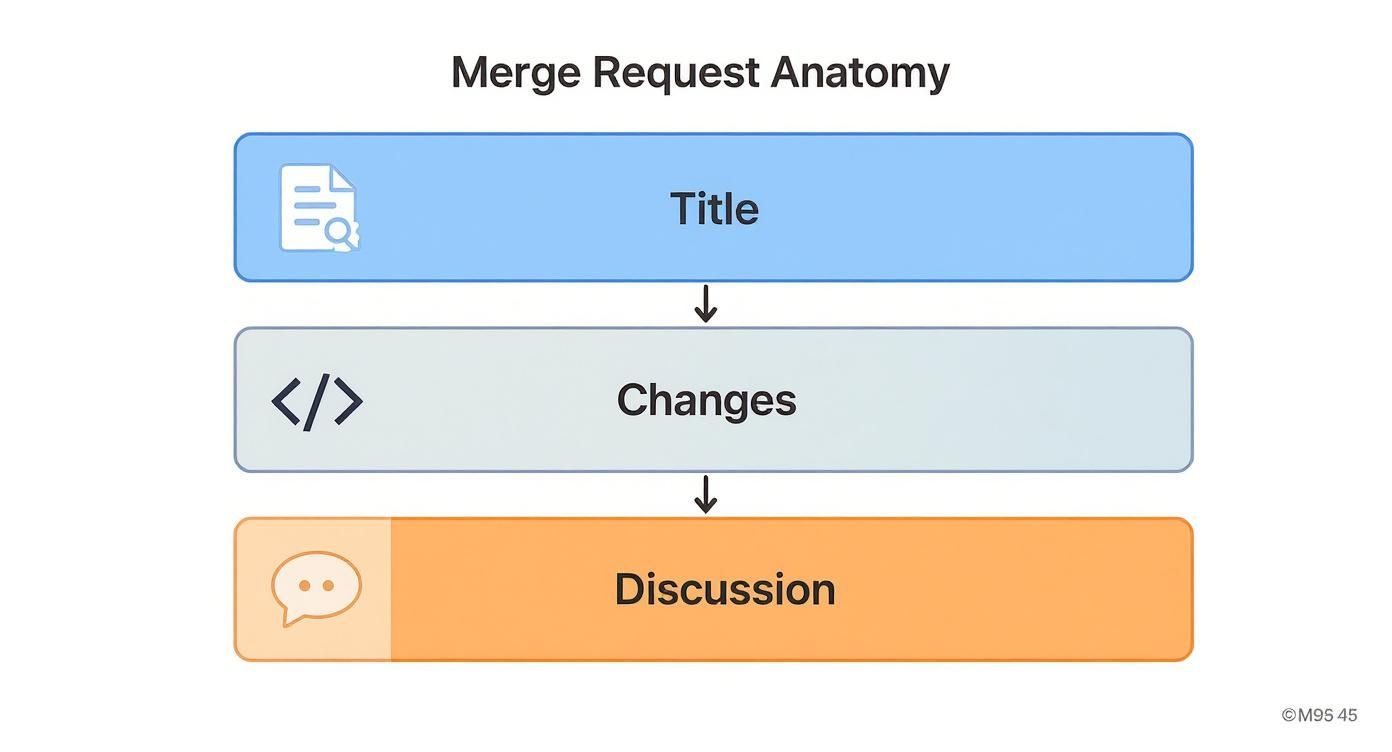
As you can see, it breaks down into three simple parts. A clear title sets the stage, the code changes provide the substance, and the discussion thread is where the magic happens. Let’s walk through the steps that bring this process to life.
Initiating the Merge Request
The journey begins on your local machine, long before you even open a browser tab for GitLab. It all starts with creating a new branch. This simple act isolates your work, so you don’t have to worry about accidentally breaking the main codebase while you're experimenting.
- Create a New Branch: Make sure you're starting from an up-to-date version of the main branch, then create a new, descriptively named branch (e.g.,
feat/add-user-login). - Make Your Code Changes: This is where you do the actual work—write your code, fix that annoying bug, or build out the new feature. Try to keep your commits small and focused, with clear messages that explain what each one does.
- Push Your Branch to GitLab: Once you have a good chunk of work ready for feedback, push your new branch up to the remote repository on GitLab.
When you push a new branch, GitLab is smart enough to show you a prompt with a direct link to create a merge request. It makes the whole transition feel pretty seamless.
Driving the Review and Iteration Cycle
With your merge request officially created, the real collaboration begins. Think of this as a dialogue between you and your reviewer, aimed at making the code as good as it can be.
First things first, you'll fill out the merge request details. Write a clear title and a solid description, hopefully using whatever template your team has in place. Most importantly, you need to assign at least one reviewer to give your code a formal once-over.
Next, your reviewer will head over to the Changes tab. This is where they'll dig in, leaving inline comments with questions, suggestions, or requests for changes. Your job as the author is to jump on that feedback and respond.
A healthy review cycle isn't about finding fault; it's a shared effort to build the best possible solution. Every comment is an opportunity to improve the code and spread knowledge across the team.
Based on the feedback, you'll make more changes to the code on your local machine, commit them, and push them to the same branch. GitLab automatically picks up these new commits and adds them to the merge request, keeping the entire history bundled together. This cycle of review, comment, and code updates goes on until every discussion is resolved and your reviewer is happy.
Finalizing and Merging the Code
Once all the feedback has been addressed and every single discussion thread is marked as resolved, the merge request is on the home stretch. The reviewer will give their formal approval, which is the green light that your code meets the team's quality bar.
Depending on your project's settings, you might need one or even multiple approvals before the "Merge" button lights up. Once all the conditions are met, it's go-time.
*   **Final Approvals:** The designated reviewers give their official thumbs-up.
*   **Execute the Merge:** The assignee (or another team member with the right permissions) clicks that glorious merge button.
*   **Cleanup:** GitLab usually offers to delete the source branch for you right after merging. It's a good practice that helps keep the repository from getting cluttered with old branches.
That final click incorporates all your hard work into the target branch, officially closing out the GitLab merge request workflow and adding your contribution to the project.
Gaining Insights with Merge Request Analytics
A GitLab merge request isn't just a gatekeeper for your code; it's a goldmine of data. When you dig into it, you can uncover some powerful truths about how your team really works. This is about moving beyond hunches and "gut feelings" to make sharp, data-driven decisions that actually lead to continuous improvement.
Think of each merge request as a single data point. Once you start tracking them, patterns begin to emerge. These patterns help you ask smarter questions. Are code reviews dragging on too long? Is one senior dev getting slammed with all the review requests? Is the complexity of new features grinding everything to a halt? Analytics gives you the answers.
Instead of guessing, you can pinpoint the exact sources of friction in your workflow. This turns process improvement from a subjective debate into a strategic, evidence-based conversation.
Key Metrics to Monitor in GitLab
A few key performance indicators (KPIs) inside GitLab can give you a clear picture of your development cycle's health. Focusing on these will tell you a lot about your team's velocity and where the roadblocks are.
*   **Time to Merge:** This is the big one. It measures the total time from the moment an MR is created until it's merged. If this number is consistently high, it could signal anything from overly complex changes to a shortage of available reviewers.
*   **Merge Request Throughput:** This simply tracks how many MRs your team successfully merges over a set period, like a week or a sprint. It’s a straightforward measure of your team’s output.
*   **Review Distribution:** This metric shows you how review tasks are spread across the team. If it's lopsided, you might have a couple of senior developers becoming bottlenecks, which also prevents knowledge from being shared more widely.
By tracking these core metrics, you shift the focus from just getting tasks done to optimizing the entire system. You start to see the development lifecycle as a series of connected stages, each one ripe for improvement.
Turning Data into Actionable Improvements
The real magic happens when you use this data to make positive changes. For instance, GitLab's official documentation shows how teams use these insights to benchmark their performance. The average time to merge is a crucial metric, with some high-performing teams reporting cycle times of less than 24 hours. Watching these numbers helps you spot productivity trends and tackle systemic issues before they slow everyone down.
To see these features in action, check out the details on GitLab's merge request analytics.
Let's say you notice your time-to-merge is spiking. You can dig in and find the root cause. Maybe the solution is to push for smaller, more focused merge requests. Or perhaps it's time to create better description templates to give reviewers the context they need right from the start.
Likewise, tracking throughput helps you get a real handle on your team's capacity. That understanding leads directly to more accurate sprint planning and delivery timelines that you can actually trust.
Supercharging Reviews with CI Pipelines and AI
Manual code reviews are great, but they’re not foolproof. We're all human, and modern development moves way too fast to rely on human eyes alone to catch every tiny bug, performance hiccup, or security vulnerability. This is where you bring in automation as a core member of your team.
By plugging in a Continuous Integration (CI) pipeline, you essentially turn every GitLab merge request into an automated quality gate. The second a developer pushes a new commit, that pipeline roars to life. It can build the code, run a whole suite of tests, and even scan for vulnerabilities—all before a human reviewer even lays eyes on it.
This automated first pass is a game-changer. It catches the simple stuff—typos, formatting errors, broken tests—right away, letting developers fix their own mistakes before ever asking for someone else's time.
Harnessing AI for Smarter Code Quality
Beyond the basics, you can add another layer of smarts with AI-powered code analysis. Think of these tools as an automated senior dev who never sleeps, dropping expert feedback right into the merge request.
Tools like SonarQube can decorate your merge requests with quality reports across more than 30 languages, while Codacy does the same for over 40 languages with inline annotations. Teams that use them see a huge drop in bugs making it to the main branch because issues are caught and squashed early. You can dive deeper into how AI tools improve GitLab merge requests and what they mean for code quality.
This level of automation frees up your human reviewers to focus on what they do best: thinking about the big picture. They can analyze the architecture, challenge the business logic, and debate the overall design instead of getting bogged down by syntax errors.
When automation handles the routine checks, your team can dedicate its brainpower to the complex, creative problems that truly matter. This elevates the quality of both the code and the review process itself.
Automating Notifications and Workflows
The last piece of the puzzle is communication. When a pipeline fails or a review is requested, you need to tell the right people immediately. Otherwise, you just create new bottlenecks.
This is where integrating your workflow with tools like Slack comes in. You can set up automated pings to a specific channel when an MR is ready for review or when a CI build breaks. It keeps everyone in the loop without forcing them to constantly refresh their GitLab dashboard.
We have a complete guide on how to integrate GitLab with Slack that walks you through the setup. And if you'd rather skip the DIY route, PullNotifier now supports GitLab (currently in Beta): each merge request gets a single live-updating Slack message, with approvals and comments arriving as thread replies instead of a flood of separate pings. By combining CI pipelines, AI analysis, and smart notifications, your merge request transforms into a lean, self-regulating quality control hub.
Mastering the Art of Effective Code Reviews
A solid GitLab merge request workflow is more than just slick automations and CI pipelines. At its heart, it’s a human process, built on clear communication and a real spirit of collaboration. The tools are just the stage—the real magic happens in how authors and reviewers work together. Get this right, and code reviews transform from a chore everyone dreads into a powerful way to share knowledge and boost quality.
For the author, the mission is simple: make the reviewer’s job as painless as possible. This all starts with small, focused merge requests. Nobody wants to see a massive "mega-merge" that touches dozens of files; they’re nearly impossible to review well and are notorious for hiding sneaky bugs. Instead, break down big features into smaller, logical pieces. Each merge request should tell a single, clear story.
Best Practices for Merge Request Authors
Your merge request description is your opening pitch. It needs to give the reviewer all the context they need to understand the why behind your code. Never assume they have the same background knowledge you do.
*   **Tell a Compelling Story:** Clearly explain the problem you’re solving and how your changes fix it. Always link back to the original issue or ticket.
*   **Keep It Small and Focused:** A merge request should do one thing and do it well. A change with **50-100 lines of code** is a breeze to review compared to one with a thousand.
*   **Provide Clear Testing Instructions:** Tell the reviewer exactly how to test your changes. This one small step cuts down on the back-and-forth and gets your MR approved so much faster.
The golden rule for an author is empathy. If you make your merge request easy to understand and review, you’ll get faster, higher-quality feedback in return.
Best Practices for Code Reviewers
As a reviewer, your job is to be a constructive partner, not a gatekeeper. Your feedback should be about improving the code and helping the author grow. The tone you use is every bit as important as the technical points you make.
Timely feedback is also huge. A merge request that sits gathering dust for days creates a major bottleneck and throws the author's workflow completely off track. Responding quickly shows you respect your teammate's time and keeps the development cycle humming. To really nail your process and make sure nothing slips through, think about adding an Ultimate Code Review Checklist to your team's toolkit.
Here’s how to give feedback that actually helps:
- Be Constructive, Not Critical: Frame your suggestions as questions or ideas. Instead of saying, "This is wrong," try something like, "Have you considered this alternative? It might handle X edge case better."
- Explain Your Reasoning: Don’t just say, "Change this." Explain why it needs changing, maybe by referencing a best practice, a potential risk, or a team convention.
- Approve with Confidence: Once the code meets the standards, approve it. Don't drag out the review with minor stylistic tweaks that don't actually affect how it works.
For teams looking to get everyone on the same page, a consistent framework can be a game-changer. You can learn more about building a solid process with a comprehensive code review checklist designed just for dev teams. By leaning into these practices, teams can turn the GitLab merge request into a cornerstone of a healthy, collaborative culture.
Even when you've got the hang of the workflow, some questions always seem to pop up. Let's tackle a few of the most common ones developers have about GitLab merge requests to clear things up and tighten up your process.
So, What’s the Real Difference Between a Merge Request and a Pull Request?
Honestly? Not much. Functionally, a merge request (MR) and a pull request (PR) do the exact same job. Both are proposals to merge your code changes from one branch into another, acting as the main stage for code review, discussions, and automated checks.
The only difference is the name. GitLab calls it a "merge request," while platforms like GitHub and Bitbucket call it a "pull request." The core idea of collaborative code merging is identical across the board.
How Do You Deal With Merge Conflicts in GitLab?
It happens to everyone. You’re ready to merge, but your source branch has changes that clash with the target branch. When this occurs, GitLab blocks the merge and flags the conflict right in the MR interface. You have a couple of ways to sort it out.
The most reliable approach is fixing it on your local machine. You'll pull the latest changes from the target branch into your feature branch, resolve the conflicts in your favorite code editor, and then push the fixed version back up. For simpler conflicts, GitLab also offers a web-based editor that lets you resolve issues directly in the browser, which can be a real time-saver.
A merge conflict isn't a bug or a failure—it's just a normal part of working on a team. Getting good at resolving them quickly is a key skill for keeping your main branch clean and healthy.
What's the Point of a Draft or WIP Merge Request?
A "Draft" merge request—which used to be called "Work in Progress" or "WIP"—is your way of saying, "Hey, this isn't finished, but I'd love to get some early eyes on it." It's an awesome tool for collaborating on tricky features without the pressure of a formal review.
When you mark an MR as a draft, it does two important things:
*   It clearly signals its "still-baking" status to your team.
*   It **disables the merge button**, which is a great safety net to prevent it from being merged by accident before it's truly ready.
This lets you open up a conversation, share your approach, and get feedback from teammates while the code is still taking shape—long before it’s polished for final approval.
Tired of chasing down code reviews and drowning in notification spam? PullNotifier now supports GitLab (Beta), delivering quiet, real-time merge request updates to Slack — one live-updating message per MR, multi-channel routing, and daily digests — so you can cut review delays and keep your team focused. See how it works.