- Published on
A Developer’s Guide to GitHub Stacked PRs
- Authors

- Name
- Gabriel
- @gabriel__xyz
If you’ve ever stared down a 2,000-line pull request, you know the feeling. The entire team grinds to a halt, paralyzed by a mountain of code that’s impossible to review effectively. This is the monolithic PR bottleneck, and it’s a massive drag on velocity.
The fix? GitHub stacked PRs. This workflow breaks down huge features into a series of smaller, dependent pull requests that build on each other. It’s a simple shift in process that makes code reviews faster, clearer, and far less intimidating.
Escape the Monolithic PR Bottleneck
Let's say you're building a new user authentication system. The old way would be to create a single feature branch, pile on dozens of commits over a few weeks, and then drop a monster PR on your team.
What happens next is predictable. Your reviewer is overwhelmed. Feedback cycles stretch into days, merge conflicts start piling up, and the whole feature stalls out. This isn't just inefficient; it's a recipe for burnout and buggy code.
This old-school approach puts a huge cognitive load on reviewers and blocks other developers from building on your work until the entire thing is finally merged.
Shifting to an Iterative Workflow
Stacked PRs flip the script. Instead of one massive change, you create a chain of small, interconnected PRs. Each one is a logical, self-contained unit of work that's easy to digest.
For that authentication system, a stacked approach might look like this:
*   **PR #1:** `feat/auth-add-user-model` (Adds the database schema)
*   **PR #2:** `feat/auth-api-endpoints` (Builds on PR #1 to add API routes)
*   **PR #3:** `feat/auth-ui-login-form` (Builds on PR #2 to create the front-end)
This structure lets reviewers tackle the feature one piece at a time, starting with the foundation and working their way up. What was once a daunting review becomes a series of quick, manageable check-ins.
This isn't just a theoretical improvement; it's a measurable workflow pattern that boosts team velocity. Stacked pull requests have become a key strategy in large GitHub projects for improving merge throughput.
The data from GitHub's official blog backs this up. A 2025 analysis showed that PR creations jumped by 20.4% year-over-year, while monthly merged PRs hit 43.2 million. This growth is fueled by teams breaking large changes into smaller, dependent PRs to keep the momentum going. Adopting github stacked prs is a practical way to build a more efficient and collaborative development cycle.
Before we dive into the "how-to," let's quickly compare the two workflows side-by-side.
Single Monolithic PR vs. GitHub Stacked PRs
| Aspect | Monolithic PR | Stacked PRs |
|---|---|---|
| Review Size | Large and intimidating (1000s of lines) | Small and focused (100s of lines) |
| Cognitive Load | Very high for reviewers | Low and manageable per PR |
| Review Velocity | Slow; can take days or weeks | Fast; reviews often happen in hours |
| Merge Conflicts | Frequent and difficult to resolve | Infrequent and easier to manage |
| Feedback Loop | Long and delayed | Short and iterative |
| Blocking Impact | High; blocks other dependent work | Low; unblocks work as each PR merges |
| CI/CD | Long build times, late failure detection | Quick builds, early failure detection |
As you can see, the benefits of stacking PRs are clear. It transforms the review process from a major bottleneck into a smooth, continuous flow, which is exactly what modern development teams need to stay competitive.
Your First GitHub Stacked PRs Workflow
Switching from giant, monolithic PRs to a stacked workflow is less about learning a complex new system and more about shifting your branching strategy. It's actually pretty simple. The whole idea is to create a chain of branches, where each new branch builds on the last one, instead of branching everything off main.
Let’s walk through a real-world example. Imagine you’re building a new user profile feature. The old way would be to lump everything into one massive feature/user-profile branch. We're not going to do that. Instead, we'll break it down into logical, bite-sized chunks.
First, you need a base branch for the whole feature. Think of this as the foundation of your stack. It's the branch that will ultimately be merged into main once everything is done.
Start by syncing up with main and creating your base branch:
git checkout main git pull origin main git checkout -b feat/user-profile-base
With that foundation in place, you're ready to tackle the first piece of the puzzle. Let's say you start with the API layer. You'll create a new branch, but this time, you branch from your new feat/user-profile-base branch.
git checkout feat/user-profile-base git checkout -b feat/user-profile-part1-api
Do your work, make your commits for the API setup, and then push the branch. Now, head over to GitHub and open a pull request. This next step is critical: make sure you set the base branch for this PR to feat/user-profile-base, not main. This is how you tell GitHub you're starting a chain.
Building Out the Stack
Here's the best part: with that first PR up for review, you don't have to stop and wait. You can immediately get started on the next logical piece—maybe the data models. To do this, you simply branch off your previous branch, feat/user-profile-part1-api.
git checkout feat/user-profile-part1-api git checkout -b feat/user-profile-part2-models
Once you've finished the data model changes, push this new branch and open a second pull request. This time, its base will be feat/user-profile-part1-api. And just like that, you've created a stack of two PRs. The dependency is crystal clear: the models (Part 2) rely on the API setup (Part 1).
This approach completely changes the code review dynamic. Instead of one intimidating, wall-of-text PR, your reviewers get to look at small, logical units of work. The result? Faster, more focused feedback.
The flowchart below shows this difference in action. It contrasts the traditional monolithic PR with the much more efficient stacked PR workflow, breaking one massive review into a series of smaller, manageable steps.
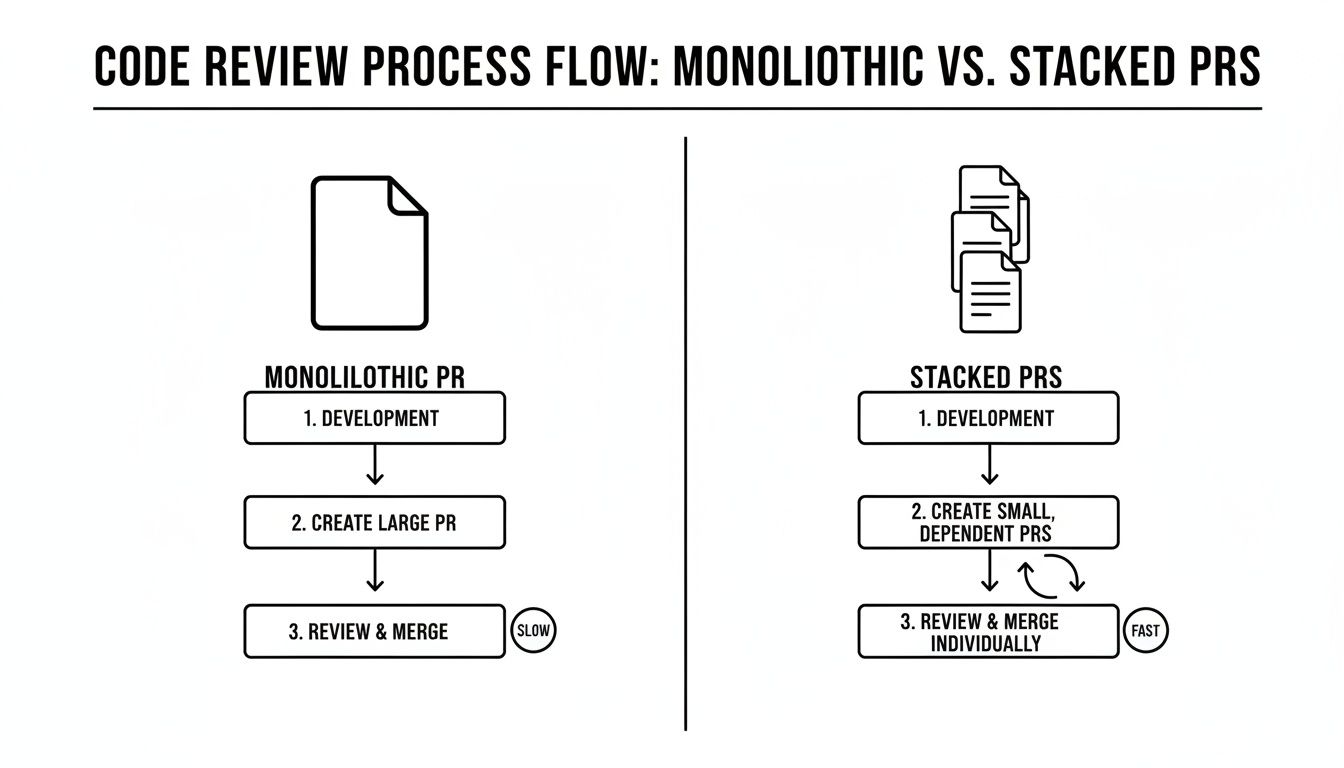
This visual really drives home the main benefit of stacked PRs: you're dramatically reducing the cognitive load on reviewers and, in turn, speeding up the entire development cycle.
Naming Conventions and Clarity
As your stacks get bigger, having a clear and consistent naming convention becomes your best friend. A good pattern helps everyone—including you—understand the dependency chain at a single glance.
Here are a few tips that have worked well for my teams:
*   **Use a common prefix:** Start every branch in the stack with the same identifier, like `feat/user-profile-`. This visually groups them together.
*   **Number the parts:** Add a sequence number like `part1`, `part2`, etc., to make the order obvious.
*   **Be descriptive:** Add a short, descriptive keyword like `api`, `models`, or `ui` to explain what that part does.
Following a structured approach like this makes your workflow predictable and easy to follow. If you want to dive deeper into crafting effective PRs, our guide on mastering the pull request GitHub workflow is a great next read.
By using this pattern, you’ve just created your first stack of github stacked prs. Each PR is small, focused, and builds on the last—making the entire feature easier to build, easier to review, and ultimately, easier to merge.
Keeping Your Stack in Sync with Rebasing
Creating a stack of PRs is the easy part. The real trick is keeping it healthy and up-to-date as feedback rolls in and the main branch marches forward. This is where mastering git rebase becomes absolutely essential.
Imagine this common scenario: a reviewer asks for a change on the very first PR in your stack. That small tweak now needs to ripple through every single dependent branch. If you were using a merge-based workflow, you’d end up with a tangled, confusing history. Rebasing, on the other hand, lets you maintain a clean, linear, and logical commit history.
Think of interactive rebase (git rebase -i) as your surgical tool for managing github stacked prs. It allows you to rewrite history in a controlled way, making sure each PR in the stack contains only its relevant changes.
Propagating a Change Up the Stack
Let’s go back to our user profile feature, which has three stacked branches:
*   `part1-api` (based on `main`)
*   `part2-models` (based on `part1-api`)
*   `part3-ui` (based on `part2-models`)
A reviewer spots something that needs changing in part1-api. If you ignore it and keep building on top, you're just baking technical debt into your stack. The right move is to fix it immediately and propagate that update through the dependent branches.
First, hop onto the branch where the change is needed, make your edits, and either add a new commit or—for a cleaner history—amend the existing one.
git checkout feat/user-profile-part1-api # ...make your code changes... git add . git commit --amend --no-edit git push --force-with-lease
With the base of your stack updated, you now need to rebase the next branch, part2-models, onto this new version of part1-api. This effectively "re-stacks" it on top of the corrected foundation.
git checkout feat/user-profile-part2-models git rebase feat/user-profile-part1-api git push --force-with-lease
You just repeat this process for every subsequent branch. Check out part3-ui, rebase it onto the freshly updated part2-models, and force-push. This systematic, branch-by-branch rebase ensures the change is applied cleanly everywhere it needs to be.
Syncing Your Stack with the Main Branch
Of course, your main branch is a moving target, with teammates constantly merging in their own work. To sidestep painful merge conflicts down the line, it’s a good habit to regularly sync your entire stack with the latest changes from main.
The process always starts at the bottom of your stack. You’ll rebase your first branch (part1-api in our case) directly onto the latest main.
git checkout feat/user-profile-part1-api git pull --rebase origin main
Once your base branch is in sync, you follow the same ripple effect as before. Check out part2-models and rebase it onto part1-api, then do the same for part3-ui onto part2-models. Any conflicts that pop up are usually much easier to handle one small branch at a time. If you do get stuck, our practical guide on how to resolve conflicts in Git can walk you through it.
While this manual rebasing process is powerful, it highlights a key tradeoff. Stacked PRs can significantly boost merge velocity, but they introduce maintenance overhead. Manual synchronization can become a daily chore, a challenge frequently discussed in engineering blogs. Learn more about these practical tradeoffs from Git-Tower.
This is exactly why automation tools, which we’ll cover later, have become so popular. They handle the repetitive rebasing and pushing so you can focus on writing code. But understanding the manual mechanics is fundamental—it’s how you’ll troubleshoot any issues that arise and truly master the github stacked prs workflow.
Reviewing and Merging Your Stacked PRs Efficiently
An effective stacked PRs workflow demands a fresh take on code reviews. For authors, the job isn’t done when the code is pushed; you have to be a great communicator. For reviewers, the focus shifts from one massive change to a logical sequence of smaller, digestible steps. It’s this shared responsibility that makes the whole thing click.
The golden rule for reviewers is simple: review the stack from the bottom up. Each pull request is built on the one before it. Starting at the top is like reading the last chapter of a book first—you'll be completely lost. Kick things off with the foundational PR, the one targeting your main branch, and work your way up.
This bottom-up approach helps you follow the developer's logic and spot architectural problems before they snowball. A small suggestion on the first PR can save a ton of rework on the three that depend on it. This saves everyone a headache and keeps the feature moving in the right direction.
Creating a Predictable Merge Train
Once the bottom PR of the stack gets the green light, merge it. This kicks off a "merge train," where each subsequent PR is merged right after its base has been updated. This simple pattern keeps your main branch history clean and linear, avoiding the chaos that comes from merging dependent branches out of order.
Here’s how it usually plays out:
- Merge the Base PR: The first PR in the stack (
part1targetingmain) is approved and merged. - Update the Next PR's Base: The author of the second PR (
part2) now needs to change its base branch frompart1tomain. This is easy to do right in the GitHub UI. - Review and Merge: Now that its base is updated,
part2only contains its own unique changes. It’s ready for a final once-over and merge. - Repeat: Keep this rhythm going all the way up the stack until the entire feature is merged.
This methodical process is the backbone of a successful github stacked prs workflow. It guarantees that what lands in main is always a complete, tested piece of the puzzle, not some fragmented change that relies on code that hasn't even been merged yet.
Enhancing Communication and Visibility
Without clear communication, a stacked PR workflow can quickly become a tangled mess. Authors really need to take the lead here and make the dependencies crystal clear.
Make good use of GitHub's linking features. In the description of every pull request, drop in links to the PRs it depends on and any PRs that depend on it. This creates a neat, clickable map of the entire stack, which helps reviewers navigate the changes without having to play detective.
A well-documented stack essentially becomes a self-contained design document. By linking PRs and writing clear descriptions for each part, you give reviewers all the context they need to give high-quality feedback without wasting time.
Also, when you're leaving comments, think about the whole stack. A comment on part2 might have implications for part3. Frame your feedback with that bigger picture in mind. For example, "This change looks good, but how will it affect the UI implementation in the next PR?" This kind of holistic view transforms code review from a simple check into a collaborative, forward-thinking discussion.
Tools and Automation for Stacked PRs
While a manual git rebase is the bedrock of managing github stacked prs, doing it over and over for a big stack can feel like a real chore. This is where specialized tooling comes in, turning a series of complex commands into a single, automated action. These tools don't replace Git; they just build a powerful layer on top of it, designed specifically to handle the repetitive parts of stacking.
Adopting automation is the secret to scaling this workflow across a team. It lowers the learning curve and gets rid of the tedious manual work of keeping all your branches in sync. This means developers can spend less time fighting with Git and more time actually writing code.
Command-Line Power Tools for Stacks
Several command-line interface (CLI) tools have popped up to make the stacked PR workflow much smoother, each with its own philosophy and command set. They take care of the heavy lifting—rebasing, pushing, and updating pull requests on GitHub.
Here are a few popular ones:
*   **Graphite (`gt`):** A comprehensive tool that offers a slick CLI experience for creating, submitting, and updating stacks. It keeps a local metadata log to track dependencies, which makes commands like `gt sync` and `gt submit` incredibly powerful for keeping your entire stack synced with `main` and up-to-date on GitHub.
*   **gh-stack:** This is a simpler, more focused utility that plays nicely with the official GitHub CLI (`gh`). It automates the process of rebasing and submitting stacks of commits, turning each commit into its own dependent PR. It’s a great choice if your team wants a lightweight solution without too many bells and whistles.
*   **spr (Stacked PRs for GitHub):** Another solid option that helps automate submitting and updating stacked pull requests. It works by managing the rebase and push cycles for you, making sure that dependencies are correctly maintained on GitHub with minimal fuss.
The core value of these tools is consistency. They enforce a predictable workflow, which means anyone on the team can pick up a stack and understand its structure without having to manually trace branch dependencies.
For a broader look at how different tools can improve development processes, exploring the best workflow automation tools can offer some valuable context.
Integrating Automation into Your Workflow
Choosing a tool usually comes down to your team’s preference for simplicity versus a rich feature set. Graphite, for example, gives you a more managed, all-in-one system, whereas gh-stack feels more like a direct power-up for your existing Git and GitHub CLI commands.
Whichever tool you land on, integrating it with other forms of automation can make your workflow even better. For example, you can create CI checks that actually understand the context of a stacked PR. If you want to dive into more advanced automation, you might be interested in learning how to create reusable GitHub Actions, which can help you build robust, stack-aware CI pipelines.
Ultimately, the goal is to make working with github stacked prs as frictionless as possible. By offloading the repetitive rebase-and-push dance to a dedicated tool, your team can fully embrace the benefits of this powerful workflow without getting bogged down in the manual mechanics.
Frequently Asked Questions About Stacked PRs
Whenever a team starts experimenting with stacked PRs on GitHub, a few practical questions almost always pop up. It's a big shift from the classic single-PR model, so it's natural to have some "what if" scenarios running through your head. Let's tackle the most common ones.
One of the first hurdles is usually Continuous Integration (CI). How in the world do you run tests on a pull request when it depends on code that isn't even in main yet?
The trick is to configure your CI pipeline to test the entire stack as one cohesive unit. For any given PR in the stack, the CI job should check out its base branch first, then merge the current PR's changes on top before running the tests. This setup ensures you’re always validating a change in its full, intended context.
What If a PR in the Middle of the Stack Is Rejected?
This scenario sounds messy, but it's completely manageable. Let's say a PR in the middle of your stack (part2, for instance) has a fundamental flaw and needs to be thrown out. You can't just delete the branch, because the PRs above it (part3, part4) depend on that code.
The solution is to perform a bit of Git surgery with git rebase. You'll need to remove the commits from the rejected branch and then re-stack the subsequent branches onto the correct new base.
- First, rebase
part3directly ontopart1. - Next, rebase
part4onto the newly adjustedpart3. - You'll keep doing this down the line until the whole chain is repaired.
It can feel a bit complex, which is exactly why automation tools like Graphite are so popular. They handle all this re-parenting logic for you with a single command.
How Big Should Each PR in a Stack Be?
There's no magic number here, but a solid rule of thumb is to keep each PR focused on a single, logical unit of work. Ideally, a PR should be small enough for a reviewer to get through it thoroughly in under 30 minutes.
Think of each PR as a single chapter in a story. It should make sense on its own but also clearly contribute to the larger narrative of the feature. If a PR tries to tell too much of the story at once, it’s a sign it needs to be broken down.
This approach doesn't just make reviews faster; it also makes debugging a whole lot easier. If a bug slips through, you can trace it back to a small, isolated set of changes, making rollbacks or fixes much cleaner.
Tired of chasing down PR reviews and drowning in notification spam? PullNotifier integrates directly with Slack to give you clean, real-time updates on your pull requests, cutting through the noise so you can focus. See how it can accelerate your team's review cycle at https://pullnotifier.com.