- Published on
A Guide to Automated Code Reviews
- Authors

- Name
- Gabriel
- @gabriel__xyz
Automated code reviews are all about using smart tools to scan your source code for problems automatically. Think of it as a tireless assistant for your dev team. This process flags things like syntax errors, security holes, and style violations before a human ever has to look at the code, saving everyone time and keeping the codebase consistent.
Moving Beyond Manual Code Reviews
Picture a world-class chef inspecting every single grain of rice by hand before cooking. That's what traditional, manual code review feels like. It’s careful and deliberate, sure, but it's also incredibly slow and prone to human error. A tired reviewer might miss a tiny but critical bug, just like different chefs might argue over the right way to slice an onion.
While manual reviews are still great for digging into complex business logic, relying on them alone creates major bottlenecks in modern software development. Teams get bogged down, and the entire delivery pipeline grinds to a halt.
The Pitfalls of Manual Inspections
Manual code reviews are full of friction that can stall even the sharpest teams. The process is usually full of headaches:
- Developer Time Sinks: Your most senior engineers, who should be solving tough architectural puzzles, end up spending hours pointing out minor syntax mistakes or style slip-ups.
- Context Switching: Developers get stuck waiting for feedback, forcing them to jump to other tasks. A GitLab survey found that after long hours, delays in code review are the third biggest cause of developer burnout.
- Subjective Debates: Arguments over trivial style preferences, like tabs versus spaces, can completely derail a review. Time gets wasted on low-impact squabbles instead of focusing on what really matters: the code's logic and function.
These problems make it clear that just having humans eyeball everything isn’t a scalable solution anymore. The goal isn’t to get rid of human expertise, but to supercharge it with a system that handles the boring, repetitive stuff without ever getting tired.
An automated review system is like a high-tech kitchen assistant. It instantly checks that every ingredient meets a set of quality standards, flagging anything that's off long before the master chef even starts thinking about the recipe.
This is where automated code reviews completely change the game. By adding a tireless, objective assistant to the workflow, the preliminary checks are handled with perfect consistency, every single time. It acts as the first line of defense, catching common mistakes, enforcing coding standards, and running security scans on autopilot.
This frees up your senior developers from the drudgery of hunting for missing semicolons. Now, they can focus their brainpower on what humans do best: evaluating core logic, assessing architectural health, and mentoring junior engineers. Automated code reviews don't replace human insight; they upgrade it, helping teams build better software, faster.
The Real Benefits of Automating Your Code Review

Let's be honest, manual code reviews can be a drag. While essential, they often bog down senior developers with repetitive, tedious checks. Adopting automated code reviews isn't just about adding another tool to the stack; it’s about giving your team leverage. It’s a force multiplier that turns technical improvements into real, measurable business wins.
For developers, the immediate payoff is huge. Instead of manually scanning for style violations, syntax errors, or other low-hanging fruit, they can let the machine handle the first pass. This frees up their mental energy to tackle what actually matters: complex logic, architectural soundness, and mentoring junior engineers. It sets a consistent quality bar for the entire codebase, ending subjective debates over formatting and style.
Think of automated code review tools as your tireless gatekeepers. They enforce consistency, catch preventable bugs, and secure your code 24/7, allowing your human experts to focus on the problems that truly require their ingenuity.
This automated consistency creates a ripple effect, making the whole development process more stable and predictable. Catching a bug or a security flaw early is exponentially cheaper and faster than fixing it once it's already in production.
Translating Technical Wins into Business Value
The perks don't stop with the engineering team. When code quality goes up and fewer bugs make it to production, the entire business benefits. A more reliable product leads directly to happier customers and better retention rates.
Development cycles also get faster and more predictable. This allows the company to ship new features and respond to market demands with more agility. For instance, recent industry reports show a clear link between AI-powered reviews and better outcomes. A leading e-commerce platform, for example, reduced its bug rate by 40% after integrating these tools into its pipeline. That didn't just boost stability; it also accelerated their time-to-market. You can dig into more of these code review automation trends on meegle.com.
Ultimately, these engineering efficiencies translate into significant cost savings and a stronger competitive edge.
To put it all together, here’s a clear breakdown of how automated code reviews impact both sides of the house—engineering and business.
Benefits of Automated Code Reviews for Business and Engineering
| Area of Impact | Benefit for Engineering Teams | Benefit for the Business |
|---|---|---|
| Code Quality | Enforces consistent standards and catches bugs early, reducing technical debt. | Results in a more stable, reliable product with fewer customer-facing issues. |
| Velocity | Speeds up the review cycle by automating repetitive checks and providing instant feedback. | Accelerates time-to-market for new features, creating a competitive advantage. |
| Security | Automatically scans for common vulnerabilities before code is merged. | Reduces the risk of costly security breaches and protects brand reputation. |
| Cost | Frees up senior developer time from tedious reviews to focus on high-value tasks. | Lowers overall development and maintenance costs, improving operational efficiency. |
As you can see, the value isn't isolated. What starts as a simple efficiency gain for developers—like faster feedback loops and less manual work—quickly becomes a strategic advantage for the entire company.
How Automation Fits into Modern CI/CD Workflows
In any modern CI/CD (Continuous Integration/Continuous Deployment) pipeline, the name of the game is speed and reliability. Automated code reviews aren't just a "nice-to-have" tacked on at the end; they're a critical gatekeeper that keeps quality high without killing your team's momentum. The real magic kicks in the second a developer is ready to merge their work.
The moment a developer pushes new code and opens a pull request, the CI/CD pipeline springs to life. This is precisely when automated review tools get triggered. They don’t sit around waiting for a human to give them the green light. They start their analysis instantly, running checks in parallel with other essential jobs like building the app or running unit tests.
This infographic gives you a simplified look at this automated feedback loop in action.
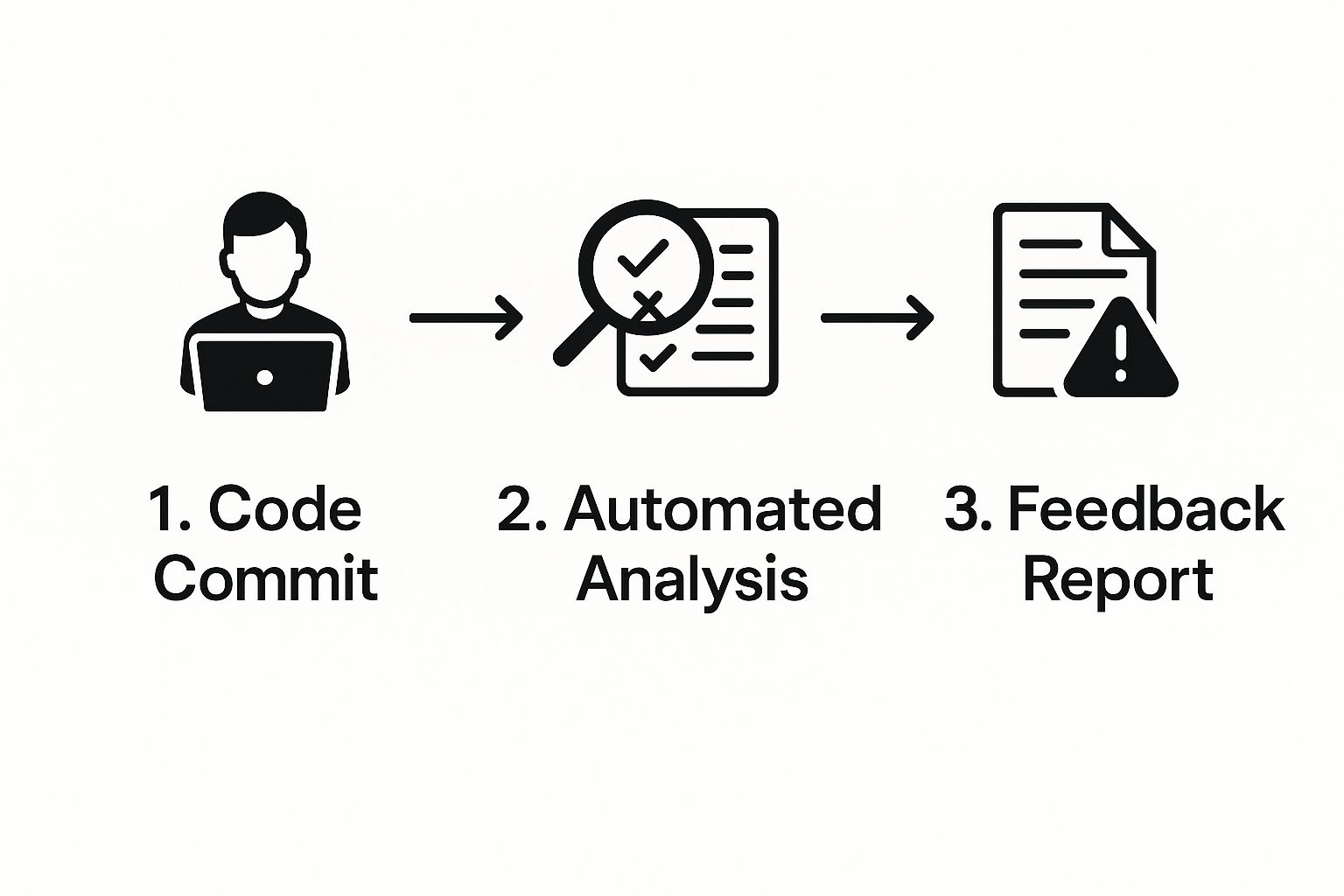
As you can see, the process flows smoothly from the initial code commit to the automated analysis, and right back to the developer with an immediate report.
What Happens During the Automated Scan
Once triggered, the tool kicks off a multifaceted analysis of the new code. Think of it like a specialized pit crew instantly swarming the pull request, with each member looking for a different type of issue.
Here are a few of the common checks they run:
- Static Analysis: The tool scans for potential bugs, "code smells," and anti-patterns that could cause headaches down the road.
- Style and Formatting: It makes sure the code sticks to the team's established style guide, keeping everything from indentation to naming conventions consistent.
- Security Scanning: It proactively hunts for common security vulnerabilities—like SQL injection or cross-site scripting—before they ever get a chance to be merged.
- Complexity Analysis: The system flags functions or classes that are way too complex and will be a nightmare to maintain, pushing for simpler, more modular code.
The Immediate Feedback Loop
Maybe the most powerful part of this whole workflow is how the feedback gets back to the developer. Instead of a buried email or a generic notification, the results pop up directly inside the pull request as comments, status checks, or a clean, consolidated report.
The core value of integrating automated reviews into CI/CD is the creation of a tight, real-time feedback loop. It empowers developers to see and fix issues immediately, while the context is still fresh in their minds.
This immediacy cuts out the frustrating context-switching that always plagues manual review cycles. A developer can see a problem, push a quick fix, and watch the automated check pass—all within minutes.
This approach keeps the development train moving. You can learn more about building these tight feedback loops by exploring how to set up code quality checks with GitHub Actions and Slack. It’s all about minimizing delays and keeping the team focused on shipping great code.
Choosing the Right Automated Code Review Tool
Picking the right automated code review tool can feel a bit like navigating a crowded marketplace. There are tons of options, but the best one always boils down to your team's unique needs, tech stack, and workflow. Get it wrong, and you're stuck with noisy notifications and frustrated developers. Get it right, and you'll see a real boost in productivity and code quality.
The market for these tools is growing fast, especially with the rise of AI. In fact, the global market for AI-assisted automated code review is expected to grow at a compound annual growth rate of 25% through 2030. This isn't just about tools that check for syntax anymore; modern tools can summarize pull requests, suggest refactors, and even spot complex security flaws before they ever hit production.
To make sense of it all, it helps to think of these tools in three main buckets. Each one plays a distinct role in the development lifecycle.
Understanding the Main Tool Categories
Not all automated code review tools do the same thing. Some are specialists, laser-focused on a single task, while others are more like a general-purpose toolkit.
- Static Analysis Tools (Linters & Formatters): Think of these as the foundational tools for enforcing coding standards. They check for style guide violations, code smells, and basic syntax errors, making sure your codebase stays consistent and readable for everyone.
- Security Scanners (SAST): Static Application Security Testing (SAST) tools are your first line of defense. They specialize in scanning your source code for known security vulnerabilities—things like SQL injection or cross-site scripting—before they can be merged.
- AI-Powered Reviewers: This is the newest and fastest-growing category. These tools bring artificial intelligence into the mix to provide deep, contextual feedback. They can summarize complicated changes, detect logical flaws, suggest performance improvements, and even predict potential bugs.
Here's a quick rundown to help you see where each type of tool really shines.
Types of Automated Code Review Tools
This table breaks down the different tool categories to help you figure out which solution—or combination of solutions—is the right fit for your team's goals.
| Tool Category | Primary Function | Best For | Example Tools |
|---|---|---|---|
| Static Analysis | Enforcing code style and standards | Maintaining a clean and consistent codebase across the team. | ESLint, Prettier, RuboCop |
| Security Scanners | Detecting security vulnerabilities | Teams working on applications where security is a top priority. | Snyk, Checkmarx, Veracode |
| AI-Powered Reviewers | Providing deep, contextual feedback | Accelerating review cycles and catching complex logical issues. | GitHub Copilot, CodeRabbit, MutableAI |
In the end, many of the most effective teams layer these tools. You might use a linter for style, a SAST tool for security, and an AI reviewer to provide intelligent feedback on logic and architecture. This approach creates a robust, multi-layered defense against bad code.
For a deeper dive into specific options, check out our guide on the 12 best code review automation tools.
Best Practices for Implementing Automated Reviews
Rolling out automated code reviews isn't like flipping a switch. It’s a process, one that’s built on earning trust and proving its worth. The secret is to start small. Nobody wants to see hundreds of new linter rules dropped on their head overnight.
Instead, pick a handful of high-impact checks that solve real, everyday problems. Think consistent code formatting or catching those pesky null pointer exceptions. This approach avoids the dreaded "alert fatigue" and gives developers a quick win, showing them the tool is an ally, not a critic. Once they see it making their lives easier, you can start layering in more rules.
Align Rules with Team Standards
Your automated review tool should feel like an extension of your team's existing culture. It needs to enforce the coding standards you’ve all agreed on, not some rigid, foreign rulebook. Configure it to match the style guides and best practices your engineers already know and use.
This keeps the feedback relevant and reinforces the quality bar you’ve set together. A great way to lock this in is to treat your configuration as code. Store your linter or static analysis settings in a version-controlled file (like .eslintrc.json or rubocop.yml). This gives you a few key advantages:
- Consistency: Every developer and CI run uses the exact same rule set. No exceptions.
- Traceability: Changes to your standards are logged and reviewed right inside a pull request.
- Scalability: New projects can instantly adopt the official company configuration.
Shift Feedback as Early as Possible
The best time to catch a mistake is the second it's made. That’s why integrating automated checks directly into a developer's IDE is so powerful. With the right plugins, your editor can run linters and scanners in real-time, flagging issues with a familiar red squiggly line as the code is being written.
The most effective automated code reviews catch issues before a pull request even exists. By providing feedback directly in the IDE, you empower developers to fix problems instantly, keeping the formal review process focused on logic and architecture.
This "shift-left" approach turns the tool from a gatekeeper into a helpful coding partner. When the bot handles all the objective, nitpicky stuff, your human reviewers are free to focus their brainpower where it truly counts: on the architecture, the business logic, and the overall design. To make sure you're covering all your bases, a good code review checklist can help balance what's automated and what needs a human touch. That's the sweet spot where you'll see the biggest jump in both speed and quality.
The Future of Code Reviews with AI
Automated code reviews are getting a massive upgrade, and it’s all thanks to AI. We're moving way beyond the old-school, rule-based static analysis tools. The new wave is all about AI models that actually understand code in context.
Think about it this way: old tools were like a spell checker, only good for catching obvious syntax mistakes. The new AI-powered tools are more like a seasoned editor. They can summarize a complex pull request in plain English, spot potential bugs before they ever get merged, and even suggest smart refactors to keep your codebase healthy for the long haul.
The Rise of the AI Co-Pilot
AI isn't some far-off concept in development anymore; it's here, and it's being used everywhere. Fresh surveys from early 2025 show that around 82% of developers are using AI coding tools at least once a week. What's more, 59% are juggling three or more of these tools at the same time.
These tools are digging deep into our work, too, touching at least a quarter of the codebase in 65% of projects. This isn't just a trend—it's a fundamental shift in how we build software. As these tools get smarter, skills like leveraging AI with prompt engineering are becoming essential for getting the most out of them.
The future isn't about AI replacing developers. It's about AI augmenting them, handling the tedious, analytical heavy lifting so human creativity can be applied to architectural decisions, user experience, and strategic problem-solving.
This is the new partnership model. AI acts as a tireless assistant, crunching through the routine analysis and freeing up developers to focus on what humans do best: thinking about the big picture.
The result? A smarter, more collaborative way to build software that’s not only higher quality but also gets shipped faster than ever before. This future isn't just about writing better code—it's about creating a better, more focused experience for developers.
Got Questions About Automated Code Reviews?
If you're thinking about automating code reviews, you probably have a few questions. Let's tackle some of the most common ones that pop up when teams are getting started.
Does Automation Replace Human Reviewers?
Not a chance. Think of automated code reviews as a tireless assistant for your team, not a replacement for human expertise. Automation is brilliant at catching the objective, repetitive stuff—think style violations, obvious security vulnerabilities, and code complexity metrics. These are the tasks that can really bog down a senior developer.
This actually frees up your human reviewers to focus on the things they're best at: the nuance of architectural decisions, the soundness of the business logic, and the overall design. The sweet spot is a workflow that combines the consistency of a machine with the contextual, big-picture thinking of an experienced engineer.
How Should We Handle False Positives?
False positives are just part of the game with any automated tool. The trick is to treat your configuration like a living document, not a set-it-and-forget-it file. When a tool flags something that isn't actually an issue, don't just hit "ignore." Use it as an opportunity to refine the rule.
Most modern tools let you tweak or even disable specific checks for a project or, in some cases, right down to a single line of code. When you build a culture where developers feel empowered to tune the ruleset, the feedback stays sharp and valuable instead of just becoming noise.
The goal is to create a high signal-to-noise ratio. Regularly tuning your automated review configuration ensures that every alert is meaningful and actionable, preventing alert fatigue and building trust in the system.
Over time, this iterative approach makes the tool smarter and more in tune with how your team actually works.
What Is the Best Way to Get Started?
Start small. Seriously. Don't try to boil the ocean by turning on every single rule at once. You'll just overwhelm your team. Instead, be strategic and begin with a handful of high-impact checks that nobody will argue with.
Good starting points usually include:
- Code Formatters: Get everyone on the same page with a single, consistent style guide.
- Critical Security Scans: Start catching the most common vulnerabilities right away.
- Basic Linters: Prevent easy-to-spot bugs and common code smells.
By rolling out automated reviews incrementally, you prove the value immediately without causing a ton of friction. This helps build momentum and makes it much easier to get buy-in when you're ready to expand the ruleset down the road.
Tired of pull request notifications getting lost in the noise? PullNotifier integrates seamlessly with GitHub and Slack to deliver clear, consolidated updates where your team already works. Cut through the clutter and reduce review delays by up to 90%. See how PullNotifier works.