- Published on
A Guide to the GitHub Pull Request Workflow
- Authors

- Name
- Gabriel
- @gabriel__xyz
A GitHub pull request workflow is really a conversation starter for your code. Think of it like a writer submitting a draft chapter to an editor. It's a formal way to say, "Hey, I've made some changes, can you take a look?" before anything gets merged into the main project. This structured process is the bedrock of keeping a codebase healthy and stable.
Why the Pull Request Workflow Matters
Imagine a team of authors all trying to write the same book by just emailing paragraphs to each other. Total chaos, right? In software, the main branch of a repository is like that final, published novel. The pull request workflow is the editorial process that protects it from turning into an inconsistent mess.
Instead of developers pushing changes directly to the main codebase—a risky move that can introduce bugs or break things—they work on separate copies. This is where branching comes in. Each new feature or bug fix gets its own branch, which is basically a safe sandbox away from the stable, production-ready code.
The Core Purpose of a Pull Request
A pull request (or PR) is how you bring those changes from your sandbox back into the main project. It does a lot more than just merge code; it’s a critical part of the development cycle.
- It starts a conversation. A PR tells the team that a set of changes is ready for review.
- It provides context. A good PR doesn't just show what changed, but why it changed, often linking back to a ticket or bug report.
- It acts as a quality gate. It can trigger automated checks and tests to make sure the new code doesn't break anything.
- It enables peer review. This is huge. Teammates can comment directly on the code, suggest improvements, and share knowledge.
This whole process turns coding from a solo mission into a team sport. If you're new to the concept, this guide on What is a Pull Request offers a great primer.
Visualizing the Basic Workflow
The journey of a pull request always follows a clear path, starting on your local machine and ending on GitHub where the review happens. This diagram lays out the essential steps every developer takes to kick things off.
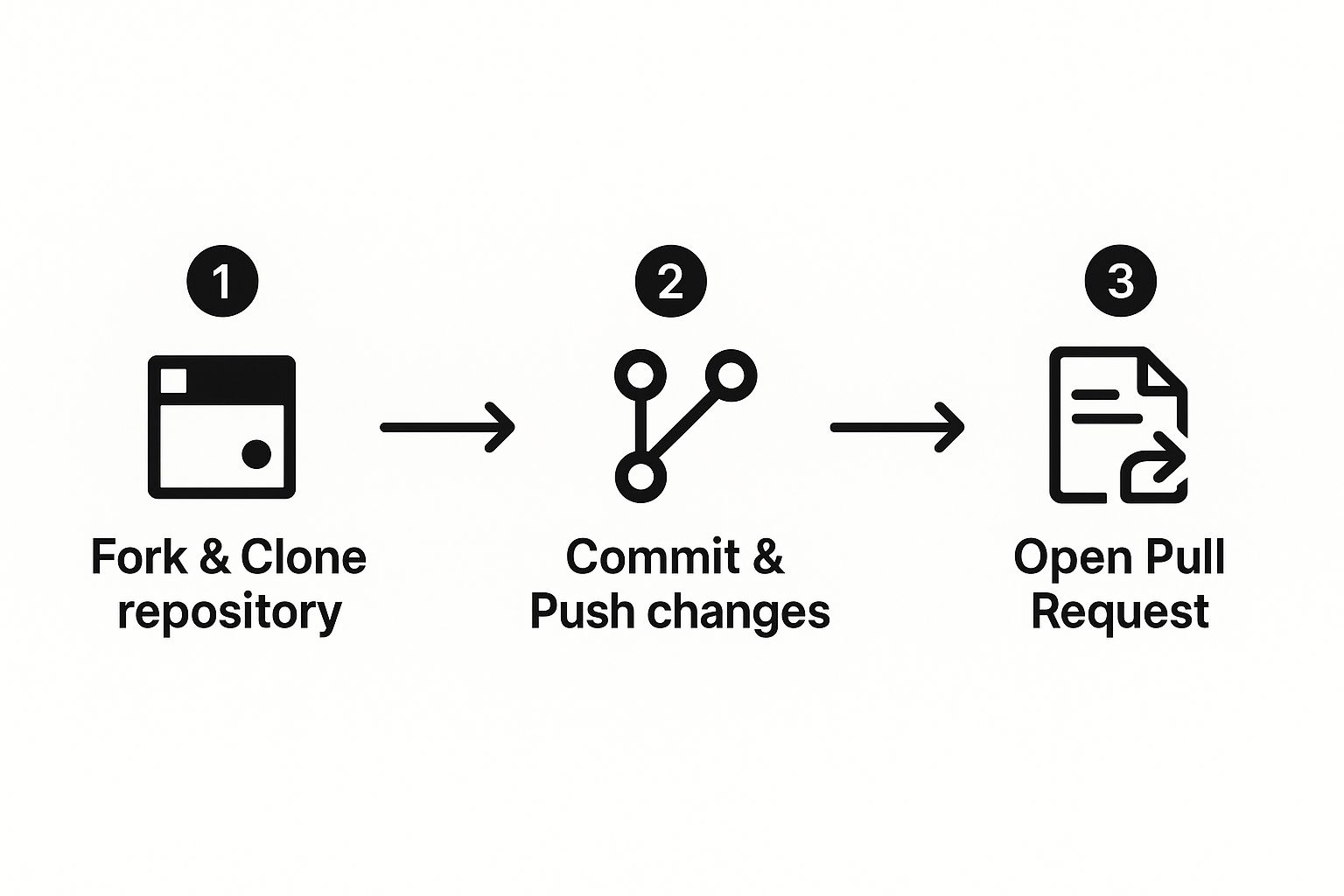
As you can see, all the work begins locally. Once you're ready, you push your branch to the remote repository and open the pull request on GitHub, which officially starts the review and discussion phase.
By creating a formal proposal, the pull request workflow shifts the focus from "adding code" to "improving the project." It's a structured dialogue that ensures every change is vetted, understood, and integrated safely.
This deliberate approach helps avoid the classic "it works on my machine" problem and builds a shared sense of ownership over the codebase. It also creates a perfect, auditable history of every change, including all the conversations that shaped the final outcome.
To give you a clearer picture of the entire journey, here’s a breakdown of the typical lifecycle.
The Pull Request Lifecycle Stages and Roles
This table outlines each stage of the PR process, from creation to completion, highlighting the main action and who is responsible for it.
| Stage | Primary Action | Key Role |
|---|---|---|
| 1. Branch Creation | Create a new branch from the main codebase to work on a feature or fix. | Developer |
| 2. Development | Write, commit, and push code changes to the new branch. | Developer |
| 3. Open Pull Request | Create a formal PR on GitHub to propose merging the changes. | Developer |
| 4. Automated Checks | CI/CD pipelines run tests, builds, and linting to ensure quality. | CI/CD System |
| 5. Code Review | Team members review the code, ask questions, and suggest improvements. | Reviewer(s) |
| 6. Discussion & Updates | Address feedback by making further commits and pushing updates. | Developer |
| 7. Approval | Once the code meets standards, reviewers give their official approval. | Reviewer(s) |
| 8. Merge | The approved changes are merged from the feature branch into the main branch. | Maintainer/Developer |
| 9. Cleanup | The feature branch is deleted to keep the repository clean. | Developer |
Understanding these distinct steps and roles is key to a smooth and effective collaboration process for any development team.
Step-by-Step: Opening a Pull Request
Before we dive into crafting the perfect PR, let's walk through the mechanics of actually creating one—from your first branch to the moment you hit "Create pull request."
Use a Clear Branch Naming Convention
Before writing any code, create a new branch with a descriptive name. Most teams adopt a prefix-based convention to keep branches organized:
feature/add-user-avatars— for new functionalityfix/login-crash-empty-profile— for bug fixeschore/upgrade-react-18— for maintenance tasksdocs/update-api-reference— for documentation changes
To create and switch to a new branch:
git checkout -b feature/add-user-avatars
Consistent naming makes it easy to scan your branch list and understand what each branch is for at a glance.
Develop, Commit, and Push
Make your changes locally, then stage and commit them with clear, descriptive messages:
git add src/components/Avatar.tsx src/api/upload.ts
git commit -m "Add avatar upload component and API handler"
When your work is ready for review, push your branch to the remote repository:
git push -u origin feature/add-user-avatars
The -u flag sets up tracking so future git push and git pull commands will automatically reference this remote branch.
Open the Pull Request on GitHub
You have two main options:
Option 1: The GitHub UI. After pushing your branch, visit your repository on GitHub. You'll usually see a yellow banner with a "Compare & pull request" button—click it. If the banner doesn't appear, go to the "Pull requests" tab and click "New pull request," then select your branch.
Option 2: The GitHub CLI. If you prefer the terminal, the GitHub CLI (gh) makes this fast:
gh pr create --title "Feat: Add user avatar upload" --body "Closes #42. Adds avatar upload to the settings page."
Both methods will ask you to choose a base branch (the branch you want to merge into, usually main) and a head branch (the branch with your changes).
Consider Opening a Draft Pull Request
If your work isn't finished yet but you want early feedback, open a draft pull request. Draft PRs signal to your team that the code is still a work in progress and isn't ready for a final review. They're a great way to:
- Get early feedback on your approach before investing more time
- Show teammates what you're working on for visibility
- Run CI/CD checks on incomplete code to catch issues early
You can convert a draft PR to a regular PR at any time by clicking "Ready for review" on GitHub. On the CLI, add the --draft flag:
gh pr create --draft --title "WIP: Add user avatar upload" --body "Early draft—feedback welcome on the API design."
How to Create the Perfect Pull Request
A great pull request is more than just a chunk of code—it’s a clear, concise proposal that shows you respect your reviewer's time. When you craft a PR thoughtfully, you speed up the entire review cycle because the review becomes smooth and efficient. It’s less about the technical changes and more about the human side of working together.
The real goal is to give reviewers everything they need to understand your changes quickly and confidently. This means explaining the "why" behind your code, not just the "what." A pull request that makes the reviewer hunt for context is one that's going to sit stale, creating a bottleneck for the whole team.
Start with a Compelling Title
Your PR title is the first thing a reviewer sees, so think of it as a headline for your work. It needs to be descriptive and instantly understandable. Vague titles like "Bug fix" or "Updates" tell reviewers nothing—they force people to dig deeper just to figure out what's going on.
Instead, get into the habit of using a clear, consistent format. A common trick is to use a prefix that signals the type of change, followed by a short summary.
- Bad Title:
Fixes - Good Title:
Fix: Prevent crash when user profile is empty - Bad Title:
Update dependencies - Good Title:
Chore: Upgrade React to version 18.3 - Bad Title:
New feature - Good Title:
Feat: Add user avatar upload to settings page
This simple practice brings immediate clarity. It helps maintainers and reviewers prioritize their work and understand the impact of your change at a single glance.
Write a Description That Tells a Story
The PR description is your chance to lay out all the crucial context. A blank description signals that the author didn't think about the reviewer's perspective at all. Your description should be a mini-narrative that walks the reviewer through your thought process and the changes you’ve made.
A powerful description should answer three key questions:
- What problem does this PR solve? State the issue you're tackling head-on. If you can, link to the relevant ticket or issue number (e.g.,
Fixes #123orCloses #123) so GitHub can automatically close it when the PR is merged. Note: this keyword must appear in the PR description, not just in a comment, for the auto-close to work. - How did you solve it? Give a brief summary of your approach. You don’t need to explain every single line of code, but you should touch on the high-level strategy and any important architectural decisions you made.
- How was it tested? Describe the steps you took to make sure your changes work. This builds confidence and tells the reviewer where to focus their own testing efforts. Mention if you added unit tests, did some manual testing, or if the changes touch a specific part of the UI.
A pull request is an act of empathy. By providing clear context, a descriptive title, and testing notes, you are respecting your reviewer's time and cognitive load, which is the fastest way to get your code approved and merged.
This approach turns a PR from a simple code dump into a self-contained package of information that makes the entire review cycle faster.
Keep It Small and Focused
If there's one golden rule for an effective PR workflow, it's this: keep your PRs small. An oversized pull request with thousands of lines of changes across dozens of files is a nightmare to review. It's intimidating, and it's almost guaranteed to be reviewed poorly, if at all. These PRs often sit for days or weeks because nobody has the time or mental energy to tackle them.
Experience and research both agree—smaller, focused pull requests get reviewed faster and with more attention to detail.
- Single Responsibility: Each PR should fix one thing. A single feature, a single bug, or a single refactor. Don't ever bundle unrelated changes into one request.
- Faster Reviews: Smaller diffs are just plain easier to understand. They reduce the cognitive load on reviewers, which leads to much quicker approvals.
- Easier Reverts: If a small, focused change introduces a bug, it's incredibly easy to find and revert. Trying to undo one part of a massive, multi-faceted change is a recipe for disaster.
By breaking down big tasks into a series of smaller, incremental pull requests, you create a steady flow of progress that’s far easier for the team to manage, review, and merge. This iterative approach is the secret to a healthy, efficient, and collaborative development process.
Navigating the Code Review Process
 Once you hit that "Create pull request" button, the real magic begins. This is where the collaborative heart of the pull request process truly beats. It’s a dialogue, not a judgment, with everyone working toward the same goal: building better, more reliable software.
Think of the review as a partnership. For the author, it's a chance to get a fresh pair of eyes on their work. For the reviewer, it's an opportunity to share knowledge and help uphold quality standards. When both sides show up with respect and a constructive attitude, the entire team wins.
Best Practices for Authors
Getting feedback on code you just poured hours into can feel personal. It's not. The comments are about the code, not you, and they're all aimed at making the final product stronger. A positive, open attitude will make the review go faster and, honestly, make you a better developer.
Your main job as the author is to make the reviewer's job as easy as possible. That means responding to comments, asking for clarification if you don't understand something, and clearly explaining why you made certain decisions. The last thing you want to do is get defensive; treat every comment as a puzzle to be solved together.
To handle feedback like a pro, try these moves:
- Acknowledge every comment. A simple thumbs-up emoji is enough. It tells the reviewer you've seen their feedback and you're on it.
- Don't rush to make changes. Take a second to really understand the suggestion. If you disagree, that's fine! Just explain your reasoning calmly and back it up.
- Batch your updates. Instead of pushing a new commit for every tiny fix, group related changes into a single, well-documented commit. This keeps the PR's history clean and easy to follow.
Best Practices for Reviewers
As a reviewer, your role is more of a helpful guide than a gatekeeper. Your feedback needs to be actionable, specific, and kind. The goal is to improve the code and empower the author, not to show off how much you know. Remember, unclear or overly harsh feedback just creates friction and slows everyone down.
A great review is a mix of pointing out potential issues and giving props for a job well done. Reinforcing good patterns is just as important as flagging mistakes. This helps create a safe environment where developers aren't afraid to put their work out there.
The most effective code review comment doesn't just say "this is wrong." It explains why it's a potential issue, suggests a better alternative, and provides the reasoning behind the suggestion. This turns a critique into a valuable teaching moment.
Using a structured approach can make your feedback much clearer. One fantastic method is a framework like Conventional Comments, which uses simple prefixes to categorize your feedback so the author knows what to do.
suggestion:A non-blocking idea for an improvement.question:You need more information.nitpick:A minor, often stylistic point that isn't a dealbreaker.issue:A blocking concern that must be addressed before merging.praise:Highlight something positive—reinforcing good patterns matters too.thought:A non-blocking observation that doesn't require action but shares useful context.
Using a system like this cuts through the ambiguity and helps the author prioritize what to work on first. Equally important for reviewers is being timely. Stale pull requests are a massive source of frustration and delay. Automating assignments can make sure PRs get seen quickly. In fact, you can learn more about how to automatically assign reviewers in GitHub to stop these bottlenecks before they start.
By adopting these habits, both authors and reviewers can turn the code review from a chore into a powerful engine for collaboration, learning, and quality within your review process.
Lessons From Real-World Pull Request Failures
Your team's pull request workflow doesn't exist in a vacuum—it depends on the platforms and infrastructure underneath it. Understanding how even well-run systems can fail teaches valuable lessons about building resilience into your own process.
Why "Simple" Changes Can Break Everything
Even the most routine maintenance can go sideways. A telling example happened in August 2025, when a standard database migration at GitHub triggered a major outage. The team was simply dropping an unused column from a table related to pull requests. Except an underlying component still referenced it, causing error rates to spike to 4% across all web and API traffic. This one change broke pushes, webhooks, and notifications. The same pattern repeated later that month with a Copilot-related migration, causing 36% of Copilot requests to fail. You can read the full story in the official GitHub availability report.
The lesson for your team: if GitHub itself can be caught off guard by a "simple" change, so can your project. This is exactly why a mature CI/CD pipeline isn't just a nice-to-have; it's your most important safety net.
Even a seemingly harmless change can have massive, unpredictable side effects. The strength of your pull request process is only as good as the automated checks protecting it.
Applying These Lessons to Your Team
You don't need to be running infrastructure at GitHub's scale to benefit from these principles. Here's how to apply them to your own workflow:
- Comprehensive Automated Checks: Your CI pipeline is your first line of defense. Run a full suite of tests—unit, integration, and end-to-end—on every single pull request to catch regressions before they have a chance to be merged.
- Incremental, Reversible Changes: Deploy changes in small batches. If something breaks, a small change is easy to revert. A massive release with dozens of changes makes it nearly impossible to isolate the problem.
- Robust Monitoring and Alerting: You can't fix what you can't see. Real-time monitoring of error rates, test failures, and deployment health helps you catch issues early. Even simple tools like GitHub Actions status checks on your PRs go a long way.
By putting these practices in place, you create a workflow where you can merge changes confidently, knowing you have multiple layers of protection. This also gives everyone better visibility into project health, which is a key part of an efficient code review process. You can take this even further by integrating tools like Slack. To learn more, check out how GitHub Slack integration improves code reviews and keeps your team in the loop.
Using Data to Optimize Your Workflow
 Tired of guessing what’s slowing your team down? It's time to stop guessing and start measuring. An effective PR workflow isn't just about good habits; it's about having a system you can actually analyze and improve. By looking at the data, you can pinpoint the real bottlenecks in your process and make smart changes that get real results.
Instead of just going with your gut, you can use cold, hard numbers to see how healthy your team’s collaboration really is. This shift from anecdotes to evidence helps build a culture of continuous improvement, where your decisions are backed by proof, not just opinions.
Identifying Your Key Performance Indicators
First things first, you need to know what to measure. Tracking the right metrics turns a chaotic process into a clear picture of your team’s performance. Think of these data points as a health check for your development cycle, showing you where things are flowing smoothly and where they’re getting stuck.
Some of the most revealing metrics include:
- Time to First Review: How long does a pull request sit there before a teammate leaves the first comment? A long delay here is often a red flag for issues with awareness or reviewer availability.
- Time to Merge: What’s the total lifespan of a pull request, from the moment it's opened to when it's merged? This is a great high-level indicator of your team's overall velocity.
- Comment Frequency: How many comments or review cycles does the average PR go through? A high number might point to unclear requirements or a need for better coding standards.
- PR Size: How many lines of code are typically stuffed into a pull request? Massive PRs are notoriously difficult to review and almost always become a major bottleneck.
By keeping an eye on these indicators, you can start answering critical questions. Are reviews happening on time? Is the workload spread out fairly? The answers are hiding in your data. To dive deeper, check out our guide on the key metrics for faster code reviews in GitHub.
Automating Data Collection and Analysis
Trying to track all this manually would be a complete nightmare. Thankfully, you don't have to. You can automate the entire process. Tools that analyze pull request workflows can give you a quantitative look at your team and developer productivity. A common approach is using GitHub Actions like Pull Request Analytics, which tracks key indicators such as opened and closed PRs, time spent in review, comment frequency, and approval rates.
This data helps you spot bottlenecks—like where PRs are sitting idle for way too long—or highlight trends showing you’ve gotten more efficient over time.
A workflow without metrics is like flying blind. Data provides the instruments you need to navigate, adjust course, and make sure you're actually moving in the right direction—toward faster, higher-quality software delivery.
With these tools, you can set up dashboards that give you actionable insights at a glance. Visualizing trends helps you see the real impact of any changes you make, confirming whether a new strategy is working or needs to be rethought. This data-backed approach transforms your workflow from a static set of rules into a living, adaptable system that's always getting better.
The Future of Pull Requests with AI
Artificial intelligence is starting to show up everywhere in software development, and the pull request workflow is no exception. AI tools are becoming that second pair of eyes every developer wishes they had, stepping in to help with everything from writing the initial code to getting the final stamp of approval.
This isn't just about cranking out code faster, although AI assistants are certainly good at that. The real game-changer is how AI is impacting the review cycle itself. Imagine an automated reviewer that never gets tired, never misses a tiny detail, and can offer perfectly contextual suggestions 24/7. That's not science fiction anymore; it's quickly becoming our reality.
Augmenting the Review Process
AI is shifting code review from a task that's purely human-driven to one that's human-supervised. It takes a huge cognitive load off reviewers by handling the repetitive, predictable stuff, freeing them up to focus on what really matters—like big-picture architectural decisions and tricky business logic.
These tools are getting really good at a few key things:
- Suggesting Fixes: AI can analyze code on the fly and propose improvements for performance, readability, and security.
- Identifying Potential Bugs: With a deep understanding of the entire codebase, AI can spot subtle errors a human might miss, like a potential null pointer exception or a race condition hiding in plain sight.
- Generating Test Cases: AI can automatically write relevant unit and integration tests for new code, making sure test coverage doesn't fall behind as you build.
This means teams can catch issues way earlier in the process, often before a human reviewer even lays eyes on the pull request. The result is a much smoother, less error-prone workflow.
The Real-World Impact on Velocity
Teams that have embraced these tools are already seeing some pretty dramatic results. The explosion of AI coding assistants has dramatically accelerated code creation and review efficiency. Just look at GitHub Copilot—its user base shot up to over 15 million by early 2025, a 4x increase in just one year. Developers now lean on it for roughly 46% of their code in files where Copilot is enabled.
This has had a massive ripple effect on merge times. According to research from DevOps analytics firm Opsera, some teams have seen their average pull request duration drop from 9.6 days down to just 2.4 days—a 4x speedup.
AI is fundamentally changing the economics of code review. By automating the low-level checks, it allows senior engineers to spend their valuable time on high-impact architectural feedback instead of catching typos and syntax errors.
At the end of the day, bringing AI into the pull request process isn't about replacing developers. It's about empowering them. By taking over the tedious work, AI frees up teams to focus their brainpower on solving complex problems and building incredible software. It's making the entire pull request process faster, smarter, and more collaborative than ever before—a critical step for any team looking to ship faster and maintain a high bar for quality.
Frequently Asked Questions
Even the most seasoned developers hit a snag in their PR workflow now and then. This section dives into some of the most common questions we hear, with practical advice to get you through the everyday challenges and keep your team shipping.
Think of these as practical tips for refining your team's collaboration habits.
How Should We Handle Large Pull Requests?
Honestly? The best way to handle a huge pull request is to not create one in the first place. When you see a PR touching thousands of lines, it's usually a red flag that the original ticket was way too big. Your first move should always be to break that monster task into smaller, logical chunks that can be reviewed and merged on their own.
But if you're already stuck with one, communication is everything.
- Over-explain in the summary: Write an extra-detailed description that covers the high-level changes and links out to any relevant design docs or tickets.
- Be a tour guide: Drop comments directly in the PR to walk reviewers through the code. Point out the most critical parts and explain the why behind your changes.
- Jump on a call: For something really complex, a quick screen-share session can save hours of back-and-forth comments.
The goal is to lower the cognitive load on your reviewer. Make a daunting task feel manageable.
What Is the Best Way to Resolve Merge Conflicts?
Merge conflicts feel intimidating, but they’re just a normal part of collaborating on code. They happen when Git sees competing changes on the same lines in a file. The absolute safest way to handle them is on your local machine—not in the GitHub UI. Working locally gives you full control and lets you run tests to make sure you didn't break anything.
A merge conflict isn't an error. It's just Git's way of saying, "I need a human to make a decision here." You can prevent most conflicts by pulling the latest
mainbranch into your feature branch before you open a PR.
Here's the local workflow:
- Fetch the latest changes: Run
git fetch originto download the newest commits from the remote without modifying your working files. - Merge main into your branch: Run
git merge origin/mainwhile on your feature branch. Usingorigin/mainensures you're merging the remote's latest version, not a potentially stale local copy. - Resolve the conflicts: Open the conflicted files, manually choose the correct code, and delete the conflict markers (
<<<<<<<,=======,>>>>>>>) that Git leaves behind. - Stage and commit: Run
git add .to stage the resolved files, thengit committo finalize the merge. - Push your branch: Run
git pushto update your remote branch with the resolved merge.
This keeps your PR's history clean and ensures it's ready for a smooth merge.
How Do We Set Team Standards for Code Review?
Setting clear, agreed-upon standards is the secret to an effective code review process. Without them, reviews can feel subjective and arbitrary, which just leads to frustration. The easiest way to get started is by creating a simple checklist or a PULL_REQUEST_TEMPLATE.md file in your repository's .github/ directory (e.g., .github/PULL_REQUEST_TEMPLATE.md).
This template can prompt developers for essential context, like linking to the Jira ticket, summarizing their changes, and explaining how they tested their code. You should also define team-wide expectations, like a target turnaround time for reviews or requiring at least two approvals for major features.
To enforce these standards automatically, use GitHub's branch protection rules (found under Settings > Branches > Branch protection rules). You can require:
- A minimum number of approving reviews before merging
- Status checks (like CI tests) to pass before merging
- Branches to be up-to-date with the base branch before merging
- Conversation resolution—all review threads must be resolved
These guardrails ensure every PR meets a baseline for quality and that everyone knows what's expected of them, without relying on human discipline alone.
Tired of chasing down reviewers and getting lost in notification spam? PullNotifier delivers clean, real-time pull request updates directly to Slack, cutting through the noise so your team can focus. Join over 10,000 engineers and see how you can speed up your code reviews at https://pullnotifier.com.