- Published on
Mastering Code Review Criteria for Better Software
- Authors

- Name
- Gabriel
- @gabriel__xyz
Code review criteria are the specific standards and guidelines we use to check source code for quality, maintainability, and security before it gets merged. Think of these principles as the difference between subjective feedback and a consistent, objective process that holds every change to a high engineering bar.
Why Your Code Review Criteria Define Your Code Quality
Let's be honest, code review is often treated as a simple bug hunt. A teammate submits a pull request, someone else scans for obvious errors, slaps on an "LGTM" (Looks Good To Me), and moves on. But what if this daily ritual could be your team's single most powerful lever for quality? What if it could prevent technical debt, lock down security, and build a culture of real engineering excellence?
This is where establishing clear code review criteria changes the game. It reframes the whole process, shifting it from an opinion swap into a systematic quality check. Without a shared set of standards, reviews become a lottery. One developer might focus on style nits, another on performance, and a third might just check if it works, leaving huge gaps in your quality control.
The Shift From Subjective to Systematic
A structured approach ensures every single piece of code is held to the same high standard. This isn't just a nice-to-have; with modern applications growing more complex and security threats on the rise, it's non-negotiable. The industry agrees—the global market for code review tools was valued at USD 2.1 billion in 2023 and is expected to climb to USD 5.3 billion by 2032.
The key is to build a checklist—whether it's in your head or on a shared doc—that covers the core pillars of software quality. The diagram below breaks down the fundamental categories that make up a rock-solid review framework.
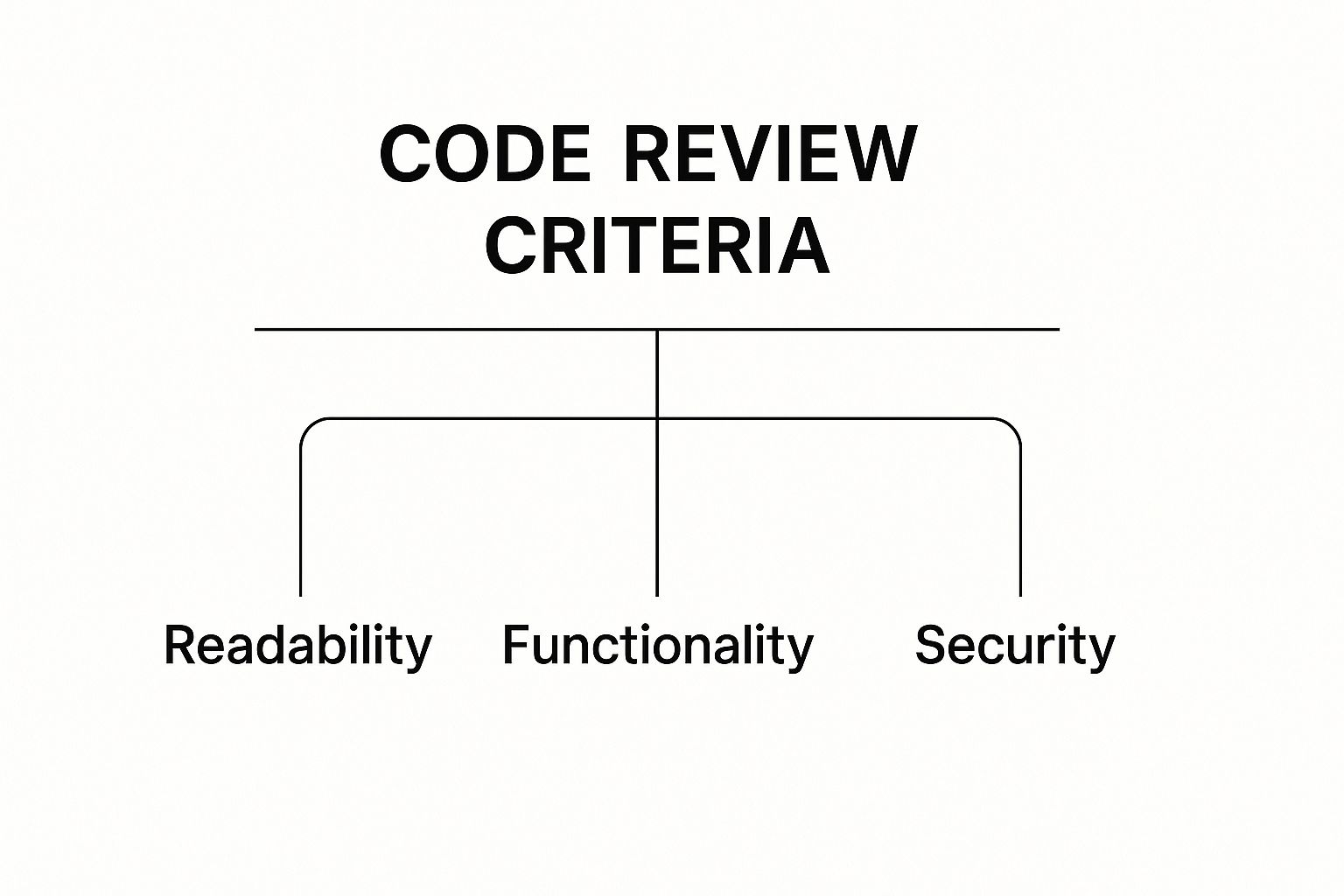
This hierarchy shows that effective criteria go way beyond just making sure the code works. They ensure it’s also clear, secure, and built to last. For a deeper dive into optimizing your review process, check out these Top Code Review Best Practices.
By applying these standards consistently, you create a powerful feedback loop. It doesn't just improve the code—it elevates the skills of your entire team. To learn more about delivering effective notes, check out our ultimate guide to constructive feedback in code reviews.
Making Your Code Easy to Understand

Think of your code like a story. Can the next developer who picks it up—who might just be you in six months—actually follow the plot? Or will they get tangled up in confusing twists and turns? Readability isn't just a matter of personal style. It's the absolute foundation of any code review criterion, creating software that can be trusted, debugged, and built upon for years to come.
When code is hard to read, it puts a hidden tax on your team's productivity. Every minute someone spends trying to figure out a cryptic variable name or a deeply nested loop is a minute they aren't building something new. The real goal here is to reduce that cognitive load and make the code's purpose obvious at a glance. Clear code is predictable, and predictable code is a terrible place for bugs to hide.
This all comes down to a simple principle: write code for humans first, machines second. Your compiler couldn’t care less if a function is named calculateData() or calculateUserAgeFromDOB(), but your teammates definitely will.
Naming Conventions That Create Clarity
Clear, consistent naming is the bedrock of readable code. Vague or overly abbreviated names turn developers into detectives, forcing them to hunt through files just to figure out what a variable or function actually does. The review process is the perfect time to enforce names that are descriptive and leave no room for guesswork.
When you’re reviewing names, ask yourself these questions:
- Does the variable name explain what it holds? A name like
dtells you nothing.elapsedDaysis self-documenting. - Does the function name describe what it does? A function called
process()is a total mystery.sendWelcomeEmailToNewUser()is crystal clear. - Is the naming consistent with the rest of the codebase? Mixing
camelCaseandsnake_caseor using different terms for the same concept just adds unnecessary confusion.
"Good code is its own best documentation. As you’re about to add a comment, ask yourself, ‘How can I improve the code so that this comment isn’t needed?’" - Steve McConnell
By making descriptive naming a priority, you're essentially embedding documentation right into the code. This cuts down on the need for extra comments that almost always go stale.
Logical Structure and Flow
Beyond just the names, the overall structure of the code has to make sense. Readability is also about how you organize functions, classes, and files. A well-structured file should read like a good article—important stuff at the top, with related functions grouped together logically.
A huge red flag is a single function that's trying to do way too much. Every function should follow the Single Responsibility Principle: do one thing, and do it well. During a code review, be on the lookout for long, sprawling methods that can be split into smaller, focused helper functions. This doesn't just make the code easier to read; it makes it way easier to test and reuse.
Another classic structural problem is deep nesting of loops and conditionals. If you see code with five levels of indentation, it's nearly impossible to reason about. A reviewer should flag this "arrow code" and suggest refactoring it into something simpler and flatter. These kinds of issues are critical to spot, and you can learn more about them in our guide on the 10 common code smells in pull requests.
Avoiding Clever Code
"Clever" code is a trap. While a slick one-liner might feel satisfying to write, it can be an absolute nightmare for the next person who has to debug it. When it comes to a choice between clever and readable, readable should win every single time. If you have to stare at a line of code for a full minute to figure out what it's doing, it's too complicated. Period.
During a code review, keep an eye out for these common offenders:
- Complex Ternary Operators: A straightforward
if/elsestatement is almost always clearer than a nested ternary. - Obscure Language Features: Using some esoteric language feature might save a few keystrokes, but it costs a ton in future maintenance time.
- Chain of Operations: Long, chained method calls are tough to follow and even harder to debug. Breaking them up with intermediate variables that have descriptive names makes the logic transparent.
At the end of the day, the best code is simple, direct, and honestly, a little boring. When you make readability a core part of your code reviews, you’re investing in a codebase your team can maintain with confidence for years to come.
Building Code That Lasts
Great code solves today's problem without creating tomorrow's nightmare. Beyond just being readable, a truly effective code review looks at the code's long-term health. This is where maintainability and extensibility come in—two sides of the same coin that determine if a codebase can adapt or if it will crumble under future changes.
Think of your codebase like a building. A good one has solid foundations, modular rooms you can repurpose, and clearly mapped-out plumbing and electrical systems. A bad one is a tangled mess where moving a single wall makes the whole roof sag. Your code review process is the architectural inspection that ensures you're building something to last.
This kind of foresight is more important than ever. As software systems get more complex, so does the focus on building them right. In fact, research interest in code review practices has shot up significantly from 2013 to 2024, as both academia and industry double down on quality. You can see this trend and discover insights into modern code review research for yourself.
The Perils of Tightly Coupled Code
One of the biggest threats to maintainable code is tight coupling. This is what happens when different parts of your code are so tangled together that a change in one place sets off a chain reaction of required changes everywhere else.
It’s like having your kitchen appliances permanently wired into the wall instead of plugged into outlets. Want to upgrade your toaster? You’ll have to call an electrician.
During a review, keep an eye out for these tell-tale signs of tight coupling:
- Direct Instantiation: A high-level component directly creating instances of a low-level one, binding them together.
- Knowledge of Internals: One module relying on the specific, internal workings of another, rather than a stable public interface.
- Lack of Abstraction: The code depending on a concrete implementation (like a specific database driver) instead of a general abstraction (like a data access interface).
When you spot this, suggest techniques like dependency injection or the use of interfaces to decouple the components. This creates clean boundaries, letting different parts of the system evolve independently without breaking each other.
Championing the DRY Principle
"Don't Repeat Yourself" (DRY) is one of the most sacred principles in software development. At its core, it means every piece of logic should have a single, clear, authoritative home within the system. Seeing the exact same block of code copied and pasted across multiple files is a massive red flag.
Why is this so dangerous? Because if a bug is found in that logic or a business rule changes, you now have to hunt down and fix it in every single location. It’s a near-guarantee you’ll miss one, leading to inconsistent behavior and maddening bugs down the road.
A code review is the perfect time to enforce DRY. When you see duplicated code, encourage the author to pull it out into a shared function, a helper class, or a reusable component. This doesn't just cut down on redundancy; it makes the code's real purpose much clearer.
Eradicating Magic Numbers and Strings
A "magic number" is a raw, hardcoded value that shows up in the code without any explanation. A line like if (userStatus == 2) is a mystery. What does 2 mean? Is the user active, suspended, or pending deletion? Without context, it's impossible to know for sure.
The fix is simple: replace these magic values with named constants. if (userStatus == UserStatus.SUSPENDED) is instantly understandable and way less prone to errors. This rule applies to strings, too. Hardcoded URLs, file paths, or API keys should be centralized in a config file or defined as constants.
By focusing on these long-term code review criteria, you elevate the review from a simple bug hunt to a strategic investment in the codebase's future. You’re not just approving code that works now; you’re ensuring it can grow, adapt, and scale for years to come.
Turning Every Review into a Security Check
Security isn't someone else's problem—it's a core responsibility that should be woven into everything we build. Think of your code review process as the first and most critical line of defense. Every single pull request is an opportunity to catch vulnerabilities before they even get a whiff of production.
Shifting your mindset from just checking functionality to actively hunting for security flaws is a game-changer. You don’t need to be a cybersecurity guru to make a huge impact. Just by learning to spot a few common red flags, you and your team can build a much more resilient product. The goal is to make security a foundational piece of your code review criteria, not an afterthought.
A solid grasp of Risk Assessment for Cyber Security is a great starting point for understanding how to pinpoint threats in your own codebase.
Validating All Inputs
One of the oldest rules in the book is still one of the most important: never trust user input. Ever. Any data coming from outside your application—a user form, an API call, a file upload—is a potential attack vector. A huge part of a security-focused review is making sure all external data is rigorously validated and sanitized.
Keep an eye out for places where raw input is used in sensitive operations. For example, is a string from a user being slapped directly into a database query? That’s a textbook SQL injection vulnerability just waiting to happen. Is user-submitted content being rendered on a page without being properly escaped? Hello, Cross-Site Scripting (XSS) attack.
Your input validation checklist should include:
- Type Checking: Make sure the data is what you expect it to be (e.g., an integer is actually an integer).
- Length Constraints: Check that the input doesn’t exceed expected lengths to prevent buffer overflows.
- Whitelist Validation: Always try to validate against a list of known-good values instead of trying to blacklist all the bad stuff. It's much safer.
- Sanitization: Remove or escape any characters that could be harmful before you process or store the data.
Secure Handling of Sensitive Data
Handling things like passwords, API keys, or personal user data requires extreme care. A code review must scrutinize how this data is stored, transmitted, and logged. Hardcoding secrets directly in the source code is a massive security risk that should be flagged immediately. Those values belong in secure environment variables or a dedicated secrets management tool.
Also, pay close attention to logging. It's common for developers to log entire objects for debugging, but this can easily expose sensitive data in your log files if you're not careful.
Make sure any code handling sensitive information automatically redacts or omits fields like
password,sessionToken, orcreditCardNumberbefore they hit the logs. This simple check is a powerful defense against accidental data leaks.
Passwords should never be stored in plaintext. Verify that a strong, one-way hashing algorithm like Argon2 or bcrypt is being used to protect user credentials. If you spot old-school algorithms like MD5 or SHA-1 being used for passwords, it’s a critical security flaw that needs to be fixed right away.
A Reviewer's Security Vulnerability Checklist
To make this a bit more systematic, here’s a practical checklist you can pull up during your next review. It covers some common vulnerability types, what to look for, and a red-flag example to help you spot potential trouble fast.
It's not exhaustive, but it hits some of the most frequent and high-impact security gaps you’ll find in modern applications.
| Vulnerability Type | What to Look For | Example Red Flag |
|---|---|---|
| SQL Injection | Raw user input being used to construct database queries. | query = "SELECT * FROM users WHERE id = '" + userId + "'" |
| Cross-Site Scripting (XSS) | User-provided data rendered directly in HTML without escaping. | <div><%= unsafe_user_comment %></div> |
| Insecure Direct Object Reference (IDOR) | Accessing resources using only a user-supplied ID without permission checks. | GET /api/documents/123 (no check if the user owns document 123) |
| Improper Error Handling | Exposing detailed stack traces or system information to the user in error messages. | A production error page showing database connection strings. |
By building these checks into your standard code review criteria, you create a powerful, proactive defense. You turn a routine process into a continuous security audit, fostering a culture where every developer is a guardian of the application's integrity.
Finding the Balance Between Performance and Simplicity

"Is this code fast enough?" It's a classic code review question, but the answer is almost never a simple yes or no. Performance is a huge part of the user experience, but blindly chasing milliseconds often leads to complicated, unreadable code that becomes a maintenance nightmare.
The real skill is striking the right balance. You have to learn to focus on optimizations that actually make a difference while sidestepping the trap of optimizing too early.
Your code review criteria needs a filter for performance, but it has to be a pragmatic one. Not all code needs to be blazing fast. A batch script that chugs away once a night has totally different performance needs than a real-time API endpoint getting slammed with thousands of requests per second. The reviewer's job is to ask the right questions and make sure performance is considered where it truly counts.
Identifying Genuine Performance Bottlenecks
Instead of nitpicking every single line, a good review hones in on patterns known to cause serious performance drag. These are the big-ticket items that can bring a system to its knees under pressure. Think of it as looking for major traffic jams, not trying to shave a second off every side street.
Keep an eye out for these common red flags:
- Database Queries Inside Loops: The classic N+1 problem. Fetching data from a database one record at a time inside a loop is a recipe for disaster, creating a storm of network requests that kills performance.
- Inefficient Data Structures: Using a list for an operation that needs frequent lookups (O(n)) when a hash map could do it in constant time (O(1)) can cause massive slowdowns, especially with large datasets.
- Significant Memory Leaks: In applications that run for a long time, failing to release resources leads to memory bloat, slowdowns, and, eventually, crashes.
- Blocking I/O on Main Threads: Things like network calls or file reads can freeze up an application if they aren't handled asynchronously. This leads to a sluggish, unresponsive UI that users will hate.
These aren't minor tweaks; they're architectural flaws with a real, measurable impact. Spotting them is a core part of any performance-aware code review.
Avoiding Premature Optimization
On the flip side of ignoring performance is obsessing over it. Premature optimization is when you start tweaking code for speed before you even know where the real bottlenecks are. This almost always leads to more complex code for a gain nobody will ever notice.
"We should forget about small efficiencies, say about 97% of the time: premature optimization is the root of all evil." - Donald Knuth
This famous quote is a powerful reminder to base optimizations on evidence, not hunches. As a reviewer, you should challenge any optimization that adds complexity without a clear, data-backed reason. Is this change fixing a known performance issue? Has profiling been done to prove this is a hot path?
If the answer is no, the simpler, more readable version is usually the better choice.
For instance, rewriting a simple, clear loop into some convoluted bit-shifting operation just to save a few nanoseconds is a textbook case of premature optimization. It wrecks readability and maintainability for a performance gain no user will ever feel. Your code review criteria should always lean toward clarity and simplicity unless there's a proven, compelling need for more complex, high-performance code.
The goal is to build software that's efficient enough for today and maintainable enough for tomorrow.
Code without tests is just a collection of assumptions. So, a huge part of any solid code review is checking not just the code itself, but the tests that prove it actually works. This isn't about chasing some vanity metric like 100% coverage; it's about making sure the changes are backed by meaningful tests that lock in behavior and prevent things from breaking down the road.
A pull request isn't really done until it includes tests that are clear, focused, and reliable. As a reviewer, you're the last line of defense, making sure every new feature or fix adds to the codebase's stability, rather than chipping away at it. This focus on quality is a global standard.
For example, North America currently leads the global code review market, but Europe's strict finance and healthcare regulations are pushing adoption there too. Meanwhile, the Asia Pacific region is catching up fast, using code reviews to meet rising demands for secure software. You can learn more about these global code review market trends to see how this plays out worldwide.
What to Look for in Accompanying Tests
When you're looking at a pull request, the tests deserve just as much attention as the production code. Think of them as living documentation of how the system is supposed to work.
Here’s a quick checklist for the tests:
- Meaningful Assertions: Does the test actually check for something specific and important? A test that just runs without crashing doesn't prove much. Look for assertions that validate the right outputs, state changes, or error conditions.
- Clear Test Names: The name of a test should tell you exactly what it's testing. A name like
test_user_creation_fails_if_email_is_duplicateis way more helpful thantest1ortest_user. - Focus on a Single Behavior: Ideally, each test should verify just one thing. This makes it a lot easier to figure out what broke when a test eventually fails.
To keep this process consistent, it helps to follow a structured approach. Using a comprehensive code review checklist ensures you’re always evaluating test quality right alongside all the other critical criteria.
Is the Code Itself Testable?
Beyond just checking the tests that are there, a good reviewer needs to ask a more fundamental question: is this code even easy to test in the first place? Code that's hard to test is often a red flag for deeper design problems, like being too tightly coupled or mixing too many different responsibilities. Untestable code is a ticking time bomb, making any future changes risky and expensive.
The ability to write a test for a piece of code is a litmus test for its design. If it's hard to test, it's probably poorly designed. This core idea is a foundational element of any effective code review criteria.
Look for code that can be tested in isolation. For instance, a single function that both fetches data from a database and performs complex business logic is a nightmare to test. You can't easily check the logic without spinning up a real database.
A much better approach is to separate those concerns. Have one function that just fetches the data, and another "pure" function that takes that data as input and applies the logic. This makes the logic part easy to unit-test without any external dependencies. Techniques like dependency injection—where you pass in dependencies (like a database connection) instead of creating them inside the function—are a great way to achieve this separation and make your code far more testable.
Still Have Questions About Code Review?
Even with a perfect checklist, code reviews can get messy. Disagreements pop up, pull requests stall, and it's not always clear who should be doing what. Let's tackle some of the most common friction points teams run into.
How Do You Handle Disagreements in a Code Review?
This is a big one. The best way to handle disagreements is to keep the feedback objective and focused on the code—never the person who wrote it.
Instead of saying, "I don't like this," try framing it as a question: "What was the thinking behind this implementation? I'm wondering if another approach might simplify X." This opens the door for a discussion, not a confrontation.
Always tie your comments back to the team’s agreed-upon standards, like readability or security. This grounds the conversation in shared goals, not just personal opinions. If you're still stuck, jump on a quick call. Talking it through is almost always faster than going back and forth in comments.
How Much Time Should a Code Review Take?
There's no magic number, but the goal is to find a sweet spot between being thorough and being fast. A review that drags on for days creates a bottleneck, but a five-minute once-over is bound to miss things.
For a small, focused pull request (think under 200 lines of code), a solid review should take about 15-30 minutes.
Anything bigger will naturally take more time. To prevent "review fatigue," where your eyes glaze over and you start missing obvious issues, encourage your team to break large features into smaller, more manageable pull requests. This makes the whole process smoother and leads to much better feedback.
Remember, the point of a code review isn't just to spot bugs. It's to share knowledge and build a sense of collective ownership over the code. Rushing it defeats the purpose.
When Should We Use Automated Tools?
Automated tools should be your first line of defense. Let the robots handle the repetitive, objective stuff so your human reviewers can focus on what they do best.
Tools are fantastic at enforcing consistent style, catching simple syntax errors, and flagging known security issues. This frees up your team to dig into the more nuanced parts of the code:
- Logic and Design: Does the overall structure make sense?
- Business Requirements: Does this actually solve the problem for the user?
- Readability: Is it clear what the code is trying to do?
- Edge Cases: Did the author miss any weird scenarios?
By integrating linters and static analysis tools into your CI/CD pipeline, these checks run automatically on every single change. This makes your code review criteria way easier to enforce and saves everyone's valuable brainpower for the tricky stuff that automation can't handle yet.
Ready to stop chasing down pull request updates and cut down on review delays? PullNotifier integrates seamlessly with GitHub and Slack to deliver clear, real-time PR notifications where your team already works. Reduce the noise, speed up your reviews, and keep your engineering momentum flowing. Start your free trial at https://pullnotifier.com.