- Published on
Automatic Code Review: Your path to automatic code review excellence
- Authors

- Name
- Gabriel
- @gabriel__xyz
Automatic code review is like having a tireless assistant on your team—a digital expert that proofreads every line of code for common mistakes before a human ever has to. This automated first pass clears out the small stuff, paving the way for faster, more meaningful manual reviews. It's all about crushing bottlenecks and shipping better code.
The End of the Endless Pull Request
We’ve all seen it: a senior developer buried under a mountain of pull requests. Each one needs a careful check for style consistency, potential security holes, and basic logical errors. This whole process is painfully slow and inconsistent, stalling the entire team. It's a frustrating reality for a lot of engineering teams.
This is exactly the problem automatic code review was built to solve. It’s not just another tool to learn; it's a fundamental shift in how modern software gets built. By automating all the routine checks, it turns a time-sucking chore into a seamless background process.
Your Automated Pre-Flight Checklist
Think of an automated review system like a pilot's pre-flight checklist. Before a plane ever leaves the gate, a standardized set of checks ensures every critical system is good to go. Pilots don't get out and manually inspect every single wire—they rely on established, automated procedures for the routine but essential stuff.
In the same way, an automatic code review system handles the foundational checks, letting human reviewers focus on what they do best. Instead of spending hours arguing over comma placement or spotting a simple null pointer exception, senior developers can zero in on the bigger picture.
This frees them up for tasks that actually require human expertise:
*   **Architectural Soundness:** Does this new code fit into the project's long-term vision and design patterns?
*   **Complex Business Logic:** Does the code correctly solve the business problem, including all the tricky edge cases?
*   **Mentoring Opportunities:** Is this a chance to guide a junior developer toward a more elegant or efficient solution?
The Shift from Gatekeeper to Guide
When you delegate the repetitive work to machines, the role of the human reviewer changes. They stop being a gatekeeper and become more of a strategic guide. The tedious "nitpicking" that often creates friction is handled instantly and objectively by a bot. The result is faster feedback loops, fewer bugs in production, and a more collaborative review culture.
The core idea is simple: let automation handle the predictable stuff, freeing up human creativity for the complex problems. It ensures every pull request meets a baseline of quality before a senior engineer ever has to look at it.
This shift is why the global code review market is exploding. It jumped from 1,028 million by 2025, all because teams need to build faster without sacrificing quality. More and more, they're moving away from chaotic review processes and toward integrated, automated systems that plug right into their workflow. You can dive deeper into the code review market growth in this detailed report.
Choosing the Right Tools for the Job
Picking the right automatic code review tools is a bit like stocking a specialist's workshop. You wouldn’t use a hammer to saw a board, and you wouldn't use a simple style checker to find deep security flaws. Every tool is built for a specific job, and a powerful automated workflow comes from picking the right specialist for each task.
Think of your codebase as a high-performance engine. To keep it humming, you need a team of experts, each with a distinct role. That's exactly how different automatic code review tools work—as specialists collaborating to ensure quality and security at every stage.
This approach lets you build a layered defense against bugs, inconsistencies, and vulnerabilities. Let's break down the key players in this automated workshop and see what each one brings to the table.
Linters: The Meticulous Organizers
First up are linters. Think of a linter as the meticulous organizer of your workshop, making sure every tool is in its proper place and every blueprint follows a consistent format. Linters enforce coding style and standards automatically, flagging everything from wonky indentation to funky variable names.
They are the first line of defense against messy, unreadable code. By automating these stylistic checks, linters get rid of one of the most tedious parts of manual code review: the nitpicking.
Instead of developers arguing over brace placement in a pull request, a linter flags it instantly. This frees up human reviewers to focus on what actually matters—the logic and architecture—not the superficial stuff.
SAST: The Dedicated Security Guards
Next are Static Analysis Security Testing (SAST) tools. If linters are the organizers, SAST tools are the dedicated security guards, constantly patrolling your codebase for potential threats. They scan your code before it's ever run, looking for patterns that match known vulnerabilities.
These tools are absolutely essential for preventing common security headaches, like:
*   **SQL Injection:** Catching unsafe database queries that could be exploited.
*   **Cross-Site Scripting (XSS):** Identifying spots where malicious scripts could be injected into your application.
*   **Insecure Dependencies:** Flagging outdated or compromised third-party libraries.
Here’s a snapshot from Snyk, a popular SAST tool, showing how it finds and explains a vulnerability right inside the IDE.
This screenshot shows how SAST tools give immediate, actionable feedback, pointing to the exact line of code with a problem and suggesting a clear way to fix it.
CI Bots: The Assembly Line Inspectors
Continuing our workshop analogy, Continuous Integration (CI) bots are the vigilant inspectors on the assembly line. They don't just check the raw materials (the code); they test the fully assembled product. When a developer opens a pull request, the CI bot automatically kicks off a whole suite of tests.
These could be unit tests, integration tests, or end-to-end tests. If anything fails, the bot immediately blocks the merge and pings the developer. This guarantees that new changes don't accidentally break something else, acting as a critical quality gate in your development pipeline.
A well-configured CI bot is the backbone of an effective automatic code review process. It provides objective proof that the code works as intended, moving beyond theoretical analysis to practical validation.
AI Reviewers: The Seasoned Mentors
Finally, we have the newest and most advanced specialists: AI-powered reviewers. These tools act like seasoned mentors with a perfect memory. They learn from your entire codebase's history, analyzing millions of lines of code and past pull requests to identify subtle issues that other tools would definitely miss.
Unlike tools that just follow a simple set of rules, AI can spot nuanced problems:
*   **Potential Performance Bottlenecks:** Identifying inefficient code that might slow down the application under heavy load.
*   **Complex Logical Errors:** Finding those tricky bugs that only show up when multiple components interact.
*   **Best Practice Deviations:** Suggesting refactoring opportunities based on patterns it's seen in high-quality code across the repo.
These AI mentors provide smart, contextual feedback that helps developers not only fix the immediate issue but also learn better coding habits along the way. They’re the future of automatic code review, shifting the focus from just finding errors to proactively improving the code itself.
To help you get started, we've put together a handy comparison of these techniques.
Comparing Automatic Code Review Techniques
This table breaks down the most common automated review methods, highlighting what they do, what they're best for, and a few examples to get you started. It's a quick guide to help you choose the right tools for your team's specific needs.
| Technique | Primary Function | Best For | Example Tools |
|---|---|---|---|
| Linters | Enforcing code style & formatting | Maintaining consistency, catching syntax errors | ESLint, Prettier, RuboCop |
| SAST | Scanning for security vulnerabilities | Identifying common security risks (SQLi, XSS) | Snyk, SonarQube, Checkmarx |
| CI Bots | Running automated test suites | Validating functionality, preventing regressions | GitHub Actions, Jenkins, CircleCI |
| AI Reviewers | Identifying complex bugs & improvements | Finding subtle logic errors, performance issues | CodeRabbit, GitHub Copilot, Tabnine |
By combining these specialists, you create a comprehensive system that boosts quality, security, and developer productivity. And as you build out your toolkit, you might find our guide on the 12 best automated code review tools for 2025 a helpful resource for diving deeper.
Integrating Automation into Your Pull Request Workflow
Knowing which tools to use is one thing, but the real magic happens when you weave them directly into your team's day-to-day development. The goal is to make automatic code review a natural, helpful part of the process—not some rigid gatekeeping system that developers start to resent. And the pull request (PR) is the perfect place to make that happen.
Imagine a developer pushes a new feature and opens a PR on GitHub. Instantly, a series of automated checks springs into action. This isn't some far-off, abstract process; it happens right where the developer is working, giving them immediate, actionable feedback inside the PR interface.
This immediate feedback loop is everything. One study found that developers are 70% more likely to fix a bug if they're notified within an hour of writing the code. When that same feedback arrives days later, the context is gone, and the motivation to fix small stuff plummets.
A Typical Automated PR Workflow
Let's walk through what this looks like in practice. A developer submits a pull request, and within seconds, a cascade of automated quality checks kicks off.
- Linter and Formatter: A linter like ESLint immediately scans the new code for style issues or basic syntax errors. If it spots anything, it drops a comment on the exact line, sometimes even offering a fix the developer can apply with a single click.
- SAST Scan: At the same time, a Static Analysis Security Testing (SAST) tool like Snyk or SonarQube starts its patrol. It's hunting for common security vulnerabilities, like potential SQL injection points or insecure dependencies, flagging critical risks before they ever get near the main branch.
- CI Bot Tests: A Continuous Integration (CI) bot, running through GitHub Actions or Jenkins, spins up to run the entire suite of unit and integration tests. It checks that the new code not only works but also doesn't accidentally break anything else.
The key is that all this feedback—every pass, fail, and comment—shows up as status checks right on the pull request page. This transforms the PR from a simple code hand-off into a living, breathing quality dashboard.
This flowchart shows how these different tools work together in layers to give comprehensive, automated feedback.
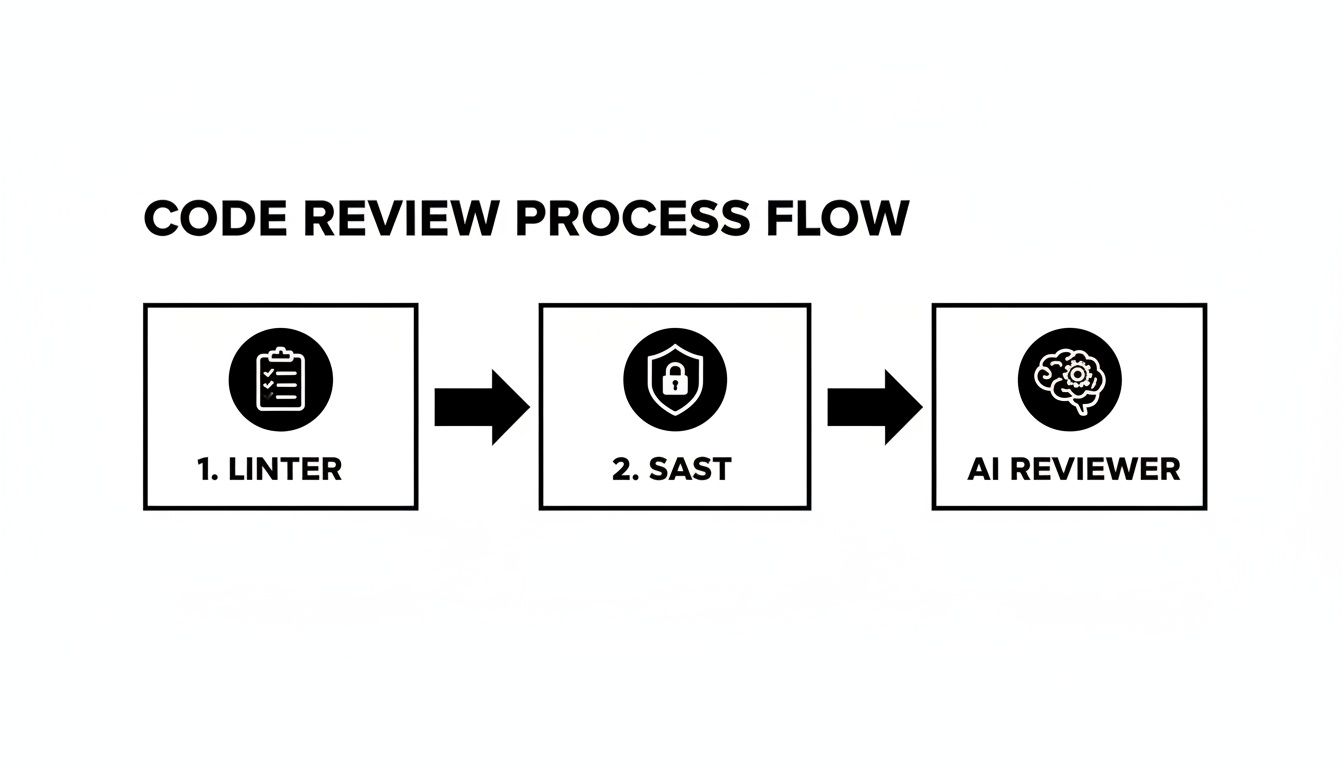
This layered approach means that by the time a human reviewer even gets tagged, the code has already passed a solid baseline for style, security, and basic functionality.
Balancing Acceleration and Enforcement
A common mistake is setting up every automated check as a hard gate. If a single formatting error blocks an entire PR from being merged, developers will quickly see the system as more of a roadblock than a helper. The secret to getting your team on board is to create a low-friction process that intelligently separates suggestions from showstoppers.
You can do this by setting up a mix of blocking and non-blocking checks:
*   **Non-Blocking Checks:** Linter warnings, stylistic suggestions, or informational alerts from an AI reviewer should provide feedback without actually preventing a merge. Think of them as helpful advice, not strict commands.
*   **Blocking Checks:** Critical issues like failing unit tests, high-severity security vulnerabilities, or a big drop in code coverage should be configured as required checks that **must pass** before the PR can be merged.
This balanced approach makes sure automation speeds up work instead of slowing it down. It keeps the team moving fast on minor issues while maintaining a strong quality gate for the things that really matter.
Automating code review is a huge piece of the larger puzzle of business process automation solutions that streamline workflows and cut down on manual work. By letting machines handle the repetitive stuff, you free up your technical teams to focus on the big-picture problems like architecture and creative solutions. It's all about building a workflow where quality is an integrated, helpful partner, not a bottleneck.
To learn more about setting this up, check out our guide on how to start https://blog.pullnotifier.com/blog/code-quality-checks-with-github-actions-and-slack.
Why Human Reviewers Still Matter
With all the talk about powerful automation, it’s easy to think the end goal is to boot humans out of the code review process entirely. But that’s a common myth that completely misses the point. The best approach isn’t a machine takeover; it’s a powerful partnership where automated tools and human reviewers work together, each playing to their strengths.
Think of an automatic code review tool as a tireless junior developer. It's fantastic at catching about 80% of the common stuff—style errors, known security flaws, and simple bugs. It handles the repetitive, predictable work with incredible speed and never gets tired.
This first pass is a game-changer. It clears out all the noise, making sure that by the time a pull request gets to a senior engineer, the easy stuff has already been handled. This completely transforms the manual review from a tedious proofreading job into a high-impact, strategic assessment.
Where Human Expertise Shines
While automation is brilliant at spotting what it's been programmed to find, it’s missing the one thing that defines a senior engineer: context. A machine can’t possibly understand the why behind the code. This is where human reviewers become more critical than ever, focusing their skills on things automation just can't touch.
Human oversight is absolutely essential for:
*   **Architectural Integrity:** Does this new feature fit the long-term vision for the codebase? Or is it a sloppy workaround that’s going to create a mess down the road?
*   **Business Logic Validation:** Does the code actually do what the business needs it to do? This includes all the subtle nuances and tricky edge cases that the original ticket might have glossed over.
*   **Mentorship and Growth:** Is there a cleaner, more maintainable, or better-performing way to solve this problem? Human review is one of the best opportunities for mentoring and leveling up the whole team. Giving good feedback here is key, and you can learn more from our guide on [how to deliver constructive feedback in code reviews](https://blog.pullnotifier.com/blog/ultimate-guide-to-constructive-feedback-in-code-reviews).
Automation doesn't replace human expertise—it frees it up. By handling the mundane tasks, it lets senior developers focus their critical thinking where it truly counts.
Acknowledging Automation’s Blind Spots
It's also important to be realistic about what today's tools can and can't do. Automated reviewers are amazing, but they are far from perfect.
Studies of real-world vulnerabilities have shown that automated tools can miss around 22% of genuine issues and have false positive rates anywhere from 30-60%. One analysis of 815 vulnerable commits found that even the best SAST tools only caught about half the problems.
This reality highlights why a collaborative system is so important. Automation gives you an essential safety net, but it's the combination of machine-speed checks and deep human analysis that creates truly high-quality, secure, and maintainable software.
This hybrid model also helps engineering managers justify tool investments by framing them as productivity multipliers, not people replacements. It reassures developers that their deep knowledge and problem-solving skills are more valuable than ever, turning them from syntax checkers into architects of quality.
Best Practices for Effective Automated Reviews

Just installing a bunch of automated tools isn't a strategy—it's a recipe for chaos. To get real value, you have to weave them into your team's culture and workflow. An effective automatic code review system does more than just catch bugs; it builds a positive feedback loop that speeds up development without drowning your team in alerts.
The goal here is to create a system that developers see as a helpful assistant, not a noisy micromanager. That takes a balanced approach focused on smart iteration, thoughtful customization, and clear communication. Let's dig into the principles that turn a random collection of tools into a high-impact quality engine.
Start Small and Iterate
Trying to boil the ocean by launching a complex setup with dozens of strict rules is a surefire way to frustrate everyone. A much saner approach is to start small, prove the value, and build on that success. Kick things off with a single, high-impact tool that solves a common headache.
For most teams, a simple linter is the perfect entry point. It instantly ends pointless debates over code style and catches basic syntax errors, delivering immediate, tangible wins. Once your team is on board, you can start layering in more powerful tools.
*   **Phase 1:** Roll out a linter (like ESLint or Prettier) with a forgiving configuration.
*   **Phase 2:** Introduce a basic security scanner (SAST) to flag only high-severity vulnerabilities.
*   **Phase 3:** Layer in automated tests as blocking checks within your CI/CD pipeline.
*   **Phase 4:** Experiment with an AI-powered reviewer for more nuanced feedback on complex logic.
This phased rollout lets your team adapt to one change at a time, building trust and buy-in with each step.
Configure, Don't Complain
Out-of-the-box tool configurations are almost never a perfect fit. They tend to spew out a high volume of "false positives"—warnings that just aren't relevant to your codebase or standards. This noise leads to alert fatigue, and soon enough, developers start ignoring the feedback altogether.
The fix is to invest time in fine-tuning the rules. Treat your configuration files like living documents that evolve with your team’s standards. If a rule consistently flags non-issues, tone down its severity or just turn it off.
Your goal is a high signal-to-noise ratio. Every alert from an automated tool should be actionable and relevant. When the feedback is consistently valuable, developers will trust the system and actually engage with its suggestions.
This proactive approach transforms the tool from an annoyance into a tailored assistant that reinforces your team's specific engineering culture.
Integrate with Smart Notifications
Nothing kills focus faster than a constant stream of notifications. If every linting error and CI status update pings an entire Slack channel, people will tune out. Effective automation hinges on a smart notification strategy that gets the right information to the right people at the right time.
Whenever possible, route feedback directly into the pull request interface. This keeps the conversation in context and avoids yanking developers out of deep work. For external alerts, use tools that can consolidate updates and route them intelligently. For example, you could set up your system to:
*   **Mention specific reviewers** in a dedicated channel only when a PR is ready for human eyes.
*   **Send a direct message** to the author when a critical build fails.
*   **Post a daily summary** of sprint progress to a team-wide channel.
Educate the Team
For automation to stick, your team needs to see it as a tool for learning and improvement, not a punishment. Frame the automated feedback as objective, constructive guidance designed to help everyone write better code. It's a way to catch small mistakes early, learn best practices, and free up manual reviews from nitpicking.
Beyond automated reviews, folding in various quality assurance testing methods helps ensure comprehensive code health. Emphasize that these tools liberate senior developers to focus on mentorship and tough architectural challenges—activities that deliver far more value than fixing indentation.
Define Your Metrics
You can't improve what you don't measure. To prove the value of your automatic code review system and find areas for improvement, you need to track key metrics. These data points give you objective proof of the system's impact.
Key performance indicators to watch include:
*   **Cycle Time:** The time from first commit to merge. Automation should shrink this number significantly.
*   **Review Response Time:** How quickly feedback—both automated and human—is delivered.
*   **Defect Escape Rate:** The number of bugs that make it to production. This should trend downward over time.
*   **Code Churn:** The percentage of code that gets rewritten shortly after being committed.
Tracking these metrics will help you justify the investment in tooling and guide future tweaks to your process.
The Future of AI-Powered Code Analysis
Automatic code review is evolving far beyond the simple, rule-based checks we're used to. While linters and static analysis tools are still a critical foundation, the real frontier is intelligent, context-aware analysis driven by AI. This isn't just about spotting errors anymore; it's about proactively making the entire codebase better.
This new generation of AI isn't just looking at the few lines of code in a pull request. It's piecing together a holistic understanding of the entire system. Imagine an AI that knows how a tiny change in one microservice might ripple out and affect a completely different part of the application, flagging downstream impacts long before they become production incidents.
From Error Detection to Code Generation
The direction here is clear: AI is learning from millions of open-source projects and internal codebases to spot subtle anti-patterns and performance bottlenecks that even a senior developer might miss. These tools are no longer just critics. They're becoming collaborators, suggesting sophisticated refactoring options and even generating the boilerplate code to fix the very issues they find.
This creates a powerful, continuous feedback loop. Developers get guidance that not only fixes the immediate problem but also teaches them better engineering practices along the way, effectively scaling mentorship across the entire team.
Intelligent Agents as Teammates
The future isn't just about catching bugs faster. It's about augmenting human developers with AI partners that can handle the massive cognitive load of understanding sprawling, complex systems.
By 2026, AI code review is on track to transform from a bottleneck into an absolute powerhouse. Today, 84% of developers already use AI that authors 41% of code, but our ability to review that code is struggling to keep up with the explosion in pull request volume. The industry is moving toward "agentic" systems that can understand a full codebase better than any single human, making deep context a core part of the development process. You can dig into some interesting predictions for AI-assisted coding on dev.to to learn more.
For forward-thinking leaders, the takeaway is that AI will redefine what's possible in software engineering. These tools will proactively guide teams toward higher-quality outcomes, making expertise and best practices instantly accessible to every developer, at scale.
This shift will fundamentally change the dynamic of how we build software. The focus will move from a reactive cycle of finding and fixing mistakes to a proactive one of building resilient, high-performance systems from the ground up, with AI as an integral partner in the quest for engineering excellence.
Common Questions About Automated Code Review
Even with a solid plan, bringing in new tools always raises a few questions. Let's tackle some of the most common ones head-on so your team can feel confident jumping into automated code review.
Will Automation Make Human Reviewers Obsolete?
No, not even close. Think of automated tools as a first line of defense. They’re fantastic at spotting objective, clear-cut problems—things like style violations, syntax errors, and known security vulnerabilities. They handle the easy stuff, consistently and without getting tired.
But these tools can't grasp the why behind your code. They have zero context for business logic, architectural decisions, or whether a feature truly meets a user's needs. That’s where human insight is irreplaceable.
The best setup is a partnership. Automation cleans up the noise, freeing up your engineers to focus their brainpower on the complex, high-impact stuff that actually matters. It elevates the human reviewer, it doesn’t replace them.
How Do We Handle Notification Noise?
This is a huge—and completely valid—concern. Nobody wants another firehose of alerts. The goal is to turn chaotic noise into a clean, actionable signal.
Here’s how you can tame the alert beast:
*   **Set Severity Thresholds:** Configure your tools to only create high-priority alerts for critical issues. Minor style tweaks don't need to ping the whole team.
*   **Keep Feedback in Context:** Route comments and suggestions directly into the pull request. This is where developers are already working, so the feedback is immediate and relevant.
*   **Use Dedicated Alerting Tools:** Use tools that can batch notifications, filter them, and send them to the right people or Slack channels instead of spamming `@here`.
What Is the Best Way to Get Team Buy-In?
Getting your team on board is everything. The key is to introduce automation as a helpful assistant, not a robotic overlord policing their work.
Start small. Pick one simple, low-impact tool, like a linter with a forgiving configuration, and run a pilot project. Let the team see for themselves how it works.
Focus on the wins. Highlight how it means less time spent on nit-picky comments during manual reviews, how it catches silly mistakes before they become bigger problems, and how its feedback helps everyone learn.
Once you have some data—like reduced review times or fewer hotfixes—share it. When people see the tangible benefits firsthand, getting them to adopt it becomes a much easier conversation.
Stop drowning in pull request noise and start accelerating your review cycles. PullNotifier delivers clean, consolidated PR updates directly to Slack, cutting through the chaos so your team can focus. Get started for free at PullNotifier.