- Published on
Master Your Bitbucket Integration With Slack
- Authors

- Name
- Gabriel
- @gabriel__xyz
Connecting Bitbucket to Slack is about more than just getting another stream of notifications. It’s about giving your development team back its most valuable resource: focus. This integration pipes real-time updates on pull requests, commits, and build statuses right into the place where your team is already talking.
The goal? To cut down on the constant app-switching that kills productivity.
Why Connect Bitbucket And Slack in the First Place

Let's get real. The biggest win from a Bitbucket integration with Slack isn't just seeing more alerts—it's about reclaiming developer headspace. The core problem it solves is context switching, a notorious productivity drain for any software team.
Every single time a developer has to tab away from their IDE or Slack to go check on a pull request, see if a pipeline passed, or find a comment thread in Bitbucket, they lose momentum. That constant back-and-forth fragments concentration and quietly introduces delays that add up over a sprint.
By piping those critical events directly into a dedicated Slack channel, you centralize the entire conversation around your code. It creates a single, scannable feed that keeps everyone on the same page without needing to constantly ask for status updates. You can dig deeper into how to improve team communication and boost performance in our related guide.
The Real Impact on Developer Headaches
A smartly configured integration solves the little frustrations that quietly slow teams down every day. Think about it: you can completely eliminate questions like, "Has anyone had a chance to look at my PR?" or "Did the build pass on staging?" The answers just appear, right there in the channel.
Here are the key problems this integration solves:
*   **Missed Pull Request Updates:** No more stale PRs. Notifications for new requests, comments, and approvals pop up instantly in Slack, prompting much faster review cycles.
*   **Information Silos:** It breaks down the walls between developers. When repository activity is visible to the whole team, it naturally fosters a culture of shared ownership and collaboration.
*   **Notification Overload:** With the right filters, you can be surgical. Route high-priority alerts (like a failed build on the `main` branch) to one channel and keep general activity in another. This cuts right through the noise.
While we're focused on Bitbucket and Slack here, it's helpful to understand the broader world of various integration solutions to see how you can connect your entire toolchain. Getting this right leads to a more transparent, responsive, and focused development process.
How to Set up the Official Bitbucket Slack App
If you're looking for the most straightforward way to get Bitbucket and Slack talking, the official Atlassian app is your best bet. It’s built for both Bitbucket Cloud and Data Center, giving you a secure, feature-rich connection without the fuss of manually configuring webhooks. Let’s get it set up.
The whole process kicks off in the Slack App Directory. Just search for "Bitbucket," find the official app made by Atlassian, and hit Add to Slack. This will walk you through the standard permissions dialog, which is the first step in creating a secure link between the two platforms.
Once installed, the app will be waiting in your Slack workspace. The real work begins when you connect it to your Bitbucket account, which is handled with a clean, secure authentication process.
Authenticating and Connecting Your Workspace
Security is everything when you’re hooking up your dev tools. The Bitbucket Slack app uses OAuth 2.0, which is the industry standard for authorization. In simple terms, this means you’re giving the app specific permissions to act on your behalf without ever handing over your Bitbucket password. Think of it as a secure handshake, not a key exchange.
To get your Bitbucket workspace hooked up, just pop into any Slack channel and run a simple slash command: /bitbucket login
Running this command opens a secure pop-up from Atlassian. You'll be prompted to log in to your Bitbucket account (if you aren’t already) and authorize the connection. It’s a one-time step that links your entire Bitbucket workspace, making all of your repositories available to connect.
Heads up for those using Bitbucket Data Center: there's one critical prerequisite. Your Bitbucket instance must be accessible from the public internet over HTTPS and have a valid SSL certificate. This isn’t optional—it’s a baseline security measure to ensure every piece of data flying between Bitbucket and Slack is encrypted.
The official Atlassian Marketplace listing gives a nice visual of what you can expect.
As you can see, the interface gives you a quick look at the key actions you can perform with slash commands, like creating pull requests right from Slack.
Linking Individual Repositories to Channels
Okay, your workspace is connected. Now it's time to tell Bitbucket which repositories should send updates to which Slack channels. This is where you gain granular control and save your channels from becoming a firehose of unfiltered notifications.
First, go to the Slack channel where you want the notifications to appear. For instance, if you have a project codenamed "Phoenix," you'd probably jump into your #dev-phoenix channel.
Once you're in the channel, use the connect command followed by your repository's URL: /bitbucket connect [repository URL]
After running the command, the Bitbucket app will drop a confirmation message in the channel. From that point on, that channel will start receiving notifications for key repository events by default, including:
*   **Pull Requests:** Opened, merged, declined, or commented on.
*   **Commits:** Pushed to any branch.
*   **Build Status:** Updates from your integrated CI/CD pipeline.
Pro Tip: Don't just dump all your repository connections into your main development channel. That’s a recipe for chaos. Create dedicated channels for high-traffic repos or specific team projects. This one organizational step is the single most effective way to keep notification noise under control.
The OAuth flow here is pretty smart—it ensures individual Slack accounts are connected to Bitbucket, which maintains a clear audit trail and helps prevent unauthorized actions. This is a huge win for any team in a compliance-focused industry. It also makes setup incredibly fast; what used to take a developer 30 minutes to configure can now be done in about 5-10 minutes with a simple /bitbucket connect command.
For a deeper dive into the Data Center specifics, you can always review Atlassian's official documentation. This process doesn't just save time—it bakes better security practices in from the start. Your integration is now live and ready for you to fine-tune.
Customizing Notifications To Reduce Channel Noise
Getting the basic Bitbucket integration with Slack up and running is just the start. The real value comes when you turn it from a noisy, fire-hose alert system into a high-signal communication tool your team actually finds useful. Without some careful tuning, your channels will quickly get flooded with updates that are irrelevant to most people, leading to that dreaded "mute channel" reflex we all know too well.
The key is to ditch the one-size-fits-all approach. Instead, you want to build a finely tuned notification strategy with specific rules that filter events and route them to the right channels—or even directly to the right people.
This visual flow shows the core steps for getting the integration active, which is the foundation for the customization we're about to dive into.
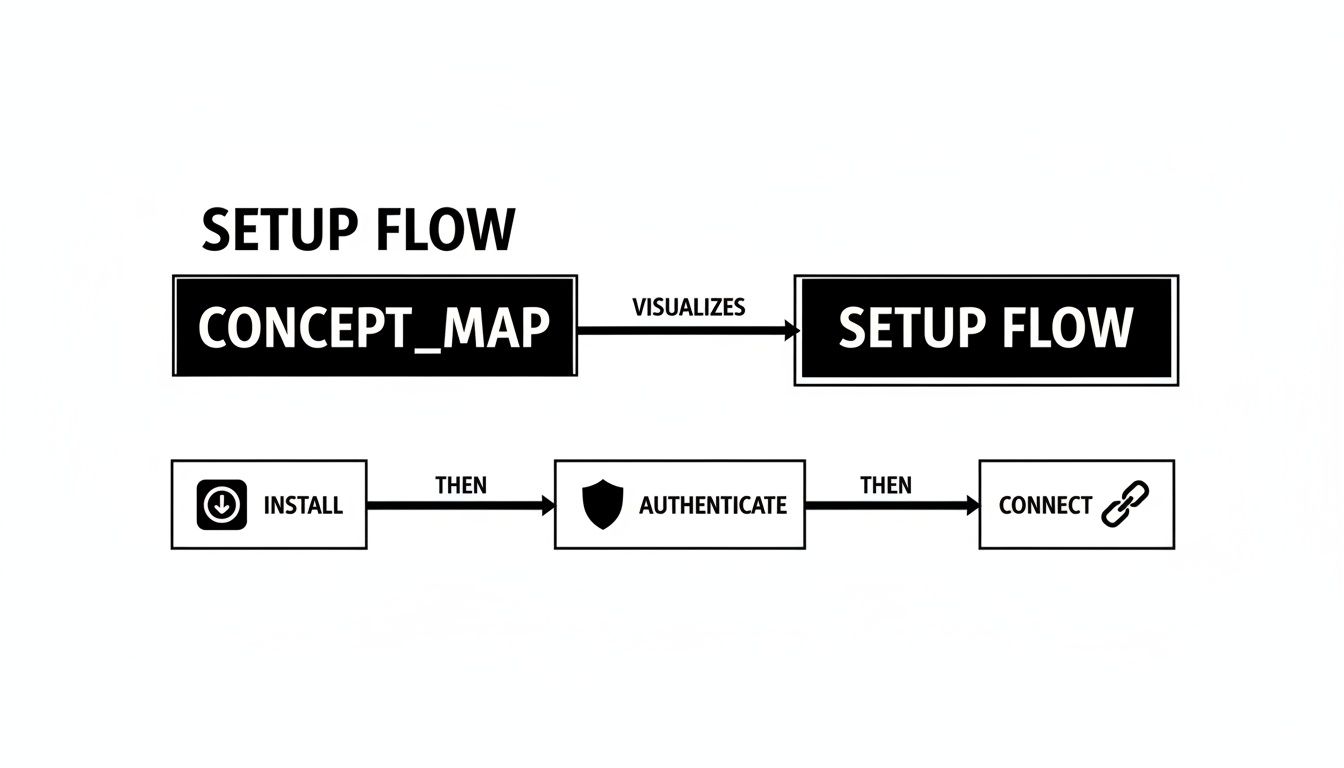
This simple process of installing, authenticating, and connecting repositories is what unlocks the powerful filtering capabilities that make all the difference.
Create Purpose-Driven Channels
The most effective first step is to stop sending every single notification to a generic #development channel. Instead, break out your notifications into multiple channels, each with a crystal-clear purpose. This strategy immediately segments the flow of information, making it way easier for developers to focus on what actually matters to their work.
Here’s a practical example of how you could structure your channels:
*   **`#dev-prs-main`:** This channel is exclusively for pull requests targeting the `main` or `master` branch. Activity here is high-stakes since it directly impacts your production environment. Everyone needs to see this.
*   **`#dev-builds-staging`:** Dedicate this channel to CI/CD pipeline notifications for your staging environment. It keeps build failures and successes visible without cluttering up the main conversation.
*   **`#dev-feature-x`:** For larger projects, spin up temporary channels for specific feature branches. All PRs, commits, and comments related to "Feature X" go here, keeping the team focused and the updates contained.
This method lets team members join only the channels relevant to their current tasks, dramatically cutting down the noise in their day-to-day. By organizing notifications this way, you make the integration a valuable asset rather than just another distraction.
Use Advanced Subscription Filters
Once you have your channels set up, you can get granular with the integration’s subscription commands. The /bitbucket subscribe command isn't just for connecting a repository; it's also for defining what gets posted. You can add flags to specify branches, event types, and a whole lot more.
For instance, to only get notifications for PRs created or merged on the main branch in your #dev-prs-main channel, you’d use a command structure that filters by both branch and event. This level of control is where the integration truly starts to shine.
Key Takeaway: The goal isn't just to see notifications, but to create a system where every alert is actionable for the people who see it. If an alert doesn't require someone in the channel to do something, it's probably just noise.
The ability to consolidate pull request, build, and commit notifications into specific Slack threads delivers some serious improvements in team communication. To learn more about how Atlassian structures this, you can explore their insights on Slack and Bitbucket Data Center integration. For teams working with complex monorepos, check out these 7 tips for managing PR notifications in monorepos.
Going Beyond the Native Integration
When your team is just starting out, the official Bitbucket Slack app is a fantastic tool. It gets the job done. But as your development process matures and your team scales, you might find yourself hitting its limits.
This isn't a knock on the native app—it's a sign of healthy growth. Your workflows are becoming more sophisticated, and you need a toolset that can keep up.
You’ll know you’re there when the questions start changing. Instead of just wanting to know if a PR was opened, your team starts asking things like, "Can we only get pinged for PRs touching a specific file path?" or "Is there a way to automatically tag the code owner in the Slack thread instead of spamming the whole channel?"
When you need that level of granular control, it’s time to look beyond the out-of-the-box solution.
Recognizing the Need for Advanced Tools
The tipping point usually comes with scale. A small team pushing a handful of pull requests a day can get by just fine with the default firehose of notifications.
But picture a larger organization with dozens of developers working across multiple repos. That same notification flow quickly turns into channel noise, burying the important updates and making the integration less valuable.
Here are a few classic scenarios where a more powerful tool becomes essential:
*   **Complex Routing Logic:** You need to route notifications based on PR labels, draft status, or even the number of files changed—not just the repository or branch.
*   **Custom Message Formatting:** You want to tweak the Slack message to include direct links to CI/CD jobs, Jira tickets, or other critical metadata.
*   **Deeper Analytics:** You’re looking to track metrics like average time-to-merge or pinpoint reviewer bottlenecks, which requires more than simple alerts.
When your Bitbucket integration with Slack starts creating more noise than signal, it’s a clear sign you need more advanced filtering and routing. The whole point is to make every single notification actionable.
If you look at how teams have adopted these tools over time, there's a clear trend. Many moved from basic webhooks to more managed, specialized apps. In fact, some studies suggest 30-40% of organizations eventually find the native integration doesn't quite meet their specific workflow demands, which has fueled the rise of dedicated notification tools.
Marketplace Apps That Offer More Control
This is exactly where specialized marketplace apps like PullNotifier or Move Work Forward step in. These tools were built from the ground up to solve the problem of high-volume, high-noise notifications.
They act as an intelligent filter between Bitbucket and Slack, giving you the power to create highly specific rules that match your team’s unique way of working. For more ideas on tools that can sharpen your team’s edge, check out this list of the top 10 best Slack apps for developers.
To really grasp how a fine-tuned integration fits into the bigger picture, it helps to understand how to build your DevOps pipeline. A solid notification system is a cornerstone of an efficient, automated workflow. By knowing when to move beyond the native app, you ensure your integration can grow right alongside your team.
Solving Common Bitbucket Integration Problems

Even the most buttoned-up Bitbucket integration with Slack can hit a snag. When notifications suddenly go dark, the usual suspect is surprisingly simple: permissions. If alerts for a specific repository stop flowing, the very first thing I check is whether the user who authenticated the connection still has read access.
It’s a classic silent failure. A developer gets moved off a project, their permissions get downgraded, and poof—the integration just stops. There’s no big error message, just radio silence. The fix is usually to have someone with the right access re-authenticate the connection for that channel.
Diagnosing Authentication and Connectivity Errors
Authentication issues are another common headache. If you're hitting errors while trying to link a new repository, sometimes the best move is to just start fresh. You can force a full re-authentication by running the /bitbucket logout command in Slack, then follow it up with /bitbucket login to forge a new, clean connection.
Things get a bit more complex for teams running on-premise with Bitbucket Server or Data Center. Suddenly, you've got network variables that cloud users never have to think about.
*   **Firewall Blocks:** Your network firewall needs to be configured to allow outbound HTTPS traffic from your Bitbucket instance to Slack's endpoints. If it's blocked, Bitbucket can't push its notification payloads out.
*   **Invalid SSL Certificates:** Slack is strict about security and requires a valid, trusted SSL certificate for your Bitbucket Server. A self-signed or expired certificate is a non-starter and will get the connection rejected immediately.
Troubleshooting Tip: I always use the
/bitbucket connect [repository URL]command in a private channel or a direct message to myself for testing. If it connects successfully there, the problem isn't the integration itself—it's almost certainly a misconfiguration in the original team channel.
Fixing these on-premise issues often means a quick chat with your IT or network security team. They can help ensure the path between your server and Slack is clear and secure, keeping your development workflow humming along without any interruptions.
Got Questions? We've Got Answers.
Here are some quick, no-fluff answers to the questions we hear most often about connecting Bitbucket and Slack. This should clear up any lingering doubts and give you some solid tips for managing your setup.
Can I Route Notifications From Different Bitbucket Branches to Different Slack Channels?
Yes, and honestly, you absolutely should. This is one of the best ways to cut down on notification noise and make sure alerts are actually relevant to the people who see them.
With the native integration or a third-party app, you can set up specific rules to filter notifications based on the branch. A classic example we see all the time is routing every pull request that targets the main branch to a high-priority channel like #releases or #dev-urgent. At the same time, you can send all the routine updates for feature branches to a team-specific channel, say #feature-phoenix-dev. It’s a simple change that ensures the right eyes are on the right information.
What Are the Security Implications of Connecting Bitbucket to Slack?
Security is always a top concern when you're linking tools, and for good reason. The official Bitbucket integration uses OAuth 2.0, which is the industry standard for secure authorization. This means you grant the app specific, revocable permissions without ever handing over your Bitbucket password—way more secure than older methods that used static keys.
If your team is on Bitbucket Data Center, it's critical that your instance is accessible over HTTPS with a valid SSL certificate. This keeps all the data encrypted while it travels between your server and Slack.
A Quick Security Tip: Always, always review the permissions an app asks for during installation. Your rule of thumb should be to grant only the bare minimum access it needs to do its job. Using tools that require minimal permissions, like PullNotifier, can tighten your security by shrinking the potential attack surface.
Does the Integration Work With Bitbucket Server and Slack Enterprise Grid?
It sure does. The official Atlassian integration was built to work with Bitbucket Cloud, Bitbucket Server, and Bitbucket Data Center. It also has full support for Slack Enterprise Grid, which is a huge plus for larger organizations.
This setup lets a company connect a central Bitbucket instance to many different Slack workspaces within their Grid. For instance, the engineering department can have its own notification setup in its workspace, while the product team has a completely different one in theirs—all pulling from the same repositories. You get the best of both worlds: centralized control and team-specific autonomy, which is exactly what you need to scale effectively.
Ready to kill the notification noise and speed up your code reviews? PullNotifier delivers clean, actionable pull request updates right where your team works. Cut through the clutter and get your team focused. Start for free on pullnotifier.com and see the difference.