- Published on
Continuous integration testing: Accelerate Your Pipeline with Smarter QA
- Authors

- Name
- Gabriel
- @gabriel__xyz
Continuous integration testing is all about running automated tests against your code every time you push a change to a central repository. It's like having an automated quality checkpoint that validates every new piece of code before it gets mixed into the main codebase. This practice is a cornerstone of modern development, helping teams squash bugs early and build far more reliable products.
What Is Continuous Integration Testing
Think of it like this: you're building a skyscraper, and every single steel beam is automatically stress-tested the moment it's welded into place. If a beam is faulty, the crew gets an alert right away—not days later after three more floors have been built on top of it. That’s the whole idea behind continuous integration testing.
It’s an automated safety net that catches problems when they're small and easy to fix. Instead of developers working in silos for weeks only to face a chaotic merge day, CI encourages them to push small changes often. Each push triggers an automated build and a battery of tests, giving instant feedback.
The Shift From Manual To Automated
Before CI became standard practice, teams were stuck in "merge hell." It was a painful, all-hands-on-deck process where everyone tried to merge their code at the end of a long cycle, inevitably leading to a mess of conflicts and regressions. Continuous integration testing solves this by making integration a boring, routine event.
But this is more than just a process—it’s a complete cultural shift. The market certainly reflects its importance, with CI tools projected to grow into a USD 2.91 billion industry by 2032. This isn't surprising when you consider that old-school workflows can spike bug rates by up to 50% and cause deployment failures in 15-20% of releases. With good CI and testing, those failures drop to under 1%.
Core Goals Of CI Testing
The main goal here isn't just finding bugs; it's about making the feedback loop as short as possible. When a test fails, the developer who wrote the code gets notified in minutes, while the logic is still fresh in their mind. This rapid validation lets teams move faster and with way more confidence.
Here's a quick look at the core components of CI testing.
Continuous Integration Testing at a Glance
| Concept | Description |
|---|---|
| Trigger | A code commit to a shared repository (e.g., a push to a feature branch). |
| Build | The CI server automatically compiles the code and its dependencies. |
| Test | A suite of automated tests (unit, integration, etc.) runs against the new build. |
| Feedback | The results are immediately sent back to the team—pass or fail. |
This simple loop forms the foundation of a reliable development pipeline.
The key goals really boil down to a few key things:
*   **Early Bug Detection:** Catching defects right after a commit, when they are cheapest and easiest to fix.
*   **Preventing Integration Problems:** Making sure new code from different developers plays nicely together.
*   **Improving Code Quality:** Enforcing a consistent quality bar that all code must clear before being merged.
*   **Enabling Faster Delivery:** Giving teams the confidence to release updates more frequently and reliably.
Continuous Integration Testing is a non-negotiable part of modern software development best practices that leads directly to higher quality and faster delivery.
"CI is the practice of integrating code from multiple developers into a single project, multiple times a day. The goal is to prevent integration problems, catch bugs early, and have a codebase that's always in a working state."
By automating this crucial step, teams can stop wasting time debugging gnarly integration issues and focus on what they do best: building great features. To dig deeper, check out our guide on 8 continuous integration best practices for 2025.
How Testing Fits Into Your CI/CD Pipeline
Think of your CI/CD pipeline as a software factory's assembly line. Raw code goes in one end, and a ready-to-ship application comes out the other. In this setup, continuous integration testing is your series of automated quality control stations placed at key points along the line.
Every time a developer pushes new code, it’s like a fresh component arriving for assembly. The CI server immediately grabs it and starts it down the line. But it doesn't just move from one stage to the next; it has to pass a gauntlet of automated tests that act as quality gates.
If the code breezes through a station—say, unit tests—it gets a green light and moves on. If it fails, a red light flashes. The assembly line halts for that specific component, and it's sent right back to the developer with a report detailing exactly what broke.
The Automated Quality Gates
This instant feedback loop is what powers modern software development. It stops a tiny defect from getting buried under layers of new code, where it could grow into a tangled, massive problem. Instead of hunting for bugs days or weeks later, teams find and fix them in minutes.
Different tests serve as different quality checks, each with a specific job.
*   **Unit Tests** are your first and fastest checkpoint. They inspect the smallest, most isolated pieces of your code, like checking if a single bolt is torqued correctly.
*   **Integration Tests** come next. They make sure different components play nicely together, like ensuring the engine and transmission connect and function as a unit.
*   **End-to-End (E2E) Tests** are the final inspection. They mimic a real user's journey through the application to confirm the entire system works as expected—basically, the final test drive of the finished car.
This layered strategy ensures that simple issues are caught early by fast, cheap tests, while the more complex, system-wide checks are saved for later. This structure gives engineering managers and tech leads a clear view of code quality at every step.
"A CI/CD pipeline without automated testing is like an assembly line without quality control. You're just building things faster, not better. The tests are what provide the confidence to accelerate."
This model isn't just about efficiency; it's a financial necessity. Market demands have fueled the growth of CI, with the CI tools market projected to hit USD 7.45 billion by 2030. This growth solves a huge pain point: traditional development used to burn 20-30% of its time on manual bug hunts. By automating these checks, CI testing slashes deployment failures by up to 90% and helps teams fix issues 5x quicker. You can find more details about the CI tools market growth on openpr.com.
To help you visualize where each test fits, here's a quick breakdown of the most common types.
Key Testing Types in a CI Pipeline
This table offers a comparative look at different automated tests, highlighting their scope, speed, and ideal placement within the CI/CD pipeline.
| Test Type | Scope | Execution Speed | Pipeline Stage |
|---|---|---|---|
| Unit Test | A single function or module in isolation | Milliseconds | Early (CI) |
| Integration Test | Interaction between multiple modules | Seconds to Minutes | Early (CI) |
| Contract Test | API contracts between services | Seconds | Early (CI) |
| End-to-End (E2E) Test | Full user workflows across the entire app | Minutes to Hours | Late (CI/CD) |
| Smoke Test | Basic, critical functionality post-deployment | Seconds | Post-Deployment (CD) |
Each test type builds on the last, creating a comprehensive safety net that gives teams the confidence to move fast without breaking things.
From Integration To Delivery
When a code change passes every single testing gate in the continuous integration (CI) phase, it's been proven stable and ready for the main codebase. This is a huge milestone. At this point, the code is considered "done" and deployable.
This is where the "CD" in CI/CD—Continuous Delivery or Continuous Deployment—kicks in. Armed with the confidence from a battery of passed tests, the pipeline can automatically push the new code to a staging environment or even straight to production.
Without solid continuous integration testing, this whole process would be incredibly risky. These automated tests are the foundation of trust that lets teams ship code quickly and reliably, making sure flawed code never reaches a user and turning integration into a predictable, everyday event.
How to Build a Powerful Testing Strategy
Building an effective continuous integration testing strategy isn’t about running every single test you can think of—that’s just a recipe for slow, expensive pipelines. The real goal is to run the right tests at the right time. A smart approach gives you fast feedback and boosts developer confidence while cutting down on costs and flaky tests that break for no reason.
The industry-standard blueprint for this is the Test Pyramid. Think of it as a guide for balancing your testing portfolio. The pyramid shape isn't just for show; it illustrates a healthy ratio of different test types, from a wide base of fast, simple tests to a narrow peak of slow, complex ones. Each layer provides a different kind of safety net.
This visual shows the basic flow where testing fits into the pipeline.
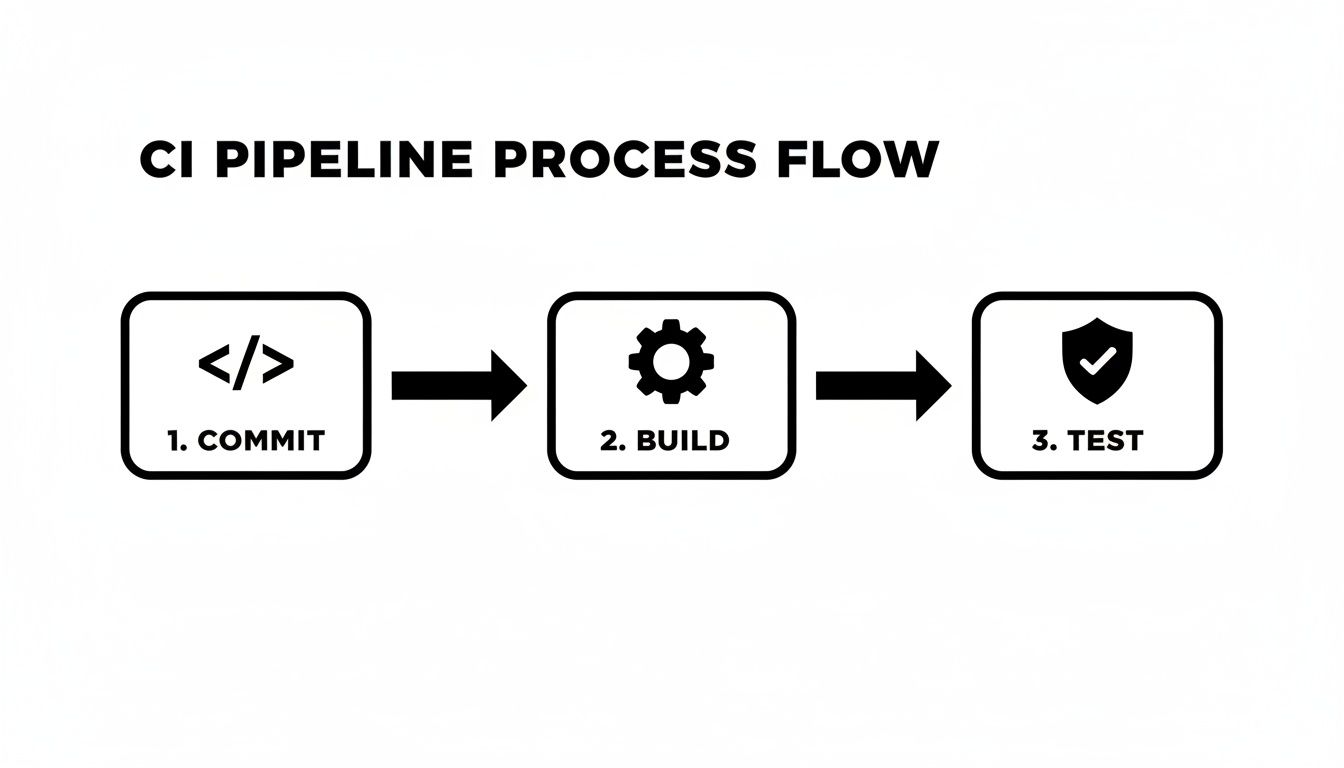
The diagram simplifies the process into its core stages: a developer commits code, the application is built, and then a suite of automated tests kicks in to validate its quality before it moves on.
The Foundation: Unit Tests
At the base of the pyramid, you have the largest and most important layer: unit tests. These are small, lightning-fast tests that check individual components—like a single function or a class—in complete isolation from the rest of the system. Because they don’t rely on external dependencies like databases or APIs, they can run in milliseconds.
The vast majority of your test suite should be made up of unit tests. Having thousands of them creates a fine-grained safety net that can pinpoint the exact location of a bug, making fixes quick and straightforward. They are the first line of defense in any solid CI testing setup.
The Middle Layer: Integration Tests
Moving up the pyramid, we find integration tests. This layer is smaller because these tests are naturally slower and more complex. They’re designed to verify that different parts of your application can actually work together as a team. For example, an integration test might check if your app can correctly write data to a database and then read it back.
While unit tests work in isolation, integration tests check the seams where components connect. This is also where you might run contract tests, which are essential for keeping microservices in sync. For teams working with modern API architectures, a comprehensive guide to testing GraphQL APIs offers valuable strategies for this layer.
The Peak: End-to-End Tests
At the very top of the pyramid sits the smallest and most expensive layer: end-to-end (E2E) tests. These tests simulate a real user’s journey through your live application, clicking buttons and filling out forms just as a person would. They are incredibly powerful for validating entire workflows but are also notoriously slow, brittle, and a headache to maintain.
Because of their high cost, you should have very few E2E tests. Reserve them only for your most critical user paths, like the checkout process or user registration.
The economic and quality impact of this structured approach is huge. The software testing market is projected to hit USD 112.5 billion by 2034, with automation growing at a 14.5% CAGR. This growth is fueled by CI, where 89.1% of organizations embed testing to catch defects instantly—a world away from the 40-60% failure rates seen in manual merges.
A balanced test pyramid ensures your CI pipeline is both a safety net and an accelerator. It provides maximum confidence with minimum friction, letting developers move fast without breaking things.
By following this model, teams can build a CI testing strategy that is fast, reliable, and cost-effective. You get the rapid feedback needed to ship high-quality software with confidence.
Choosing the Right Tools for Your Pipeline
Your continuous integration testing strategy is only as good as the tools you use to run it. Picking the right CI server and testing frameworks can feel like a huge task, but it really boils down to a few key things: your team's size, your tech stack, and how you like to work. It's less about finding one "best" tool and more about piecing together a stack that just fits.
The whole process usually starts with the CI server. Think of it as the brain of your pipeline—it's where you define workflows, kick off builds, and run all your automated tests.
Hosted Solutions vs Self-Managed Servers
One of the first big forks in the road is deciding between a cloud-based, hosted solution and running your own CI server. Each path has some serious trade-offs when it comes to maintenance, flexibility, and cost.
Hosted CI/CD Services (SaaS):
*   **Examples:** [GitHub Actions](https://github.com/features/actions), [CircleCI](https://circleci.com/), [GitLab CI/CD](https://docs.gitlab.com/ee/ci/), [Bitbucket Pipelines](https://bitbucket.org/product/features/pipelines).
*   **Pros:** These services handle all the infrastructure for you. No worrying about server maintenance, updates, or scaling. You can get set up fast, and they usually play nicely with their matching version control systems.
*   **Cons:** You give up some control over the environment, and costs can get unpredictable as you use them more. Customization can also be a bit more limited than what you'd get with a self-hosted setup.
Self-Hosted CI Servers:
*   **Examples:** [Jenkins](https://www.jenkins.io/), [TeamCity](https://www.jetbrains.com/teamcity/), [Drone](https://www.drone.io/).
*   **Pros:** [Jenkins](https://www.jenkins.io/), the old-school open-source favorite, lets you customize just about anything through its massive plugin library. You have total control over the hardware and software, which is a must-have for teams with specific security or compliance rules.
*   **Cons:** That control comes with a catch—you're on the hook for setting up, maintaining, and securing the server. This takes real expertise and can turn into a major operational headache.
Choosing a CI server is like deciding between renting a furnished apartment and building your own house. Renting (hosted) is fast and convenient, while building (self-hosted) gives you total control but requires a lot more work.
For most teams, a hosted service like GitHub Actions is a fantastic place to start. Its tight integration with GitHub repos makes creating and managing workflows a breeze. If you really want to get the most out of it, learning how to create reusable GitHub Actions can slash the amount of duplicated code in your pipelines.
Selecting the Right Testing Frameworks
Once you've got a CI server, you need frameworks to actually write and run your tests. This decision is almost always driven by your application's programming language and architecture. A team building a React frontend will use a completely different set of tools than a team writing a Go backend service.
Here’s a quick look at some popular choices across the testing pyramid:
*   **Unit & Integration Testing:** Tools like **Jest** (JavaScript), **JUnit** (Java), **pytest** (Python), and **Go's native testing package** are the usual suspects. They're lightweight, fast, and built to run early and often in your pipeline.
*   **End-to-End (E2E) Testing:** The E2E world has changed a lot recently. **Playwright** has shot to the top of the list for its speed, cross-browser support, and reliable auto-waiting features. **Cypress** is still a big favorite for its great developer experience and debugging tools, while **Selenium** is the old veteran, still hanging around thanks to its massive language support.
At the end of the day, the best tool stack is one your team actually enjoys using and can maintain without pulling their hair out. It should give you fast, reliable feedback and empower your team to build, test, and ship code with confidence—not become another bottleneck.
Measuring and Improving Your Testing Process
A continuous integration pipeline is a powerful engine, but like any engine, it needs regular tune-ups to keep running smoothly. Without data, you’re just guessing. Measuring your testing process turns that ambiguity into actionable insights, helping you fine-tune your pipeline so it speeds up development instead of becoming another bottleneck.
You can't improve what you don't measure. A data-driven approach is about moving beyond a simple pass/fail mentality and asking deeper questions. Is our feedback loop getting slower? Are our tests reliable? Where are the hidden points of friction? By tracking the right metrics, you can spot problems early and make targeted improvements.
Key Metrics for Pipeline Health
To get a clear picture of how your pipeline is doing, you only need to focus on a few core metrics. These numbers tell a story about its speed, stability, and overall effectiveness, acting as the vital signs for your entire CI testing process.
*   **Build Duration:** This is the total time it takes for your pipeline to run, from a code commit all the way to a final result. A consistently increasing duration is a major red flag, often signaling that your test suite is becoming bloated or inefficient.
*   **Test Failure Rate:** This tracks the percentage of builds that fail because one or more tests didn't pass. A high rate might point to a dip in code quality, but more often than not, it means there are problems with the tests themselves.
*   **Flaky Test Percentage:** Flaky tests are the bane of any CI pipeline—they pass and fail randomly on the exact same code. Tracking this is critical, as a high percentage of flaky tests quickly erodes developer trust in the entire system.
When developers stop trusting the tests, they start ignoring them. A pipeline with a 5% flaky test rate can feel just as broken as one with a 50% failure rate because the results become unpredictable and meaningless.
Turning Data Into Action
Once you start collecting this data, the real work begins: using it to diagnose problems and drive meaningful change. Think of your metrics as a roadmap for optimization, pointing directly to the areas that need your attention.
For example, a rising build duration is a classic growing pain. It doesn't necessarily mean you should write fewer tests. Instead, it could be a sign that it’s time to introduce parallelization, where you run multiple test suites at the same time across different machines. Splitting a 20-minute test run into four parallel jobs can bring the total time down to just five minutes.
A high test failure rate prompts a different kind of investigation. Are developers pushing code without running tests locally? Or are the tests themselves poorly written and brittle? Digging into the specific tests that fail most often can reveal patterns and lead to targeted improvements in both your code and your test quality.
Finally, tackling flaky tests is non-negotiable. The first step is to quarantine them so they don't block valid code changes. Once they're isolated, your team can prioritize debugging their root causes—which often stem from timing issues, unstable test environments, or dependencies on unpredictable external services. Systematically identifying and fixing these tests is one of the most impactful things you can do to improve pipeline reliability and maintain team morale.
Making Test Feedback Visible and Actionable
 to see this in action.
Here is an example of how PullNotifier presents consolidated feedback in a single, clean Slack thread.
The screenshot shows how all status checks for a pull request are neatly organized under one message, providing an instant health summary.
By transforming raw CI output into a clear, contextual signal, you empower your team to act decisively. This simple shift can dramatically shorten review cycles, reduce developer friction, and ensure the value of your continuous integration testing is fully realized.
Ultimately, making feedback visible and actionable bridges the final gap between your automated pipeline and your team. It ensures that when a test fails, the alert isn't just another notification—it's the start of a quick and easy solution. This tight feedback loop is what enables teams to maintain high velocity and exceptional quality.
Got questions about continuous integration testing? You're not alone. As you start building out your CI pipelines, a few common queries always seem to pop up. Let's tackle them head-on.
What Is the Difference Between Continuous Integration and Continuous Delivery?
Think of it this way: Continuous Integration (CI) is about building trust in your code. It's the practice of merging code changes frequently into a central repository, which then kicks off automated builds and a battery of tests. The whole point is to catch bugs and integration issues immediately.
Continuous Delivery (CD) is the next step. It's about building trust in your release process. Once a build successfully passes all the CI tests, CD takes over and automatically pushes that build to a staging or production-like environment. The code is then ready to be released to users with a single click.
CI proves the code is solid. CD gets that solid code ready to ship.
How Do You Handle Flaky Tests in a CI Pipeline?
Flaky tests are productivity killers. They fail one minute and pass the next on the exact same code, slowly destroying your team's trust in the CI pipeline. When you spot one, you need to act fast.
Here’s the game plan:
- Quarantine it. Pull the test out of your main pipeline right away. A flaky test shouldn't be allowed to block developers or fail otherwise good builds.
- Dig for the root cause. Flakiness usually comes from tricky issues like race conditions, timing problems, or dependencies on unreliable external services.
- Fix it for good. Don't let quarantined tests pile up in a "flaky" folder forever. They represent a gap in your test coverage. Make fixing them a priority.
Can You Do Continuous Integration Without Automation?
Technically, maybe? But it would completely miss the point. The entire value of CI comes from getting fast feedback on every single code change.
Manual testing is just too slow for the job. Modern teams push dozens of commits a day, and you can't have a human manually test every single one. Automation is what makes CI continuous. Without it, your feedback loop stretches from minutes to hours or even days, and you're left with a slow, impractical process that offers none of the benefits.
How Does CI Testing Work With Microservices?
CI is even more important in a microservices world, but it demands a different strategy. Each microservice needs its own CI pipeline to run unit and integration tests, making sure it works perfectly in isolation.
The real challenge is testing how all these services talk to each other. This is where contract testing shines. Instead of building slow and brittle end-to-end tests that span your entire system, contract tests just verify that each service upholds the API "contract" it has with its consumers. This approach keeps your pipelines fast and independent while giving you the confidence that your distributed system won't fall apart.
Ready to make your CI feedback loop faster and less noisy? PullNotifier integrates directly with GitHub and Slack to deliver clear, consolidated pull request status updates right where your team works. Cut through the noise, reduce review delays by up to 90%, and keep your developers focused on shipping great code. Get started for free at https://pullnotifier.com.