- Published on
Master Code Review in GitHub: Boost Your Team’s Quality
- Authors

- Name
- Gabriel
- @gabriel__xyz
Before a single line of code gets submitted for review, you need a solid framework in place. Setting this foundation for your code review in GitHub is the difference between a chaotic, inconsistent process and one that actually makes your code better. It’s about building a system that encourages quality from the start.
Building the Foundation for Quality Code Reviews
An effective code review workflow doesn't just happen. It's built on purpose, with smart choices about process and tooling. Without a clear structure, teams inevitably fall into bad habits—feedback gets inconsistent, reviews drag on for days, and nobody's quite sure who should be looking at what.
Putting a few key guardrails in place transforms your review process from a frustrating bottleneck into a genuine source of collaboration. This upfront investment pays off big time by cutting down on friction and giving everyone a shared sense of ownership over the codebase.
Establish a Clear Branching Strategy
Think of your branching strategy as the blueprint for how code gets from a developer's laptop to production. A well-defined model like GitFlow, with its dedicated branches for features, releases, and hotfixes, brings a predictable rhythm to your workflow. The goal is to keep your main branch stable and ready to deploy at all times, which it accomplishes by making sure all new work happens in isolated feature branches.
This separation is a game-changer for code reviews. It means pull requests are created from self-contained branches, making it far easier for reviewers to understand the scope and intent of the changes without having to untangle them from other work.
A solid branching strategy is essential for organizing code changes and streamlining the review process. Choosing the right one depends on your team's size, project complexity, and release cadence. Here's a quick look at some common models to help you decide.
Key Branching Strategies for GitHub Workflows
| Strategy | Best For | Key Benefit |
|---|---|---|
| GitFlow | Projects with scheduled release cycles and a need for a dedicated production branch. | Highly structured, excellent for managing multiple versions and hotfixes simultaneously. |
| GitHub Flow | Teams practicing continuous delivery that deploy frequently from the main branch. | Simple and fast, with a focus on getting changes deployed as soon as they're ready. |
| Trunk-Based Development | Experienced teams working on a single product where collaboration is tight and changes are small. | Minimizes merge conflicts and encourages continuous integration by keeping developers close to main. |
Each model offers a different approach to managing code, but all of them provide the structure needed for a predictable and effective code review system. Once you pick a strategy, the next step is to enforce it.
Protect Your Most Important Branches
Once you've settled on a branching strategy, the next move is to lock it down with GitHub's branch protection rules. These rules are your automated gatekeepers, preventing anyone from pushing code directly to critical branches like main or develop.
You can set up rules to:
- Require at least one approving review before a merge is allowed.
- Automatically dismiss old approvals when new commits are pushed.
- Mandate that all status checks, like your automated test suite, must pass.
These settings create non-negotiable standards, making sure no code slips through without being properly vetted. If you're looking for a good starting point, this ultimate code review checklist can help establish a strong baseline for your team.
This infographic breaks down just how much of a difference a formal review process makes.
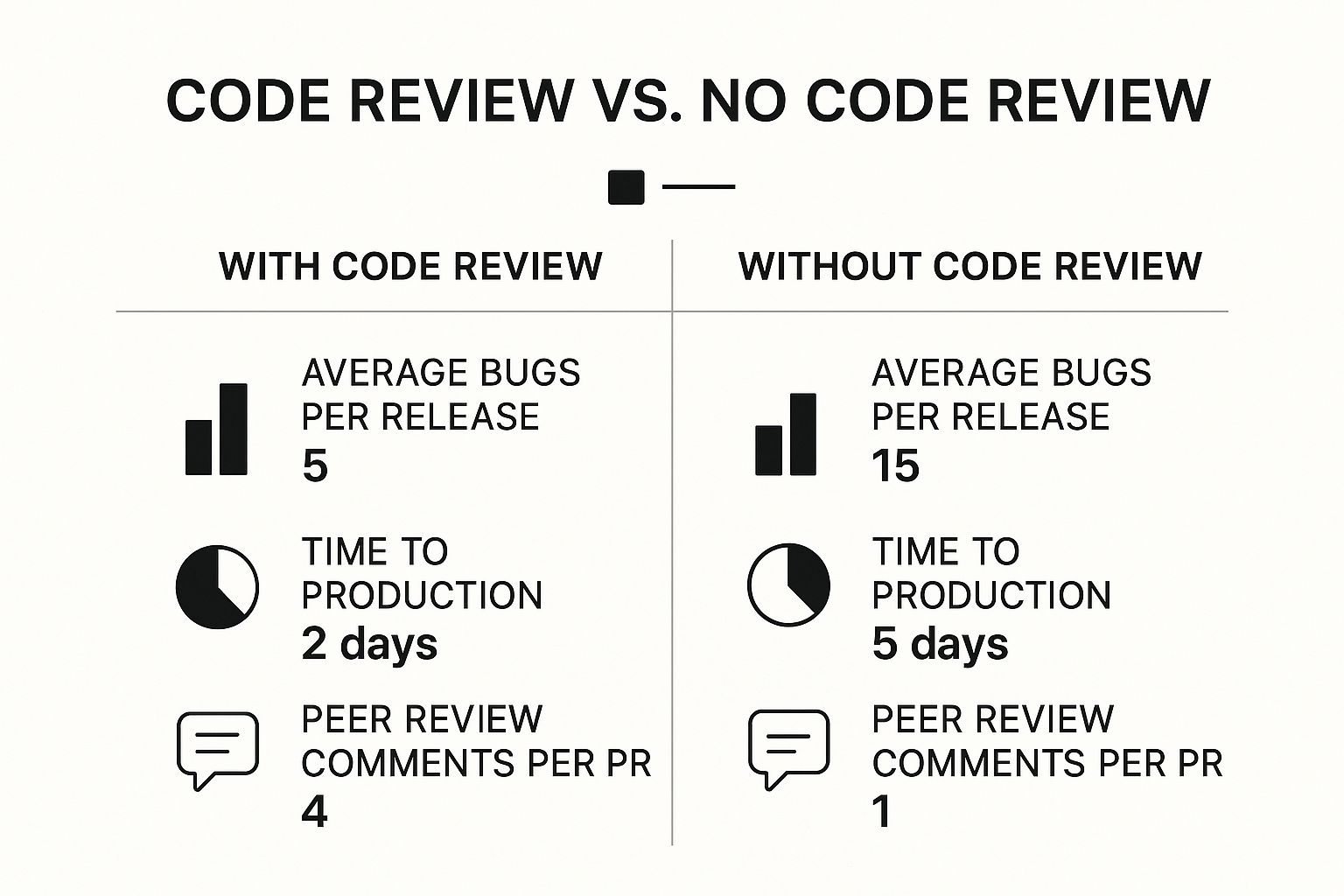
The numbers don't lie. A structured process cuts down on bugs and helps your team ship faster.
Automate Reviewer Assignments with CODEOWNERS
One of the most common bottlenecks in any review process is just figuring out who should review a pull request. The CODEOWNERS file is a simple but powerful solution that automatically assigns reviewers based on which files were changed.
It's just a plain text file that you place in your repository's root or .github directory. Inside, you map file paths to specific teams or individuals. For example, you can set it up so any changes to your authentication service are automatically routed to the security team for a mandatory look-over.
With over 420 million repositories, GitHub has baked these kinds of features directly into its pull request system for a reason. Tools like protected branches and CODEOWNERS files are designed to centralize and streamline reviews, making it easier for experts to weigh in where it matters most.
Crafting a Pull Request That Reviewers Will Love

Let's be honest: a truly effective code review starts long before anyone leaves a single comment. It all begins with a well-crafted Pull Request (PR). A PR that’s confusing or missing context is just a recipe for a slow, painful review cycle that tanks the quality of the feedback you get.
If you want the best results, you have to make it dead simple for your reviewers to understand what you changed, why you changed it, and how it all fits into the bigger picture. This means treating the PR itself as a critical piece of communication, not an afterthought.
Write Descriptions That Tell a Story
The description is single-handedly the most important part of your PR. A title like "Fix Bug" is completely useless to a reviewer. Instead, you need something descriptive that actually summarizes the change, like "Fix User Logout Loop on Session Timeout."
From there, the description needs to expand on the "why" behind your code. Don't just list what you did; explain the problem you were trying to solve.
- Link to the Issue: Always, always include a link to the relevant ticket or issue in your project management tool. This gives reviewers the full backstory.
- Explain Your Approach: Briefly walk through the solution you chose and why it was the best option. Did you consider other paths? Mention them.
- Highlight Key Changes: Point out any tricky, complex, or particularly important areas of the code. This helps direct your reviewers' attention where it's needed most.
Setting this context turns a simple code-checking exercise into a genuine, collaborative problem-solving session.
A great pull request is self-contained. A reviewer should have everything they need to understand the change—the problem, the solution, and the impact—without having to dig through old conversations or project management tools.
Keep Your Pull Requests Small and Focused
One of the biggest mistakes I see developers make is creating massive PRs that touch dozens of files and try to solve multiple problems at once. These "monster PRs" are a nightmare to review effectively. They intimidate reviewers, which leads to huge delays and shallow, rubber-stamp feedback.
The golden rule here is one PR per logical change. If you're fixing a bug but also decide to refactor a related service, split that work into two separate PRs. Sticking to this discipline has a huge payoff:
- Faster Reviews: Smaller changes are just quicker for people to understand and approve.
- Higher Quality Feedback: Reviewers can really focus their attention on a single, well-defined problem.
- Easier Reverts: If something goes wrong post-merge, a small, focused PR is incredibly simple to roll back.
Following this principle is a cornerstone of any effective development workflow. To dig deeper, check out our comprehensive guide on pull request best practices that can help your team build this crucial habit.
Guide Reviewers with Checklists and Visuals
Don't sleep on GitHub’s PR templates and checklists—they are seriously powerful tools for guiding your reviewers. Use a checklist to outline the exact steps someone needs to follow to test your changes locally. This gets rid of any ambiguity and ensures every part of the change gets validated.
And for any front-end changes, you should always include screenshots or GIFs showing the before-and-after. A quick visual can explain a UI change far more clearly than a few paragraphs of text ever could. This simple habit helps reviewers instantly grasp the user-facing impact of your work, making the code review process in GitHub a much smoother and more productive experience for everyone involved.
Leading a Constructive Code Review Conversation
The mechanics of a code review in GitHub are simple enough, but the real magic is in the conversation. A review isn't an interrogation or a chance to flex your technical muscles; it's a collaborative dialogue to make the code—and the team—better. This is where your engineering culture is truly forged.
The aim is to shift the team's mindset from simply "finding mistakes" to mentoring and shared ownership. Every comment has the power to either build someone up or tear them down. Choosing your words carefully is everything if you want to create a psychologically safe space where developers feel comfortable putting their work out there.
Framing Feedback for Reviewers
How you say something often matters more than what you say. Instead of barking commands, try framing your comments as suggestions or questions. It's a small linguistic shift, but it invites discussion instead of triggering a defensive reaction.
Look at the difference:
- Command: "Fix this. Use a map instead of a for-loop for better performance."
- Suggestion: "Have you considered using a
Maphere? It might give us a performance boost for lookups."
The second approach opens the door for the author to either agree and make the change or explain the thought process behind their original approach. It respects their expertise while still offering a valuable insight. This conversational style keeps the review from feeling like a one-sided lecture and turns it into a genuine learning opportunity.
Communication is the cornerstone of a healthy review process. Frame your feedback with curiosity, not criticism. Ask "What was the thinking behind this?" instead of stating "This is wrong." This simple shift turns a potential conflict into a learning opportunity for everyone.
Using GitHub's Tools for Actionable Suggestions
GitHub has some powerful features designed to make feedback more direct and less confrontational. The "Suggest Changes" feature is a prime example. It lets you propose a specific code change right inside a comment.
Instead of just describing what needs to be changed, you can actually show it. The author can then accept your suggestion with a single click, which dramatically speeds up the revision cycle. This is way more efficient than a long back-and-forth text exchange trying to nail down a complex change.
Receiving Feedback for Authors
As the author, your job is to come in with an open mind. Remember, the comments are about the code, not you personally. Fight the urge to get defensive. Instead, treat every piece of feedback as a chance to see your work from a fresh perspective.
- Ask for clarification if a comment isn't clear.
- Acknowledge good suggestions and thank your reviewers for their time.
- Explain your reasoning calmly if you disagree with a suggestion.
If a discussion thread in the comments starts getting long or tangled, it's usually a sign to jump on a quick video call. A five-minute chat can resolve what might take an hour of typing to sort out. The end goal is a better codebase, and that's a shared responsibility.
Letting Automation Handle the Repetitive Work
Your team's brainpower is a finite resource. It’s far too valuable to spend on tedious tasks like checking for style inconsistencies or spotting missing tests. A modern code review in GitHub isn't just about human feedback anymore; it's about building a smart, automated pipeline that handles the grunt work. This frees your developers to focus on what really matters: architecture and logic.
The goal here is to establish a consistent quality baseline before a human reviewer even lays eyes on a pull request. This is where automation, especially GitHub Actions, becomes a non-negotiable part of your workflow. It acts as an impartial gatekeeper, making sure every single submission meets your team's standards.
Setting Up Your Automated Quality Gates
Think of GitHub Actions as your team's diligent, tireless assistant. With a simple workflow file tucked away in your .github/workflows directory, you can set up a series of automated checks that run on every PR. This isn't just about convenience; it's about enforcing consistency.
Here are a few essential checks you should implement right away:
- Linters and Formatters: Tools like ESLint for JavaScript or Black for Python can automatically enforce your coding style. This simple step eliminates entire categories of nitpicky comments from the review process.
- Unit and Integration Tests: Your test suite is your most important safety net. Configure an action to run all your tests and block the merge if even a single one fails. No exceptions.
- Security Scans: Integrate tools that scan for common vulnerabilities in your code and its dependencies. This helps you catch potential security risks long before they make it to production.
By setting up these checks, any PR that lands in a reviewer's queue has already been confirmed to be well-formatted, pass all existing tests, and scanned for obvious security holes. If you're looking for more ideas, you might find some useful integrations among the many free open-source data engineering tools on GitHub.
The Rise of AI in Code Reviews
Beyond the usual automation, AI is starting to fundamentally change how we approach code reviews. We're seeing tools like GitHub Copilot move beyond simple code completion and into the realm of intelligent review assistance. Copilot can now analyze a PR, identify potential bugs, suggest performance improvements, and even help draft clearer PR descriptions.
This AI-driven assistance is seeing massive adoption for a reason. With over 4 million GitHub Actions workflows running daily, the trend is clear. GitHub Copilot is already used by 15 million developers, and studies show it helps them complete tasks 55% faster. It has also been shown to slash PR review times from nearly ten days down to just two.
By delegating the initial, more mechanical parts of a code review to AI and automated checks, you allow your human reviewers to dedicate their limited time and cognitive energy to what machines can't assess: architectural soundness, business logic, and long-term maintainability.
Integrating these tools builds a powerful, efficient review pipeline. It not only boosts code quality but also makes for a better developer experience by cutting down on tedious work and speeding up feedback loops. If you want to dive deeper, our guide on the best code review automation tools provides an excellent overview of what’s out there.
Using Slack for Real-Time Review Alerts
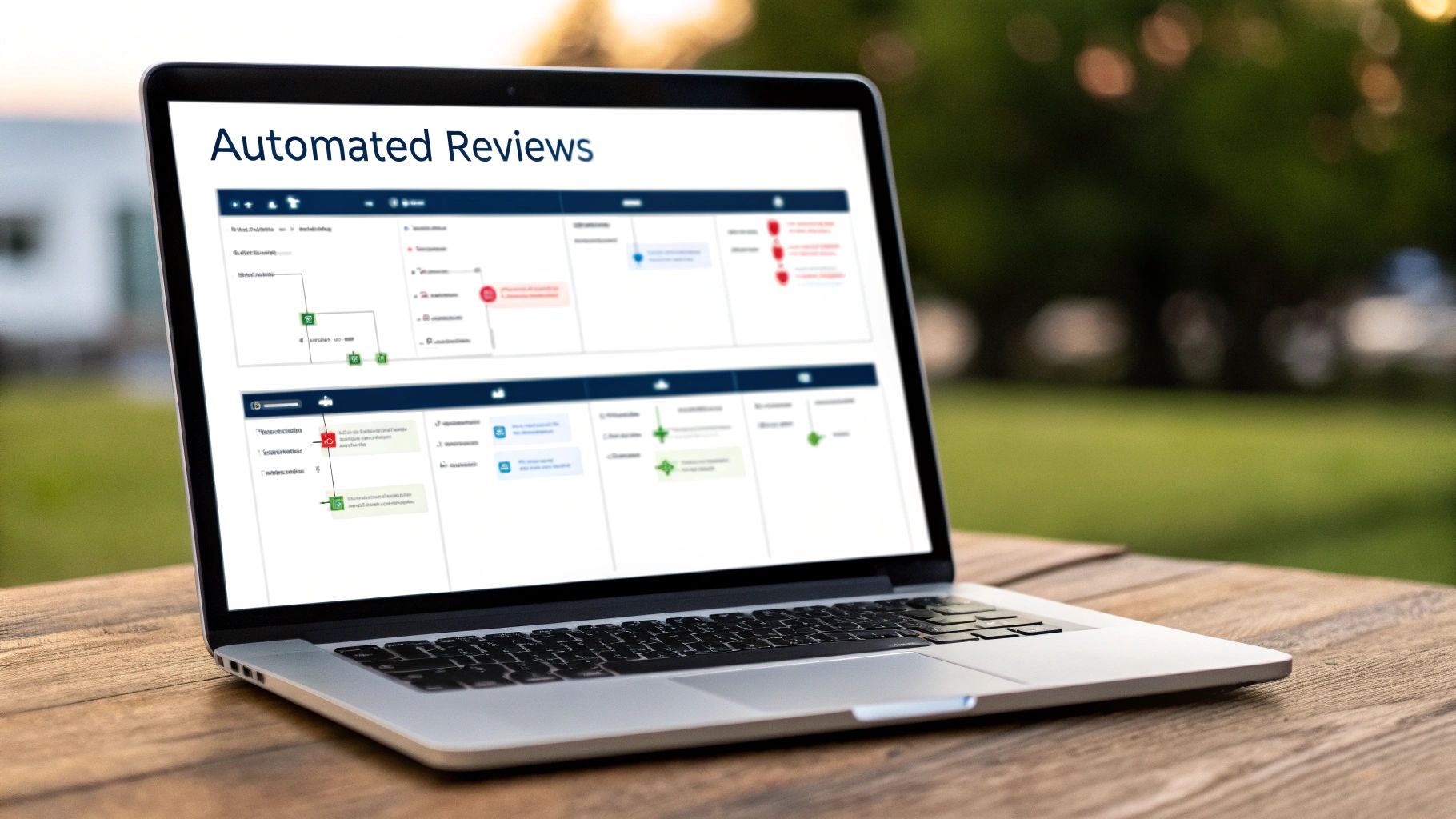
This interface shows just how much you can tailor notifications to fit your team's real-world needs. The goal is to cut through the noise and surface what’s urgent. By routing alerts to the right channels, you make sure every part of the code review in GitHub gets seen by the right people, right when it matters.
Why Your Team Needs Slack Integration
Let’s be honest: relying only on GitHub notifications or email is a surefire way to slow your review cycle to a crawl. Important pull requests get buried in noisy inboxes, and developers lose critical momentum while waiting for feedback.
This delay isn't just an inconvenience. It’s a direct hit to your team's velocity and leads to frustrating context-switching when a review finally lands hours—or even days—later.
Integrating GitHub with Slack closes this gap. It pushes critical updates—new PRs, review requests, comments—directly into the communication hub your team lives in all day. That immediate visibility means nothing gets missed, keeping the feedback loop tight and responsive.
Setting Up Smart Notifications with PullNotifier
While GitHub has a native Slack app, its notifications can be a firehose, spamming channels with every minor update. That’s where a tool like PullNotifier shines. It’s built to deliver concise, real-time updates that are actually helpful, not just more noise.
Setting it up is dead simple. You connect your GitHub account, pick the repositories you want to track, and then map them to specific Slack channels. This lets you create dedicated channels for different teams or projects, guaranteeing alerts are always relevant to who’s in the channel.
For example, you could configure PullNotifier to:
- Ping the
#backend-devchannel when a new PR is opened for the API service. - Automatically @mention designated reviewers to grab their attention immediately.
- Keep all updates for a single PR tucked into one threaded message, so channels stay clean.
This level of customization is what makes it so powerful. You're not just getting notifications; you're getting a curated feed of actionable information. For a deeper dive into how this can totally change your workflow, check out our guide on how GitHub Slack integration improves code reviews.
A fast review cycle is a competitive advantage. The longer a PR sits idle, the more expensive it becomes due to context switching and the potential for merge conflicts. Instant Slack alerts cut down this idle time dramatically, often reducing review delays by up to 90%.
Gotchas and Common Questions About GitHub Code Reviews
Even with a perfectly mapped-out process, teams stumble over the same hurdles when they start doing code reviews in GitHub. It’s one thing to know the best practices; it's a whole other ball game to apply them when deadlines are looming and pull requests are stacking up.
Let's get past the theory and tackle the real-world friction points that can mess with an otherwise solid review culture.
How Long Should a Review Actually Take?
This is the big one, and the honest answer is always: it depends. But if you need a number, here's a good rule of thumb: no pull request should sit untouched for more than 24 hours. Any longer than that, and the author starts losing the mental context, which makes acting on feedback way harder than it needs to be.
As for the review itself, think in focused bursts. If you're spending more than 30-45 minutes on a single review, that’s usually a big red flag. It almost always means the pull request is too big. This is your cue to reinforce the team habit of keeping PRs small and focused on one logical change. A smaller PR isn't just simpler to review; it’s faster to test and a lot safer to merge.
How to Handle Disagreements in Feedback
Disagreements aren't just normal; they're a healthy part of building great software. When they pop up in a code review, the trick is to keep the conversation focused on the code, not the people behind it.
If you're the author and you don't agree with a suggestion:
- Understand before you respond. Ask questions to make sure you're getting the reviewer's point of view before you start defending your code.
- Explain your "why." Calmly lay out the reasoning for your implementation. There's a good chance you have context the reviewer is missing.
- Know when to talk it out. If you're stuck in a comment thread that's going nowhere, just hop on a call. A quick 5-minute chat can solve what an hour of typing never could.
Remember, the goal is to find the best outcome for the codebase, not to "win" the argument.
Should We Be Using AI Tools in Our Reviews?
Absolutely. AI assistants are quickly becoming a non-negotiable part of the modern dev workflow, and for good reason. Tools like GitHub Copilot can take a first pass at a review, flagging potential bugs, suggesting performance tweaks, and checking for style consistency before a human ever lays eyes on it.
And the numbers don't lie. Developers using GitHub Copilot are seeing huge benefits. When users accept around 29.7% of Copilot’s suggestions, they report massive productivity boosts. AI-generated code is already making up about 46% of the code in an average user's projects, and somewhere between 60–75% of developers say it's made their job more satisfying. You can dig into more of the data in this breakdown of GitHub statistics.
Integrating AI doesn’t replace human reviewers; it gives them superpowers. By letting the AI handle the boring, repetitive checks, you free up your senior engineers to focus on the stuff that actually requires their expertise—like tough architectural decisions and complex business logic.
Don't let your team's momentum die waiting for a review. PullNotifier delivers real-time, actionable alerts to Slack, cutting through the noise so your team can ship faster. Start your free trial at PullNotifier and see why over 10,000 engineers trust it to keep their review cycles tight.