- Published on
Mastering GitHub Draft PR Workflows
- Authors

- Name
- Gabriel
- @gabriel__xyz
Ever sent an important email and wished you had a draft to look over first? A GitHub Draft PR is basically that, but for your code. It's a way to open a pull request that's still a work-in-progress, letting you share code and get early feedback without sending up the Bat-Signal for a formal review.
Think of it as putting a "wet paint" sign on your work. It tells your team that you're still sketching out ideas and prevents anyone from accidentally merging an unfinished feature into the main branch.
What Is a GitHub Draft PR Anyway?
Let's stick with the email analogy. Before you hit "send" and blast your message to the whole company, you might write a draft to collect your thoughts or ask a trusted colleague for a quick look. A GitHub Draft PR gives you that same safe space for code that isn't quite ready for its big debut.
This simple status change is a game-changer for team communication. Instead of opening a regular pull request that immediately pings every code owner, a draft PR keeps things quiet. It’s a low-key way of saying, "Hey, I'm working on this. Feel free to peek, but please don't drop everything to review it just yet."
The Core Purpose of Draft Mode
The whole point of draft mode is to create a safe, no-pressure zone for collaboration. It lets developers push commits, mess around with different solutions, and ask for a gut-check on their approach without the formality of an official code review. This is incredibly useful for catching architectural issues early on, long before a feature is even close to "done."
By making this distinction, teams sidestep a common problem: wasting precious review cycles on code that everyone knows is still being worked on.
A draft pull request acts as an explicit signal that the code is in flux. It's a built-in way to manage expectations and cut down on notification fatigue for everyone involved in the development lifecycle.
How It Transforms Team Communication
Before draft PRs were a thing, developers had to rely on clunky workarounds. You'd often see pull request titles with prefixes like "[WIP]" or "[DO NOT MERGE]" just to get the point across. GitHub draft PRs baked this concept right into the platform, and the benefits are clear:
*   **Reduces Notification Noise:** Code owners and your go-to reviewers aren't automatically spammed with notifications when you create a draft PR.
*   **Prevents Premature Reviews:** It clearly signals that the branch isn't ready for a detailed, line-by-line critique.
*   **Blocks Accidental Merges:** The "Merge" button is grayed out by default, which is a fantastic safety net against merging half-finished work.
This feature has become a cornerstone of modern development workflows. As GitHub's own documentation points out, draft pull requests can't be merged, and code owners aren't automatically requested for review until you mark the PR as ready. This solves the age-old problem of how to share early-stage work without triggering a bunch of unnecessary CI builds or alerts. To see how this fits into the bigger picture, check out our guide on the GitHub pull request workflow.
From First Commit to Final Merge
Let’s walk through the life of a GitHub draft PR, from the very first commit all the way to the final merge. Knowing this journey helps slot the feature into your team's workflow, whether you’re a fan of GitHub’s UI or live in the command line. Both paths get you to the same place: a safe harbor for your work-in-progress code.
Creating a draft PR is dead simple. When you go to open a new pull request in the GitHub interface, don't just click the big green "Create pull request" button. Instead, look for the little dropdown arrow right next to it. Give that a click, and you'll see the "Create draft pull request" option. Select it, and your PR is instantly flagged as a work-in-progress.
For those who prefer the terminal, the GitHub CLI makes it even quicker. Just add the --draft flag to your gh pr create command, and you can spin up a draft PR without ever leaving your code editor.
gh pr create --title "My New Feature" --body "Initial work on the new feature" --draft
The Active Development Phase
With your draft PR open, you’ve entered the active development phase. This is your sandbox. You can push new commits, experiment with different solutions, and refactor to your heart's content. Most importantly, the “Merge pull request” button is greyed out and disabled, which acts as a fantastic safety net against accidental merges of half-baked code.
During this stage, you can still get informal feedback. Just @-mention a specific teammate in a comment if you want a second pair of eyes on a tricky function or an architectural decision. It’s a great way to collaborate without spamming the entire team with a formal review request. This strikes a perfect balance between getting help and not creating unnecessary noise.
This whole feature came about because GitHub saw how large teams were struggling to collaborate without gumming up their workflows. As their own product docs point out, draft PRs are styled differently to make their WIP status obvious at a glance. It's a small but powerful change that helps combat the notification fatigue so common in busy engineering orgs.
Converting to Ready for Review
The single most important moment for a draft PR is when you flip the switch to "Ready for Review." This one click completely changes the PR's state and purpose.
This diagram shows the two distinct states of a pull request: the initial draft phase and the formal "ready for review" stage.
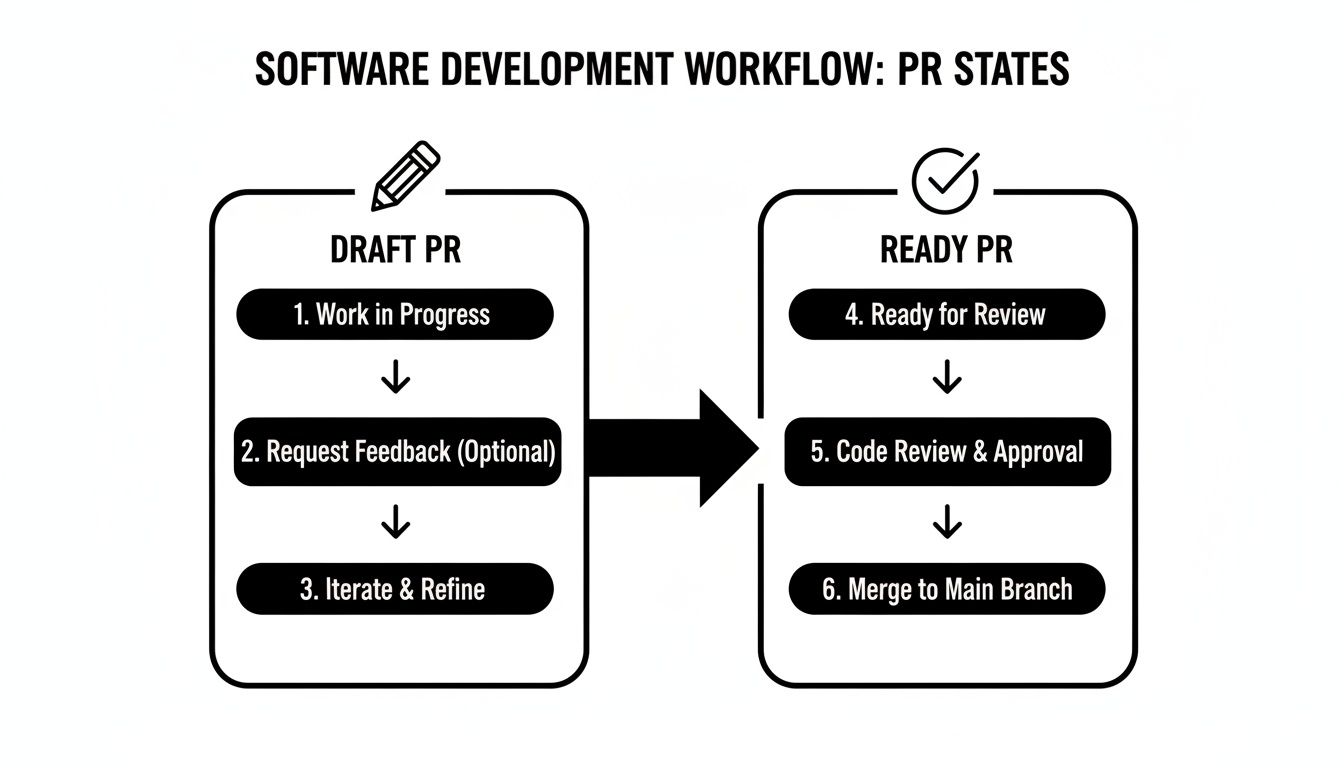
Moving from the pencil icon of a draft to the checkmark icon of a ready PR is your signal that you've moved from informal tinkering to the formal review and merge pipeline.
When you click that "Ready for review" button at the bottom of the page, a few things happen automatically:
*   **Notifications Fire Off:** Any code owners or requested reviewers get an official notification that your work is ready for their feedback.
*   **The Merge Button Lights Up:** As long as your branch protection rules are met, the PR is now mergeable.
*   **Formal Review Kicks Off:** The PR officially enters the review queue, telling everyone it’s feature-complete and waiting for approval.
This clear, deliberate transition makes sure everyone on the team knows exactly where your work stands, creating a smooth handoff from development to review. If you want a deeper dive into what happens next, check out our developer's guide on how to merge GitHub branches correctly.
How Draft PRs Tame Your CI Pipeline
A regular pull request is like a starting gun for your Continuous Integration (CI) pipeline. The moment you create it, a full suite of automated checks kicks off. While that’s great for finished code, it’s incredibly wasteful for work that's still being figured out. This is where a GitHub draft PR comes in—it gives you a powerful way to tell your CI system, "Hey, I'm not done here, hold off on the heavy lifting."
This simple distinction lets you build a smarter, two-tiered CI system. Instead of firing up every single test for every single commit, you can configure your pipeline to run a much lighter set of checks on draft PRs. This keeps your feedback loop fast during development while saving the expensive, resource-intensive jobs for when the code is actually ready for a proper review.
Configuring Conditional Workflows
With a tool like GitHub Actions, setting up this conditional logic is a piece of cake. The secret sauce is the github.event.pull_request.draft property in your workflow file. It simply returns true if the PR is a draft and false if it’s not, giving you a switch to control which jobs run.
For instance, you could split your CI pipeline into two distinct paths:
*   **For Draft PRs:** Run the quick stuff. Think code linting, formatting checks, and maybe some lightning-fast unit tests. These give you immediate feedback without bogging down the system.
*   **For "Ready for Review" PRs:** Unleash the full test suite. This is where you run the heavy, resource-intensive jobs like integration tests, end-to-end tests, and building deployment artifacts.
Running jobs conditionally is a cornerstone of modern CI. If you want to dive deeper, it’s worth exploring some established Continuous Integration best practices that can help you squeeze even more efficiency out of your pipeline.
A Practical GitHub Actions Example
Putting this into practice is surprisingly simple. You just need to add an if condition to the jobs in your GitHub Actions workflow file to check that draft status.
Here’s a quick YAML snippet showing how it works. We have one job, "lint-and-unit-test," that runs on all pull requests. But the second, more intensive job, "integration-tests," is restricted to only run when the PR is not a draft.
name: CI Pipeline
on: pull_request: types: [opened, synchronize, reopened, ready_for_review]
jobs: lint-and-unit-test: runs-on: ubuntu-latest steps:
- name: Run Linters and Unit Tests run: echo "Running fast checks on all PRs..."
integration-tests: runs-on: ubuntu-latest if: github.event.pull_request.draft == false steps:
- name: Run Integration Tests run: echo "Running slow, expensive tests only on ready PRs..."
By adding
if: github.event.pull_request.draft == false, you ensure your most expensive jobs only execute when a PR is formally ready for review. This simple line can lead to significant savings on CI/CD costs.
This strategy gives you the best of both worlds. Developers get the quick feedback they need on their works-in-progress, and the team conserves precious CI minutes for code that’s actually ready for the final stamp of approval. It’s a win-win that makes the whole development process more efficient and cost-effective.
Building Smarter Team Workflows
A GitHub draft PR is more than just a personal tool—it's a game-changer for orchestrating team collaboration. By standardizing how your team uses them, you can open up clearer communication channels, get feedback much faster, and make sure everyone is on the same page long before a formal review ever kicks off.
Think of it like setting the rules of engagement for your team. When everyone knows that a draft PR is the standard for sharing work in its early stages, it cuts through the ambiguity and encourages people to jump in and collaborate. This way, you can catch architectural flaws or design goofs when they’re still cheap and easy to fix, not after days of work have already been sunk into a bad approach.
Proven Workflows for Draft PRs
High-performing teams don't just hope for good collaboration; they build processes to make it happen. A GitHub draft PR can be the heart of several powerful workflows designed for early and continuous feedback.
Here are a few proven strategies your team can start using today:
*   **Early Architectural Feedback:** Before you've even written a line of implementation logic, open a draft PR. You can include the basic file structure, function signatures, or interface definitions. This gives senior engineers a chance to weigh in on the high-level design and prevent a painful refactor down the road.
*   **Visualizing Complex Tasks:** For those huge, multi-day features, a long-lived draft PR acts as a living document of your progress. Teammates can pop in, see the latest commits, and offer ideas without the pressure of a formal review.
*   **Pair Programming Handoffs:** When you're working with a partner, a draft PR is the perfect handoff mechanism. One developer pushes their changes, and the other can pull them down to continue, using the draft PR as the central hub for their shared work.
Adopting Team-Wide Best Practices
To really make these workflows stick, you need to agree on a consistent set of best practices. These simple guidelines ensure that every draft PR is easy to understand and gives reviewers the right context.
Of course, for this to work, everyone needs the right access. It's a good idea to make sure you know how to properly add collaborators in GitHub so no one is left out.
By establishing clear conventions, you transform draft PRs from a personal convenience into a shared language for your team. This consistency is what separates good teams from great ones.
Consider adopting these simple rules:
- Use a Naming Convention: While the "Draft" status is a clear signal, adding a prefix like
[WIP]or[DRAFT]to the title makes it immediately obvious in a crowded list of pull requests. - State Your Intentions Clearly: The PR description is your best friend. Be explicit about what you're trying to achieve and, more importantly, what kind of feedback you're looking for. Are you after a high-level architectural review or just a quick check on a specific algorithm? Let people know.
- Maintain Atomic Commits: Even in a draft, try to make small, logical commits. A clean commit history makes it much easier for a colleague to follow your thought process and give targeted feedback on specific changes.
By integrating these workflows and best practices, your team can turn the humble GitHub draft PR into a cornerstone of a more transparent, efficient, and collaborative development culture.
Of course. Here is the rewritten section, crafted to sound like an experienced human expert, following all the provided guidelines.
Measuring Your Team's Performance
While the collaborative perks of a GitHub draft PR are great, their real magic shows up when you start measuring their impact. Shifting from gut feelings to hard data is how you see exactly how this feature is tweaking your team's velocity and review culture. By tracking the right numbers, you can turn a fuzzy concept like "smarter workflows" into tangible improvements in speed and code quality.
The trick is to look at metrics that cover the entire journey of a pull request, not just the final merge. Digging into data from the draft phase can uncover hidden bottlenecks you’d otherwise miss. For instance, if a PR sits in draft for days, it might be a quiet signal that a developer is stuck or needs a bit of architectural guidance early on.
Key Metrics for Draft PR Analysis
To get a real pulse on your team’s health, you need to see how work flows from an idea all the way to a merged commit. Pull request analytics are now essential for engineering teams trying to hunt down these productivity drains. Data from real-world teams shows that the average time in draft status can be anywhere from 6 to 13 minutes, while the median time to get that first review is between 4 and 7 hours, all depending on the team's workload. You can learn more about how to measure PR analytics with GitHub Actions.
Think about tracking these specific metrics:
*   **Time Spent in Draft Status:** This is the clock running from the moment a draft PR is created until it's marked "Ready for Review." A high average here might mean developers need more support upfront or that the tasks are bigger than they look.
*   **Time to First Review After Conversion:** This tracks the lag between a PR being marked as ready and the first review kicking off. A long delay could point to reviewers being overloaded or a clunky notification process.
Turning Insights into Actionable Improvements
Once you start gathering this data, the patterns will jump out at you. You can then start asking the right questions that lead to genuine process improvements.
Data doesn’t just show you what’s happening; it tells you where to look. By measuring the draft PR lifecycle, you can spot friction points in your review culture and make data-driven decisions to fix them.
For example, if you notice that PRs from junior developers are spending way more time in draft, it might be a perfect opportunity to beef up your mentorship or documentation. On the other hand, if formal reviews are slow to start for everyone, it could be a sign that your team needs a better system for handling review requests, so good work doesn't just sit there waiting.
Common Questions About GitHub Draft PRs
Even after you get the hang of draft PRs, a few questions always seem to come up as teams start weaving them into their daily workflow. Let's clear up some of the common sticking points so everyone can use the feature confidently.
Most of the confusion tends to circle around how flexible draft PRs are, especially when it comes to notifications and how they play with automated systems like GitHub Actions.
Can I Revert a Pull Request Back to a Draft?
Yes, you absolutely can. A pull request's state isn't set in stone.
If you mark a PR as "Ready for Review" but then get feedback that requires a major overhaul, you can flip it right back to a draft. This sends a clear signal to your team that it's a work-in-progress again and immediately shuts down any further review notifications until you're ready.
Do Draft Pull Requests Trigger GitHub Actions?
By default, yes. When you create a draft pull request, it still fires the pull_request event in GitHub Actions. This is actually pretty handy for running quick, lightweight checks like linting or unit tests without waiting for a full review.
But you don't have to run your entire CI pipeline. You can easily configure your workflow to run different jobs—or skip intensive ones—based on the PR's draft status. This is a great way to get early feedback while saving precious CI minutes.
Will Mentioning Someone in a Draft PR Notify Them?
It will. While draft PRs don't automatically bug your designated CODEOWNERS for a formal review, you can still pull specific people in for a quiet look.
If you @-mention a teammate in a comment, they'll get a notification just like they normally would. This is perfect for when you want to ask a specific person for some early, informal feedback without sounding the alarm for the entire review squad.
Tired of noisy GitHub notifications flooding your Slack channels? PullNotifier cuts through the chaos by delivering clean, real-time pull request updates directly where you need them. Reduce review delays and keep your team focused by trying it at https://pullnotifier.com.