- Published on
What Is a Pull Request? Learn Its Role in Modern Development
- Authors

- Name
- Gabriel
- @gabriel__xyz
A pull request is how you formally propose changes to a software project. Instead of messing with the main codebase directly, you make your edits on a separate copy. Once you're done, you request that the project owner pull your changes into the main project. It’s a cornerstone of collaborative coding.
Decoding the Pull Request
Imagine you and your friends are building a massive LEGO castle together. The finished castle is the main project, or main branch. If you wanted to add a new tower, you wouldn't just start building on top of the main structure and risk knocking something over. You'd build your tower separately.
Once your tower is built and you’re happy with it, you’d show it to your friends and say, "Hey, I built this awesome new tower. What do you think? Can we add it to the main castle?"
This is exactly what a pull request is in the coding world. It's not just a submission of code; it's the start of a conversation. It’s a dedicated forum where developers can discuss proposed changes, review the new code for quality, and ensure it integrates smoothly before it becomes a permanent part of the project.
This structured process is a safety net. It helps prevent bugs and keeps the code quality high by allowing teammates to review the changes collaboratively. They can suggest improvements, catch errors, and make sure the new code aligns with the project's goals. This system is central to how modern software teams, especially in open-source, manage contributions without chaos.
The Key Players in Every Pull Request
Every pull request workflow involves a few key roles working in tandem to get changes from idea to implementation. Understanding who does what makes the whole process click.
Here’s a quick look at the main participants in a pull request and what they’re responsible for.
Key Roles in a Pull Request Workflow
| Role | Primary Responsibility | Key Actions |
|---|---|---|
| Author | Proposes the code changes. | Creates a branch, writes code, and opens the pull request. |
| Reviewer | Inspects the proposed code. | Provides feedback, asks questions, and requests revisions. |
| Maintainer | Manages the main project. | Approves and merges the pull request into the main branch. |
These roles provide a clear structure for collaboration and quality control.
While some platforms like GitLab use slightly different terms (e.g., "Merge Request"), the core ideas are identical. To dive deeper into these nuances, you can check out our detailed guide on the differences between a pull request and a merge request.
How Pull Requests Transformed Coding
Before pull requests became a staple, collaborating on code was… well, a bit of a mess. Think of a single master document where multiple people are trying to make edits at once, with no real review process. It was a recipe for overwritten work, endless conflicts, and a total lack of transparency.
Development was often locked down by a small group of gatekeepers with direct access to the main codebase. This created huge bottlenecks and made it tough for new or outside contributors to get involved, especially in the early days of open-source software. There just wasn't a clear, organized way to discuss, review, and safely merge changes from a growing community.
The Shift to a Collaborative Model
Then came distributed version control systems like Git, which completely changed the game. Building on that foundation, platforms like GitHub introduced the pull request as a core feature after launching in 2008. This wasn't just a new button to click; it was a cultural revolution in how software gets built.
A pull request democratized the development process. It created a formal, transparent forum where anyone could propose a change, have their code reviewed by peers, and contribute to a project regardless of their location or status.
This new model was a perfect fit for the rise of distributed teams and Agile methodologies, which thrive on constant feedback and small, iterative improvements. Control shifted from a top-down model to a collaborative conversation, building a culture of shared ownership and much higher quality standards.
The Impact of Widespread Adoption
It didn't take long for the pull request to become the gold standard for managing code contributions. The numbers speak for themselves. Since its introduction, GitHub has seen an explosion of activity, with over 70 million pull requests created by 2020.
Today, roughly 90% of large open-source projects on GitHub use pull requests as their main way of integrating changes. This massive adoption shows just how essential the workflow has become. If you want to dive deeper, you can discover more about these pull request statistics and their impact.
This evolution from a closed, centralized system to an open, distributed one has had a massive impact:
- Improved Code Quality: Every change gets a second set of eyes, which means bugs and design flaws are caught before they hit the main codebase.
- Enhanced Collaboration: It creates a natural space for mentorship and knowledge sharing, helping developers learn from one another's work.
- Greater Transparency: The entire story of a change—from the initial idea to discussions and revisions—is documented and available for anyone on the team to see.
Ultimately, the pull request is so much more than a Git feature. It represents a fundamental shift in how we think about building software together, paving the way for the powerful, community-driven projects that run much of the digital world today. For any modern developer, mastering this process is non-negotiable.
Anatomy of an Effective Pull Request

A truly effective pull request is so much more than a block of code—it’s a piece of technical communication. The best PRs are self-contained stories. They guide reviewers through your changes, explaining the "what" and the "why" with total clarity.
Nailing this is the difference between a quick merge and a week of confusing back-and-forth questions.
The goal is pretty simple: give a teammate enough context to understand your work without having to ask for a tour guide. When a reviewer has to hunt down the original ticket, guess the purpose of a change, or figure out how to test it, the whole process grinds to a halt for everyone.
An effective pull request respects the reviewer's time. By providing clear context, instructions, and reasoning upfront, you make it easy for them to give you the feedback you need and approve your changes quickly.
Think of your PR as a proposal you're pitching to the team. You need to sell them on why your changes are necessary, how they solve a problem, and why they should feel confident merging them. This takes more than just good code; it takes good communication.
The Core Components of a Great PR
To move beyond just submitting code, you have to craft the non-code parts of your pull request with just as much care. A well-structured title and description can slash review time by setting clear expectations right from the start.
Here’s a checklist of what every great pull request should include:
- A Clear and Descriptive Title: Ditch the generic "Fix bug" or "Update feature." A good title summarizes the change, like "Feat: Add User Profile Caching to Reduce Load Times" or "Fix: Correct Calculation Error in Payment Module." It gives instant context.
- A Compelling Description: This is where you tell the story. What problem does this PR solve? Why was this specific approach chosen over others? Provide a brief but thorough narrative that connects the dots for the reviewer.
- Link to the Issue Tracker: Always, always connect your pull request to the original ticket (e.g., in Jira, Asana, or GitHub Issues). This gives reviewers a one-click path to the full background, requirements, and user story.
- Clear Testing Instructions: Don't make your reviewers guess how to verify your changes. Give them step-by-step instructions on how to set up the environment and test the new functionality. Be explicit.
- Screenshots or GIFs for UI Changes: If you've made visual changes, show them. A picture is still worth a thousand words, and a quick GIF can save a reviewer from having to pull down your branch and run it themselves just to see a button change.
The Complete Pull Request Lifecycle Step by Step
Understanding a pull request in theory is one thing, but seeing it in action is where it all clicks. The journey from a single line of code to its final home in the main codebase follows a clear, structured path built for quality and teamwork.
Let’s walk through the entire lifecycle, step-by-step, from the perspective of both the developer making the change and the reviewer signing off on it.
This visual breaks down the core three-stage flow of a typical pull request, from creation to completion. 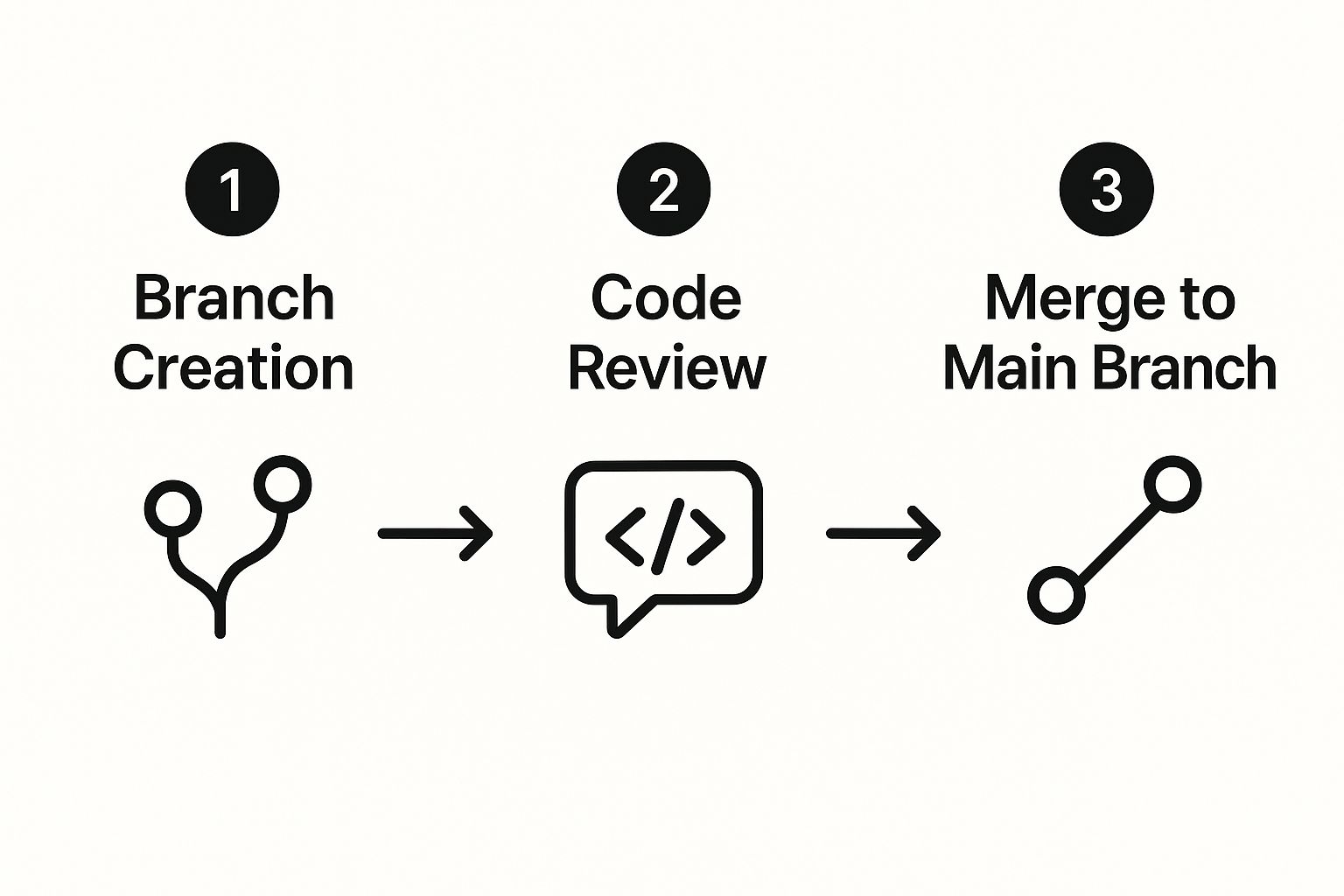 Think of it like an assembly line for your code. Each stage—branching, reviewing, and merging—acts as a crucial quality gate, making sure every change is isolated, inspected, and safely integrated.
Step 1: The Author Creates the Change
It all starts with a developer—the author—who needs to build a new feature or squash a bug. To avoid chaos, they don't work directly on the main project code (often called the main or master branch). Instead, they create a safe, isolated workspace.
Create a New Branch: First, the author creates a copy of the main codebase. This copy is called a branch. Naming it something descriptive like
feature/user-loginorfix/payment-bugis a good practice. This branch is their personal sandbox where they can experiment freely without touching the stable, live version of the project.Make Commits: As the author writes code, they save their progress in small, logical chunks known as commits. Each commit gets a clear message explaining what changed, which creates a neat, historical log of their work.
Push the Branch: Once the coding is done, the author "pushes" their branch and all its commits from their computer to the project's shared remote repository on a platform like GitHub or Bitbucket.
Open the Pull Request: With the code now on the remote server, the author formally opens a pull request. This is their way of telling the team, "Hey, my work is ready for you to look at." They’ll add a title and a description to give reviewers the context they need to understand the changes.
Step 2: The Reviewer Inspects the Code
Now the baton is passed. One or more teammates step into the reviewer role to make sure the new code is up to snuff and meets the project's quality standards.
The reviewer’s job is to carefully examine the proposed changes, often called the "diff." They're on the lookout for potential bugs, logic flaws, style issues, or even just opportunities to make the code a little better.
A code review is a collaborative dialogue, not a critique. The goal is to improve the code together, share knowledge, and maintain a high-quality codebase for the entire team.
Reviewers can leave comments directly on specific lines of code, ask clarifying questions, and suggest changes. If the author needs to make revisions, they just add new commits to their branch, and the pull request updates automatically. This back-and-forth continues until everyone is happy.
Assigning reviewers manually can become a bottleneck, which is why many teams look for ways to streamline this step by exploring how to automatically assign reviewers in GitHub.
Step 3: The Maintainer Merges the Code
Once the reviewers give their thumbs-up, a project maintainer (often a senior developer or team lead) takes the final step.
The maintainer merges the pull request. This action takes all the approved commits from the author's feature branch and seamlessly integrates them into the main project branch. The new feature or bug fix is now officially part of the codebase!
After the merge, the temporary feature branch is usually deleted to keep the repository tidy and prevent clutter.
Mastering the Art of Code Reviews
The real magic of a pull request isn’t just in the code it holds—it’s unlocked during the code review. This process is so much more than a simple bug hunt. Think of it as an opportunity for knowledge sharing, mentoring teammates, and collectively holding the line on quality across the entire project.
A great review makes code easier to read, ensures it fits with the project's architecture, and builds a culture of shared ownership. The goal is to make the code better together, turning one person's changes into a robust, team-approved solution.
The code review process is the immune system of a software project. It catches potential issues, strengthens the overall health of the codebase, and ensures that only quality contributions become part of the final product.
Data shows that the median time to review a pull request can be anything from under 30 minutes in agile teams to several days in larger organizations. In fact, 60-70% of pull requests get at least one comment, and about 25% go through multiple review cycles before they’re finally merged. These numbers show just how easily review bottlenecks can slow a team down, often because a few key people are overloaded. You can dig into more detailed pull request stats to see these patterns for yourself.
Giving and Receiving Feedback Constructively
The tone of a review can make or break team morale. Feedback should always be constructive, focusing on the code itself—not the person who wrote it. The goal is to guide, not to criticize. This simple shift turns reviews from a dreaded chore into a valuable learning experience for everyone.
For the author, getting feedback is a chance to grow. It's crucial to approach comments with an open mind, ask questions to clarify, and resist the urge to get defensive. Every suggestion is about making the final product better and the codebase stronger for the whole team. A solid code review checklist can be a huge help here, ensuring reviews are consistent and thorough.
Effective vs Ineffective Code Review Practices
How you communicate during a code review directly impacts your team's culture. Constructive, clear feedback builds trust and improves code quality, while vague or harsh comments create friction and kill morale.
The table below breaks down the difference between productive review behaviors and those that are better left behind.
| Practice | Effective Approach (Do This) | Ineffective Approach (Avoid This) |
|---|---|---|
| Commenting | Asking open-ended questions like, "What was the reasoning for this approach?" | Making demands such as, "Change this to my way immediately." |
| Tone | Using positive and encouraging language to acknowledge good work. | Using subjective or personal critiques like, "I don't like this style." |
| Specificity | Providing concrete examples and suggesting specific improvements. | Leaving vague or unhelpful comments such as, "This is confusing." |
| Focus | Concentrating on logic, readability, and adherence to project standards. | Nitpicking minor stylistic preferences that automated tools can handle. |
Adopting these effective habits doesn't just improve the code—it builds a healthier, more collaborative engineering culture where everyone feels empowered to contribute their best work.
Common Pull Request Mistakes to Avoid
We've all been there. Even the most seasoned developers can slip into bad habits that drag the whole team down. It's important to remember that a pull request isn't just code—it's a direct request for your teammate's time and attention. Making that review process painless is a skill in itself.
But all too often, a few common mistakes turn what should be a quick review into a frustrating bottleneck.
These pitfalls don't just hold up a single feature; they create friction, let quality slip, and burn out your best reviewers. The good news? Most of these are dead simple to fix once you know what you’re looking for.
Building better PR habits makes you a far better teammate and helps your entire team ship higher-quality code, faster.
Creating the Monster PR
First up, the most infamous mistake of all: the "monster" PR. This is that pull request with thousands of lines of code changed across dozens of files. It usually happens when a developer goes dark for a few weeks, bundling multiple features, bug fixes, and a bit of refactoring into one massive drop.
Let's be honest, reviewing a PR like that is basically impossible. No one can reasonably be expected to catch subtle logic errors or bigger architectural issues when they're staring at a wall of changes.
Key Takeaway: Keep your pull requests small and focused. Each one should solve a single, specific problem. That makes them faster to review, easier to reason about, and way less likely to ship with sneaky bugs.
A solid rule of thumb is to aim for changes a reviewer can digest in under 15 minutes. If you feel your PR is starting to get bloated, it's time to break it down into smaller, logical chunks.
Writing Vague or Empty Descriptions
Another classic blunder is the PR with a lazy title like "bugfix" and a completely empty description. This immediately forces your reviewer to play detective. They have to hunt down the ticket, dig through your code, and try to piece together the context behind your changes.
This isn't just annoying; it puts a massive cognitive load on the reviewer and is one of the top reasons PRs get stuck in limbo. A great description gives the "why" behind the "what" and makes the whole process smoother for everyone.
To avoid this, always make sure your description includes:
- A clear summary of the problem and how you solved it.
- A link to the ticket in your project management tool (like Jira or Linear).
- Screenshots or GIFs to show off any UI changes.
Giving your reviewer this context upfront is a sign of respect for their time. It’s also the fastest way to get your code approved and merged.
Got Questions About Pull Requests? We've Got Answers.
As you get your hands dirty with pull requests, a few common questions always seem to pop up. Let's tackle some of the trickiest situations developers run into so you can handle them like a pro.
What Is a Merge Conflict?
A merge conflict is Git’s way of throwing its hands up and saying, “I don’t know how to combine these changes!” It happens when Git can't automatically merge changes from two different branches.
This usually happens when you and another developer edit the same exact lines in the same file, or when one person deletes a file while someone else is trying to change it. Instead of guessing, Git flags the file and asks a human—that's you—to step in and decide which changes to keep.
To fix it, you'll need to manually edit the conflicted files, combine the changes the way you want them, and then commit the resolved file to finalize the merge.
What's the Difference Between a Pull Request and a Merge Request?
In short: nothing. They are two different names for the exact same thing, just used by competing platforms.
- Pull Request (PR): This is the term you'll hear on platforms like GitHub and Bitbucket.
- Merge Request (MR): This is what you'll see on GitLab and similar tools.
It's purely a branding choice. Both are requests to merge code from one branch into another, and both kick off the same kind of collaborative code review process we've been talking about.
No matter what it’s called, the workflow is the same: you propose changes from a feature branch, your team reviews them, and the code gets merged into the main branch after it’s approved.
What Should I Do If My Pull Request Is Stuck?
A PR just sitting there can bring progress to a grinding halt. The first thing you should do is check for any obvious roadblocks. Are the automated checks or tests failing? If they are, that’s your first stop—fix those right away.
If everything looks good, it's time to give your reviewers a gentle nudge. A quick, polite message in your team's chat usually does the trick. Something like, “@reviewer, could you please take a look when you have a moment?” is often all it takes.
Still no movement? Your PR might be too big. Consider breaking it down into smaller, more digestible chunks. A smaller PR is much faster and easier for someone to review.
Tired of your pull requests getting stuck in review limbo? PullNotifier sends smart, real-time PR updates directly to Slack, cutting through the noise and ensuring your team never misses a request. Get your code reviewed and merged faster by visiting https://pullnotifier.com.