- Published on
Code Review GitHub: Master Your Pull Requests Effectively
- Authors

- Name
- Gabriel
- @gabriel__xyz
A proper code review on GitHub is a non-negotiable part of modern software development. It's the moment when developers systematically check each other's code for errors, style issues, and logic gaps before it gets merged into the main codebase. This whole dance happens inside of Pull Requests, which are the central stage for all the discussion, feedback, and final sign-offs.
Why Better GitHub Code Reviews Matter
Let's get past the idea that code reviews are just about spotting bugs. When you really dial in your review process on GitHub, it has a massive ripple effect on the entire business. You're talking about crushing technical debt, shipping features faster, and building a team that actually collaborates well. Small, consistent tweaks to how you review code can stop major production fires before they even start.
More Than Just Finding Mistakes
An effective code review is a conversation, not a courtroom trial. It’s where junior devs get to learn from the seniors, where best practices are hammered home, and where everyone starts to feel a sense of shared ownership over the codebase.
When you get this right, you naturally reduce the "bus factor"—that scary situation where critical knowledge lives in just one person's head. It's a collaborative safety net, making sure more than one pair of eyes understands the why behind every new feature or fix.
The whole point is to create a positive feedback loop:
- Higher Code Quality: You catch architectural flaws, security holes, and logic bombs early, saving a ton of time and money later.
- Knowledge Sharing: Reviews are the best way to spread context around the team, making your codebase more resilient when people inevitably move on.
- Consistent Standards: The team works together to maintain a consistent style and stick to the architectural patterns you’ve all agreed on.
- Natural Mentorship: It's a built-in, practical way for mentorship to happen, leveling up the entire team organically.
The Foundation of Modern Development
GitHub is the undisputed center of the software development universe. By early 2025, it was home to over 100 million developers and more than 420 million repositories—a jump of 12.9% in just a year. The scale is staggering, and it means that mastering the GitHub code review workflow isn't just a nice-to-have anymore. It's a core competency. If you're curious, you can explore more about these trends to see how the ecosystem is evolving.
A great code review culture isn't about pointing out every missing semicolon. It's about fostering an environment where everyone feels responsible for the quality of the product and empowered to help their teammates improve.
Ultimately, investing in a solid review workflow is about building a culture of quality. It all comes down to a few core GitHub features that every developer needs to have down cold.
Core Components of a GitHub Code Review
To get started, it helps to understand the main tools GitHub gives you for the job. These features work together to create a structured and transparent review process.
| GitHub Feature | Primary Role in Code Review |
|---|---|
| Pull Requests | The central hub for proposing changes and initiating the review process. It contains all context, discussions, and commits. |
| Comments & Suggestions | Allows reviewers to provide specific, line-by-line feedback and offer direct code suggestions for quick fixes. |
| Approvals & Reviews | The formal mechanism for reviewers to approve changes or request further modifications before merging. |
Mastering these three components is the first step toward building a review process that not only catches bugs but also strengthens your team.
How to Craft the Perfect Pull Request
A great code review is only possible if it starts with a well-crafted Pull Request. When a PR is confusing, way too big, or missing crucial context, it's pretty much dead on arrival. It just creates friction and wastes everyone's time. Your goal should always be to make the reviewer's job as easy as you can.
Think of yourself as the storyteller for your own changes. You're not just throwing a chunk of code over the wall; you're presenting a thought-out solution. This is where your title and description become your most powerful tools. A vague title like "Bug fix" is a huge red flag. Get specific: "Fix User Logout Loop on Session Timeout."
Provide Crystal Clear Context
The description is your chance to explain the "what" and the "why." Don't just rehash what the code does—the reviewer can read the code themselves. Instead, you need to explain the business reason behind the change, link to the Jira ticket or GitHub issue, and give a quick rundown of your approach. This context is what elevates a simple code check into a meaningful discussion about architecture.
And when it comes to any frontend or UI changes, a picture is absolutely worth a thousand words.
- Add Screenshots or GIFs: Visually show the "before" and "after." This makes the impact of your code immediately obvious and saves the reviewer from having to pull down your branch and run it locally.
- Keep it Focused: Only include visuals that are directly related to the changes in that specific PR.
- Annotate When Necessary: A simple arrow or box can draw attention to the exact parts of the UI you've updated.
This screenshot from GitHub's own docs perfectly illustrates the collaborative nature of code reviews, with inline comments and discussions happening right where the code lives.
This kind of back-and-forth is so much more effective when the initial PR gives all the necessary context from the get-go, letting reviewers dive straight into the important stuff: the code itself.
The Power of Small Pull Requests
Honestly, one of the most impactful habits you can adopt is keeping your PRs small and focused. A pull request that touches hundreds of files and multiple features is a nightmare to review thoroughly. It’s basically an invitation for rubber-stamping, which defeats the whole point of a code review on GitHub.
A pull request should be like a single chapter in a book, not the entire novel. It should tell one cohesive story, making it easy for the reviewer to follow along and provide meaningful feedback.
Try to make each PR address a single concern. If you're working on a massive feature, your best bet is to break it down into a series of smaller, dependent PRs. This "stacked PR" method allows for continuous, bite-sized reviews instead of one giant, overwhelming one. It takes a bit more coordination, sure, but the improvement in review quality and speed is massive.
For more strategies on this, check out our guide on pull request best practices. This approach respects your reviewer’s time and leads to significantly better outcomes.
Giving Feedback That Improves Code and Developers
Effective feedback is the absolute heart of a good code review on GitHub. It's the point where you shift from just spotting syntax errors to acting as a true quality gatekeeper, a mentor, and a collaborator.
Your goal isn't to criticize. It's to elevate—both the code itself and the developer who wrote it. This means looking past the immediate lines of code and thinking bigger. A truly great review assesses how these changes fit into the entire system, ensuring new code doesn't just work but integrates cleanly.
A Reviewer's Holistic Checklist
Before you even drop a single comment, it helps to run through a quick mental checklist. I find this keeps me focused on what really matters and prevents me from getting bogged down in minor style debates that a linter should be handling anyway.
- Logic and Correctness: Does the code actually do what it's supposed to? More importantly, does it do so without creating weird side effects or bugs in edge cases?
- Maintainability: Is this code clear? Is it readable? If another developer has to touch this code six months from now, will they be able to understand it?
- Test Coverage: Are there enough tests to prove the new logic works? Just as crucial, do all the existing tests still pass?
- Architectural Alignment: Does this change follow our project's established patterns? Does it align with our long-term goals, or is it a one-off solution that will cause headaches later?
This structured approach helps you provide comprehensive feedback that adds real value.
Fostering Collaboration Through Communication
The way you phrase feedback changes everything.
Nobody likes being told "Change this" or "Fix this." It feels confrontational and tends to shut down the conversation. A much better approach is to frame your comments as questions or suggestions. This small tweak in language invites discussion and instantly positions you as a partner trying to solve a problem together.
Instead of issuing a command, try asking a leading question. "Have you considered using a
Sethere to avoid duplicates?" is way more collaborative than "Use aSetinstead of anArray."
This simple change respects the author's ownership of the code and encourages them to think through the solution, which is a fantastic mentoring technique. To really get this right, check out our https://blog.pullnotifier.com/blog/ultimate-guide-to-constructive-feedback-in-code-reviews for more strategies.
Using GitHub Suggestions for Actionable Feedback
One of the best tools in a reviewer's arsenal is GitHub's code suggestion feature. Instead of just describing a change, you can show it. When you spot a small improvement, you can propose the exact code change right inside your comment.
This is a game-changer for a few reasons:
- It kills ambiguity. The author sees precisely what you mean, which cuts out any back-and-forth for clarification.
- It saves everyone time. The author can accept the suggestion with a single click. Done.
- It encourages small fixes. It lowers the barrier to entry for making those minor improvements that might otherwise feel too trivial to even bring up.
For example, instead of just writing, "This variable name could be clearer," you can suggest a better name directly in the diff. This transforms your feedback from a simple comment into an immediate, actionable improvement.
By combining a holistic checklist, collaborative communication, and direct suggestions, you create a review process that builds not only a stronger codebase but stronger developers, too.
Streamlining Your Workflow with Automation
Let's be real, manual checks are great for spotting tricky architectural issues, but automation is what makes quality scalable. A truly effective code review on GitHub relies on letting the machines handle the boring, repetitive stuff. This frees up your team to focus on what actually matters: the logic, the maintainability, and the bigger picture.
When you automate the routine checks, you're setting a quality baseline for every single pull request before a human even lays eyes on it. This completely changes the dynamic of the review. Instead of nitpicking syntax, you can have meaningful conversations about the code's design. The whole process gets faster, more efficient, and boosts the quality of both the code and the feedback.
This flow shows how automated checks act as your first line of defense, ensuring only code that meets a certain standard makes it to a manual review.
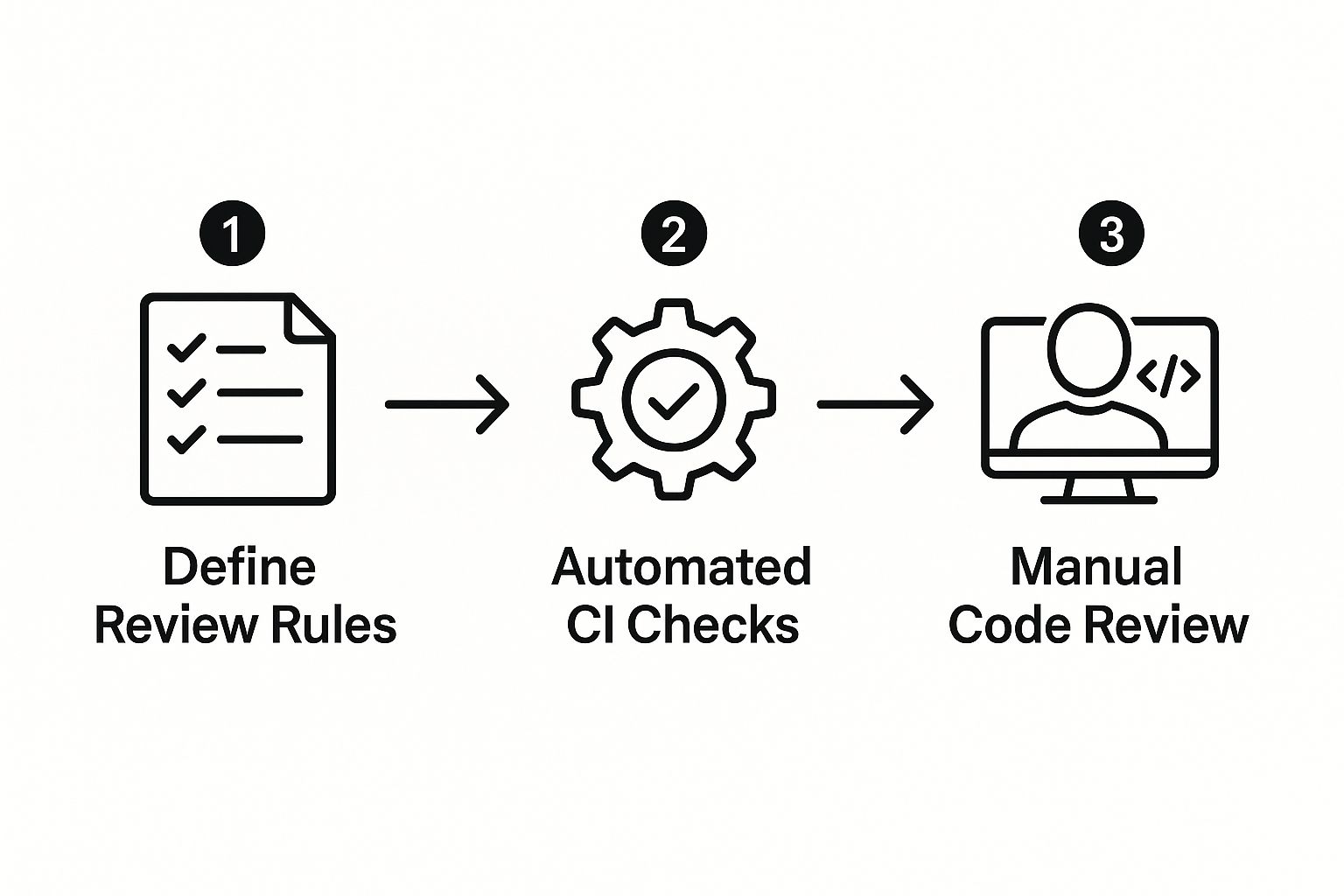
By the time a pull request lands in a reviewer's queue, you know all the basic style and syntax issues are already sorted.
Using GitHub Actions for Quality Gates
GitHub Actions is the go-to for building automated workflows right inside your repository. You can set it up to run a gauntlet of checks on every new PR, creating a powerful, automated quality gate.
Here are a few no-brainers to automate:
- Linting: Automatically scan code for stylistic errors using a shared ruleset. Think ESLint for JavaScript or similar tools for your stack.
- Running Tests: Kick off your entire test suite to make sure nothing breaks. This is non-negotiable for catching regressions.
- Code Formatting: Use tools like Prettier to enforce a consistent format across all submitted code. No more style debates.
Automating these mundane checks removes entire categories of feedback from your manual reviews. It saves a ton of time and, just as importantly, takes the personal sting out of stylistic critiques. It's not criticism; it's just a status check. For a deeper look, check out our list of the 12 best code review automation tools for 2025.
Taming Notification Overload
So, you've automated your quality checks. Great. But now you have a new problem: a firehose of notifications. A busy repository can absolutely flood your team with alerts, making it way too easy to miss an important review request. This is where you need a tool to manage the noise.
That's exactly what PullNotifier was built for. It helps your team get concise, real-time updates directly in Slack, where you're already working.
Instead of drowning in emails and random pings, you get targeted alerts that keep everyone in sync without the constant distraction. It helps you focus on what actually needs your attention, leading to faster reviews and a much smoother development cycle.
Using Advanced GitHub Features for Better Reviews
Once you've got a solid review process and some basic automation in place, it's time to leverage GitHub's more powerful features to crush common bottlenecks. This is the leap from a good code review on GitHub to a great one. You're essentially building guardrails that protect your codebase and guide developers toward best practices without you having to say a word.
Think of these advanced settings as your team’s safety net. They enforce quality standards automatically, which frees up your reviewers from having to manually check if every little rule was followed. Instead, they can get right to the important stuff: the quality and logic of the code itself.
Automatically Assigning the Right Reviewers
One of the biggest time-sinks in any review cycle is tracking down the right person for the job. You’ve probably seen it: a pull request for a complex database migration gets assigned to a frontend developer, and everything grinds to a halt while they figure out who should be looking at it. This is exactly what a CODEOWNERS file is designed to prevent.
It’s a simple text file you drop into your repository's root or .github directory that maps file paths to specific GitHub users or teams.
- How it works: When a pull request touches files covered by a
CODEOWNERSrule, the people or teams you've listed are automatically requested to review it. No more manual assignments. - A real-world example: You can set a rule so that any changes inside the
src/billing/directory must be reviewed by the@payments-team. Simple. - The benefit: This completely eliminates the guesswork. Specialized code gets reviewed by the actual experts, which dramatically speeds up the whole process.
Setting this up is a game-changer for directing the flow of reviews to the people with the most context. It just makes the entire workflow more efficient.
Protecting Your Most Important Branches
Merging unapproved or failing code into your main branch is a nightmare waiting to happen. Thankfully, GitHub gives us protected branches and required status checks to act as a crucial line of defense. These are your non-negotiable quality gates.
A protected branch is GitHub's way of saying, "This branch is critical, and no one can merge into it without following the rules." It transforms your review policy from a suggestion into an enforceable standard.
You can configure a set of rules that physically block the "Merge" button until certain conditions are met:
- Require pull request reviews before merging: This is the big one. It mandates at least one approved review before a merge is possible.
- Require status checks to pass before merging: This ensures all your automated CI checks—like tests and linters—come back green.
- Dismiss stale pull request approvals: If a developer pushes new code after getting an approval, this setting automatically dismisses it, forcing a fresh review of the latest changes.
These settings are absolutely essential for maintaining a stable main or develop branch. They institutionalize your best practices, making it impossible for anyone to take shortcuts. By enforcing these rules, you build a much more resilient and predictable development process, which ultimately allows your team to move faster with confidence. The goal here is to make quality the path of least resistance.
Common Questions About GitHub Code Reviews
Even with a solid workflow, some parts of a code review on GitHub can leave even experienced teams scratching their heads. It's totally normal. Knowing how to handle these tricky situations keeps things moving and makes sure everyone stays focused on shipping great code, not getting bogged down in confusion.
Let's walk through some of the questions I hear all the time.
How Do You Handle a Code Review for a Very Large Feature?
The short answer? You don’t—at least not in one go.
Trying to tackle a single, massive pull request is a recipe for disaster. It’s draining for the reviewer and, honestly, it’s just not an effective way to catch real problems. The best approach is to break the work into smaller, logical chunks that can be reviewed and merged on their own.
A common way to do this is with feature flags. You can merge smaller pieces of a big feature into your main branch behind a flag, keeping it turned off in production until everything is ready. Each of those pieces becomes its own manageable PR. This method, sometimes called stacked PRs, turns a huge bottleneck into a steady stream of digestible reviews. It also pretty much eliminates the nightmare of massive merge conflicts.
By breaking down large features, you're not just making the reviewer's job easier; you're de-risking the entire development process. Smaller changes are simpler to test, easier to understand, and quicker to roll back if something goes wrong.
What’s the Best Way to Give Feedback on Stylistic Issues?
Simple: let a robot do it.
The most effective way to handle style feedback is to take human opinion out of the picture completely. Debates over semicolons or line breaks are a massive time-sink. Worse, manual comments on code style can feel like nitpicking and often distract from the real, high-level architectural feedback that matters.
Instead, let tools enforce consistency for you:
- Linters: Tools like ESLint for JavaScript or RuboCop for Ruby are perfect for catching style and quality issues before anyone lays eyes on the code.
- Formatters: Integrate an auto-formatter like Prettier to make sure every file in the project has the exact same formatting.
Set these tools up to run as a GitHub Action on every single pull request. This gives the author immediate, impersonal feedback. It guarantees that by the time a human reviewer sees the PR, it already meets the team's standards.
What If I Disagree with a Reviewer’s Suggestion?
First off, it’s okay to disagree. Healthy debate is how great software gets built. The goal isn't to "win" an argument; it's to find the best possible solution for the codebase.
Before you push back, make sure you actually understand where the reviewer is coming from. If their comment is a bit vague, just ask for clarification.
If you’ve heard them out and still think your approach is better, explain your reasoning. Don't just say "I disagree." Back up your position with data, examples, or by tying it back to established design principles. If you can't reach an agreement after a few comments, it's time to stop typing. A quick 5-minute video call can resolve what might have turned into an endless, passive-aggressive comment thread.
Once you’ve made a decision together, just drop a quick summary of the outcome back in the PR comments. That way, anyone looking at it later will know why things were done a certain way.
Tired of missing important pull requests in a sea of notifications? PullNotifier delivers focused, real-time alerts directly to Slack, cutting through the noise so your team can review and merge code faster. Stop letting review delays become your bottleneck and start shipping with confidence. Learn more at https://pullnotifier.com.