- Published on
A Guide to Code Review With Git
- Authors

- Name
- Gabriel
- @gabriel__xyz
Code review with Git is so much more than a bug-squashing exercise. It's a fundamental rhythm for modern development teams, a structured process where developers systematically check each other's work before it gets merged into the main codebase.
Why Modern Teams Rely on Code Review With Git
Beyond just catching errors, a solid Git-based review process is the engine for team growth and codebase integrity. Top engineering teams don't just see it as a procedural checkbox—it's a cultural pillar. It’s the main way knowledge gets passed around, turning what one person knows into wisdom the whole team shares.
This kind of collaboration tears down knowledge silos. When a senior developer reviews a junior’s code, they aren't just pointing out mistakes; they're mentoring. And when a junior dev looks at a senior's work, they get a front-row seat to advanced patterns and architectural decisions they might not have seen otherwise. This constant back-and-forth gets new hires ramped up incredibly fast.
Fostering Shared Ownership and Quality
A consistent review process builds a powerful sense of shared ownership. The code stops being "your code" or "my code" and becomes "our code." This simple shift encourages everyone to maintain higher standards because they know their peers are going to have eyes on their work.
This leads directly to some huge wins:
- Consistent Standards: The team naturally starts to align on coding styles, patterns, and best practices without needing a million meetings.
- Reduced "Bus Factor": Knowledge gets spread around, so if one developer leaves, the rest of the team isn't stuck with a black box they can't maintain.
- Higher Code Quality: More eyes on the code means more chances to spot tricky edge cases, performance drains, and logical flaws. Using a comprehensive code review checklist can really help here to make sure nothing critical gets missed.
The Power of Asynchronous Collaboration
Git's whole branching and pull request model is perfectly designed for asynchronous work. A developer can spin up an isolated branch, get their work done, and then submit it for review without breaking anyone else's focus. For distributed teams scattered across different time zones, this isn't just nice—it's essential.
By decoupling the act of writing code from the act of reviewing it, teams can maintain development velocity without compromising on quality. A pull request acts as a documented conversation about a specific change, creating a valuable historical record.
The scale of this collaborative model is just massive. Platforms like GitHub, which are built entirely around Git workflows, now support over 100 million developers working on more than 420 million repositories. This widespread adoption just goes to show how central the code review with git process has become to building reliable software at any scale.
Building a Git Workflow for Better Reviews
A streamlined review process doesn't just happen when a pull request gets opened. It actually starts way earlier, with how your team uses Git itself. If you want reviews that are fast, focused, and actually effective, you need a solid technical foundation—and that foundation is a structured workflow.
The most battle-tested approach I’ve seen is the feature-branching workflow.
It's a beautifully simple model. Every new piece of work, whether it’s a feature, a bug fix, or a quick refactor, gets its own dedicated branch. This isolation is the secret sauce. It keeps your main branch (usually called main or master) clean, stable, and ready to deploy at a moment's notice. More importantly, it ensures every pull request tells a self-contained story about a single, specific change.
This clean separation makes the entire code review with git process a whole lot saner for everyone involved.
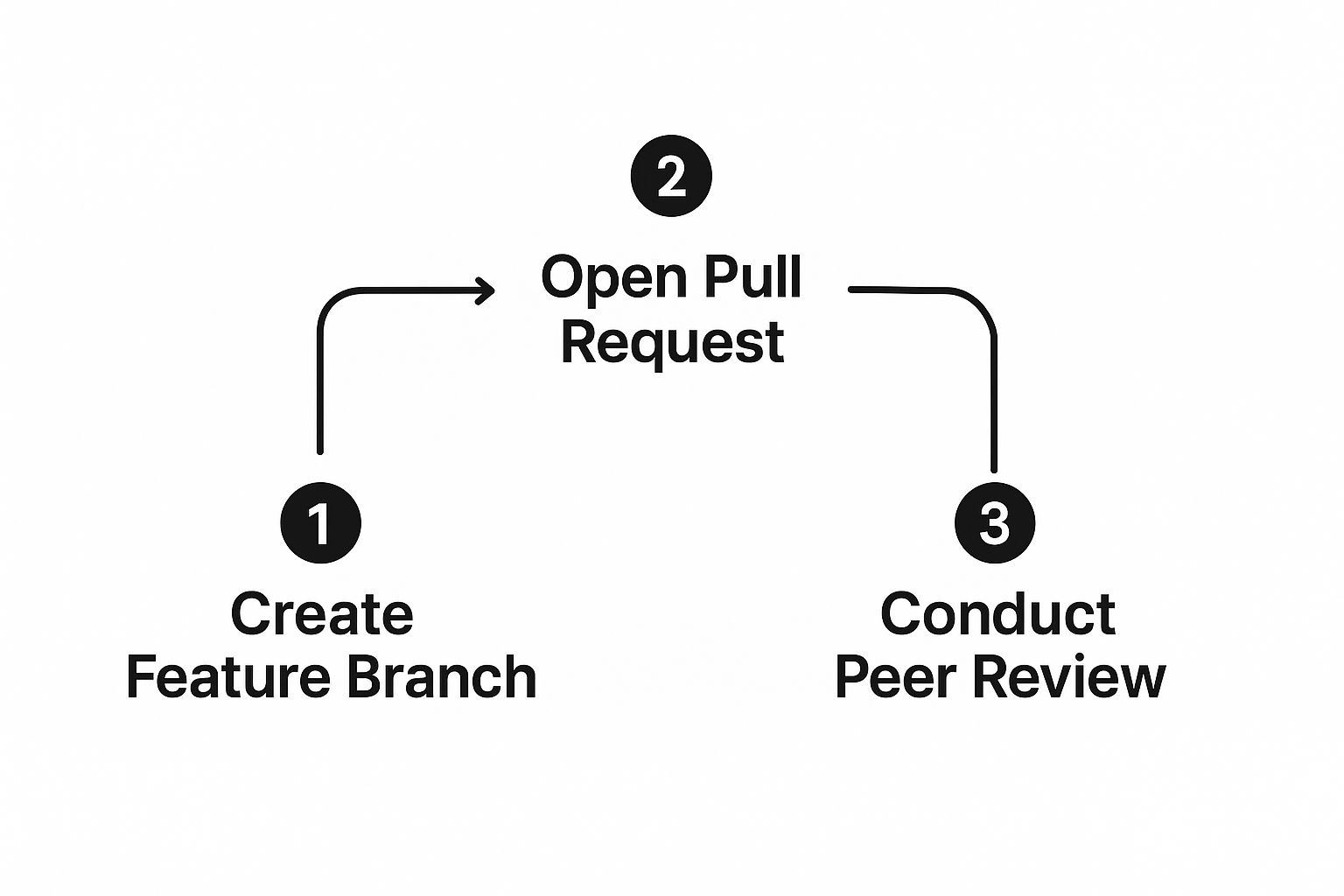
This image really nails the lifecycle, from creating a branch to getting that crucial peer review. It’s a linear flow where each step logically builds on the last, creating a focused and manageable chunk of work for someone to evaluate.
Keeping Pull Requests Small and Atomic
If there's one habit that will radically improve your code review experience, it's this: keep your pull requests small.
We've all seen them—the monster PRs with thousands of lines of changes across dozens of files. They’re a recipe for a slow, superficial review. Let's be honest, nobody has the time or mental bandwidth to properly scrutinize that much code in one sitting.
Instead, your goal should be atomic pull requests. An atomic PR has one single, crystal-clear purpose.
- It fixes one bug.
- It adds one feature.
- It refactors one component.
This approach transforms the review from a daunting chore into a quick, focused check. Reviewers can grasp the context instantly, give much higher-quality feedback, and approve changes faster. It's not just a hunch; studies on developer productivity consistently show that smaller, frequent changes lead to fewer bugs and quicker integration times.
A pull request should be like a good story: it has a single, clear plot. When a reviewer has to mentally juggle three different subplots (a bug fix, a new feature, and a style refactor), the quality of their feedback will inevitably suffer.
A Practical Branching and Committing Strategy
Okay, let's walk through what this looks like in the real world. Imagine you're tasked with adding a user authentication feature. Instead of tackling it all in one giant branch, you break it down.
First thing's first, you'll create a specific feature branch from the latest version of your main branch.
git checkout main git pull origin main git checkout -b feature/user-login
As you work, make small, logical commits with clear messages. A vague message like "WIP" or "changes" is completely useless to your future self and your teammates. A great commit message explains the why, not just the what.
git commit -m "feat: Add email and password validation to login form"
Once your focused set of changes is complete, you’re ready to push the branch and open that pull request.
git push -u origin feature/user-login
Using the -u flag here is a nice little time-saver. It automatically sets up the remote tracking branch, making future pushes simpler. This small discipline—atomic commits, single-purpose branches, and clear messaging—sets the stage for a code review that's actually helpful instead of painful. It pays off big time in team velocity and code quality.
To help you get into the rhythm, here’s a quick-reference table of the Git commands you'll be using constantly to prep your code for review.
Essential Git Commands for the Review Workflow
| Command | Purpose | Example Usage |
|---|---|---|
git checkout -b [branch-name] | Creates a new branch and switches to it. | git checkout -b fix/auth-bug-123 |
git add [file-name] | Stages a specific file for the next commit. | git add src/components/LoginForm.js |
git commit -m "Your Message" | Commits the staged changes with a descriptive message. | git commit -m "fix: Resolve incorrect password error" |
git pull origin [branch-name] | Fetches and merges the latest changes from the remote branch. | git pull origin main |
git push -u origin [branch-name] | Pushes your branch to the remote repository and sets tracking. | git push -u origin fix/auth-bug-123 |
Think of these commands as your daily toolkit. Mastering this simple sequence is the first step toward a more predictable and efficient review process for your entire team.
Crafting a Pull Request That Gets Approved

Alright, your atomic branch is pushed. Now comes the main event: the Pull Request. This isn't just a formality; the PR is the central hub for the entire code review with git. It's where your code tells its story, and how you frame that story can make all the difference between a quick approval and a week of back-and-forth.
Simply clicking "create" and hoping for the best just doesn't cut it. Crafting a high-quality PR is an act of empathy for your teammates—you're making their job easier, which gets your code merged faster.
Think of the PR as the cover letter for your code. A vague title like "Bug fix" is the equivalent of sending a generic resume; it’s lazy and immediately gets less attention. A strong title summarizes the what in one clear line. For example, "Fix: Prevent crash when user profile image is missing" gives a reviewer immediate context before they’ve even seen a single line of your changes.
The Anatomy of a Helpful PR Description
The PR description is your chance to explain the why. This is where you connect the dots for your reviewer, saving them from having to reverse-engineer your entire thought process. A well-written description acts as a guide, making the review faster and far more effective.
A great description almost always includes:
- A Link to the Ticket: Always tie your PR to the corresponding issue in your tracker, whether it’s Jira, Trello, or something else. This provides the full backstory and acceptance criteria.
- A Summary of the Change: Briefly explain the problem you solved and the approach you took. Why did you choose this particular solution over the alternatives?
- Clear Testing Instructions: Never make your reviewer guess how to verify your changes. Give them simple, step-by-step instructions on how to set up the environment and test the new functionality.
A pull request isn't just a request to merge code; it's a piece of technical documentation. Investing five extra minutes to write a clear description can save your team hours of confusion and endless comment threads.
For teams looking to get this right every time, exploring established pull request best practices can provide a solid framework for creating descriptions that are consistently clear and actionable.
Standardizing Quality with PR Templates
To make sure this level of quality becomes a habit, not an afterthought, start using PR templates. Most Git platforms like GitHub, GitLab, and Bitbucket allow you to create a markdown template that pre-populates the description field for every new pull request.
This is a simple but incredibly powerful way to standardize the information your team needs for every review. A simple template can prompt developers to fill out crucial sections, ensuring nothing important gets missed. It removes ambiguity and establishes a clear "definition of done" for submitting code.
Using Draft PRs and Requesting Reviewers
Not every pushed branch is ready for a formal review. If you've got changes that are still evolving, use the "Draft" or "Work in Progress (WIP)" feature. This is the universal signal to your team that you'd like some early feedback but the code isn't ready for a final approval stamp.
Finally, be strategic about who you ask to review your code. Don't just blast the entire engineering team. Tag one or two developers who have the most context on the code you've touched. This targeted approach respects your colleagues' time and ensures you get the most relevant feedback for your code review with git.
Giving and Receiving Constructive Code Feedback
The technical side of a code review with git is pretty straightforward, but the human element is where things can get tricky. This is where real collaboration happens, and it's also where friction can build if communication isn't handled with care.
Effective feedback is an art form. It can transform a simple check into a powerful mentorship opportunity for the entire team.
Best Practices for Reviewers
As the reviewer, your goal is to improve the code, not criticize the author. The language you use matters—a lot. Instead of pointing out a flaw directly, try framing your comments as questions or suggestions. This small shift in tone invites a conversation rather than a defensive reaction.
Here’s how you can make your feedback more collaborative:
- Focus on the Code, Not the Coder: Try to avoid using "you." For instance, instead of saying, "You forgot to handle this edge case," ask, "What happens in this edge case?" This keeps the conversation focused on the implementation.
- Ask, Don't Tell: When you spot a potential improvement, ask a clarifying question. "Have you considered a different approach here?" feels a lot more collaborative than "You should do it this way."
- Explain the 'Why': Don't just suggest a change; provide your reasoning. A comment like, "Let's change this to use the
histogramdiff algorithm because it handles moved code blocks more clearly," is educational and helps justify the request.
A great code review comment is a conversation starter. Its purpose is to build a shared understanding and arrive at the best possible solution together, not to prove a point or assign blame.
Gracefully Receiving Feedback
On the flip side, if you're the author, receiving feedback well requires an open mind. It's natural to feel a little protective of your work, but remember that every comment is an opportunity to get better.
Try to avoid the temptation to get defensive. Assume the reviewer has good intentions and is just trying to help strengthen the codebase. If a comment isn't clear, just ask for clarification.
And always thank your reviewers for their time and insights, even if you disagree on a minor point. This positive reinforcement encourages them to be just as thorough next time.
When you treat the process as a collaborative effort to build the best product, every pull request becomes a valuable lesson. Fostering this culture of psychological safety is essential for any high-performing team. To dive deeper, our guide on constructive feedback in code reviews offers more strategies to build a positive and productive environment. This collaborative mindset is the foundation of an effective code review process with Git, ensuring that feedback elevates both the code and the developers behind it.
Using AI and Automation to Supercharge Reviews

Let's be honest: manual reviews are great for catching logic flaws, but they just can't keep up with today's development pace. Your team's brainpower is far too valuable to be spent spotting missing semicolons or debating code formatting. That's a job for the machines.
This is where automation becomes a game-changer for any serious code review with git.
By building automated checks right into your Git workflow, you can hand off all the tedious, repetitive tasks. This creates a solid quality gate that every pull request has to pass before a human ever lays eyes on it, freeing up your team to focus on the stuff that actually matters—like architecture and complex business logic.
Establishing an Automated Quality Gate
Your first line of defense is always a rock-solid CI/CD pipeline. With tools like GitHub Actions or GitLab CI/CD, you can set up a series of automated jobs that kick off the moment a pull request is opened or updated. For any high-performing team, this is non-negotiable.
Your automated checks should cover a few key bases:
- Linting and Style Checks: Lock in a consistent code style across the entire codebase. This puts an end to all those stylistic debates during manual reviews once and for all.
- Unit and Integration Tests: Run your test suite automatically to catch regressions and make sure new code doesn't break anything important.
- Security Scans: Use automated tools to scan for common vulnerabilities and sketchy dependencies, flagging potential risks before they become real problems.
Once these checks are in place, the pull request that lands in front of a human reviewer is already a much cleaner artifact. The conversation can jump straight from syntax to substance.
The Rise of AI in Code Reviews
Going beyond basic automation, AI assistants are completely changing the code review landscape. These tools are much smarter than simple pattern-matchers; they offer intelligent suggestions that can seriously speed up your development cycle. Think of them as a proactive partner for both the author and the reviewer.
For the person writing the code, AI can suggest refactoring opportunities, help write boilerplate, and even generate relevant unit tests. This means the code that arrives for review is already in better shape.
For the person reviewing the code, AI can summarize complex changes, highlight risky code paths, and even suggest specific improvements.
This screenshot shows GitHub Copilot in action, providing smart, context-aware code suggestions directly in the editor. By automating away the more mechanical parts of coding, developers can stay in the flow and focus on solving tougher problems.
The impact here isn't just theoretical; it's measurable. Recent data shows that developers using GitHub Copilot complete their tasks around 55% faster.
The integration of AI into the review process has also been shown to slash pull request review times from an average of 9.6 days down to just 2.4 days—a nearly fourfold improvement. Explore more on how AI is reshaping code quality workflows.
This speed doesn't come at the expense of quality—it actually enhances it. By handling the first pass of a review, AI tools allow human reviewers to perform deeper, more strategic analysis. The end result is a more robust and maintainable codebase.
Embracing both automation and AI is no longer a luxury. It's a core strategy for any team that's serious about improving their code review process with Git.
Lingering Questions About Git Code Reviews
Even with the best process in place, teams always have questions when they start tightening up their Git code review workflow. Let's tackle some of the most common ones I hear from engineering teams, with straight answers to get you past these hurdles.
How Big Is a Pull Request Allowed to Be?
This is the classic question, and while there's no single magic number, I’ve found a solid rule of thumb: a reviewer should be able to give a thorough review in under 30 minutes.
If a pull request touches more than a dozen files or balloons past 400-500 lines of changes, you’re probably looking at something too big. When a PR becomes a massive wall of code, reviewers just end up skimming, which defeats the whole point. The goal should always be small, atomic PRs that zero in on a single feature or bug fix. It makes the review process faster and way more effective.
What Should We Actually Track to Measure Our Review Process?
You can't fix what you can't see. Tracking a few key metrics can shine a light on bottlenecks and show you exactly where your Git-based workflow needs some love.
Here are the metrics that give you the most bang for your buck:
- Review Time: How long does a PR sit there gathering dust before its first review? A long initial delay is a huge source of frustration and kills developer momentum.
- Time to Merge: This is the big one. It captures the entire lifecycle, from the moment a PR is opened until it’s safely in the main branch. A high Time to Merge could mean the code is too complex, the description is unclear, or your feedback loop is just plain slow.
- Post-Merge Bugs: Are bugs popping up in production that trace back to a specific PR? This is a direct gut-check on how effective your reviews really are.
Code review metrics in GitHub are non-negotiable for measuring the quality and efficiency of your process. Tracking these stats gives you actionable insights into your team's velocity and the overall health of your codebase. You can find more practical advice on tracking key code review metrics on Graphite.dev.
How Many Reviewers Should I Add to a PR?
Less is almost always more here. The sweet spot is usually one or two reviewers.
Requesting a single, dedicated reviewer who actually has context on the code is far more effective than blasting the entire team and hoping for the best. You can always add a second person for particularly critical or complex changes.
When you add too many reviewers, you run into the "bystander effect"—everyone assumes someone else will get to it, and the PR just sits. Be strategic. Pick reviewers who can provide real, valuable feedback, not just everyone on the project. This targeted approach respects your team's time and guarantees a faster, more focused code review.
Stop letting pull requests get stuck in review limbo. PullNotifier integrates seamlessly with GitHub and Slack to deliver real-time, consolidated updates, cutting through notification noise and reducing review delays by up to 90%. Try PullNotifier for free and accelerate your development cycle today.