- Published on
code security review: Quick Guide to Finding Vulnerabilities
- Authors

- Name
- Gabriel
- @gabriel__xyz
A code security review is, at its heart, the process of auditing your application's source code to find and stomp out security vulnerabilities before they ever see a production server. It’s a mix of manual, human-powered inspection and powerful automated tools designed to catch flaws like injection attacks, broken authentication, or accidental data exposure.
Think of it as embedding a security mindset directly into your development lifecycle, rather than treating it as an afterthought.
Why Code Security Reviews Are Essential

Let’s skip the obvious "security is important" talk and get straight to the point. In today's world of rapid development, the pressure to ship new features is relentless. This creates a natural tension with the need for airtight security—and that’s precisely where vulnerabilities love to hide.
One small coding oversight, something that seems completely harmless in the moment, can become a gaping hole for attackers to exploit. The fallout isn't just theoretical; it’s real-world financial loss, a tarnished reputation, and a complete breakdown of customer trust.
The Modern Threat Landscape
Today’s development environment is a minefield. Your application is no longer just your own code; it’s a complex web of open-source packages and third-party dependencies. That means you inherit the security (or lack thereof) of countless other projects. A single outdated library can introduce a critical vulnerability into your system without you ever writing a line of bad code.
Making matters worse, public repositories have created an enormous attack surface. The 2025 State of Code Security Report from Wiz dropped a bombshell: a staggering 35% of GitHub repositories are public. Even more alarming, 61% of organizations expose sensitive secrets like API keys and credentials in these public repos. As DailySecurityReview.com noted, that's like leaving the front door wide open with the keys hanging in the lock.
A proactive code security review is no longer a "nice-to-have"—it's a foundational pillar of any resilient development process. It transforms security from a reactive panic into a deliberate, integrated practice.
This new reality makes a systematic code security review absolutely non-negotiable. It’s not about blame games or slowing down releases. It’s about building a safety net that catches mistakes before they become catastrophes.
What a Modern Review Involves
A truly effective review process isn't a single action but a multi-layered strategy that combines human intuition with machine precision. For a more structured approach, our detailed code review checklist can be a great starting point.
Here’s a breakdown of the core components that make up a modern security review process.
Core Components of a Modern Code Security Review
| Component | Primary Goal | When to Perform |
|---|---|---|
| Manual Peer Reviews | Spot complex business logic flaws and design issues. | During the pull request phase, pre-merge. |
| SAST (Static Testing) | Find common vulnerability patterns in source code. | Integrated into CI pipeline, on every commit. |
| DAST (Dynamic Testing) | Simulate attacks on the running application. | Staging/testing environments, post-deployment. |
| SCA (Composition Analysis) | Scan third-party dependencies for known vulnerabilities. | On every build and continuously monitored. |
Each of these pillars plays a unique role, covering different angles of your application's security posture.
By weaving these practices together, you create a robust defense that helps your team build secure, dependable software without killing your momentum.
Laying the Groundwork for a Successful Review
An effective code security review doesn’t just happen. It’s the result of smart, intentional preparation. Jumping into a review without a clear plan is like trying to navigate a new city without a map—you'll get lost, waste time, and miss the most important landmarks. A little groundwork ensures every review is focused, efficient, and actually hardens your application's security.
The goal here is to build a simple framework that guides reviewers, sets clear expectations, and slots right into your existing development workflow. This setup is what turns a review from a dreaded chore into a productive, collaborative process. Skip this, and you'll get inconsistent reviews where critical vulnerabilities can easily slip through the cracks.
Defining a Clear and Realistic Scope
Before anyone looks at a single line of code, you have to define the scope. Trying to review an entire application in one go is a recipe for burnout and overlooked issues. It just doesn't work.
Instead, focus on what's changed. The most practical approach is to scope the code security review to the specific changes in a pull request or a new feature branch. This keeps the task manageable and directly relevant to the work being done. It lets reviewers zero in on the areas with the highest potential for new vulnerabilities, like:
*   **Authentication and Authorization Logic:** Any changes to how users log in, manage permissions, or access data.
*   **Input Handling and Data Validation:** Code that processes user-submitted data, which is a classic breeding ground for injection attacks.
*   **Third-Party Integrations:** New APIs or libraries that could bring in inherited risks.
By narrowing the focus, you empower your team to do a much deeper, more meaningful analysis where it counts, rather than a superficial scan of the whole codebase.
Establishing Security Standards and Checklists
Consistency is everything in a solid review process. Without a shared standard, what one developer flags as a critical issue, another might completely ignore. This is where established security frameworks are a lifesaver. Using a guide like the OWASP Top 10 gives everyone a common language and a baseline for spotting the most critical web application security risks.
From there, you can build a simple, practical checklist tailored to your team's stack and common pitfalls. This isn't about creating some rigid, bureaucratic document; it's about providing a quick reference to keep reviewers on the right track.
A well-crafted checklist doesn't replace critical thinking—it enhances it. It ensures the common stuff is always checked, freeing up mental bandwidth for reviewers to spot more complex, context-specific flaws.
Your checklist should be a living document. It needs to evolve as your team encounters new threats or adopts new technologies. Think of it as a gentle nudge to check for things like proper error handling, secure defaults, and the absence of hardcoded secrets.
Fostering a Collaborative Security Culture
Honestly, the most important part of any code security review isn't a tool or a process—it's the culture. If reviews are seen as a way to assign blame or nitpick a developer's work, the whole system breaks down. Developers will get defensive, hide mistakes, and resist feedback, which completely undermines your security goals.
Creating a blame-free environment is non-negotiable. You have to frame security reviews as a collaborative learning opportunity where the entire team works together to build a more robust product. The focus must always be on the code, not the coder.
Encourage open dialogue where reviewers explain the "why" behind their feedback, linking it back to potential real-world impacts. When a developer understands the risk, they're far more likely to internalize the lesson and avoid similar mistakes down the road. This simple shift in mindset turns every review into a valuable teaching moment, strengthening the entire team's security awareness over time.
Running the Review with Manual and Automated Methods
Alright, this is where the prep work really starts to matter. An effective code security review isn't about picking sides between manual checks and automated tools. It’s about blending them. Think of it as a hybrid approach where each method watches the other's back.
Automation is your first line of defense. It’s relentless, scanning for known vulnerability patterns at a speed no human ever could. This frees up your team to do what they do best: apply critical thinking to uncover those tricky, context-dependent flaws that automated tools just don't get.
The Power of Manual Inspection
Let's be real—no tool can replicate the intuition of a seasoned developer. Manual reviews shine when it comes to spotting business logic flaws. These are the kinds of vulnerabilities that hinge on understanding the intent behind the code, not just its syntax. This human touch is absolutely essential for catching subtle but critical security gaps.
Here's an analogy: an automated tool can tell you if a door is unlocked, but a human can tell you if the door was built in the wrong place to begin with. Your team's expertise is your greatest security asset.
Manual reviews are irreplaceable for things like:
*   **Flawed Authentication and Authorization:** Checking if a user *should* be able to do something, not just that they *can*.
*   **Insecure Business Logic:** Finding ways to twist the application's intended features, like a price manipulation flaw in an e-commerce checkout.
*   **Race Conditions:** Spotting those sneaky timing-based vulnerabilities where the sequence of operations can be exploited.
Spotting Common Vulnerabilities by Hand
During a manual code security review, your developers should be on the hunt for common red flags. For example, in a web app, any code that takes user input without proper sanitization is an immediate suspect for Cross-Site Scripting (XSS) or SQL injection.
Take a look at this seemingly innocent snippet for fetching user data:
query = "SELECT * FROM users WHERE userId = '" + request.getParameter("id") + "';"
An automated tool might flag this, sure. But a human reviewer instantly sees the massive risk of SQL injection. They can visualize exactly how a malicious actor could mess with the id parameter to run their own database commands, completely bypassing the query's intended logic. That kind of contextual risk assessment is what a quality manual review is all about.
Weaving Automation into Your Workflow
While manual reviews give you depth, automation provides the breadth and speed you need. Integrating security tools right into your CI/CD pipeline transforms security from a one-off event into a continuous, automatic habit. The two main players here are SAST and DAST.
Static Application Security Testing (SAST) tools are like a spell-checker for your code. They analyze it without running it, looking for patterns that match known vulnerabilities. This makes them incredibly fast—perfect for running on every single commit or pull request.
Dynamic Application Security Testing (DAST) tools do the opposite. They test your app while it's running, basically poking and prodding it from the outside to see how it reacts to simulated attacks. This is crucial for catching runtime issues you'd never see in the source code alone.
By embedding SAST and DAST into your pipeline, you create an automated security gate. This ensures that a baseline level of security is checked long before a human reviewer even needs to look at the code.
For teams wanting to get ahead of the curve, it’s worth looking into emerging tech. When you're adding automation to your review process, you might want to check out AI tools for detecting security vulnerabilities, which are starting to bridge the gap between static analysis and human-like contextual understanding.
Choosing the Right Automated Tools
The market is packed with great options, and the best choice really comes down to your tech stack, workflow, and budget. The key is to find tools that slot neatly into your existing processes and give your developers clear, actionable feedback. To help you sort through it all, we put together a guide on the 12 best automated code review tools for 2025.
Ultimately, the goal is a layered defense. Automation is your wide net, catching the majority of common, predictable flaws. This clears the way for your manual reviewers to do a deep, high-impact analysis on the most critical parts of your application, ensuring nothing falls through the cracks.
Taming Your Third-Party Dependencies
Let's be real—nobody builds applications from scratch anymore. We all stand on the shoulders of open-source giants, pulling in libraries and packages that let us build faster. But that speed comes with a price. Every dependency you add to your project is another potential backdoor, bringing its own set of vulnerabilities along for the ride.
This isn't a small problem; it's one of the biggest attack surfaces we face. A solid code security review has to go beyond your own code and dig deep into the code you inherit. If you ignore your dependencies, you're basically locking the front door but leaving every window wide open.
The Hidden Dangers in Your package.json
Every time a developer runs npm install or pip install, they're placing implicit trust in dozens, sometimes hundreds, of external packages. A single vulnerability buried in a nested dependency—one you might not even realize you're using—can compromise your entire application.
This risk is only getting worse as vulnerabilities in popular open-source projects are found and exploited faster than ever. A package that was perfectly safe yesterday might have a critical CVE (Common Vulnerabilities and Exposures) disclosed today. Without a system to track this, you’re flying blind.
The hard truth is that most organizations just can't keep up. A recent analysis found that an alarming 90% of audited codebases had open-source components that were more than four years out-of-date.
That number alone should be a wake-up call. The same report found that 86% of risk-assessed codebases contained vulnerable open-source components, with a staggering 81% containing high or critical-risk flaws. You can get all the details in the full 2025 Open Source Security and Risk Analysis report.
Implementing Software Composition Analysis
The best way to get a handle on this risk is with Software Composition Analysis (SCA). SCA tools automatically scan your project's dependencies, figure out which versions you’re running, and check them against a massive database of known vulnerabilities. Think of it as a background check for every piece of code you didn't write yourself.
Plugging an SCA tool into your CI/CD pipeline is a must-do. It gives you continuous visibility and makes sure no new, vulnerable dependency can sneak into your main branch without getting flagged.
Your Action Plan for Dependency Management
Just running an SCA tool isn't enough. You need a smart strategy to manage the findings without completely derailing your team.
Generate a Software Bill of Materials (SBOM) An SBOM is just a fancy term for an inventory list of every single component in your software. Your SCA tool can spit this out for you, giving you a crystal-clear picture of your entire dependency tree. This is your source of truth.
Automate Dependency Updates Most vulnerabilities are fixed with a simple version bump. Tools like Dependabot and Renovate can automatically create pull requests to update outdated packages, making it almost effortless to stay current. For a deeper look, check out our comparison of Dependabot vs Renovate for dependency updates.
Prioritize Your Fixes Strategically You're going to find a lot of issues. Trying to fix them all at once is a recipe for burnout. Use the CVSS (Common Vulnerability Scoring System) score to figure out what to tackle first:
    *   **Critical (9.0-10.0):** Stop what you're doing and fix these now. They often represent major risks like remote code execution.
    *   **High (7.0-8.9):** These should be your next priority, especially if they're in production-facing code.
    *   **Medium (4.0-6.9):** Schedule these fixes for your next development cycle.
    *   **Low (0.1-3.9):** Address these when you have the time, or if they impact a sensitive part of your application.
This tiered approach helps your team focus on what matters most, letting you systematically crush risk without killing your development velocity. A strong dependency management strategy isn't just nice to have—it's a non-negotiable part of any modern code security review.
Integrating Security Checks into Your Pull Requests
Let's be honest, security reviews that happen days or weeks after the code is written are a huge pain. They create bottlenecks, force developers into frustrating rework, and slow everything down. The best code security review is one you barely notice—a smooth, automated step in the daily workflow. This is all about shifting security left, right into the pull request.
When you embed security checks directly into the PR process, security stops being a dreaded gatekeeper and starts acting like a helpful collaborator. Feedback arrives instantly, right where developers are already working. This lets them fix potential issues on the spot while the context is still fresh, which is always going to be faster and cheaper.
Automating Security Within the PR Lifecycle
The big idea here is simple: treat security checks just like you treat unit tests. A PR shouldn't be mergeable until it clears a baseline of automated security scans. This creates a powerful, non-negotiable quality gate that stops common vulnerabilities from ever hitting your main branch. It's how you build a culture where security is a shared responsibility, not just one team's problem.
Setting this up means tweaking your CI/CD pipeline to automatically trigger security tools whenever a new PR is opened or updated. These tools run quietly in the background, analyze the proposed changes, and report their findings directly back to the PR as status checks or comments.
This automated flow for managing dependencies typically follows a straightforward but effective cycle of scanning, analyzing, and prioritizing what needs attention.
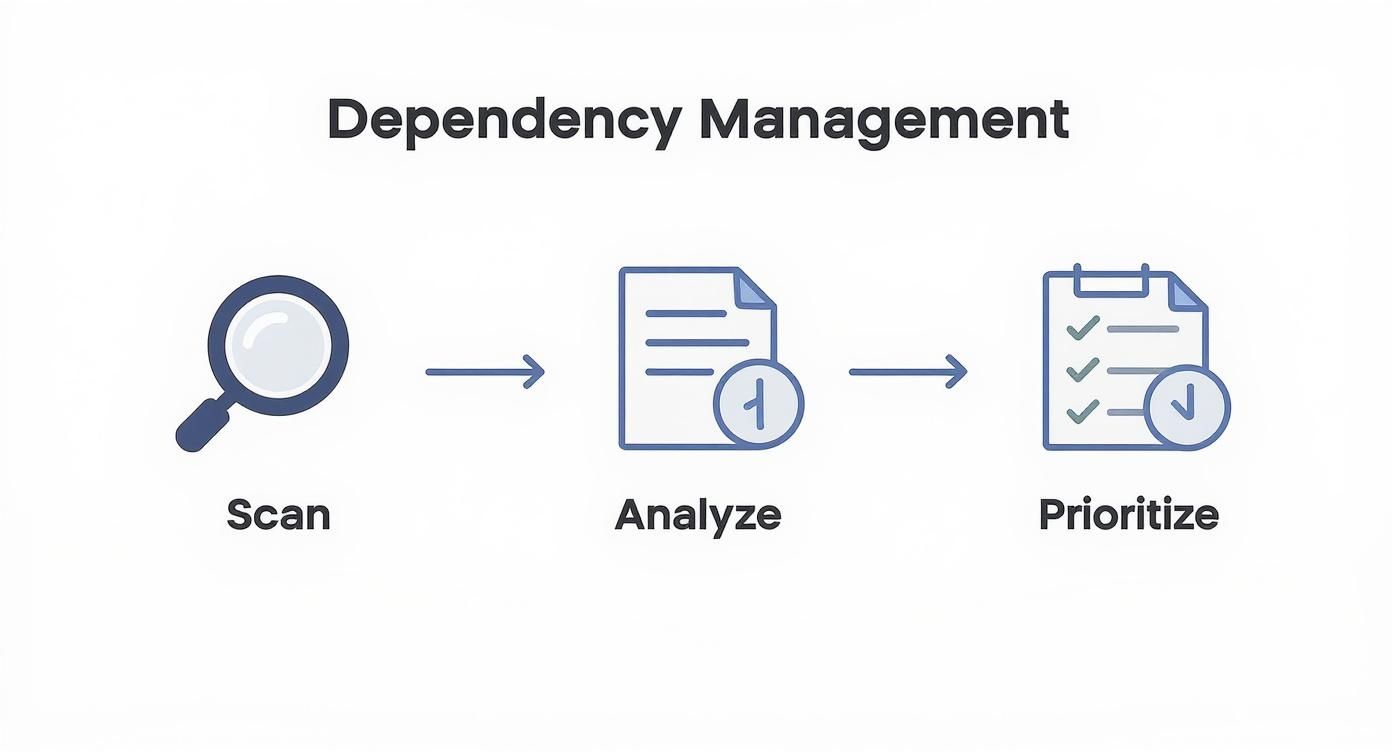
As the graphic shows, having a structured process transforms a reactive scramble into a proactive strategy, making sure risks are systematically caught and handled.
Key Security Scans to Automate
To build a solid safety net, you'll want to layer a few different types of automated scans. Each one is designed to find different kinds of problems, giving you more comprehensive coverage.
*   **Static Application Security Testing (SAST)**: This is your first line of defense. SAST tools scan your source code for well-known insecure coding patterns, like SQL injection vulnerabilities or sloppy error handling. They're fast and perfect for catching common mistakes early.

*   **Software Composition Analysis (SCA)**: As we've covered, your dependencies are a massive source of risk. SCA tools check your project's third-party libraries against a database of known vulnerabilities, flagging any outdated or insecure packages right in the PR.

*   **Secret Scanning**: This one is absolutely critical. These scanners hunt for hardcoded secrets like API keys, passwords, and private certificates within the code. Accidentally committing a secret, especially to a public repository, can lead to an immediate and painful security breach.
By running these scans right inside the pull request workflow, you create an environment of immediate feedback. A developer finds out about a potential vulnerability minutes after pushing their code, not days later during a manual review.
This instant feedback loop is what makes the whole process so powerful. It dramatically shortens the time from mistake to correction.
Configuring Intelligent and Actionable Notifications
The final piece of the puzzle is getting these results to developers in a way they'll actually appreciate. Nobody wants a flood of noisy, irrelevant alerts—they'll just get ignored. This is where a tool like PullNotifier really shines. Instead of drowning your team in notifications, you can set up intelligent routing.
Picture this: an SCA scan finds a critical vulnerability in a new dependency. Instead of a generic alert in a crowded channel, you can trigger a workflow that:
*   **Immediately fails the build**, blocking the PR from being merged.
*   Posts a **single, consolidated message** in the team's dedicated Slack channel.
*   **Automatically @mentions** the developer who authored the PR and the team's security champion.
*   Includes a **direct link** to the vulnerability details and suggested fix.
This targeted approach cuts through the noise and delivers actionable feedback right where your team works. It turns a potential security crisis into a routine, manageable task. By making the code security review an automated, integrated, and painless part of every pull request, you empower developers to build more secure software by default.
Common Questions About Code Security Reviews
As engineering teams start taking code security seriously, a few questions pop up almost every time. Getting straight answers is the fastest way to build a solid process and get everyone pulling in the same direction. Let's cut through the noise and tackle the most common ones we hear.
The idea here isn't to give you textbook definitions, but real-world advice you can actually use. Think of this as your cheat sheet for refining your security workflow, picking the right tools, and handling curveballs like AI-generated code.
How Often Should We Conduct a Code Security Review
A code security review shouldn't be a big, scary event you dread once a quarter. If you want it to actually work, it needs to be part of your daily development rhythm—less like a formal audit, more like a continuous quality check.
The best way to do this is to operate on two different speeds:
*   **Always-On Automated Scanning:** This is your first line of defense. Tools for SAST, DAST, and SCA should be baked directly into your CI/CD pipeline. They need to run on every single pull request, giving you instant feedback *before* anything gets merged.
*   **Deep-Dive Manual Reviews:** Save the human brainpower for the really sensitive stuff. Any changes touching authentication, payment systems, or core cryptography deserve a hands-on review. It's also a smart move to do a manual review before shipping a major new feature.
This two-track approach makes security an everyday habit, not a bottleneck that brings development to a halt.
What Is the Difference Between SAST DAST and SCA
It’s easy to get lost in the alphabet soup of security tools. The simplest way to keep SAST, DAST, and SCA straight is to think of them as three different specialists you've hired to protect your app.
| Tool Type | Analogy | How It Works |
|---|---|---|
| SAST (Static) | A Code Inspector | Scans your source code from the inside out without running it, looking for well-known bad patterns and flaws. |
| DAST (Dynamic) | A Friendly Hacker | Probes your running application from the outside in, mimicking real-world attacks to find runtime vulnerabilities. |
| SCA (Composition) | A Project Librarian | Catalogs all your third-party and open-source dependencies and checks them against a massive database of known vulnerabilities. |
You really do need all three for solid coverage. Relying on just one is like locking your front door but leaving the windows and back gate wide open.
How Should We Handle Security for AI-Generated Code
Here’s the golden rule: treat code from an AI with the same—if not more—skepticism as code from a brand-new junior developer. Never trust it blindly. AI tools are incredible for speeding up development, but they have zero real-world security context.
A 2025 report found that AI-generated code introduced security flaws in 45% of cases. This isn't a "maybe" problem; it's a "when" problem that demands human oversight.
Any code spit out by an AI has to go through your full code security review process, no exceptions. That means it gets hit by your automated scanners and, more importantly, gets a thorough review from a human who knows what they're looking for.
Train your developers to see AI as a helpful assistant for writing boilerplate, not as a security expert. Every single line it generates needs to be validated before it even thinks about touching your main branch.
Ready to make your code review process faster and more efficient? PullNotifier integrates directly with GitHub and Slack to deliver clear, actionable pull request updates right where your team works. Cut through the noise and accelerate your development cycle. Get started for free on pullnotifier.com.