- Published on
Fix Your GitHub Slack Notifications
- Authors

- Name
- Gabriel
- @gabriel__xyz
Your GitHub Slack notifications should be a helpful tap on the shoulder. But for most teams, they're a fire alarm that won’t shut off.
The default integration has one setting: flood the channel. Alerts for every single commit, comment, and CI run create a constant stream of pings. The noise is so overwhelming that critical updates get lost in the chaos, slowing down code reviews and burning out your developers.
Why Your GitHub Slack Notifications Are So Noisy
Let’s be honest, the standard GitHub app for Slack is a one-size-fits-all tool. The problem is, no two engineering teams work the same way. It’s great at sending everything, but it gives you almost no control over what you actually see. The end result is a notification feed that actively hurts your team’s focus.
This isn’t just a small annoyance. It has real consequences.
Picture this: a senior dev opens a pull request. The notification for it is immediately buried under a dozen alerts from the CI/CD pipeline. By the time a reviewer even sees the PR, it's already stale. That kind of notification fatigue leads directly to slower dev cycles and a whole lot of frustration.
The Real Cost of Notification Overload
This problem gets even worse in complex projects. For teams working in massive codebases, the firehose of updates makes it nearly impossible to track what actually matters. If you're dealing with that, our guide on managing PR notifications in monorepos might give you some valuable insights: https://blog.pullnotifier.com/blog/7-tips-for-managing-pr-notifications-in-monorepos.
Taming your notifications is a huge step to improve developer productivity by cutting down on distractions. Every interruption forces a developer to context-switch, which shatters their concentration and drains mental energy. When every ping feels urgent, none of them are.
A truly effective notification system shouldn't just deliver information; it should deliver clarity. It filters out the noise so your team can focus on what they do best: building great software.
This is exactly where a purpose-built tool becomes a necessity. Instead of wrestling with default settings, you need a solution designed from the ground up for customization. A smarter approach lets you define precise rules, so the right alert gets to the right person at the right time. For example, a "ready-for-testing" label should ping the QA team, not the entire engineering department.
Here’s what a smarter workflow is designed to fix:
- Irrelevant Alerts: No more notifying backend engineers about minor CSS tweaks in the frontend repo.
- Repetitive Updates: Consolidate a dozen comments on a single pull request into one clean, threaded message.
- Actionable Pings: Tie notifications to specific actions, like a direct review request or a failed build that needs someone to look at it now.
By moving from a noisy, reactive system to a quiet, proactive one, you give your team the space to stay focused and engaged. This guide will walk you through how to build that system using PullNotifier, turning your GitHub Slack notifications from a constant distraction into a powerful tool for getting things done.
Your First Steps with PullNotifier
Getting started with PullNotifier is refreshingly simple. The whole point is to take you from a chaotic notification feed to a calm, organized one, and you can get there in just a few minutes. It all boils down to connecting your GitHub and Slack workspaces and then creating your first rule to direct the alerts where they need to go.
We'll walk through the initial setup and explain why each permission matters. This isn’t just about linking accounts; it’s about building a smart, deliberate bridge between your code and your team's communication hub. This first connection is the foundation for all the powerful, custom filtering you'll set up later.
Connecting Your Accounts Securely
First things first, you’ll need to authorize PullNotifier to access both your GitHub and Slack workspaces. When you kick off the process, you'll be guided through a standard OAuth flow for each platform. This is a critical security step, as it means you're granting specific, limited permissions instead of handing over the keys to the kingdom.
For GitHub, PullNotifier only asks for read-only access to your pull requests and repository metadata. It never requests code-writing permissions, so your codebase stays completely secure.
Over on the Slack side, it just needs permission to post messages into the channels you specify. This minimalist approach to permissions ensures you stay in full control of your tools.
Creating Your First Notification Rule
Once your accounts are linked, it's time for the fun part: creating your first rule. This is where you tell PullNotifier exactly what to watch for and where to send the alert. Think of it as creating a dedicated communication pipeline for your development workflow.
A great first rule is often the simplest one. Let's route all new pull requests from your main repository to a dedicated Slack channel.
- Select a GitHub Repository: Choose your primary application repo, maybe something like
my-awesome-app. - Designate a Slack Channel: Pick a channel where your dev team lives, such as
#dev-team-prs. - Define the Trigger: Start with the basics—notify on "Pull Request Opened."
This simple rule immediately declutters your main development channel. All PR-related discussions now have a dedicated home, separating them from general chatter and other announcements. It’s a small change that makes a huge difference in creating focused, context-rich conversations around your code.
You can set this all up in minutes on the PullNotifier platform.
Below is a quick look at the clean interface where you'll define these rules. As you can see, it's a straightforward process of mapping a GitHub repository to a Slack channel. With this initial rule in place, you've already made a massive improvement to your team's github slack notifications workflow.
Okay, you've connected your accounts and set up a basic rule. You're already cutting down on the noise. Good start.
Now, let's unlock the real power of a tool like this by creating custom rules that actually match how your team works. This is where we go beyond simple repository-to-channel mapping and start building an intelligent notification system that works for you, not against you.
This approach turns your github slack notifications from a passive, noisy feed into an active part of your development workflow. We'll get into filtering alerts by specific labels, authors, and even individual repositories, making sure every single ping is relevant and actionable.
The difference is night and day. Just look at the impact of switching from default settings to a custom-tuned rule set. We're talking about massive reductions in both notification spam and review delays.
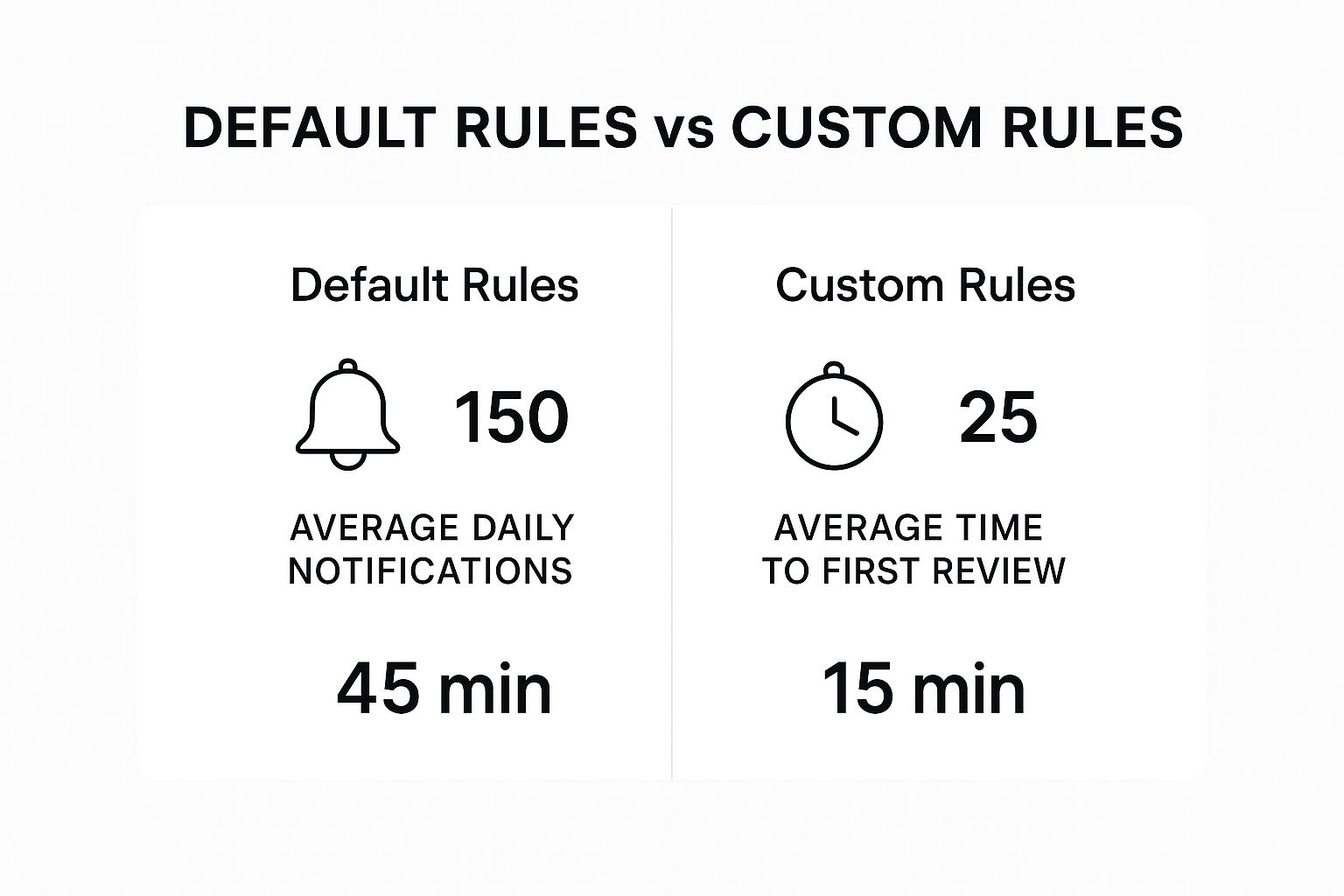
The data here is pretty clear: a smart notification strategy doesn't just quiet things down. It directly speeds up your development cycle by getting the right eyes on the right code, faster.
Use GitHub Labels to Route Information
One of the most effective ways to build a focused workflow is to use your existing GitHub labels as triggers. Your team is probably already using labels to categorize pull requests, so why not put them to work directing your notifications, too? This is how you create specific communication channels for different stages of development.
Think about a common scenario: a pull request is finally ready for the QA team. Instead of someone having to remember to manually ping them or letting the update get buried in a general channel, you can just automate it.
- Create a rule that watches for the
ready-for-testinglabel. - Set the destination to a dedicated
#qa-teamSlack channel.
The moment a developer applies that label, the QA team gets a direct, targeted notification. No more ambiguity. No more PRs sitting idle waiting for a handoff. You can set up similar rules for needs-design-review or documentation-required to pull in other teams at exactly the right moment.
Filter Notifications by Author or Reviewer
Let's be real, not every notification needs to go to the entire team. Sometimes, you just need to get the attention of one person or a small group. Filtering by PR author or reviewer is a fantastic way to slash channel-wide noise and deliver personal, high-priority alerts.
For example, maybe your tech lead wants to personally review all contributions from junior developers. Easy. Set up a rule that sends them a direct message in Slack whenever a PR is opened by a specific list of GitHub usernames. This keeps their focus sharp without spamming the main team channel.
The goal is to match the notification to the audience. A rule that alerts an entire channel about a CI failure is useful, but a rule that DMs a specific reviewer when their feedback is requested is essential for high-velocity teams.
You can also create rules that trigger when a specific senior engineer is requested for review on a critical PR. This ensures their expertise is brought in quickly, without them having to wade through dozens of unrelated alerts. This level of personalization makes your notification system feel less like a bot and more like a genuinely helpful assistant.
For teams looking to improve their notification strategy, comparing the default GitHub app with a specialized tool like PullNotifier highlights the significant gaps in customization and filtering.
PullNotifier vs Default GitHub App Notification Features
| Feature | Default GitHub App | PullNotifier |
|---|---|---|
| Basic Notifications | Yes (PRs, issues, comments) | Yes (PRs, issues, comments, CI/CD status) |
| Channel Routing | Basic (repo to channel) | Advanced (repo, labels, authors, reviewers, branch patterns) |
| Label-Based Filters | No | Yes, fully customizable rules |
| Author/Reviewer DM | No | Yes, direct messages for specific user actions |
| Consolidated Updates | No (separate message per event) | Yes (single, dynamic message per PR) |
| Monorepo Support | Limited (all notifications to one channel) | Yes, route updates based on code paths |
As the table shows, while the default app handles the basics, PullNotifier provides the granular control needed to eliminate noise and create a truly efficient workflow.
Isolate Workflows by Repository
For any organization or team managing multiple projects, repository-based filtering isn't a nice-to-have; it's essential. The frontend team doesn’t need to see every commit pushed to the backend API, and the mobile team can safely ignore updates to the main web app.
PullNotifier lets you create distinct rule sets for different repositories or even groups of repositories using wildcard patterns.
- Frontend Rule: Route all PRs from repositories matching
frontend-*to the#team-frontendchannel. - Backend Rule: Send notifications for
backend-apianddata-servicesto#team-backend. - Urgent Hotfix Rule: Create a high-priority rule for a
hotfix-*branch pattern across all repositories, sending an immediate alert to an#ops-alertschannel.
This kind of segmentation is crucial for maintaining focus and stopping the cross-team notification spam that plagues so many engineering departments. It respects developers' time and attention, letting them stay locked in on the updates that actually impact their work.
Streamline Your Code Review Process

A well-oiled notification system is the secret weapon for a faster, more effective code review cycle. When your github slack notifications are precise and consolidated, you aren't just cutting down on noise—you're actively tightening your team's feedback loop. It’s all about turning alerts from a constant distraction into a valuable part of your development workflow.
The single biggest win here is eliminating context switching. Instead of developers chasing down updates across a dozen different pings, PullNotifier creates a single, dynamic message for each pull request. When someone leaves a comment, approves a change, or requests an update, that original Slack message is simply updated.
This creates a clean, persistent source of truth right inside your channel. No more scrolling through endless pings just to piece together the history of a PR.
Fostering Faster Feedback Loops
This one change has a massive ripple effect on your entire review process. When the conversation around a PR is consolidated, reviewers can grasp the full context at a glance. They see the initial code, the latest comments, and the current status—all in one place.
That immediate clarity encourages quicker engagement. Reviewers don't have to mentally rebuild the conversation; they can just jump right in. This directly leads to some pretty great outcomes:
- Shorter PR Cycle Times: Faster feedback means developers can iterate and get their code merged more quickly.
- More Collaborative Reviews: When the discussion is easy to follow, more team members are naturally inclined to participate.
- Reduced Mental Overhead: Your team spends less time managing notifications and more time actually writing code.
The core idea is simple: a notification should be an invitation to collaborate, not a chore to manage. By keeping the conversation tidy and centralized, you make it effortless for your team to do their best work.
Keeping Development Velocity High
Let's walk through a real-world scenario. A developer pushes a critical hotfix and requests a review. With a default setup, the initial PR notification might get buried. Follow-up comments create even more pings, cluttering the channel and making the PR's status hard to track. The whole process becomes slow and disjointed.
Now, imagine that same scenario with a smarter system. The moment the PR is opened, a single message appears in the #ops-alerts channel. Every new comment, approval, and status change updates that same message in real-time. The assigned reviewers see a complete, live view of the PR's progress.
This kind of streamlined communication is vital for maintaining high development velocity without sacrificing code quality. Over 500 organizations and 10,000 engineers already use tools like PullNotifier to make sure the right people see real-time updates in a format that's actually helpful. For the full background on how the github slack integration works, including the limits of the official app and what to do about them, read our complete guide. There is also a detailed write-up on how GitHub Slack integration improves code reviews for the code-review angle.
Ultimately, this approach transforms your Slack channels from a chaotic archive of past events into a dynamic dashboard for current work. It’s a foundational shift that helps teams stay aligned, focused, and incredibly efficient, ensuring that important code gets reviewed and shipped faster than ever before.
Your GitHub Slack notifications can do a lot more than just announce a new pull request. Instead of just being reactive alerts, think of them as a raw data stream you can tap into to understand—and improve—your team's performance. You can build a real-time dashboard of your entire development cycle, right inside Slack.
This isn't just about getting more alerts; it's about changing your perspective. You're turning a simple notification tool into a lightweight analytics platform. The goal is to move beyond basic pings and foster a data-driven culture where your team can spot bottlenecks and celebrate wins together, in the same place they collaborate.
Pipe Custom Reports with GitHub Actions
One of the slickest ways to make this happen is with GitHub Actions. You can set up simple workflows that grab key metrics and shoot them straight into a designated Slack channel. Suddenly, you have a central hub for project visibility where everyone is on the same page.
Imagine these kinds of automated updates popping up in your team's channel:
- Deployment Summaries: Right after a production deploy, a message lands detailing what was just released, which PRs were included, and who the contributors were.
- Test Coverage Reports: A weekly post automatically shows the latest test coverage percentage, making it easy to see trends over time.
- Build Time Metrics: You can automatically track how long your CI/CD pipeline is taking to run, flagging any slowdowns that need a closer look.
By bringing performance data directly into your team's collaboration space, metrics stop being something buried in a separate dashboard and become a natural part of the daily conversation.
Track and Improve Your Review Efficiency
You can push this concept even further by pulling in data from other tools to get a clearer picture of your code review process. It's not just about knowing a PR was opened; it's about understanding how efficiently your team handles it.
Some tools can send detailed reports to Slack, like deployment statuses with all the metadata, including the branch and PR info. Others provide insights into team performance, helping you track and improve how quickly pull requests get reviewed and merged. The Pull Request Stats action on the GitHub Marketplace is a great example of this.
This effectively turns your notification system into a diagnostic tool. By keeping an eye on metrics like time-to-first-review or the average PR lifespan, you can easily spot friction in your workflow and take concrete steps to smooth things out.
As you start to dial in your team's workflow, you're bound to run into specific questions and edge cases. Let's be honest, getting your github slack notifications perfect is more of a continuous tuning process than a one-time setup. Knowing how to handle the common snags can save you a ton of headaches, so let's jump into a few of the most frequent questions I see from developers.
How Do I Stop Getting Notifications for Draft Pull Requests?
This one's a classic. Nobody wants their channels clogged with alerts for PRs that aren't even ready for a first look. It's just noise.
The good news is that filtering these out is a piece of cake. With PullNotifier, you can set up a simple condition that only fires off a notification when a pull request is officially marked as "Ready for Review." It's a tiny tweak, but the impact on your channel's signal-to-noise ratio is massive. Your team stays focused on PRs that actually need their attention.
Can I Route Notifications to Different Channels Per Repository?
Absolutely, and if you're not doing this, you should start. It’s a fundamental feature for keeping any team, big or small, sane and organized. You can easily create distinct, independent rules for every single repository.
A common setup I recommend looks something like this:
- All notifications from the
frontend-apprepo go straight to the#frontend-devSlack channel. - Meanwhile, any updates from the
backend-apirepository are sent to#backend-dev.
This kind of separation is non-negotiable for preventing the cross-team spam that turns a general engineering channel into an unreadable mess.
The best notification systems are all about delivering information with context. Routing alerts by repository ensures the right eyes are on the right updates, which cuts down on distractions for everyone else.
Is It Possible to Only Be Notified When I Am a Reviewer?
Yes, and this is where you can get really specific to protect your own focus time. You can create a highly targeted rule that triggers only when your specific GitHub username is added as a reviewer to a pull request.
Want to take it a step further? Have those personal alerts sent as a direct message in Slack instead of to a public channel. This carves out a separate, personal space for your review requests, guaranteeing you’ll never miss one because it got buried in a busy channel conversation.
Ready to finally silence the noise and build a smarter notification system? PullNotifier gives you the granular control you need to create focused, actionable alerts. Start your free trial today and see the difference it makes.