- Published on
What is a Git Pull Request? Complete Guide for Developers
- Authors

- Name
- Gabriel
- @gabriel__xyz
Imagine you've just written a new chapter for a book your team is co-authoring. You wouldn't just add it to the final manuscript without anyone looking at it, right? You'd pass it around for feedback first.
That's exactly what a Git pull request is: a formal way to propose your new code changes and ask your team to review them before they're added to the main project. It's less of a command and more of the start of a conversation.
What a Pull Request Really Means
A pull request, or PR as it's commonly called, is the heart of collaborative coding on platforms like GitHub and Bitbucket. It’s a dedicated space where your proposed changes are presented for discussion, feedback, and ultimately, approval.
This entire process creates a transparent history of how a feature was built, from the first line of code to the final, polished version. The most crucial part of any PR is the code review. If you're new to the concept, understanding What Is Code Review is a great place to start, as it’s the main quality gate for any software project.
While the name "pull request" is common, you might also hear "merge request." They serve the same purpose but are used on different platforms (like GitLab). We dive into the subtle differences here: https://blog.pullnotifier.com/blog/pull-request-vs-merge-request.
To get a clearer picture, let's break down who and what is involved in a typical PR.
The Anatomy of a Git Pull Request
This table breaks down the core components and actors involved in a typical pull request workflow, providing a quick reference guide.
| Component | Role and Purpose |
|---|---|
| Author | The developer who writes the code and opens the pull request to propose their changes. |
| Reviewer | One or more teammates who inspect the code for quality, correctness, and style. |
| Main Branch | The primary, stable version of the codebase (often called main or master). |
| Feature Branch | A separate, isolated branch where the author develops their new feature or bug fix. |
| Merge | The final step, where the approved changes from the feature branch are integrated into the main branch. |
Think of these components as the cast and setting for a short play where your new code is the star of the show, and the goal is to get it ready for the main stage.
Why Your Team Needs Pull Requests
Imagine a project where multiple developers push code directly to the main branch. It sounds efficient, but it's a recipe for disaster. You'd get a chaotic mix of bugs, clashing coding styles, and undocumented changes that nobody can track. This is where a Git pull request comes in—it’s the essential workflow that brings order to that chaos, acting as a critical checkpoint before any new code gets added.

A pull request turns the act of merging code from a solo task into a team conversation. And frankly, that conversation is where the magic happens.
Fostering Collaboration and Shared Ownership
A PR is so much more than just a bug hunt. It's a fantastic tool for mentorship and getting the whole team on the same page. Junior developers get specific, helpful feedback from senior engineers, which helps them learn the ropes much faster. At the same time, everyone gets a peek at what their colleagues are building, which cuts down on duplicated work and builds a real sense of shared ownership.
This collaborative approach has a real, measurable impact. One study found that teams using developer productivity tools saw an 8.69% increase in pull request submissions and a 15% increase in their merge rates. Even better, their successful builds shot up by 84%—a clear sign that a solid review process leads to more reliable code. You can dive deeper into these developer productivity findings on opsera.ai.
A project without pull requests is like a building constructed without blueprints. Each worker adds pieces independently, hoping they fit. A project with pull requests ensures every brick is inspected and approved before being cemented into place.
Adopting this structured process brings a few huge wins:
- Improved Code Quality: Having at least one other person review every line of code drastically reduces the odds of bugs slipping into production.
- Knowledge Sharing: PRs become a form of living documentation. They don't just show what changed, but also the discussion around why it changed, which is invaluable for onboarding new people and spreading expertise.
- Clearer Accountability: The entire history of comments, feedback, and approvals is logged, creating a transparent audit trail for every single change.
In the end, using pull requests isn't just about following a technical best practice. It’s a commitment to building a stronger engineering culture and, ultimately, a much better product.
Navigating the Pull Request Workflow
Knowing the theory is great, but getting your hands dirty is where the real learning happens. A Git pull request follows a predictable lifecycle, taking a new idea from a rough draft to a fully merged feature. It’s a structured journey that ensures every change is intentional, carefully reviewed, and safely added to the project.
The whole thing kicks off the moment you start a new task. Instead of messing with the main codebase directly, you create your own isolated space to work. This is a core principle of collaborative coding—it keeps unstable, in-progress work from breaking things for the rest of the team.
From Branch to Open PR
The path from a few lines of code on your machine to a team-wide discussion involves just a handful of steps. Each one builds on the last, creating a transparent and traceable record of your work. It’s this methodical process that makes pull requests so effective for keeping code quality high and everyone on the same page.
Here’s how it usually plays out:
Create a New Branch: Before you write a single line of code, you’ll create a new feature branch. Think of it as making a copy of the latest version of the
mainbranch to use as your personal sandbox. You can build, test, and experiment here without impacting the live code. A good branch name might be something likefeature/user-login.Make and Commit Changes: As you code, you save your progress by making commits. Each commit is like a checkpoint or a snapshot of your work, bundled with a short message explaining what you did (e.g., "Add email validation to login form").
Push Your Branch: When you’re ready for feedback, you push your feature branch from your local computer up to the shared remote repository, like GitHub. This step makes your branch and all its commits visible to your teammates.
Open the Pull Request: Back on GitHub, you'll see a prompt to open a pull request for your new branch. This is the main event—you're formally proposing your changes. You’ll give it a clear title, write a summary of what you built, and tag the teammates who need to review it. Getting your code in front of the right people quickly is crucial, and you can learn more about streamlining this in our guide on how to automatically assign reviewers in GitHub.
From Review to Merged Code
The feedback loop is the heart of the pull request. It’s where collaboration really comes alive.
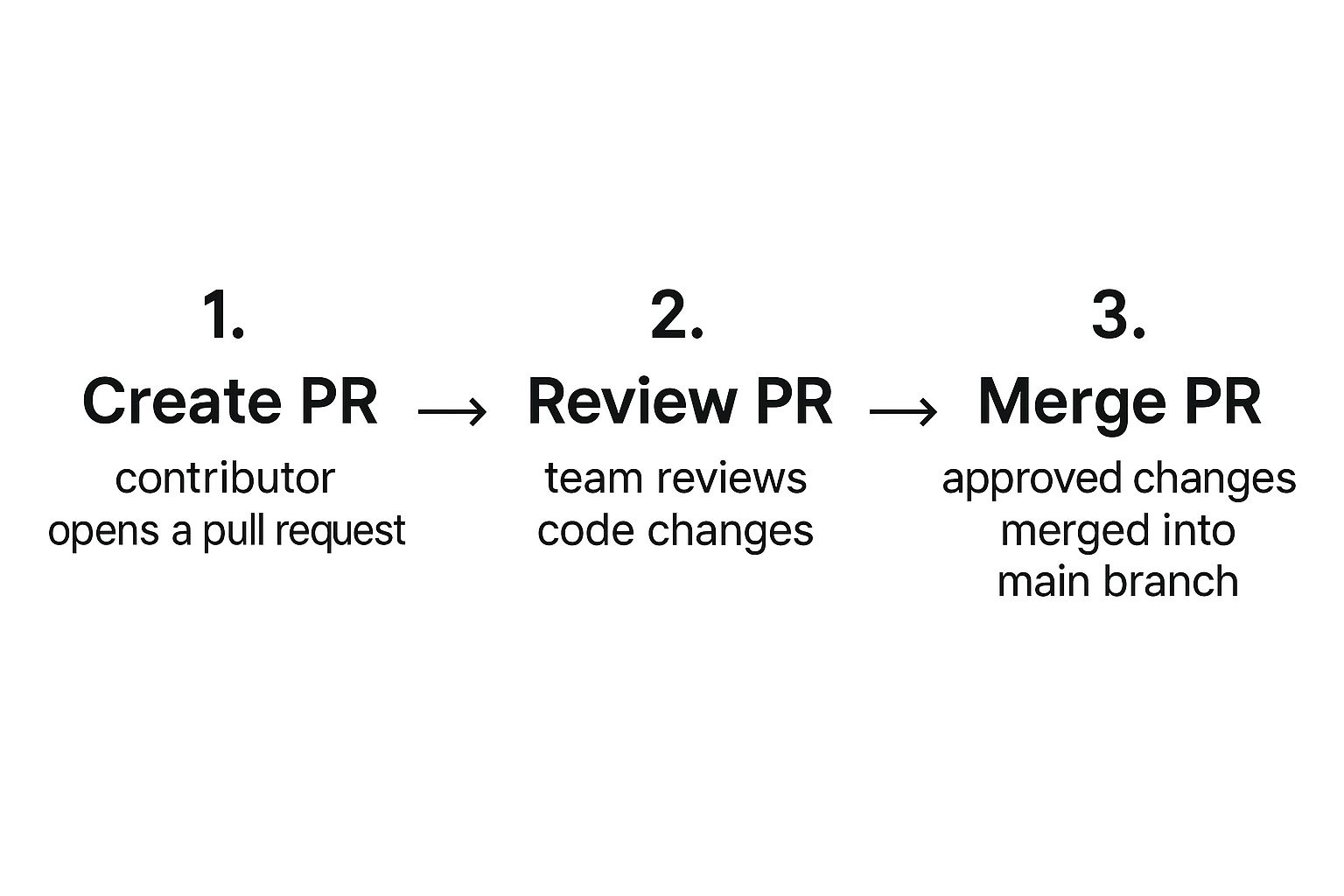
This simple flow—propose, review, integrate—is what drives modern software development. Once the PR is open, your reviewers will jump in to leave comments, ask questions, and suggest improvements. After you’ve addressed all the feedback and gotten the green light, your code is officially merged into the main branch.
To wrap things up, the now-obsolete feature branch is deleted to keep the repository clean. And just like that, the workflow is complete.
Best Practices for Effective Pull Requests
Anyone can create a pull request. But crafting a great one—the kind your team can review quickly and merge confidently—is an art form. If you want to build one habit that will make the biggest impact, it's this: keep your pull requests small and focused.
A PR should do one thing and do it well. Think of it as a single, self-contained unit of work, whether that's squashing a specific bug or adding one new feature. When a reviewer is staring down a PR with hundreds of files changed, their eyes glaze over. They'll skim, and that's when mistakes slip through. Small PRs, on the other hand, are easy to understand, quick to approve, and far less likely to hide sneaky bugs. It turns a potential code marathon into a simple, productive conversation.
Writing a Clear and Helpful Description
A great pull request tells a story. The title should be the headline—a quick, clear summary like "Fix User Login Validation Bug," not just a vague "Updates." Then, the description is where you fill in the details, giving reviewers all the context they need without making them hunt for it.
A solid PR description always covers these bases:
- The "Why": What problem are you solving? Briefly explain why this change was needed in the first place.
- The "How": Give a high-level overview of your approach. Did you make any specific technical choices? Why?
- A Link to the Ticket: Always link back to the original task or issue in your project management tool (like Jira or Trello). This gives reviewers the full backstory.
A well-written pull request description is an act of empathy for your reviewers. It respects their time by giving them all the information they need upfront, transforming the review from an investigation into a simple verification.
The Art of Giving and Receiving Feedback
The code review process is a dialogue, not a monologue. When you're the one leaving feedback, your goal should be to help, not to criticize. Try framing your suggestions as questions or collaborative ideas. This small shift in tone can make a huge difference in building a positive, supportive team culture. For more on this, check out our guide on how to write clear PR feedback.
When you're the one receiving comments, approach them with an open mind. See it as a chance to make the code better and learn from your teammates' perspectives. Make sure to respond to every comment, even if it's a simple "done" or a quick explanation of your thinking. That kind of clear communication ensures nothing falls through the cracks and keeps everything moving.
How AI and Automation Are Changing the Pull Request Game
The pull request process as we know it is getting a major upgrade, and it's all thanks to AI and automation. What used to be a purely manual, often tedious, part of a developer's day is turning into a smarter, more automated quality check. This frees up developers to do what they do best: solve tough problems.
It all starts with something many teams already use: CI/CD pipelines. Think of these automated workflows as the first line of defense. The second a pull request is opened, they spring into action—running tests, checking code style, and trying to build the project. If anything breaks, the PR gets flagged instantly, catching obvious bugs long before a human reviewer has to spend time on it.
AI Is Becoming the Ultimate Code Review Partner
But now, AI is stepping in to play a much more direct role in the review itself. We're seeing a new wave of tools designed to help developers with the heavy lifting, taking over some of the most monotonous tasks.
These aren't just pie-in-the-sky ideas; they're real features shipping now:
- Automatic PR Descriptions: AI can now generate surprisingly accurate summaries of your code changes. This saves the author a ton of time and gives reviewers the context they need right away.
- Smart Code Suggestions: Imagine an assistant that analyzes your new code and suggests improvements for better performance, readability, or even security. That's what these tools do.
- Summarizing Complex Changes: For those massive, complex pull requests, AI can break down the changes into a simple, digestible summary. It's a game-changer for getting reviewers up to speed quickly.
The data backs this up, too. One study looked at over 18,000 pull requests and found a clear pattern: PRs with AI-generated descriptions were reviewed faster and were more likely to get merged. You can dig into the numbers yourself in this research on AI-assisted productivity gains on arxiv.org.
This mix of smart automation and AI is redefining what a git pull request even is. It's no longer just a pause for human inspection but a dynamic, intelligent process that actively improves both code quality and team speed.
Common Questions About Git Pull Requests
As you start using pull requests more and more, a few common questions always seem to surface. Let's clear up some of the usual points of confusion so you can keep your workflow humming along.
Think of this as a quick reference guide you can pop back to whenever you need a refresher.
What Is the Difference Between a Git Pull and a Pull Request?
This is probably the most common mix-up for anyone new to Git, and it's an important one to get right. While both git pull and a pull request move code around, they have totally different jobs.
A git pull is a command you run locally, right in your own terminal. It grabs the latest changes from the remote repository (like the main project on GitHub) and immediately merges them into the branch you're working on. It’s all about syncing your local code with what's happening elsewhere.
A pull request, on the other hand, is a feature of platforms like GitHub, GitLab, or Bitbucket. It’s not a command but a formal request. You're asking for your new code to be reviewed and then merged into another branch, which is typically the main or develop branch.
Here's a simple way to remember it:
git pullis you taking updates from the team. A pull request is you asking the team to take your updates. One is a personal sync; the other is a team review.
How Do I Handle Merge Conflicts in a Pull Request?
First, don't panic! Merge conflicts sound scary, but they’re just a normal part of working on a team. They happen when you and someone else edit the same lines in the same file, and Git doesn't know which version to keep.
Fixing them is a straightforward process. You'll start by pulling the latest changes from the target branch (like main) into your own feature branch. Git will then flag the exact files—and the specific lines—that have conflicts.
Your job is to open those files, look at the conflicting changes side-by-side, and decide what the final code should look like. You manually edit the file to resolve the differences, save it, and then commit the fix. Once you push that commit, your pull request updates automatically, and the merge conflict warning will vanish.
Can I Update a Pull Request After I Have Opened It?
Yes, absolutely! In fact, you almost always will. A pull request isn't set in stone; it's a living, breathing conversation about your code.
When a teammate leaves a comment asking for a change, you don't need to close the PR and start over. Just make the required edits in your local branch and push a new commit. The open pull request on GitHub will automatically update to include your latest changes, keeping the entire review history in one clean thread.
Tired of pull requests getting lost in the noise? PullNotifier sends smart, real-time PR updates directly to Slack, cutting through the clutter so your team can review and merge faster. See how it works.