- Published on
Mastering Code Reviews with GitHub
- Authors

- Name
- Gabriel
- @gabriel__xyz
Conducting code reviews with GitHub is a cornerstone practice for any modern software team. It's the primary way we maintain code quality and keep collaboration flowing. But it’s so much more than just catching bugs—it’s a strategic process for sharing knowledge, mentoring developers, and ensuring the project stays healthy for the long haul.
Why Better GitHub Code Reviews Build Better Teams

We often talk about code reviews as a simple bug hunt, but that’s a narrow view that misses the forest for the trees. A truly effective review process isn’t a chore; it’s the cultural backbone of an engineering team. It's where standards are upheld, knowledge gets passed down, and collective ownership is built, one pull request at a time.
Fostering a Culture of Excellence
A healthy review culture shifts the dynamic entirely. Developers start seeing feedback not as criticism, but as a team effort to make the product better. When everyone expects thoughtful, constructive comments, they naturally submit better-prepared pull requests. This creates a positive feedback loop that lifts the entire team's performance.
This mindset pays huge dividends for the codebase. It’s one of the best ways to prevent the slow creep of technical debt by making sure new code follows established patterns. I once saw a senior dev leave a simple comment on a junior’s PR about a seemingly harmless hardcoded value. That one comment kicked off a discussion that uncovered a flawed assumption, preventing a massive production outage that would have been a nightmare to debug later.
The Engine of Collaboration and Mentorship
These days, GitHub is the undisputed hub for this kind of collaboration. Since its launch in 2008, it has exploded in popularity. As of early 2025, it’s home to over 100 million developers working across more than 420 million repositories. That scale alone tells you how central it is to the way we build software.
A great code review is a conversation, not an interrogation. It’s an opportunity to teach, learn, and align on the best path forward for the code and the team.
This conversational approach is everything. For junior developers, a pull request becomes a personalized learning experience. For senior engineers, it’s a chance to mentor and scale their expertise across the team.
The best teams get this. They build processes that allow them to move fast without breaking things. For a masterclass in how a top-tier company strikes this balance, check out our deep dive into how Stripe ships over a thousand pull requests per day.
How to Configure Your Repository for Success
A smooth code review process doesn't magically happen when a pull request is opened. It begins much earlier, rooted in a well-configured repository that sets your developers up for success from the very beginning.
Think of it as setting the stage. By defining the rules of engagement upfront, you build guardrails that eliminate ambiguity and drastically speed up the entire cycle. This proactive approach ensures every PR meets a baseline quality standard before it ever lands in a reviewer's queue, saving countless hours of back-and-forth on trivial issues.
Automate Assignments with CODEOWNERS
One of the most powerful yet underutilized features for code reviews with GitHub is the CODEOWNERS file. It’s a simple text file, placed in the root of your repository, that automatically assigns reviewers based on which files were changed. It completely ends the guessing game of "who should review this?"
For example, you can make sure any changes to your authentication logic are always seen by your security expert, or that UI tweaks get a once-over from the frontend team.
# Assign the security team lead to any changes in the auth directory/src/auth/ @security-lead# Ensure the frontend team reviews all UI component updates/src/components/ @your-org/frontend-team
This is a tiny configuration change with a massive impact. It ensures the right eyes are on the right code, every single time, improving both review quality and speed.
Enforce Quality with Branch Protection Rules
If you're serious about your project, branch protection rules are non-negotiable. They are your primary defense against merging broken or unvetted code into your main branch. Straight from your repository's settings, you can enforce a series of checks that must pass before a merge is even possible.
By setting clear, automated checks, you're not micromanaging. You're building a system that protects your codebase and empowers your developers to move faster with confidence.
Here are the most critical rules you should enable right away:
- Require pull request reviews before merging: This is the foundation. You can specify that at least one, or even two, approvals are required.
- Require status checks to pass before merging: This is where you link your CI/CD pipeline. It guarantees that all automated tests, linting, and builds must succeed before the code can be merged.
- Dismiss stale pull request approvals when new commits are pushed: This one is crucial. If a reviewer approves a PR and the author pushes more changes, this rule automatically invalidates the old approval, forcing a fresh review of the new code.
The diagram below shows the basic developer workflow that these rules help standardize.
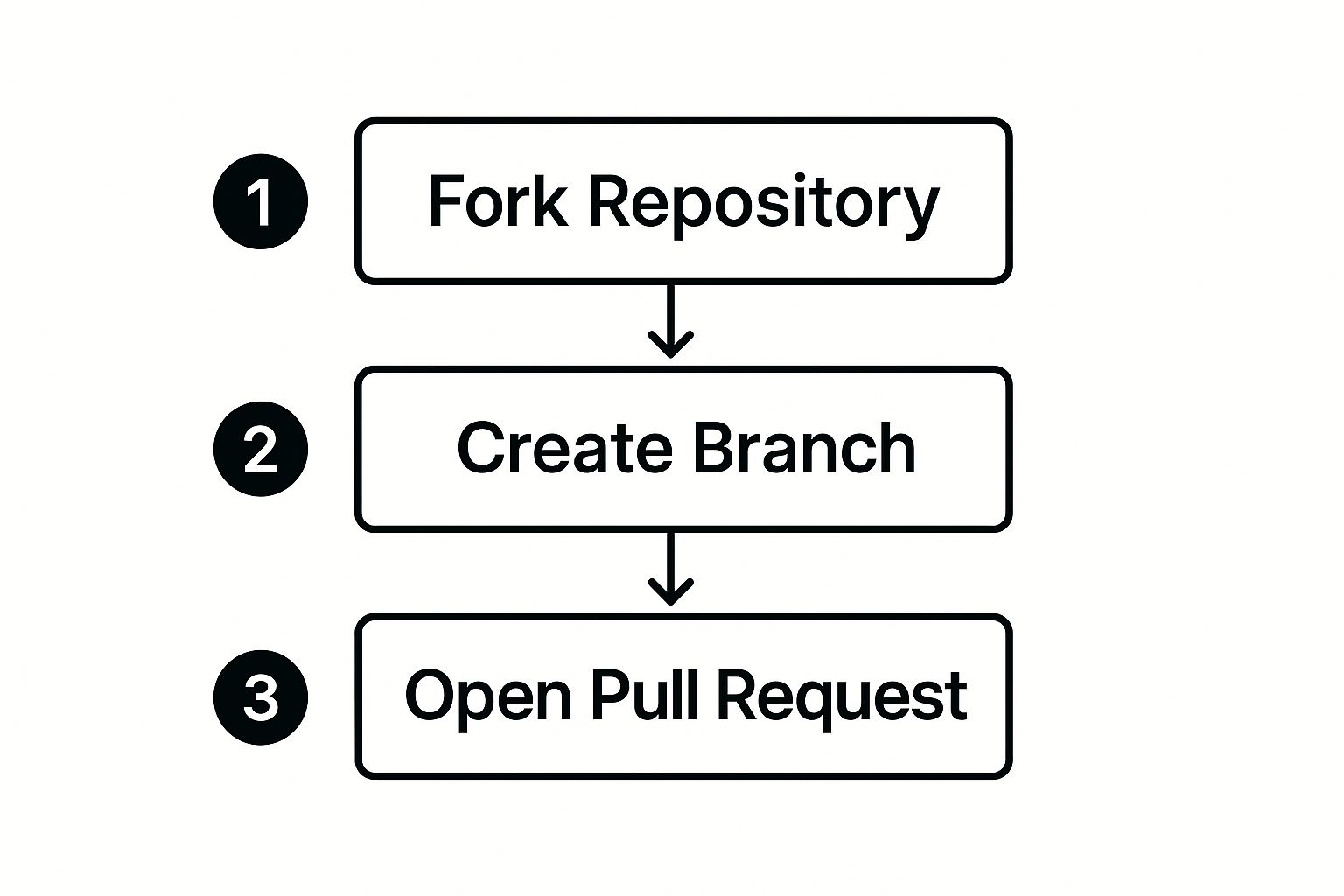
This simple flow—forking, branching, and opening a pull request—becomes incredibly reliable when it's backed by strong repository configurations like these.
Standardize Context with a PR Template
Finally, a well-crafted pull request template is your secret weapon for getting fast, effective feedback. A blank description box is an open invitation for inconsistency and forces reviewers to dig around for context.
By creating a PULL_REQUEST_TEMPLATE.md file in a .github folder, you can pre-populate every new PR with the exact structure you need. This small bit of effort drastically reduces the time it takes for a reviewer to understand the "what" and "why" behind a change, leading to much better reviews.
Creating Pull Requests People Want to Review
Here’s a secret that took me years to learn: the key to a fast and effective review cycle isn't some complex process. It's simply creating a high-quality pull request. As the author, you have more control over the review's speed and quality than anyone else. A PR that’s a breeze to review is a skill that shows respect for your teammates' time and leads directly to better, more constructive feedback.
If there's one habit you can adopt for immediate impact, it's this: create small, focused pull requests.
Nothing kills review momentum like a PR that changes hundreds of files or touches multiple unrelated features. When a reviewer is faced with a massive wall of changes, they're far more likely to skim, miss critical issues, or just put it off until they have a huge block of time. Which, let's be honest, is never.
In contrast, a small PR with a clear purpose invites deep engagement. Aim for a single logical change per pull request. This makes it incredibly easy for your team to understand the context, test the changes, and give you specific, actionable feedback that actually helps.
Writing Descriptions That Give Reviewers Context
Your PR's title and description are your first impression. A title like "Fixes Ticket-123" is a huge missed opportunity. Be descriptive and summarize the change, like "Add User Avatar to Profile Header." It immediately tells the reviewer what to expect.
The description is where you explain the crucial "why" behind your changes. Don't just dump a link to a project management ticket and call it a day. Briefly summarize the problem you're solving, how you solved it, and any important context the reviewer needs to know. For an even deeper dive, our guide on pull request best practices offers a detailed checklist.
A great pull request description tells a story. It guides the reviewer through the changes, highlighting the problem you solved and the path you took to solve it.
When you're dealing with visual changes, words often fail. This is where including screenshots or GIFs becomes a total game-changer. A simple before-and-after image can communicate the impact of a UI tweak more effectively than paragraphs of text. This small step removes ambiguity and helps your team instantly grasp the user-facing impact of your work.
To help you get this right every time, I've put together a checklist my team uses.
The High-Impact Pull Request Checklist
Use this checklist before you hit 'Create Pull Request' to ensure your submission is clear, concise, and review-ready.
| Checklist Item | Why It Matters | Real-World Example |
|---|---|---|
| Descriptive Title | Sets clear expectations for the reviewer. | "Feat: Add User Avatar to Profile Header" instead of "Fixes UI bug." |
| Contextual Description | Explains the 'why' behind the code, linking to the original problem. | "This PR fixes a bug where user avatars were not displaying on the profile page. I've updated the UserProfile component to fetch the avatar URL from the new API endpoint." |
| Small & Focused | A PR should do one thing and do it well. This makes reviews faster and more thorough. | A single PR for adding a new button, another for its functionality. Not both in one. |
| Screenshots/GIFs for UI | Visuals communicate changes instantly and remove ambiguity. | A "before" and "after" screenshot of the updated profile page. |
| Self-Reviewed | Catch your own mistakes first. It shows respect for your teammates' time. | You notice and remove a console.log statement you left in for debugging before assigning reviewers. |
| Relevant Ticket Linked | Provides a direct link to the broader context in your project management tool. | Linking directly to the Jira, Asana, or Linear ticket for the feature or bug. |
Following this checklist not only gets your code reviewed faster but also elevates the quality of the feedback you receive. It's about making the reviewer's job as easy as possible.
Your Most Important Reviewer Is You
Before you ever click that "Assign Reviewers" button, do a thorough review of your own pull request. Seriously. Read through every single line of code as if you were seeing it for the first time.
This simple act of self-review is your absolute best chance to catch embarrassing typos, leftover debugging code, and obvious logic errors.
This final check does more than just polish your code. It sends a powerful message to your team: you value their time. A clean, self-reviewed PR shows you've done your part to make their job easier, fostering a culture of mutual respect that's essential for effective code reviews with GitHub.
The Art of Constructive Code Review Feedback
When you switch from writing code to reviewing it, the whole process becomes intensely human. Code is the result of someone's hard work and deep focus, so getting feedback can easily feel personal. To make code reviews with GitHub a team effort instead of a battle, you have to master giving constructive feedback.
The golden rule? Critique the code, not the coder.
It all starts with how you frame your comments. Instead of barking commands, try asking questions. Rather than saying, "This is inefficient, use a map," you could try, "Have you considered using a map here? It might speed up lookups on larger datasets." This simple shift changes the entire dynamic. It opens up a conversation and shows respect for the author's original approach, turning a potential conflict into a problem-solving session.
Actionable and Empathetic Communication
Great feedback is always specific and actionable. A vague comment like "this is confusing" just leaves the author scratching their head. You need to pinpoint the exact issue and suggest a clear way forward.
GitHub's built-in features are perfect for this. The "suggestion" tool, in particular, is a game-changer. Instead of just describing what you want to be changed, you can drop a code block right into your comment with the exact fix you have in mind. The author can then accept it with a single click. Boom. A potentially long back-and-forth is resolved instantly.
The best feedback is a gift. It's an investment of your time and expertise aimed at making both the code and the developer who wrote it better. Treat it as such.
Another great little trick is to agree on team-wide comment prefixes. This adds a layer of nuance that plain text often misses, helping to clarify the intent behind your comment.
[Nitpick]: Perfect for tiny things that don't block the merge, like a typo in a comment or a minor style preference. It tells the author, "Hey, this isn't a big deal, fix it when you have a second."[Question]: Use this when you genuinely don’t get what a piece of code is doing. It’s a much friendlier way to ask for clarification than just saying "I don't understand this."[Suggestion]: Ideal for offering an alternative idea without demanding it be implemented. It keeps the conversation collaborative.
Navigating the Review Process
While the standard GitHub pull request is the bread and butter of code review, the process is constantly being tweaked as teams hunt for better workflows. There are always challenges, especially when you're dealing with a pile of stacked PRs. In fact, some developers have gone as far as building entirely new systems, like 'git-review', which cleverly treats the review itself as a commit on the PR branch to make everything more traceable. It's worth a look to explore these alternative code review approaches and see how others are shaking things up.
For the person on the receiving end of the comments, your mindset is just as critical. It's totally normal to feel a bit defensive when your work is being scrutinized. But before you jump to defend your code, try to understand where the feedback is coming from. A comment you initially disagree with might just be a misunderstanding that a quick clarifying question can clear up.
Remember, every comment is a chance to learn something new. Embrace it, thank your reviewers for taking the time, and work together to ship the best code you can.
Automating Your Way to Faster, Smarter Reviews
 Let's be honest, human attention is your team's most valuable—and limited—resource. Every minute a developer spends manually checking for style inconsistencies or simple syntax errors is a minute they aren't focusing on business logic, architecture, and the actual user experience.
This is where automation becomes your most powerful ally in sharpening your code reviews with GitHub.
The core idea is simple: let robots handle the robotic work. By setting up a solid Continuous Integration (CI) pipeline with GitHub Actions, you create an automated quality gate that every single pull request must pass before it gets to a human.
Setting Up Your Automated Quality Gate
Think of GitHub Actions as your tireless assistant, the one who handles the entire checklist of mundane-but-critical tasks. You can configure workflows that trigger automatically on every pull request, catching common issues long before a reviewer even sees the code.
This ensures that when a review request finally lands, it’s already met a baseline of quality. A great automated pipeline typically includes:
- Linting: Enforce consistent code style and catch common syntax mistakes across the codebase. Tools like ESLint for JavaScript or Black for Python are easy wins here.
- Unit & Integration Tests: This is non-negotiable. You need to know that new changes don't break existing functionality and that the new code works as intended.
- Security Scans: Automatically scan for known vulnerabilities in your dependencies or common security flaws in the code itself, like SQL injection.
By automating these checks, you free up your team’s brainpower for the nuanced stuff that actually requires human intelligence. If you're looking for the right tools for your stack, exploring some of the best code review automation tools is a great place to start.
The Rise of AI in Code Reviews
The next frontier is, unsurprisingly, Artificial Intelligence. Tools like GitHub Copilot are completely changing how code is both written and reviewed. Instead of just catching errors after the fact, AI assists developers in writing cleaner, better code right from the start.
This proactive approach dramatically cuts down on the amount of trivial feedback needed during a manual review. The impact is huge.
Research shows that developers using GitHub Copilot completed coding tasks 55% faster.
But here’s the real kicker for team velocity: AI assistance helped slash average pull request review times from a sluggish 9.6 days down to just 2.4 days—that’s a fourfold improvement. Developers clearly trust the output, as about 88% of AI-generated code remains unchanged in the final software. You can read the full research about these findings to dig into the data yourself.
When you blend traditional CI/CD automation with these emerging AI tools, you get a powerful system. Your code review process becomes faster, more reliable, and a whole lot less painful for everyone involved. That means your team can spend less time nitpicking and more time shipping great features.
Common Questions About GitHub Code Reviews
Every team hits a few familiar bumps in the road when they're trying to nail down their code review process in GitHub. Over the years, I've seen the same questions come up again and again. Here, I'll tackle the most common ones with practical advice to help you smooth things over and keep your team shipping.
The goal is to move past the usual friction points and build a review culture that feels helpful, not like a roadblock. Let's get into some real-world solutions for the tricky spots that can slow down even the sharpest engineering teams.
How Do We Handle a Massive Pull Request We Can Not Avoid
Look, the best way to handle a massive pull request is to not have one in the first place. A culture that prioritizes small, frequent commits will always be faster and safer. But sometimes a big refactor is just unavoidable, and you're left staring down a monster PR.
When that happens, the trick is to give it some structure. Don't just throw it at a couple of developers and cross your fingers.
- Schedule a Live Walkthrough: The PR author should set up a quick call to walk the reviewers through the big picture—the architecture, the core changes, the why. This gives everyone crucial context that's a nightmare to explain in text alone.
- Create a Review Checklist: Use the PR description to break down the review into smaller, digestible tasks. Think of it like a to-do list: "Review the new API service," "Check the database migrations," "Verify the frontend components."
- Tag Team the Review: Don't put it all on one person. Assign different pieces of the PR to different people based on who knows what best. This spreads the work around and gets the right eyes on the right code.
The idea is to transform an overwhelming chore into a structured, collaborative effort.
A huge PR isn't just a review burden; it's a risk. By breaking it down collaboratively, you de-risk the merge and ensure its quality without burning out your team.
What Is the Perfect Number of Reviewers for a PR
There’s no magic number that works for everyone, but two is usually the sweet spot for a solid review. One person, no matter how good they are, is bound to miss something. A second pair of eyes is an incredible safety net and almost always brings a fresh perspective to the table.
In a perfect world, your two reviewers would play distinct roles:
- The Context Expert: Someone who lives and breathes the specific part of the codebase being touched.
- The System-Level Thinker: Someone who can step back and see how these changes might ripple across the entire system.
You can actually automate this pretty easily. A simple CODEOWNERS file in your repo can ensure the right context expert gets looped in automatically every single time.
How Can We Speed Up Reviews Without Sacrificing Quality
Speeding up reviews isn't about cutting corners—it's about removing friction. A smooth process is a fast process. It all starts with the author, who needs to create a pull request that's crystal clear, with a great description and maybe even a screenshot or two.
Next, automate everything you possibly can. Linters, tests, and security scans should all run via GitHub Actions before a human ever lays eyes on the code. This clears out all the small stuff and lets your reviewers focus on what matters: the logic and architecture.
Finally, you need smart notifications. A pull request that’s just sitting there waiting is a bottleneck. Using a tool that sends targeted alerts to the right people in their main chat app, like Slack, is what keeps the ball rolling.
Stop letting pull requests get stuck in review limbo. PullNotifier integrates directly with Slack to deliver concise, real-time updates that cut through the noise and keep your team shipping faster. Drastically reduce review delays and improve your team's workflow by visiting https://pullnotifier.com.