- Published on
A Developer's Guide to Git Merge Requests
- Authors

- Name
- Gabriel
- @gabriel__xyz
A Git merge request (MR) is how you propose to blend your new code changes from one branch into another. Think of it as the central hub for your team to collaborate on those changes, kicking off code reviews and automated checks before anything goes live.
What Are Git Merge Requests and Why They Matter
Let's imagine you're part of a team co-writing a book. To avoid chaos, each author works on their chapter in a separate document. When a chapter is finished, you don't just copy and paste it into the main manuscript and hope for the best.
Instead, you submit it for review. That submission is exactly like a git merge request.
You’re essentially saying, "My part is done, and I think it's ready to be included in the final book." This simple step launches a critical process where other authors (your reviewers) can read your chapter, suggest edits, ask questions, and point out parts that don't quite fit. This structured feedback loop is the heart and soul of collaborative software development.
The Core of Team Collaboration
Without merge requests, development would be the Wild West. Developers could easily introduce bugs, overwrite each other's work, or add features that don't line up with the project's goals. MRs act as both a safety net and a forum for discussion, making sure every line of code gets at least a second pair of eyes on it.
This process brings a few huge benefits to the table:
*   **Improved Code Quality:** A fresh perspective can easily catch bugs, logical flaws, or performance bottlenecks the original author might have overlooked.
*   **Knowledge Sharing:** Reviewers get to learn about different parts of the codebase, and authors get feedback that helps them grow.
*   **Collective Ownership:** When the team reviews code together, everyone shares responsibility for the project's health and success.
A merge request isn't just about merging code; it's about building consensus. It transforms the solitary act of coding into a transparent, team-driven activity that protects the integrity of the project.
Merge Request vs Pull Request
You'll often hear the term "pull request" (PR) thrown around, sometimes in place of "merge request." Don't get confused—they're functionally the exact same thing. Both are proposals to merge code from one branch to another.
The only real difference is the name used by the platform. GitLab calls them merge requests, while GitHub and Bitbucket call them pull requests.
Merge Request vs Pull Request At a Glance
Here's a quick table to clear things up:
| Term | Primary Platform | Core Function |
|---|---|---|
| Merge Request (MR) | GitLab | Proposing code changes for review and integration. |
| Pull Request (PR) | GitHub, Bitbucket | Proposing code changes for review and integration. |
Ultimately, whether your team uses MRs or PRs, the underlying workflow is identical. If you want to dive deeper into the subtle naming differences, you can explore our full guide on pull request vs merge request, but just know they describe the same collaborative process.
The Complete Merge Request Workflow From Start to Finish
Knowing what a Git merge request is in theory is one thing, but seeing it in action really shows off its power. The workflow isn't just a series of technical commands; it's more like a structured conversation that shepherds code from a developer's machine into the project's official history, with quality control and collaboration built right in.
This journey almost always follows a predictable path, starting with a proposed change and ending with its final integration into the main codebase.
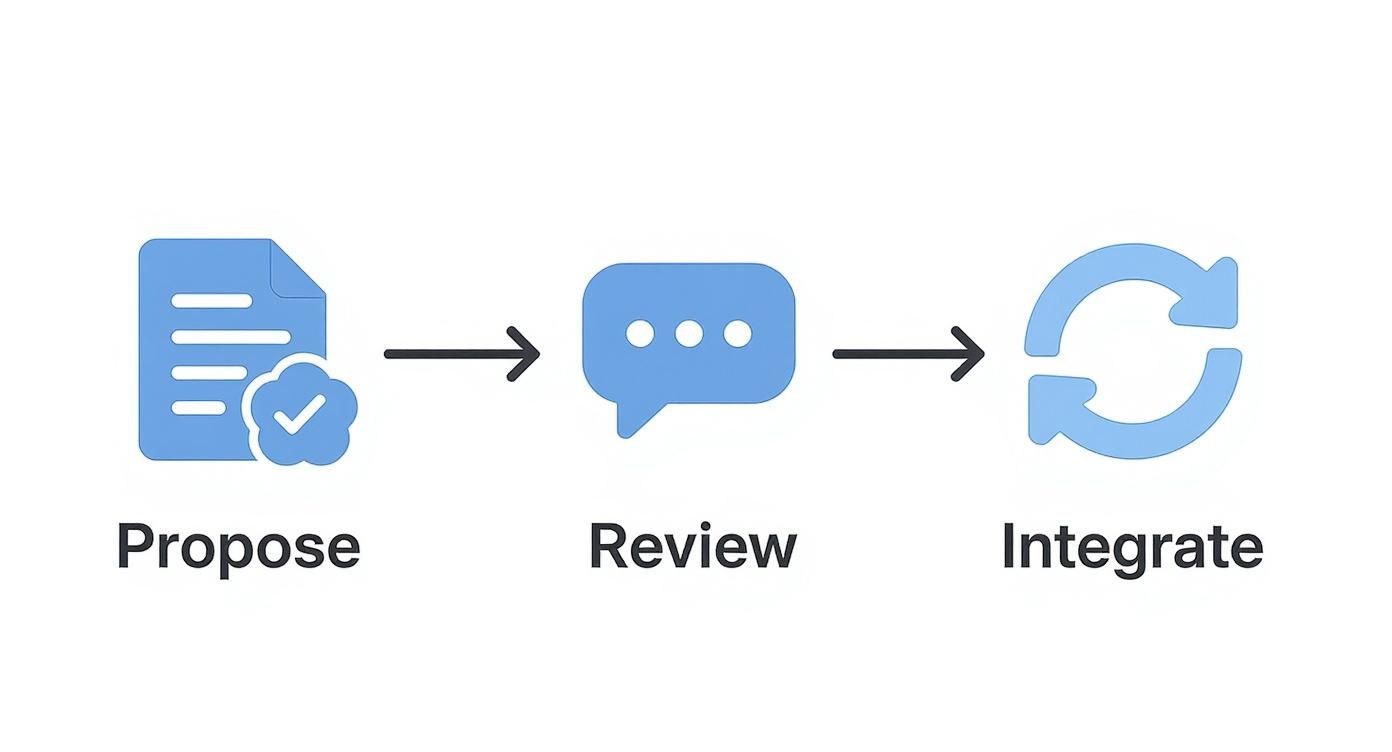
This visual breaks down the simple but effective cycle of proposing, reviewing, and integrating code that forms the foundation of modern software development. The main takeaway here is that merging is the last step, not the first—which really underscores just how important the review phase is.
Step 1: Proposing Changes
It all starts when a developer creates a new feature branch. Think of this as a clean, isolated copy of the main codebase where they can safely build a new feature or smash a bug without messing with the stable version of the project.
Once the initial code is written and committed to this branch, the developer pushes it up to the remote repository. From there, they open a new merge request. This is their formal proposal to merge the feature branch into the main branch (often called main or master), and it's the action that officially kicks off the collaborative part of the process.
Step 2: Undergoing Code Review and Automation
This is where the magic really happens. The merge request becomes a central hub for discussion. Team members are tagged as reviewers to look over the new code, ask questions, and suggest improvements right there in the platform's interface.
The whole point of the review stage is to tap into the team's collective brainpower to boost code quality. It's a joint effort to catch potential bugs, make the code more readable, and ensure the changes align with project standards before they have a chance to break something.
At the same time, an automated process called Continuous Integration (CI) springs into action. The CI pipeline runs a whole battery of checks on its own:
*   **Build Tests:** Confirms the application still compiles correctly with the new code.
*   **Unit and Integration Tests:** Runs a suite of predefined tests to make sure the new code works as intended and doesn't break anything that was already working.
*   **Code Style Checks:** Verifies that the code follows the team’s formatting rules, keeping everything consistent.
This automation is your first line of defense. It catches objective errors and frees up human reviewers to focus on the tricky stuff, like logic, architecture, and overall approach. For a deeper look at how these automated processes fit in, check out these CI/CD pipeline best practices.
Step 3: Integrating and Merging
Based on all the feedback and the CI results, the author makes any needed changes, pushing new commits to their feature branch. This cycle of review, feedback, and revision continues until every discussion is resolved and the reviewers give their thumbs-up.
Once the merge request has all the necessary approvals and every automated check is green, it's good to go. A developer with the right permissions hits the "merge" button, which officially integrates the changes from the feature branch into the target branch. This process is now industry standard—a whopping 82% of companies with version control use a formal code review process, and 70% of projects use automated testing triggered by merge or pull requests.
Finally, the feature branch is usually deleted to keep the repository tidy, and the cycle starts all over again for the next task.
How to Create Merge Requests That Get Approved Faster
Ever feel like your merge requests are stuck in a holding pattern? Getting your code merged quickly isn't about luck; it's about making your reviewer's job as painless as possible. A well-crafted git merge request is like a guided tour of your changes, giving them all the context needed for a swift and confident approval.
A few smart habits can cut down on the back-and-forth, speed up the review cycle, and earn you a reputation as a thoughtful, effective collaborator.
Write a Title and Description That Actually Help
Think of your merge request title as a news headline. It should be punchy, clear, and tell the whole story at a glance. "Fix Bug" is useless. "Fix User Login Timeout on Mobile"? Now your reviewer knows exactly what they're looking at before they even open the files.
The description is where you fill in the blanks, explaining the "why" behind your changes, not just the "what." This is your golden opportunity to share crucial context that the code alone can't convey.
This example gets it right—it links to the issue and uses a template to guide the author. A great description connects your code to a bigger picture, helping reviewers see its business value or technical necessity right away.
Make Your Merge Request Easy to Review
If you do just one thing to get faster approvals, make your merge requests small and focused. Let’s be honest, a request with 500 lines of changes is a monster that nobody wants to tackle. A 50-line one? Much more approachable. Huge MRs practically invite reviewer fatigue, which is when subtle bugs love to sneak through.
Break down big features into smaller, logical chunks that can be reviewed and merged on their own. This not only makes each review manageable but also creates a steady, satisfying flow of progress.
The ideal merge request is atomic—it does one thing and does it well. When a reviewer can understand the entire scope of a change in a single sitting, they can provide higher-quality feedback and approve it much faster.
Provide a Clear and Actionable Checklist
Want to make sure every MR you submit is top-notch? Just follow this simple checklist:
*   **Write a Descriptive Title:** Summarize the change clearly (e.g., "Add User Profile Avatar Upload" instead of "User changes").
*   **Explain the 'Why' in the Description:** Briefly explain the problem you're solving and how your changes get the job done.
*   **Link to the Issue Ticket:** Always connect your MR back to the original task or bug report. Context is king.
*   **Keep It Small and Focused:** Stick to one concern per merge request. If you stumble upon a bug while building a feature, fix it in a separate MR.
*   **Add Screenshots or GIFs:** For any UI changes, visuals are a lifesaver. They show the impact of your code instantly.
Ultimately, a smoother merge request workflow and quicker approvals are all about boosting overall developer productivity.
Conducting Constructive and Effective Code Reviews
Approving a git merge request is a huge responsibility. A truly great code review does so much more than just hunt for bugs—it actively improves the codebase, helps mentor the author, and strengthens the team's shared ownership of the project. Your role isn't to be a gatekeeper; it's to be a collaborator.
This mindset shift is everything. Instead of just pointing out what’s wrong, the best reviewers guide authors toward better, more elegant solutions. This small change transforms the entire process from a tense standoff into a positive, educational moment where everyone walks away smarter and the code gets better.
Understand the Context First
Before you even think about looking at a single line of code, stop and get the big picture. One of the most common mistakes reviewers make is jumping straight into nitpicking syntax without understanding why the merge request even exists. Feedback like that might be technically correct, but it's strategically useless.
Start with the merge request's title and description. A well-written MR should clearly explain the "why" behind the code. Look for links to issue tickets, design documents, or user stories to get the full story. You can't give meaningful feedback if you don't know what problem the author is trying to solve.
A code review without context is just an opinion. By understanding the goal of the merge request, you can align your feedback with the project's objectives, ensuring your suggestions are relevant and impactful.
Balance High-Level and Low-Level Feedback
Effective code reviews happen on two levels: the 30,000-foot architectural view and the line-by-line details. You have to provide feedback on both. A change might be perfectly coded line by line, but if it's in the wrong part of the application or ignores future scalability, it’s still a problem.
Always start with the big picture:
*   **Architecture:** Does this change fit neatly into our existing design patterns? Or does it feel out of place?
*   **Logic:** Is the overall approach sound? Is it an efficient way to solve this particular problem?
*   **Scalability:** Could this implementation create performance bottlenecks a few months down the road?
Once you’re confident the high-level approach is solid, then you can zoom in on the finer details. This is where you look at things like variable naming, potential edge cases, and overall code clarity. This top-down approach saves everyone from wasting time on minor tweaks when a fundamental architectural change might be needed.
Frame Feedback as a Collaborative Discussion
How you say something in a code review matters. A lot. Commands and demands can feel harsh and shut down the conversation, but questions open the door to collaboration and encourage the author to think critically about their own solution.
This is a cornerstone of providing helpful feedback. If you want to dive deeper, check out our ultimate guide to constructive feedback in code reviews.
So, instead of saying, "Change this to use a different method," try asking something like, "What are your thoughts on using anotherMethod() here? It might handle edge cases more effectively." This phrasing shows you respect the author's work and kicks off a productive discussion. The goal isn't to prove who's right—it's to improve the code together.
Using AI and Automation to Supercharge Your Workflow
The old-school git merge request process is all about human eyeballs and attention to detail. But let's be honest, a new wave of automation and AI is completely changing the game. These tools are like having an intelligent assistant on your team, taking care of the repetitive, predictable checks so you can focus on what actually matters: solving tricky problems and nailing down the high-level architecture.
This whole shift really kicks off with a solid CI/CD pipeline. Think of it as a tireless gatekeeper for your code. The second a merge request pops up, these automated workflows get to work, running through a whole battery of essential checks.
This isn’t just about making life easier; it's a massive quality control boost. It catches bugs, style violations, and security holes long before a human reviewer even lays eyes on the code. You're basically preventing entire categories of errors from ever touching your main branch.
The Rise of AI in Code Reviews
Going beyond just basic automation, AI is now jumping right into the review process itself. Modern AI assistants can analyze the changes in a merge request and offer up surprisingly sharp feedback. They’re quickly becoming essential partners for keeping code quality high and shipping faster.
So, what can these AI tools actually do?
*   **Suggest Code Improvements:** AI can spot an inefficient algorithm, recommend cleaner syntax, or flag when you're using a deprecated function.
*   **Summarize Complex Changes:** Got a monster merge request? An AI-generated summary can give reviewers the gist in seconds, saving them a ton of time.
*   **Perform Preliminary Reviews:** The AI can act as the first line of defense, flagging potential problems and leaving comments for the author to fix before even looping in the rest of the team.
This kind of intelligent help dramatically cuts down on the mental heavy lifting for human reviewers. The results speak for themselves. For instance, with over 50,000 companies now using GitHub Copilot, there's been an 11% jump in pull request merge rates. Even better, the code review process is clocking in up to 15% faster. If you want to dive deeper, you can check out more GitHub Copilot statistics.
By handing off all the routine checks to machines, teams free up their brainpower for the creative, critical thinking that automation just can't touch. This doesn't just mean faster approvals—it means higher-quality, more thoughtful feedback, too.
Integrating the Right Tools for Your Team
The real trick to making automation work is picking tools that slide right into your existing workflow. The goal here is to remove friction, not to add another complicated layer to your process. Whether you need static analysis, security scanning, or a full-blown AI coding partner, there’s a solution out there for you.
Many platforms offer marketplaces or built-in integrations for these tools, making the setup pretty painless. You can find everything from open-source linters to enterprise-level security scanners. For a good look at what's available, take a look at our guide on the 12 best automated code review tools for 2025.
At the end of the day, bringing automation and AI into your git merge request process isn't about replacing developers. It's about giving them the power to work smarter, faster, and more collaboratively—leading to better software shipped with a lot more confidence.
Answering Your Top Git Merge Request Questions
As you get more comfortable with merge requests, you're bound to run into some tricky situations. It’s totally normal. Knowing how to handle these common quirks will help you solve problems faster and feel more confident in your workflow.
Let's walk through some of the questions that pop up all the time for developers.
Merge Request vs. Pull Request: What's the Deal?
This is easily the biggest point of confusion for newcomers, but the answer couldn't be simpler: there's no functional difference. They're just two names for the exact same thing.
*   **Merge Request (MR):** This is the term you'll see on [GitLab](https://about.gitlab.com/).
*   **Pull Request (PR):** This is what [GitHub](https://github.com/) and [Bitbucket](https://bitbucket.org/product) call it.
Both MRs and PRs do the same job: they propose changes from a feature branch into a main branch, kick off a code review, and give your team a place to discuss everything before it gets merged. The name "pull request" just comes from the idea that you're asking the main repository to "pull" in your changes.
How Do I Handle Merge Conflicts?
Merge conflicts sound scary, but they’re just a part of life when you're working on a team. They happen when Git can’t figure out how to automatically combine changes because two people edited the exact same lines in the same file.
Fixing them is a manual process, but it's straightforward:
- Pull the latest changes from your target branch (like
main) into your feature branch. - Git will hit the brakes on the merge and flag the files with conflicts using special markers (
<<<<<<<,=======,>>>>>>>). - Open up those files and edit them by hand to decide which code to keep. You'll need to delete the conflict markers, too.
- Once you’ve sorted it out, just stage, commit, and push your changes. Your merge request will update, and that pesky conflict warning will disappear.
What's a Draft or Work-in-Progress Merge Request For?
A "Draft" (on GitHub) or "Work in Progress" (WIP) merge request (on GitLab) is an amazing tool for getting feedback early. It lets you open an MR without formally requesting a review or making it ready to merge.
A draft merge request is basically your way of saying, "Hey team, I'm not finished yet, but could you take a quick look at my approach?" It’s a great, low-pressure way to run your CI checks or get some architectural feedback before you’ve polished every last detail.
When you're happy with your changes and ready for the real deal, you just mark it as ready. This flips it to a standard merge request and sends out the official notifications to your reviewers.
This whole collaborative process is the engine of modern software development. To give you an idea of the scale, platforms like GitHub are home to over 420 million repositories, with developers merging more than 518.7 million pull requests every year. It just goes to show how essential the git merge request has become to building software together. You can find more details on GitHub's incredible growth at sqmagazine.co.uk.
Tired of noisy GitHub notifications flooding your Slack channels? PullNotifier cuts through the chaos by delivering clean, real-time pull request updates in a single, consolidated thread. Accelerate your code reviews and keep your team focused by visiting https://pullnotifier.com to get started for free.