- Published on
What Is Workflow Automation? Boost Efficiency Today
- Authors

- Name
- Gabriel
- @gabriel__xyz
Let's be honest, "workflow automation" sounds like something you'd hear in a stuffy boardroom. But when you get down to it, the concept is actually pretty simple.
Workflow automation is all about using software to handle repetitive tasks for you, based on a set of rules you've already defined. Think of it as setting up a digital assembly line for your work. Once it's running, tasks move from one stage to the next without anyone having to manually push them along.
What Is Workflow Automation Really

Let's cut through the jargon with a quick analogy. Imagine you're setting up a chain of digital dominoes. You only have to push the first one—that’s your trigger event. From there, a whole sequence of actions follows automatically, one after another. You don’t touch any of the other dominoes; the system handles it all.
That initial push is the trigger. It’s the specific event that kicks off the entire process. The falling dominoes are the actions—the individual tasks the software performs. The path those dominoes follow is dictated by a set of rules, which is just simple "if this happens, then do that" logic. This simple framework is the engine behind any automated workflow.
The Three Building Blocks of Automation
To really get what workflow automation is all about, you just need to understand its three core components. Every automated process, no matter how simple or complex, is built from these fundamental parts.
At its heart, automation isn't about replacing people; it's about replacing repetitive processes. It frees human talent to focus on creativity, strategy, and complex problem-solving—areas where technology assists, but people excel.
This shift from manual grunt work to smart, automated systems is what delivers massive gains in productivity. When you understand these building blocks, the tech becomes much less intimidating. You can see exactly how it turns tedious manual tasks into seamless, self-operating processes. For a deeper look into how this applies in specific fields, check out this guide on creative workflow management.
The table below breaks down each component with a relatable example, making the concept easy to grasp.
The Three Building Blocks of Automation
| Component | Its Role in the Process | A Simple Example |
|---|---|---|
| Trigger | The starting event that initiates the automated workflow. | A customer submits a "Contact Us" form on your website. |
| Action(s) | The specific tasks performed automatically once the trigger occurs. | An email is sent to the customer, and a new lead is created in the CRM. |
| Rule(s) | The logic that guides the actions, often using "if-then" conditions. | If the form indicates "Sales Inquiry," then assign the lead to a sales representative. |
By mixing and matching these elements, you can design workflows that do everything from sending simple email notifications to managing complex, multi-step approval chains. This approach doesn't just save a ton of time; it also cuts down on human error, ensuring your processes run the same way, every single time.
The Real-World Benefits of Automating Work

It’s one thing to talk about the mechanics of workflow automation, but it’s another to see what it actually does for your bottom line. Theory is great, but tangible, measurable results are what really reshape a business. This isn't just about shaving a few minutes off a task—it's about unlocking real, sustainable growth.
The first and most obvious win? Significant cost savings. Every single manual task, whether it's data entry or sending a follow-up email, carries a labor cost. Automation steps in and handles those repetitive jobs, freeing up your people to tackle strategic work that actually drives revenue.
Drive Down Costs and Boost Productivity
Think about all the time sunk into administrative quicksand—chasing down approvals, manually generating reports, or updating client records. Automation does all of that instantly, 24/7, which slashes your operational costs. An automated invoicing system, for example, can chew through thousands of invoices without anyone lifting a finger, letting the finance team focus on big-picture financial strategy.
This straight-up reduction in manual grunt work leads to a massive surge in productivity. When your team isn't bogged down by monotony, they have the bandwidth for innovation, customer engagement, and solving complex problems. It's a fundamental shift in where your team invests its energy and talent.
The numbers don't lie. Firms that embrace automation see their operating costs drop by an average of 22%. Better yet, over 90% of workers say automation makes them more productive at their jobs. In sales and marketing, the impact is even more dramatic, with automation helping to generate 451% more qualified leads. For more ways to improve your team's output, check out our guide on boosting productivity in engineering.
Achieve Near-Perfect Accuracy and Compliance
Let's face it, humans make mistakes. It happens. But in business, even a tiny error—a misplaced decimal, a wrong address—can snowball into costly problems like incorrect orders, compliance headaches, or a soured customer relationship. Workflow automation brings a level of precision that manual work just can't touch.
By standardizing a process, automation guarantees that every task is performed the exact same way, every single time. This consistency is a game-changer for:
- Quality Control: Products and services meet predefined standards without any deviation.
- Data Integrity: Automated data transfers wipe out typos and transposition errors, so your systems run on clean, reliable information.
- Regulatory Compliance: Automation naturally creates a perfect audit trail, making it a breeze to prove you're adhering to industry regulations.
This means you spend less time fixing mistakes and more time operating on a stable, predictable foundation.
Automation transforms business operations from a series of variable, manual actions into a reliable, consistent system. It replaces "I think I did it right" with "I know it's done right."
Improve Employee Morale and Engagement
This might be the most overlooked benefit of all: the huge impact automation has on your team’s well-being. Nobody gets excited about monotonous, soul-crushing work. In fact, repetitive tasks are a fast track to burnout and disengagement.
When you automate the boring stuff, you're sending a powerful message to your team: your time and skills are valuable. It empowers them to ditch the drudgery and focus on more fulfilling, challenging work that uses their brainpower. The result is a more motivated, engaged, and satisfied workforce. Companies that get this right see better retention and a stronger culture, which creates a powerful cycle of success. And yes, it pays off, with companies reporting annual savings anywhere from $10,000 to several million dollars. You can find more powerful stats like these in this roundup of automation statistics.
How Automation Works in Different Departments
Theory is one thing, but seeing workflow automation in action is where it really clicks. The true impact of automation becomes clear when you see how different teams use it to smash through bottlenecks, ditch mind-numbing tasks, and speed up their day-to-day work.
From human resources to software development, automation acts like a digital assistant that handles all the repetitive stuff that grinds teams to a halt. Every department has its own unique headaches, but the fix is often the same: find a manual, rule-based process and let software take over. This frees up your experts to focus on the work that actually requires a human brain.
Just look at the kind of time savings we're talking about across the board.
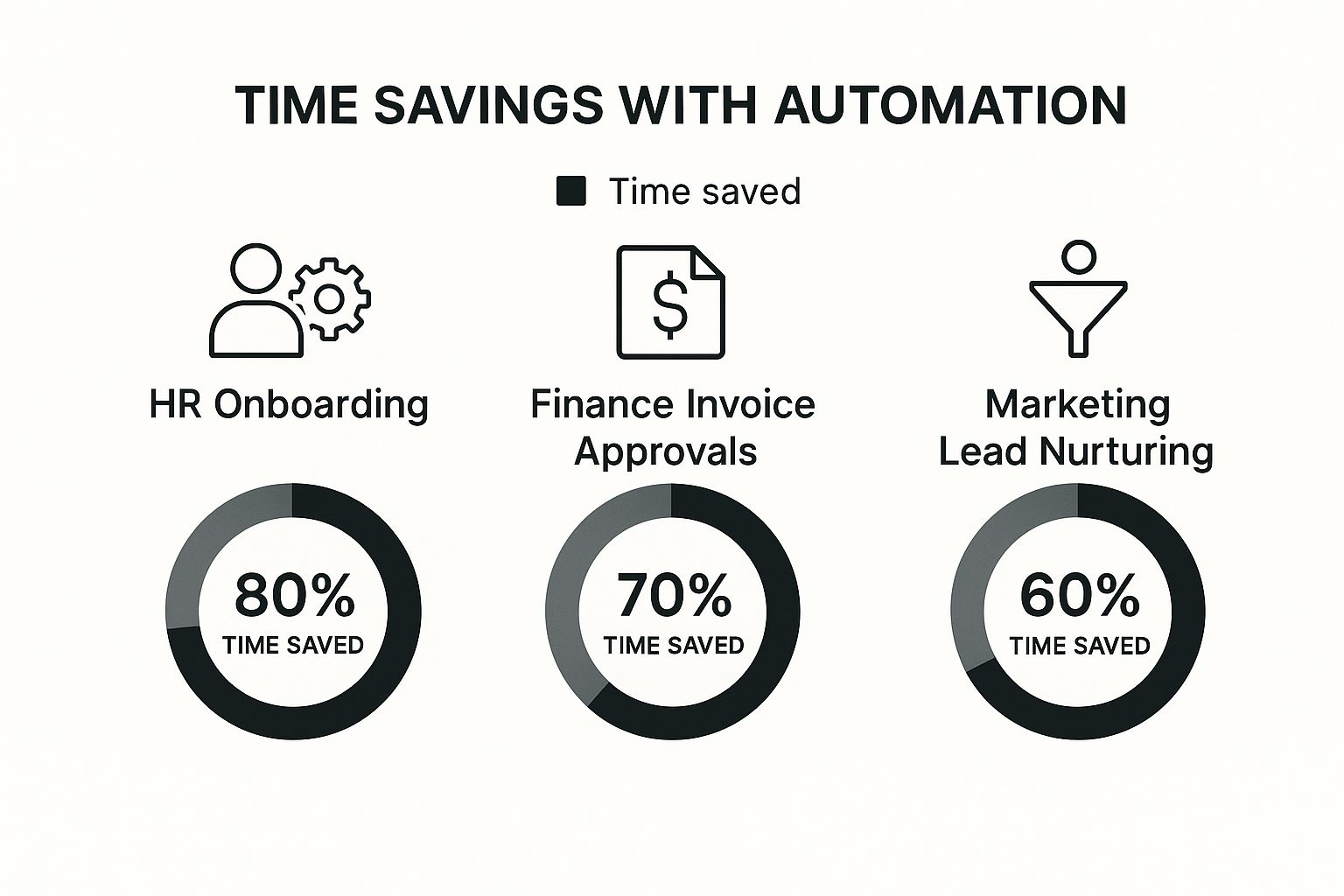
As you can see, the results are huge. Some processes become up to 80% more efficient once a good automation workflow is in place.
Human Resources Onboarding
The Headache: Onboarding a new hire is a classic example of death by a thousand papercuts. HR specialists are buried under a mountain of manual tasks—sending offer letters, tax forms, and policy docs. Then they have to chase people to schedule orientations, get IT to set up accounts, and follow up endlessly to make sure it all gets done.
The Fix: The moment a candidate hits "accept," a workflow kicks in.
- The system automatically shoots over a digital contract for an e-signature.
- Once it's signed, a welcome packet and all the necessary onboarding forms are sent out.
- At the same time, tasks are created for IT to prep a laptop and for the hiring manager to schedule a welcome meeting.
The Payoff: The onboarding experience becomes smooth, professional, and completely consistent. New hires feel taken care of from day one, and HR gets to focus on the human side of things—like making someone feel welcome—instead of chasing paperwork.
Finance Invoice Approvals
The Headache: For most accounts payable teams, invoice processing is a slow, manual nightmare. Invoices land in an inbox, get printed or forwarded, and then sit on a desk (digital or physical) waiting for someone to sign off. This old-school process is a recipe for delays, lost invoices, and painful late fees.
The Fix: An automated workflow starts the second an invoice arrives.
- Step 1: The system scans the invoice, pulling key details like the vendor, amount, and due date.
- Step 2: It routes the invoice to the right department head for approval based on rules you set (e.g., anything over $1,000 goes straight to a director).
- Step 3: Once approved, the invoice is automatically queued up for payment in the accounting system.
The Payoff: The approval cycle gets slashed from weeks to just a few days, sometimes even hours. The finance team gets a crystal-clear view of cash flow, kills late fees, and has a perfect audit trail for every single payment. For more specialized needs, tools like compliance automation platforms can take this even further by streamlining regulatory tasks.
Software Development Code Reviews
The Headache: Code reviews are absolutely critical for dev teams, but they’re often a huge time sink. A developer opens a pull request (PR), then has to manually hunt down the right reviewers on Slack, nudge them when they forget, and keep checking back for feedback. All that back-and-forth communication adds up to serious delays.
The Fix: This is where tools like PullNotifier shine. It hooks directly into platforms like GitHub to automate the entire communication loop. Instead of a mess of notifications, you get clean, actionable updates right in Slack.
When a PR is opened, the system instantly notifies the assigned reviewers in their Slack channel. It then keeps an eye on the review's progress, sending gentle reminders for PRs that are getting stale and announcing when the code is finally approved and merged.
The Payoff: The code review cycle gets a massive speed boost. Developers stop wasting time chasing people down and get back to what they do best: writing code. It cuts down on notification fatigue and makes sure the most important code gets a second look, fast.
If you want to see exactly how to set this up for your own team, check out our guide on how to automatically assign reviewers in GitHub.
Choosing the Right Type of Automation Tool
The world of automation is packed with different tools, each built to solve a specific kind of problem. Picking the right one isn't about finding the "best" tool overall, but the best tool for your team's specific needs and technical skills. It's the first step toward making a smart choice.
Think of it like choosing a vehicle. You wouldn't use a race car to haul furniture, and you wouldn't take a semi-truck on your daily commute. Each is designed for a purpose. Automation tools are just as specialized, ranging from simple connectors to complex digital workers that can think for themselves.
Let's break down the most common types so you can find the perfect fit.
Simple Rule-Based Tools
These are the most accessible entry point into automation. They run on a straightforward "if this, then that" (IFTTT) logic. When a specific trigger happens in one app, it automatically fires off an action in another. Simple and clean.
They're perfect for connecting two apps to handle a single, linear task. For example, "if a new row is added to a Google Sheet, then send a Slack notification." Because these tools are typically no-code, they're ideal for non-technical users in marketing, sales, or operations who need to automate repetitive tasks without writing a single line of code.
Integration Platforms (iPaaS)
Integration Platform as a Service, or iPaaS, is the next level up. These platforms are the central hubs that connect multiple cloud-based applications, letting them share data and work together smoothly. Think of an iPaaS tool like a universal translator for all your software.
Unlike the simple rule-based tools, iPaaS can handle complex, multi-step workflows involving several different applications.
- Example: A new customer signs up (Trigger: Stripe), which creates a contact in your CRM (Action 1: Salesforce), adds them to an email list (Action 2: Mailchimp), and notifies the success team (Action 3: Slack).
These platforms are powerful enough for IT departments but often have user-friendly interfaces that let business users build pretty sophisticated automations.
Robotic Process Automation (RPA)
What happens when you need to automate tasks in an older, legacy system that doesn't have a modern API to connect with? That's where Robotic Process Automation (RPA) comes in. RPA uses software "bots" that mimic human actions, interacting with software just like a person would.
These bots can click, type, copy, and paste their way through user interfaces. This makes them perfect for working with outdated desktop applications, mainframes, or any system that can't be integrated through other means. You'll often see RPA in finance and insurance for mind-numbing tasks like data entry and claims processing.
RPA doesn't integrate with an application's code; it works with its screen. It’s the digital equivalent of hiring someone to sit at a computer and perform repetitive, on-screen tasks—only the bot works 24/7 without making typos.
AI-Powered Intelligent Automation
This is the most advanced category, blending traditional automation with artificial intelligence and machine learning. These tools don't just follow pre-set rules; they can make decisions, understand unstructured data, and learn over time. This is where automation starts handling tasks that require actual judgment.
For instance, an AI-powered tool could read incoming customer support emails, understand the sentiment and intent, and automatically route the ticket to the correct department without a human ever touching it. Developers also benefit hugely from specialized AI tools. To see how this applies to software engineering, check out our list of the 12 best automated code review tools for 2025. This technology is ideal for complex, data-heavy processes where the rules aren't always black and white.
To wrap things up, here's a quick look at the main types of automation software, what they're best for, and who typically uses them.
A Comparison of Automation Tool Categories
| Tool Category | Best Used For | Typical User Profile | Platform Example |
|---|---|---|---|
| Simple Rule-Based | Connecting two apps for linear, single-step tasks. | Non-technical users (marketing, sales, ops). | IFTTT |
| Integration (iPaaS) | Building multi-step workflows across multiple cloud apps. | Business users and IT departments. | Zapier |
| RPA | Automating tasks in legacy systems without APIs. | IT departments, business process analysts. | UiPath |
| AI-Powered | Handling complex processes that require decision-making. | Data scientists, developers, enterprise IT. | Workfusion |
Each category has its strengths, and the best choice really comes down to the problem you're trying to solve. For simple app-to-app connections, a rule-based tool is great. For orchestrating your entire tech stack, you'll want an iPaaS. And for the really tough, judgment-based work, AI is the way to go.
Look, workflow automation isn't just some shiny new toy for tech companies anymore. It's quickly becoming table stakes for any business that wants to stay in the game. The days of treating it as a "nice-to-have" are long gone. Today, it’s a core part of building a resilient, agile organization that can actually roll with the punches.
The shift is obvious when you look at the money pouring in. What was once a niche market has absolutely exploded. Companies are investing billions because they've realized that doing things by hand just doesn't cut it in a world that moves this fast. This isn't just about being a little more efficient—it's about survival.
The Market is Growing, Fast
The global workflow automation market has ballooned from a modest idea into a massive industry. By 2025, it’s expected to be worth around USD 21.17 billion, and some projections even see it soaring past USD 80.57 billion by 2035. That's a compound annual growth rate of over 14.3% for the next decade, which signals a huge, sustained change in how business gets done. You can explore more data on the workflow automation market to really see the scale of this thing.
This incredible growth isn't happening in a vacuum. It's being pushed forward by a few major shifts in how we all work.
Adopting automation has moved beyond being a simple cost-cutting trick. It’s now a strategic imperative for building a business that can actually thrive when everything is constantly changing.
Key Drivers Behind the Automation Boom
Two massive forces are pushing businesses of all shapes and sizes toward automation. They represent a fundamental change in both where we work and how we build things.
1. The Rise of Remote and Hybrid Work
The massive shift to remote work put a ton of strain on old-school, manual processes. You can't just walk an invoice over to someone's desk for a signature when your team is scattered across the country. This new reality demands digital-first workflows that are clear, consistent, and work from anywhere. By 2025, an estimated 35 million Americans will be working remotely—a huge leap from just a few years ago.
Automation acts as the digital glue holding distributed teams together. It makes sure things like approvals, new-hire onboarding, and project updates run smoothly without anyone needing to be in the same room.
2. Technology is No Longer Just for Developers
A decade ago, if you wanted to automate something, you needed a team of developers and a pretty hefty budget. Not anymore. The game has totally changed with the arrival of powerful no-code and low-code platforms. These tools put the power to automate directly into the hands of the people who actually understand the processes inside and out—the folks in marketing, HR, and operations.
This accessibility has been a total game-changer. Suddenly, anyone can be an "automator," whipping up custom solutions for their own department’s headaches without writing a single line of code. It empowers teams to solve their own problems on the fly, sparking a culture of bottom-up improvement and showing everyone what workflow automation can really do.
A Practical Framework for Implementing Automation
Having a powerful tool is one thing; using it effectively is another ballgame entirely. Great technology often falls flat without a smart strategy, and workflow automation is no exception. A thoughtful game plan is what separates a project that delivers real value from one that just fizzles out. This framework is your playbook for getting it right.
The biggest mistake you can make is trying to automate everything at once in a "big bang" launch. That path is usually way too complex and incredibly risky. Instead, the most successful projects follow a more measured, strategic rollout that builds momentum and shows value right out of the gate.
Start Small to Win Big
The secret is to begin with a single, high-impact pilot project. Look for a process that’s a known bottleneck—something repetitive, rule-based, and universally disliked by your team. Your first target should be a task that, if automated, would deliver a quick, visible win that gets everyone genuinely excited about what’s possible.
This first success acts as a powerful proof of concept. It lets you work out the kinks in a low-stakes environment while building the internal support you'll need for bigger things. Once you prove the value on a small scale, you’ll find it’s much easier to get buy-in for more ambitious projects down the line.
Technology is only half the equation. Despite the clear benefits, around 70% of digital transformation projects fail to meet their goals. Success hinges on a solid strategy and careful change management, not just the software itself.
Define Success Before You Start
Before you even think about building a single rule, you need to know what winning looks like. Vague goals like "improve efficiency" just won't cut it. You have to get specific by setting clear, measurable metrics.
Your goals should be concrete, like:
- Slashing process time from three days down to four hours.
- Cutting error rates in data entry by 95%.
- Dropping manual touches on an invoice from five to just one.
Having these key performance indicators (KPIs) in place from day one gives you a clear benchmark to measure your progress against. This data-driven approach removes all the guesswork and proves the real-world return on your automation investment.
Finally, get your team involved from the very beginning. The people doing the manual tasks day in and day out are your best source of information. They know the nuances, pain points, and hidden complexities of a workflow better than anyone. By including them in the design process, you not only build a better automation but also turn potential skeptics into your biggest cheerleaders. This collaborative approach is vital for success, and you can find more insights on why automation projects succeed or fail to help guide your planning.
Got Questions About Workflow Automation? We’ve Got Answers.
Dipping your toes into automation always kicks up a few questions. It's totally normal to wonder about the impact on your team, how technical it all is, and frankly, where to even start. Let's tackle those concerns head-on so you can move forward with a clear plan and get your team excited for what's next.
Here are a few of the most common questions that pop up when teams start thinking about automating their workflows.
Will Automation Take Jobs Away from My Team?
This is usually the first question on everyone's mind, and the answer is a firm no. Think of workflow automation as job evolution, not job elimination. The goal is to get rid of the mind-numbing, repetitive work—the data entry, the endless report pulling, the manual reminder emails.
When you take those tasks off their plate, you free up your team to focus on what humans do best: strategic thinking, creative problem-solving, and building real relationships with customers. History shows us time and again that new technology doesn't just replace work; it creates new, more valuable roles focused on managing and optimizing the very systems that made the old work obsolete.
How Do I Decide What to Automate First?
The easiest way to get started is to hunt for the pain points. The best tasks to automate right out of the gate are the ones that are highly repetitive, happen frequently, and follow a strict set of rules.
Ask your team a simple question: "What boring, repetitive task do you wish you never had to do again?" Their answers will hand you a perfect roadmap for your first automation project.
Common starting points are things like processing invoices, routing customer support tickets, or handling new hire paperwork. By picking a process that's a known bottleneck and where success is easy to measure—like hours saved or errors eliminated—you can score a quick win. That initial success is a game-changer for building momentum and getting everyone on board for more.
Is This Too Technical for My Non-Technical Team?
Not anymore. One of the biggest shifts in automation has been the explosion of no-code and low-code platforms. These tools are built with intuitive, visual drag-and-drop interfaces that just about anyone can pick up and use.
This is huge because it empowers the people who actually do the work—in marketing, HR, finance, you name it—to build their own automations without needing an IT degree or writing a single line of code. It puts the power to fix a broken process directly into the hands of the people who know that process inside and out.
Ready to eliminate the manual chasing and delays in your code review process? PullNotifier integrates seamlessly with GitHub and Slack to automate your pull request notifications, cutting down noise and keeping your team in sync. Start streamlining your development workflow for free today.