- Published on
Master GitHub Review Code: Tips to Improve Your Workflow
- Authors

- Name
- Gabriel
- @gabriel__xyz
A productive code review process doesn’t just happen. It's built on a solid foundation of shared expectations and crystal-clear communication. Getting this groundwork right before anyone even looks at a line of code is the difference between a frustrating chore and a collaborative opportunity for growth.
Building a Foundation for Effective Code Reviews

Let's be real, modern software development is massive. GitHub is on track to blow past 100 million developers and 420 million repositories by early 2025. With that many people collaborating—one in six developers are now in India, according to some reports—you can't just wing it. Standardized review practices are non-negotiable.
Start with Clear Pull Request Templates
A great review starts with a great pull request. A well-designed PR template is your first line of defense against ambiguity, making sure every submission comes with the context needed for a meaningful review.
Your template should standardize crucial information:
- Link to the Ticket: Connect the code directly to its purpose in your project management tool, whether that's Jira, Asana, or something else.
- Summary of Changes: Explain the "why" behind the code, not just the "what." What problem is this PR actually solving?
- Testing Steps: Give reviewers clear, step-by-step instructions to validate the changes on their own machine. This simple step kills guesswork and speeds up verification immensely.
To get you started, here’s a look at the essential fields to include in your PR templates. This structure ensures every review kicks off with complete context, cutting down on confusion and that endless back-and-forth.
Core Components of a High-Impact Pull Request Template
| Element | Purpose | Example Snippet |
|---|---|---|
| Ticket Link | Provides direct access to the original requirement or bug report. | Resolves: JIRA-123 |
| Change Summary | Explains the "why" behind the code changes, not just the "what." | This PR refactors the user authentication flow to use OAuth2, which improves security and prepares for our upcoming SSO integration. |
| Testing Instructions | Guides the reviewer on how to verify the changes locally. | 1. Pull down this branch. 2. Run npm install. 3. Navigate to /login and attempt to log in with a test account. |
| Screenshots/GIFs | Visually demonstrates UI changes or new functionality. |  |
| Definition of Done | A checklist to confirm all requirements have been met. | - [x] All tests pass - [x] Documentation updated - [x] Deployed to staging |
Having a solid PR template is a game-changer. It sets a professional tone and respects the reviewer's time by giving them everything they need upfront.
Establish Commenting Conventions
Not all feedback is created equal. To help authors prioritize what to fix, it’s a good idea to establish some simple, team-wide conventions for comments. Prefixes are a fantastic way to signal your intent instantly.
For example:
[blocking]: This flags a critical issue that must be fixed before the PR can be merged. No exceptions.[suggestion]: A non-blocking idea for improvement. The author can consider it, but it’s not a dealbreaker.[nitpick]: Minor feedback on style or syntax that doesn’t impact how the code works.
This kind of system strips the emotional guesswork out of feedback. A comment labeled
[nitpick]feels way less personal than an untagged critique, which helps foster a more constructive and less defensive review culture.
Ultimately, building a robust foundation for code reviews is just one piece of the puzzle. It ties directly into broader quality assurance process improvement strategies. The goal is to define a clear "Definition of Done" for every pull request, so everyone on the team is aligned on what merge-ready code actually looks like.
Creating Review-Ready Pull Requests
Here’s a secret: the best code reviews start long before anyone else even sees your work. If you want fast, high-quality feedback, the single most important thing you can do is craft a pull request (PR) that’s easy for your team to digest. Think of it like packaging for your code—if it’s a mess, nobody will want to look inside.
The golden rule? Keep your pull requests small and focused. A PR should tackle one logical change, and only one. When a reviewer opens a 50-line PR that fixes a single bug, they can give it their full attention. But a massive, 1,000-line PR that refactors a service and adds three new features? That just causes reviewer fatigue and guarantees a skim-read at best.
Tell a Story with Your PR Description
Your PR's title and summary are your first chance to explain the why, not just the what. A title like "Fix Bug" is pretty much useless. Instead, something like "Fix User Logout Bug on Safari" gives immediate, valuable context.
The description is where you build the narrative. It should be simple and clear:
- Problem: What's the issue you're actually solving?
- Solution: How did you approach the fix, and why this way?
- Impact: What should reviewers pay close attention to? Are there any potential side effects?
This simple story turns a confusing github review code session into something clear and productive. It guides your reviewer and shows you respect their time.
Before you even hit that "request review" button, review your own code. Seriously. Read through your changes line-by-line, pretending you're the one reviewing it. You’ll be shocked at how many typos, forgotten debug statements, or simple logic errors you catch yourself.
Guide Your Reviewers with Context
Finally, don’t ever make reviewers guess what you were thinking. If you wrote a particularly complex or clever bit of code, drop an inline comment right in the PR explaining your thought process. It could be a simple note or a link to relevant documentation.
This little bit of proactive clarification prevents a ton of unnecessary back-and-forth.
For more ideas on this, check out our complete guide on pull request best practices to make every PR a home run.
Giving Feedback That Improves Code and People
This is it. The moment a reviewer leaves a comment is where the entire github review code process either shines or falls apart. It’s not just about pointing out bugs; it’s about communication. The best feedback improves the code and builds up the person who wrote it, turning a simple critique into a powerful coaching moment.
One of the easiest yet most effective shifts you can make is to frame comments as questions, not commands. Instead of bluntly stating, "This is inefficient, change it," try a softer approach. Something like, "What was the thinking behind this approach? I'm wondering if a hash map might be faster here." This simple change invites a conversation, not a confrontation.
Be Specific and Actionable
Nothing stalls a pull request faster than vague feedback. Comments like "This is confusing" or "Needs a refactor" are dead ends. They leave the author guessing and frustrated. Instead, give them concrete, actionable guidance that shows them exactly what to do next.
Actionable feedback might look like this:
- Suggesting Code: Drop a small code snippet directly in your comment to show, not just tell.
- Linking to Docs: If you know a better library or a pattern we've agreed on, link to the official documentation or our team's style guide.
- Explaining the "Why": Always clarify the reason for your suggestion. Is it for performance, readability, or to make future maintenance less of a headache?
Every comment should aim to teach, not just to correct. When you explain the principle behind your feedback, you're investing in your teammate's growth. You're also preventing the same issue from popping up again in the next PR.
Balance Critique with Praise
Let's be real—a code review shouldn't feel like a laundry list of everything someone did wrong. A healthy review culture balances critical feedback with genuine positive reinforcement. If you spot a clever solution, an elegant algorithm, or even just really clear documentation, call it out!
A simple "Nice work here, this is so much cleaner!" can completely change the tone of a review. This kind of encouragement builds trust and makes developers far more receptive when you do need to point out something that needs fixing.
For a deeper dive into striking this balance, check out our ultimate guide to constructive feedback in code reviews for more strategies.
Using AI to Supercharge Your Code Reviews
Let's be honest, the manual github review code process can be a real drag. While it's absolutely essential, it's also slow. This is where AI assistants are starting to make a huge difference. Think of them as an automated first-pass reviewer, programmed to catch all the common slip-ups so your human reviewers can focus on what actually matters—the architecture, the business logic, and the overall impact on the product.
Tools like GitHub Copilot aren't some futuristic fantasy anymore. They're a practical way to ship better code, faster.
These AI tools are fantastic at spotting the kinds of things a human eye might gloss over during a quick scan. We're talking potential null pointer exceptions, sneaky security vulnerabilities, or minor style inconsistencies. They handle the nitty-gritty, repetitive checks, freeing up your team's mental energy for the complex problem-solving that humans do best. It’s a powerful partnership where AI supports human expertise, not replaces it.
Letting AI Handle the Repetitive Work
AI-powered features are changing how we approach code reviews. Developers still have the final say, but they can offload a ton of the routine checking to an intelligent assistant. GitHub’s own research confirms that AI shines at these "grind" tasks, like flagging missing docstrings or obvious bugs.
The data backs this up. Developers using Copilot are completing code reviews 15% faster, which means they can ship quality code more quickly. It's a significant boost in efficiency.
The infographic below gives a great visual breakdown of how AI assistants and human reviewers stack up on key metrics like speed and accuracy.
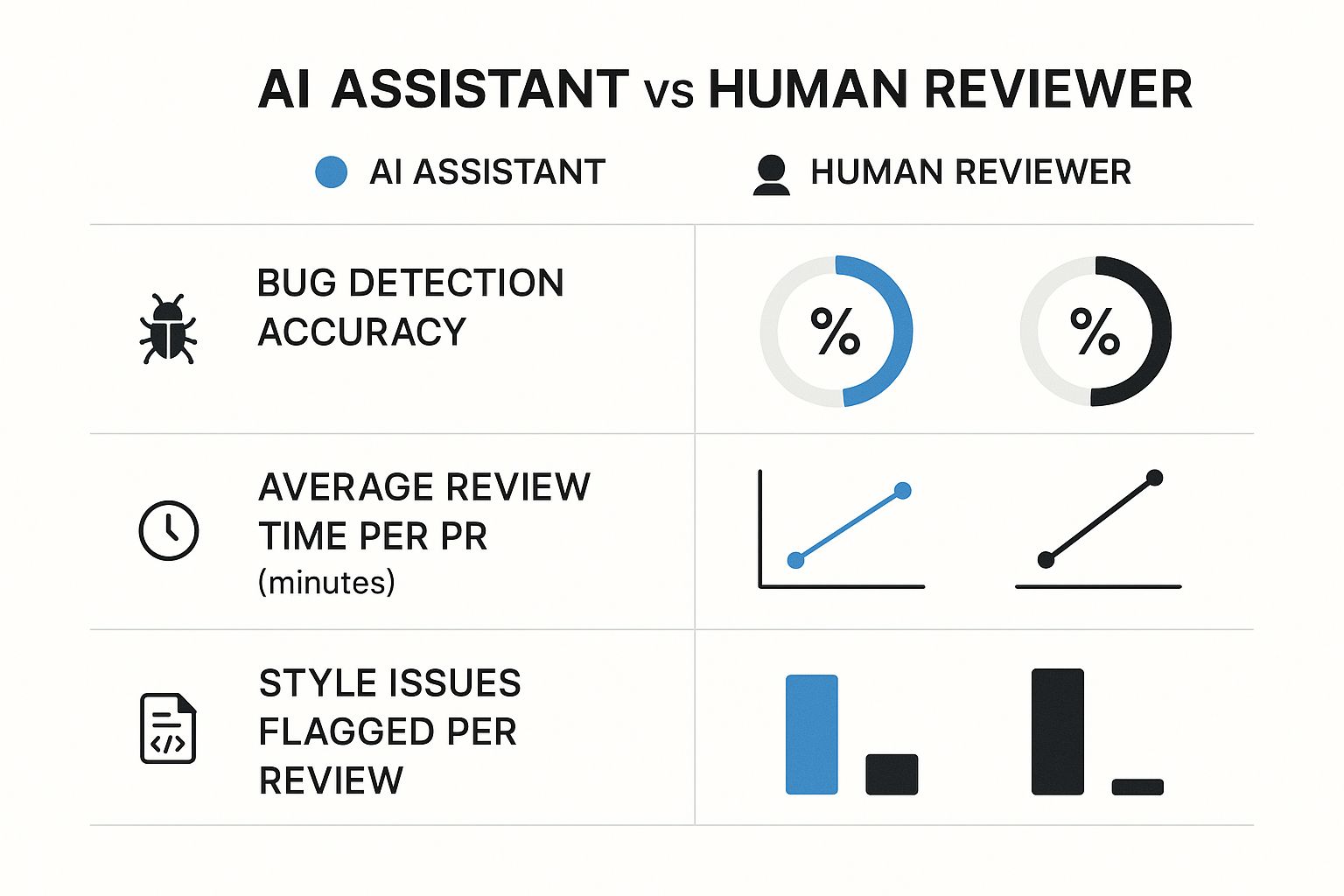
This really drives home AI's strength in rapidly flagging style issues and common bugs, while highlighting that humans are still essential for deep, contextual analysis.
Now, let's put this into a more practical comparison to see where each excels.
Human vs AI Strengths in Code Review
This table breaks down which tasks are better left to human intuition and which ones are perfect for an AI to handle. Using this as a guide can help you create a much more efficient and effective review process.
| Task Type | Best Handled By Human | Best Handled By AI |
|---|---|---|
| Architectural Decisions | Analyzing if the new code fits the overall system design and long-term goals. | Flagging deviations from established architectural patterns. |
| Business Logic | Validating that the code correctly implements complex business requirements. | Identifying logic errors like unreachable code or infinite loops. |
| Security Vulnerabilities | Assessing context-specific security risks and complex threat models. | Detecting common vulnerabilities like SQL injection or XSS. |
| Code Readability | Judging the clarity of variable names and the overall flow of the code. | Enforcing consistent formatting and linting rules automatically. |
| Performance | Identifying potential performance bottlenecks based on system knowledge. | Spotting inefficient algorithms or known performance anti-patterns. |
Ultimately, a hybrid approach is the most effective. Use AI for a quick, automated first pass to catch the low-hanging fruit. Then, bring in your human reviewers to dive deep into architectural soundness and business logic. This strategy gives you the best of both worlds—speed and profound insight.
The most effective strategy is a hybrid one. Use AI for a rapid, automated first pass, and then bring in human reviewers to assess the architectural soundness and business logic. This approach gives you the best of both worlds—speed and deep insight.
If you're looking to automate even more, there are plenty of specialized tools out there. You might want to explore some of the 12 best automated code review tools for 2025 to find one that fits your team's stack. And for those seeking more advanced capabilities, checking out the Amino Pro features could provide some powerful additions to your workflow. The end goal is always the same: build a smarter, more efficient review cycle.
Cut Down on Review Delays with Automated Notifications
In a busy team, even the most well-crafted pull requests can get lost in the shuffle. Let's be honest, standard GitHub email notifications are mostly just noise, buried under a mountain of other messages. This is how the github review code process grinds to a halt, leaving PRs to go stale while developers are stuck waiting.
Smart automation is the answer to cutting through this chaos. Instead of relying on emails that everyone ignores, tools like PullNotifier hook directly into communication platforms like Slack. This gives your team real-time, actionable alerts right where they're already talking.
Targeted Nudges, Not More Spam
The goal here isn’t to create more noise—it's to get the right information to the right people at the right time. You can set up these tools to send gentle, targeted nudges for specific events.
For instance, you could create rules to:
- Automatically ping the assigned reviewers the moment a new PR is opened.
- Send a reminder to a team channel if a PR has been gathering dust for more than 24 hours.
- Instantly notify the original author when someone leaves feedback.
This kind of proactive approach keeps the review cycle in constant motion. As development gets faster, this efficiency isn't just nice to have; it's essential. In fact, some enterprise teams have seen AI tooling slash the average time to open a pull request from a sluggish 9.6 days down to just 2.4 days. That's a huge leap forward. You can dig into more stats on this shift over at wearetenet.com.
A smart notification system can drastically cut down your review turnaround times. It's not about nagging people—it's about making it impossible for important work to fall through the cracks and keeping your team's momentum strong.
Common Questions About GitHub Code Reviews
Even on seasoned teams, the same questions about code reviews pop up again and again. Getting everyone on the same page about these common sticking points is key to a smooth, predictable workflow. When you address them head-on, you cut down on confusion and keep the focus where it belongs: shipping great code.
Here are a few of the most frequent queries I hear from developers.
How Many Reviewers Should a Pull Request Have?
While there's no single magic number, the sweet spot for most teams I've worked with is two reviewers. A single reviewer can easily miss things, but looping in more than two people often invites conflicting feedback and can really slow things down.
A great pairing is one peer who's deep in the context of the change and one senior developer. The senior can bring a higher-level perspective, checking for things like architectural alignment and long-term maintainability. You might need more eyes on mission-critical changes, but the goal should always be to find that perfect balance between quality and speed.
What Is the Best Way to Handle Disagreements?
When a comment thread starts to feel like a stalemate, it’s time to take it offline. A quick video call or a chat at someone's desk can resolve a misunderstanding in minutes—something that could take hours of back-and-forth typing.
The trick is to frame the discussion around the project's goals and technical trade-offs, not personal opinions.
It's all about finding the best solution for the product and the end-user. If you're still stuck after a quick chat, bring in a neutral third party, like a tech lead, to mediate and make the final call.
How Long Is Too Long for a PR to Stay Open?
Ideally, a pull request should get its first round of feedback within one business day. When PRs sit idle for too long, they become massive bottlenecks. They risk painful merge conflicts and force the author to constantly switch contexts, which kills productivity.
The best way to avoid this is to keep your PRs small and focused on a single, logical change. Using automated tools to gently nudge reviewers about pending requests also does wonders for keeping the pipeline moving and preventing code from going stale.
Stop letting pull requests get lost in the noise. PullNotifier integrates with Slack to deliver real-time, actionable alerts that cut through the clutter and keep your team's momentum strong. See how it can slash your review delays by visiting https://pullnotifier.com.